chatgpt-wechat answers WeChat messages with a shell plugin, and its only tagged release is from 2024
A secure personal LLM assistant/customer-service bot for WeCom and WeChat, with support for Dify workflows.
At a glance
- What is it?
- chatgpt-wechat is a Go service that relays WeChat messages through a WeCom application so a model can answer them, with session export, image generation, a vector knowledge base, and a plugin system that includes a shell plugin. The recommended stable release is a tag from January 2024, and the page is written in Chinese.
- Who is it for?
- Check the terms of WeChat and WeCom first, because that is what the project is really asking. Its headline claim is that you can use a model inside WeChat safely, with no risk of the account being banned, by routing through a WeCom application instead of talking to WeChat directly.
- Can I use it commercially?
- Yes. Apache-2.0 is a permissive licence: you can use, modify and sell software built on it, as long as you keep its copyright and licence notices.
- Is it still maintained?
- Activity is slowing. The repository last received commits 6 months ago.
- What is it written in?
- Mainly Go, according to GitHub's language statistics.
Answers come from the project's GitHub data, last synced on November 20, 2026, and from our analysis. They are not legal advice.
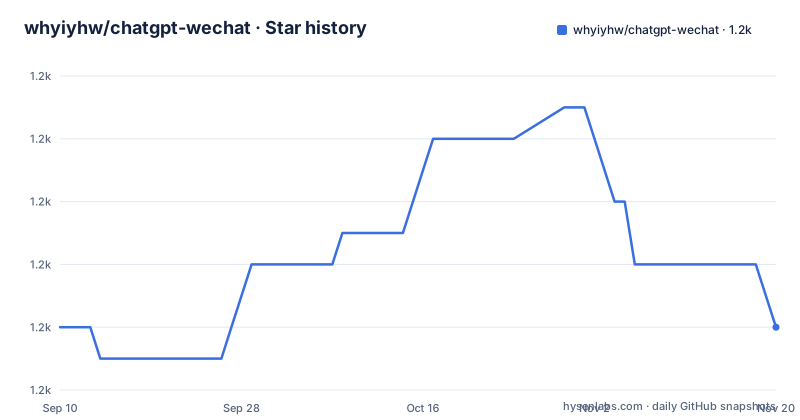
Star history
- whyiyhw/chatgpt-wechat1,170 ★ · +0
| Repository | 2026-09-10 | 2026-11-20 |
|---|---|---|
| whyiyhw/chatgpt-wechat | 1.2k | 1.2k |
0 Stars in the last 71 days, measured from the daily GitHub snapshot. Compare with other projects
Editorial analysis
The recommended stable release was published in January 2024
There is one tagged release in the whole repository, and it is v0.6.6, dated 2024-01-05. Its release title is written differently from its tag, which is the kind of small mismatch that makes a manual lookup slower than it needs to be.
The upgrade section is explicit about which one to use. It says v1.0.0 is still in development and tells you to use v0.6.6 for the stable version. So the release the project itself points at for production is more than two years old.
What the development line contains is described as a list of changes: the database moves to PostgreSQL for vectorised queries, support for a Google model at a price the page calls cheap per token, a web bot that can also be published as a customer service bot, the newest WeCom customer service protocol, and custom domain support for the WeCom API. The web front end lives in a separate repository, and the original features are described as largely unaffected.
The implemented checklist on the page ends on 2024-05-14, and the last commit to the default branch is dated 2026-05-20. So the checklist, the tag, and the branch are three different points in time, and none of the visible page tells you which of them the code you would clone actually is.
A shell plugin, reachable by anyone who can message the account
This is the part to think about before anything else in the capability list.
The plugin section names three plugins as currently supported: a shell plugin, a search plugin, and a wikipedia plugin. It then says that anyone can develop and connect other capabilities themselves according to the rules, with summary and weather given as examples.
So there are two facts in one sentence. The plugin surface is open to code you did not write, and one of the three bundled plugins executes shell commands.
Now put that next to the transport. Messages arrive through a WeCom application or a WeCom customer service channel, which means they arrive from chat users rather than from an authenticated API client of yours. The model reads those messages and may decide to invoke a tool. One of the available tools runs commands.
That is not a flaw in the design; it is what a plugin system plus a chat front end is. But it means the review order is fixed: the rules for third party plugins, and the permissions of the shell plugin, matter more than any feature on the page. Everything else in the list, session export, image generation, the vector base, the adaptive context window, is comparatively low risk.
The page also promises session switching without losing history, and an export path for sessions. That is a convenience, and it is also an audit surface: whatever your users asked the model, and whatever the shell plugin did, is recorded in there too.
The fix for an unreachable endpoint asks you to listen on all interfaces with no authentication
There is a troubleshooting entry for a server inside mainland China that sees a refused connection, and it offers two routes.
The first is to install a proxy client yourself, have it listen in socket mode on all interfaces, and explicitly not turn authentication on, then enable it in the configuration file. The entry points at version v0.2.2 for details. The second route is to move the server to Hong Kong or somewhere overseas, and the reason given is that the mainland will be unable to reach the endpoint for a long time.
Both of those are honest statements, and the first one is a security instruction worth reading twice. A listener on all interfaces with no authentication is a service anyone who can reach the host can use. In this project's own words, the page tells you not to enable auth, and does not say to restrict the bind address.
So the practical reading is: if you take the first route, put a firewall in front of it, because the page will not. And note that the entry describes a limitation of network reachability rather than a bug, which is the more useful of the two facts to have.
The other proxy options on the page are for outbound traffic rather than this: an HTTP or SOCKS5 proxy and a reverse domain proxy are listed as configuration options, alongside compatibility beyond one model vendor.
Two configuration typos you will search for and never find
The troubleshooting section is written as questions, and the first one asks what to do when the model responds but the application receives nothing. The answer walks through three checks, and two of them contain typos in strings you would paste into a search engine.
One is an error code and message where the word missing is spelled without its final letter. Another names a configuration parameter with its letters transposed, so searching for the correct spelling of that parameter finds nothing and searching for the misspelled one finds this page. Both are in the instructions for the most common failure mode in the whole project, which is the model answering and the message not arriving.
The three checks themselves are sensible. First, a step in the install guide about configuring a trusted enterprise IP address, which is a WeCom requirement rather than a chatgpt-wechat one. Second, a command to follow the logs of a single container, with the container named for the chat service. Third, two keyword strings to search inside those logs, one for application messages and one for customer service messages, each followed by a send failure marker. That is a good way to document a distributed failure and it is a shame it is marred by two spelling errors in the identifiers.
A third entry answers how to make a configuration change take effect: restart one service, or rebuild and bring the whole stack up again.
The Redis password lives in two files in two directory trees
Changing the cache password is a three step procedure and it touches two different trees.
First, the service configuration file, where the password goes under a cache section:
RedisCache:
    Pass: "xxxxxx"
Second, the Redis configuration file under the build directory, where it goes on the requirepass line:
requirepass "xxxxx"Third, the whole stack is taken down and brought back up, rather than restarted, which tells you the two files are read by two processes that both need replacing.
That is ordinary operational friction, and the entry gives both file paths in a form you can copy. The same shape appears in the neighbouring entry about restarting a single service after an edit: one route is a service restart, the other a rebuild and a full start.
The last troubleshooting entry is the interesting one. If Redis fails to start or cannot be reached after an update, the advice is to stop the stack, delete the contents of the data directory under the Redis build path, and start again. The stated cause is leftover files from an older Redis version.
That is a symptom of runtime state living inside the source tree rather than in a volume. The data directory sits next to the Redis configuration file, both inside the build directory, which is why an upgrade can leave residue that has to be deleted by hand rather than migrated.
The no-ban-risk claim is a WeCom relay, and that is a terms question
The first line of the page, written in Chinese, is the pitch: use a model inside WeChat safely by relaying through a WeCom application, with no risk of the account being banned.
The mechanism is standard enterprise messaging. A WeCom application receives the message, the service calls the model, and the reply goes back to WeChat. The customer service path is described as supporting multiple channels, and the development line says the newest WeCom customer service protocol is supported, with custom domains allowed for the WeCom API. An earlier checklist entry notes that the server can talk to WeCom directly with no cloud function relay in the middle.
So the claim is not that the project defeats WeChat's enforcement. It is that by going through the enterprise side of the platform, you are using a different, sanctioned channel. That is a more credible claim than the usual ones, and it is still a claim about two platforms' rules rather than a property of this code. Nobody reading a repository can settle it.
The funding paragraph is worth quoting in substance because it is unusual. It states the project is open source and free, has no paid membership, and that the only promotion is an advert for the author's own public account, with no traffic driven outside GitHub, and it warns that anyone asking you to pay is a fraudster.
A front end written with a model, admitted to on the page
The upgrade notes point at a separate repository for the web front end, and the sentence describing it is an admission. The author says the front end is their weak point and the pages were written with a model's help.
That is better than the alternative, and it also tells you something about the shape of the project: the Go service and the chat integration are one piece, the web interface is another, and the second one was built quickly with assistance rather than designed.
The planned list makes the same point structurally. It still carries an unchecked item for a web administration panel and another for a web client and user system revamp, plus one for configuration stored in a database so it can be edited through a page. So the project knows a configuration file is not enough and has not built the alternative.
Two other unchecked items are worth naming for what they imply. One is conversation token accounting with a switch to a different token when the balance runs out, and another is multiple key rotation to cope with a provider's rate limiting. Both are ways of working around a provider's limits rather than of respecting them, and both are still only plans, which is the right place for them.
Six top-level directories, and the service lives under chat/service/chat/api
The repository is small at the top: a license file, the readme, a directory named for the chat service, a directory for documentation, and a directory for plugins. That is the whole layout.
The naming inside the service directory is the interesting part, because the configuration paths from the troubleshooting entries reveal the structure. The service configuration file sits at a path that repeats chat three times, under an api directory and an etc directory, which is the shape a generated service skeleton produces. The Redis configuration and its data directory sit under a build directory beside the service, which is the path from the previous two sections.
So the runtime configuration, the cache configuration, and the cache data are all inside the repository tree rather than in a mounted volume or an environment file. For a container deployment that is one decision with two consequences, and the residue entry documents the second one.
The capabilities themselves are a reasonable list for the setting: a scenario mode with hundreds of predefined prompt templates and prompts that can be changed while a conversation runs, adaptive context handling so sessions do not need clearing by hand, segmented streaming replies, multilingual voice and text input, image messages for question answering, drawing through two providers including one that runs locally, a private vector store, and session export.
Editorial conclusion
Check the terms of WeChat and WeCom first, because that is what the project is really asking. Its headline claim is that you can use a model inside WeChat safely, with no risk of the account being banned, by routing through a WeCom application instead of talking to WeChat directly. Whether that holds is a question about two platforms' rules rather than about this code, and the code cannot make it true. With that settled, this fits someone who wants a model reachable by colleagues over a chat app they already use, and who will not give it a shell. Five things to check. Whether you need the shell plugin at all, since it is one of three listed and messages from a chat app reaching a model that can run commands is the sharpest edge here. Whether you are running v0.6.6, which is what the page recommends and is over two years old, while the branch has moved much further. Whether your deployment can accept the documented fix for an unreachable model endpoint, which involves a listener on all interfaces with authentication switched off. Where your credentials and conversation history live, since the service is a Go binary under a directory tree with its own Redis. And how you will read the logs, because the troubleshooting strings on the page contain two misspellings you will not find in a search engine.
Frequently asked questions
What does chatgpt-wechat do?
It answers messages that arrive over WeChat by relaying them through a WeCom application or customer service channel and sending the model's reply back. The page adds multi-channel customer service support, session export, image generation through two providers, and a private vector knowledge base.
Which version of chatgpt-wechat should I use?
The page says v1.0.0 is still in development and recommends v0.6.6 for stability, which is the only tagged release and is dated 2024-01-05. The newest entry in the implemented list is dated 2024-05-14 while the default branch has commits as late as 2026-05-20.
Does chatgpt-wechat run shell commands?
A shell plugin is listed among the three supported plugins, alongside search and wikipedia, and the page says users can build their own plugins to a documented rule. Since messages arrive from a chat application and reach a model that can invoke a plugin, that plugin surface is the first thing to review.
How does the page fix a refused connection on a server in mainland China?
It offers two routes: install a proxy client listening in socket mode on all interfaces with authentication not enabled, then enable it in the configuration file, referencing version v0.2.2; or move the server to Hong Kong or overseas, since the page states the mainland will not be able to reach the endpoint for a long time.
Where does the Redis password go in chatgpt-wechat?
In two files. It goes into the cache section of the service configuration file and onto the requirepass line of the Redis configuration under the build directory, after which the whole stack is taken down and brought up again. A related entry says to delete the Redis data directory if it fails to start after an update.
Does chatgpt-wechat have a paid component?
The page states the project is open source and free, has no paid tier, and that the only promotion is an advert for the author's own public account, with nothing driven outside GitHub. It adds that anyone asking you to pay is a fraudster.
Official sources
Add this badge to your README
If you maintain this project, the badge below links readers to this analysis and shows its maintenance status from the daily GitHub snapshot. Paste the markdown into your README; add ?metric=license or ?metric=stars to the image URL for a different field.

[](https://hysenlabs.com/projects/whyiyhw-chatgpt-wechat)Star history chart for your README
[](https://hysenlabs.com/projects/whyiyhw-chatgpt-wechat)Was this useful?