React Native Navigation 8.8.x: a native library you install by editing native files
A complete native navigation solution for React Native
At a glance
- What is it?
- React Native Navigation hands iOS and Android their own platform navigation and asks you to edit native files to adopt it, which is why the project page sends you to a documentation site. The real detail sits in the package manifest: nativePackage true, an rnn-link postlink binary, four module entry points, and a version string that trails the newest tag.
- Who is it for?
- Adopt React Native Navigation when the platform's own navigation behaviour matters more to your product than a JavaScript-only setup, and when your team can absorb a native integration step on both platforms. Do not adopt it expecting a drop-in JavaScript dependency, since the package marks itself nativePackage true and asks you to edit native files, and do not plan around its public API from the repository alone, because the API contract lives in the documentation site.
- Can I use it commercially?
- Yes. MIT is a permissive licence: you can use, modify and sell software built on it, as long as you keep its copyright and licence notices.
- Is it still maintained?
- Yes. The repository last received commits 11 days ago.
- What is it written in?
- Mainly MDX, according to GitHub's language statistics.
Answers come from the project's GitHub data, last synced on November 13, 2026, and from our analysis. They are not legal advice.
Star history
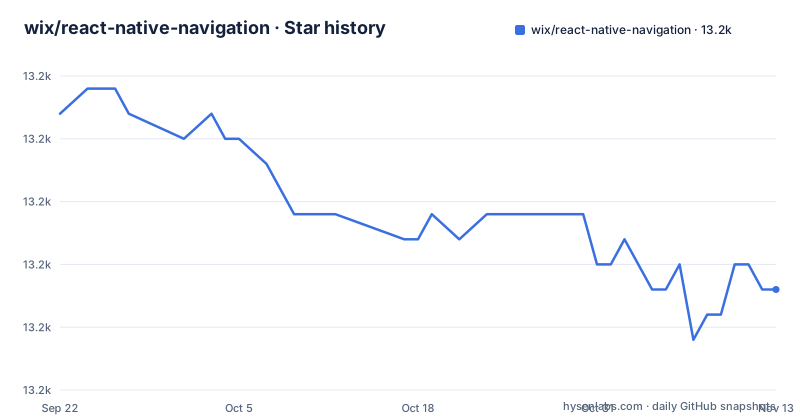
- wix/react-native-navigation13,169 ★ · -7
| Repository | 2026-09-22 | 2026-11-13 |
|---|---|---|
| wix/react-native-navigation | 13.2k | 13.2k |
-7 Stars in the last 52 days, measured from the daily GitHub snapshot. Compare with other projects
Editorial analysis
Adopting it means editing native files, so the install guide lives elsewhere
The installation section is short because the work is not small. As react-native-navigation is a native navigation library, integrating it into your app will require editing native files, and the project sends you to the installation guides in its documentation at wix.github.io/react-native-navigation/ rather than pretending a package manager line is enough. That is the honest framing: you will be touching your iOS and Android projects, not just adding a dependency. One piece of automation does ship inside the package itself, because the manifest declares a bin entry that maps the command name rnn-link to ./autolink/postlink/run.js, so an autolink step exists as a program you can invoke. What the repository hands you for the native side is a podspec named ReactNativeNavigation.podspec at the root plus the android/, ios/, and autolink/ directories that the package publishes. If your team cannot own native build files, this library is the wrong shape of tool for you.
nativePackage true means both platform trees land in node_modules
The manifest sets "nativePackage": true, which tells the React Native toolchain that this dependency contains native code rather than JavaScript alone. The files array decides how much of the repository reaches your install: src, lib, android, ios, autolink, and *.podspec are published, while __tests__, __fixtures__, __mocks__, and every dotfile are excluded. Two consequences follow that are easy to miss. First, a JavaScript developer who will never build for iOS still downloads the iOS sources and the CocoaPods podspec, so install size and cold clone time pay for both platforms. Second, there is no JavaScript-only variant to fall back on, and no flag in the manifest to skip native linking, so if your CI produces a web or server bundle it has to treat this package specially. The publishConfig block pins the registry to https://registry.npmjs.org/, and the bugs field routes issues to the GitHub tracker, so a mirror or private proxy changes where you get the package but not where you report it.
Four module entry points decide which copy of the code you run
Consumers do not import one file, they import whichever one the resolver picks, and the manifest is explicit about the order. The main field points at ./lib/module/index.js, types points at ./lib/typescript/index.d.ts, and the react-native field points at ./src/index.ts, so a bundler with React Native support loads TypeScript source while a plain Node resolution loads compiled output from lib. The exports map repeats that split with four conditions per entry, types, default, source, and react-native, and adds a second subpath, ./Mock, with its own types, default, source, and react-native targets, plus ./package.json. That Mock entry is the seam for tests, and the repository supports it with a __mocks__/ directory and a jest.config.js alongside jest-setup.js. The lib tree exists because the prepare script runs bob build, so published JavaScript is generated at pack time rather than committed. What none of this gives you is the API surface itself: the repository carries ARCHITECTURE.md and TypeScript declarations, but the documented contract lives in the documentation site.
iOS 11 and Android 5.0 are the stated floors, and Windows counts as a dev host
The stated requirements are unusually old on both platforms: apps using React Native Navigation may target iOS 11 and Android 5.0, which is API 21, and you may use Windows, macOS, or Linux as your development operating system. Broad floors like that are a deliberate choice about device reach, and they also mean the native code is written against long-lived platform APIs rather than recent ones. The development host list has a second-order consequence for contributors and for CI: Windows and Linux are both accepted, neither can produce an iOS binary, so the iOS half of any test matrix depends on macOS runners. The repository carries a .buildkite/ directory for its own pipelines, and the project page links a GitHub Actions release workflow.
The playground is wired into the package scripts, not just the docs
Most projects of this shape keep an example app; here it is exposed as scripts in the manifest, which makes it easy to see what a working setup needs. Two entries open the playground on each platform, and one drives Android setup and teardown:
open playground/ios/playground.xcworkspace
studio playground/android
cd playground/android && ./gradlew uninstallAll
The development loop adds a watch script that runs node ./scripts/watch and a start script that runs node ./scripts/start, with node ./scripts/clean to reset. The playground directory is therefore not sample code for reading, it is the harness the maintainers use, and it is the fastest way to see how the native pieces are wired together. Around it sit three testing layers that explain how confident the project is about changes: test-app/, integration/, and e2e/ with an index.e2e.js entry point, on top of jest.config.js and the __mocks__/ directory that pairs with the ./Mock export. A change that passes the unit layer can still fail in the playground, which is why the native step is not optional for anyone working on this library.
Tag 8.8.11 exists while the manifest on master reads 8.8.9
The release history and the branch metadata do not line up, and knowing which one you are reading saves an afternoon. The newest tags are 8.8.11 dated 2026-08-02, 8.8.10 dated 2026-06-29, and 8.8.9 dated 2026-06-21, so publishing is still happening on a 8.8.x patch line. The package.json in the repository, however, carries version 8.8.9, matching the oldest of those three tags, while the last push to master is dated 2026-11-02 and the repository is not archived. Nothing here suggests abandonment; the cadence is a matter of weeks between patch tags. The consequence is procedural: do not derive the version you are building against from the manifest on a branch, because the branch version is an input that lags publication. Pin an exact version from the npm registry, then read CHANGELOG.md on master for what landed after it.
Help lives in a Stack Overflow tag, a Discord server, and a public Jenkins job
Support for this library is spread across four channels with different lifetimes, and the project page links each one explicitly. Documentation and contributing guides are published as a site, with the contributing page sitting under docs/meta-contributing in that same tree. Questions are collected under the Stack Overflow tag wix-react-native-navigation rather than on GitHub Discussions, which is good for searchability and bad for anything time sensitive, since accepted answers outlive the versions they describe. Live help goes to a Discord server and a Twitter account. The project page also links the GitHub Actions release workflow. Two things are missing from that set, and both matter for anyone planning a long-lived dependency. There is no stated support policy or version support window anywhere on the project page, so nobody has committed to answering questions about 8.8.9 next year. And the answers live in vendor-run spaces, so when the version moves, the historical record stays on Stack Overflow while the live channel does not.
Editorial conclusion
Adopt React Native Navigation when the platform's own navigation behaviour matters more to your product than a JavaScript-only setup, and when your team can absorb a native integration step on both platforms. Do not adopt it expecting a drop-in JavaScript dependency, since the package marks itself nativePackage true and asks you to edit native files, and do not plan around its public API from the repository alone, because the API contract lives in the documentation site. Before you commit, pin an exact published version rather than the branch version, since the manifest on master reads 8.8.9 while the newest tag is 8.8.11 from 2026-08-02, and read CHANGELOG.md for the gap.
Frequently asked questions
what is react native navigation
It is Wix's MIT-licensed library that provides 100% native platform navigation on both iOS and Android for React Native apps, through a JavaScript API that the project describes as simple and cross-platform. Apps may target iOS 11 and Android 5.0, which is API 21.
how to install react native navigation
You cannot install it with a single line, because as a native navigation library it requires editing native files in your app. The project points to the installation guides in its documentation, and the manifest declares an autolink binary, rnn-link, that maps to ./autolink/postlink/run.js.
how to setup react native navigation
Development can happen on Windows, macOS, or Linux, while apps may target iOS 11 and Android 5.0 (API 21). The repository ships a playground app with scripts that open playground/ios/playground.xcworkspace and playground/android, plus an Android uninstall step through gradlew.
react native navigation alternatives
The project names no alternative and publishes no comparison of its own. What it states is that it provides 100% native platform navigation on both iOS and Android with a simple cross-platform JavaScript API, and that adopting it requires editing native files.
Official sources
Add this badge to your README
If you maintain this project, the badge below links readers to this analysis and shows its maintenance status from the daily GitHub snapshot. Paste the markdown into your README; add ?metric=license or ?metric=stars to the image URL for a different field.

[](https://hysenlabs.com/projects/wix-react-native-navigation)Star history chart for your README
[](https://hysenlabs.com/projects/wix-react-native-navigation)Was this useful?