Magic UI: copy-paste animated components for React and Next.js
UI Library for Design Engineers. Animated components and effects you can copy and paste into your apps. Free. Open Source.
At a glance
- What is it?
- Magic UI is an MIT-licensed collection of animated React components distributed through a shadcn-style registry. It suits design-minded frontend engineers, and it is not a package you install and import from node_modules.
- Who is it for?
- Adopt Magic UI if you are building a React or Next.js interface with Tailwind and shadcn conventions and you want motion effects you can read and edit rather than configure. Do not adopt it if you need a stable versioned dependency, a framework-agnostic animation layer, or a component that works without Framer Motion.
- Can I use it commercially?
- Yes. MIT is a permissive licence: you can use, modify and sell software built on it, as long as you keep its copyright and licence notices.
- Is it still maintained?
- Yes. The repository last received commits 1 day ago.
- What is it written in?
- Mainly MDX, according to GitHub's language statistics.
Answers come from the project's GitHub data, last synced on November 14, 2026, and from our analysis. They are not legal advice.
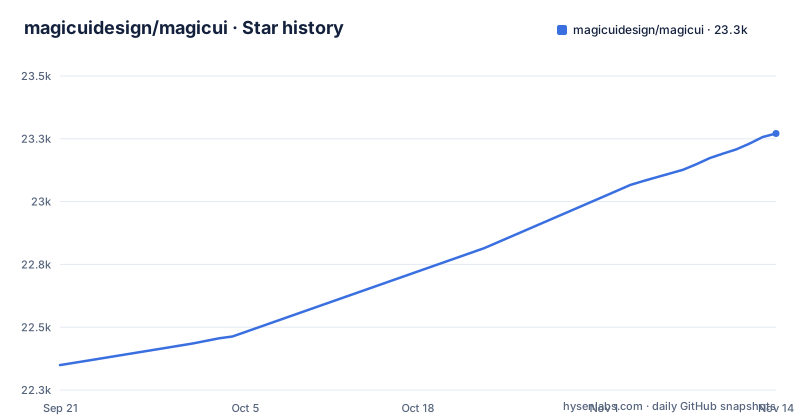
Star history
- magicuidesign/magicui23,271 ★ · +922
| Repository | 2026-09-21 | 2026-11-14 |
|---|---|---|
| magicuidesign/magicui | 22.3k | 23.3k |
922 Stars in the last 54 days, measured from the daily GitHub snapshot. Compare with other projects
Editorial analysis
What Magic UI actually is, and who it is written for
Magic UI describes itself as a "UI Library for Design Engineers" offering "Animated components and effects you can copy and paste into your apps." The README is short and points to https://magicui.design/docs for documentation, so most of what you need to evaluate lives on the site rather than in the repo.
The target reader is someone who already works in the shadcn ecosystem. If your project has a components directory generated by the shadcn CLI, Magic UI's distribution model will feel familiar. If you are looking for a runtime library with a semver contract, a changelog and a dependency you can pin, this is a different kind of thing. The distinction matters more than any individual effect: you are adopting source code, not an API surface.
The repository is a pnpm workspace with turbo, so the project itself is a monorepo with an apps directory and a registry.json at the root. That registry.json is the interesting file. It is what turns a folder of components into something the shadcn CLI can resolve by name.
The registry model: why there is nothing to import from node_modules
Magic UI ships through the shadcn registry mechanism. The root registry.json enumerates components and their files, and the CLI fetches that metadata, writes the component source into your project, and installs the dependencies the entry declares. This is the same data flow shadcn uses for its own components: a JSON manifest, a fetch, a file write, then a package manager run.
The practical consequences are worth stating plainly. First, the component becomes your code. You can edit the animation timings, swap the easing, or delete the parts you do not use, and no upstream release will overwrite you. Second, you inherit the maintenance. A bug fix upstream does not reach you unless you re-run the CLI and reconcile the diff. Third, the dependency graph is decided at install time by the registry entry, not by your own judgement, which is why the CLI printing the packages it intends to add is worth reading before you confirm.
The monorepo layout reinforces this. The registry is a build artifact of the site, generated with a script named build:registry, and there is a registry-deps:check script that the project runs as part of its own check script. That check exists because registry entries can drift from the dependencies their components actually use. It is a maintenance concern the maintainers have, and it becomes yours the moment you copy a component in.
Installing a component and rendering it in a Next.js app
The README does not contain install commands; it directs you to https://magicui.design/docs. The repository does tell you the toolchain the project itself expects, and the docs site is the authoritative place for per-component commands.
If you want to run the Magic UI repository itself rather than consume components from it, the root package.json pins the toolchain: pnpm 9.15.0, Node >= 22.14.0, and a preinstall hook that runs only-allow pnpm. The workspace scripts are turbo-driven, so the development command is:
pnpm install
pnpm dev
That starts the workspace apps in parallel. It is the maintainer path, not the consumer path, and it is worth keeping the two separate in your head. The README documents no command for adding a single component to an external project, so consult the documentation site for the current syntax before copying anything into your tree.
Where the copy-paste model breaks down
The biggest limitation is upgrade cost. Because components land in your source tree, there is no version number that tells you whether you are current. If an effect is fixed upstream, you find out by reading the repository or the docs, then manually diffing the new file against yours. Teams that treat Magic UI as a dependency, with a lockfile and a scheduled bump, will be surprised.
The components are animated, and the README does not document which runtime animation dependencies each one requires or how to opt out. If your bundle budget is tight, or if you have standardized on CSS animations or the Web Animations API, verify per component before adding several.
The project is Next.js and React oriented. The docs live under a site built in this monorepo. There is no indication that the components target other frameworks, and the repository gives no Vue package. Treat any non-React port as out of scope for this project.
Finally, the README documents no rollback procedure. If a component breaks your build after the CLI writes it, the recovery path is your own version control, not anything the project provides. That is not a flaw unique to Magic UI, but it is a real operational constraint that the documentation does not address.
Magic UI compared with Aceternity UI and shadcn
Aceternity UI is a fair comparison because both projects occupy the same niche: animated React components copied into your app rather than imported from a package. The difference in approach is mostly one of posture. Magic UI's repository is a turbo monorepo with a registry.json, a registry dependency check in its own check script, and a contributing guide the README says lets you add your own component in about five minutes. That is infrastructure for a registry, which suggests an emphasis on the distribution mechanism being reproducible.
Against shadcn, the relationship is complementary rather than competitive. Magic UI's registry follows the same conventions, and the CLI you use to add Magic UI components is the shadcn CLI. If you already run shadcn, Magic UI is an extension of that workflow; if you do not, you are adopting shadcn's conventions as a prerequisite. That is the honest framing: choosing Magic UI is partly choosing the registry model.
What none of these projects give you is a stable versioned package. If your constraint is that dependencies must be pinned and auditable through a lockfile alone, the registry model is the wrong shape for your project regardless of which registry you pick.
Licence, maintenance and what upgrading costs you
Magic UI is licensed under MIT, per the README and the LICENSE.md at the repository root. MIT is permissive: you can use, modify and redistribute the components, including in commercial products, provided the licence terms are met. Because the components are copied into your repository, the licence file you received with the source is the one that governs the copy in your tree. This is a description of the licence, not legal advice; check with counsel if your situation is unusual.
The last push to the repository was on 2026-11-02, and the repository is not archived. The repository has no published GitHub releases, which fits the distribution model: there is no published package to release. The README does not describe a changelog or a migration guide for component changes.
Upgrade cost therefore falls into two buckets. Refreshing a component means re-running the CLI and reconciling a diff against your local edits. Refreshing the whole set means doing that many times, with no manifest telling you which components changed. Budget for it before you copy in twenty effects, and keep your local modifications small enough that a diff is readable.
Editorial conclusion
Adopt Magic UI if you are building a React or Next.js interface with Tailwind and shadcn conventions and you want motion effects you can read and edit rather than configure. Do not adopt it if you need a stable versioned dependency, a framework-agnostic animation layer, or a component that works without Framer Motion. Before committing, verify that the registry entry for the component you want resolves under your Tailwind major version, and confirm which runtime dependencies the CLI is about to add to your package.json.
Frequently asked questions
What does Magic UI do?
It provides animated React components and effects that you copy and paste into your own application rather than install as a package. The README describes it as a UI library for design engineers, with documentation at magicui.design/docs.
How do I install Magic UI components?
Components are distributed through the shadcn registry mechanism, with registry.json at the repository root enumerating components and their files. The README points to the documentation site for the per-component commands.
How do I use Magic UI in a React project?
The README points to magicui.design/docs for setup. Because the source is copied into your project rather than installed as a package, you import it from your own components directory.
What is Magic UI?
It is an open source UI library for design engineers, offering animated components and effects you copy and paste into your apps. The repository is licensed under MIT and its documentation lives at magicui.design/docs.
How does Magic UI compare with shadcn?
The two are complementary rather than competing: Magic UI's registry follows shadcn's conventions, and the CLI used to add its components is the shadcn CLI. Adopting Magic UI therefore means adopting the shadcn registry model as a prerequisite.
How does Magic UI compare with Aceternity UI?
Both projects distribute animated React components that you copy into your app instead of importing from a package. Magic UI's repository is a turbo monorepo with a registry.json and a registry dependency check in its own check pipeline, which reflects an emphasis on the registry being reproducible.
Official sources
Add this badge to your README
If you maintain this project, the badge below links readers to this analysis and shows its maintenance status from the daily GitHub snapshot. Paste the markdown into your README; add ?metric=license or ?metric=stars to the image URL for a different field.

[](https://hysenlabs.com/projects/magicuidesign-magicui)Star history chart for your README
[](https://hysenlabs.com/projects/magicuidesign-magicui)Was this useful?