webtui pins bun 1.2.16 while asking for 1.3.0, and its README numbers two steps 4
Modular CSS Library that brings the beauty of Terminal UIs to the browser
At a glance
- What is it?
- webtui is a modular CSS library that gives ordinary HTML elements the look of a terminal interface, distributed as a small monorepo of seven packages on npm. Its quickstart is short and accurate about what to type, but the tooling around it contains three contradictions worth reading before you install anything.
- Who is it for?
- Use it if you want terminal styling without hand writing component CSS, and if you are comfortable with a cascade layer declaration that has to be correct or the styles will not apply in the order you expect. Do not expect more than that from the repository: the README is a hundred words long, it gives three elements as the entire API demonstration, and every option list lives on a documentation site that the README links but does not describe.
- Can I use it commercially?
- Yes. MIT is a permissive licence: you can use, modify and sell software built on it, as long as you keep its copyright and licence notices.
- Is it still maintained?
- Yes. The repository last received commits 33 days ago.
- What is it written in?
- Mainly MDX, according to GitHub's language statistics.
Answers come from the project's GitHub data, last synced on November 14, 2026, and from our analysis. They are not legal advice.
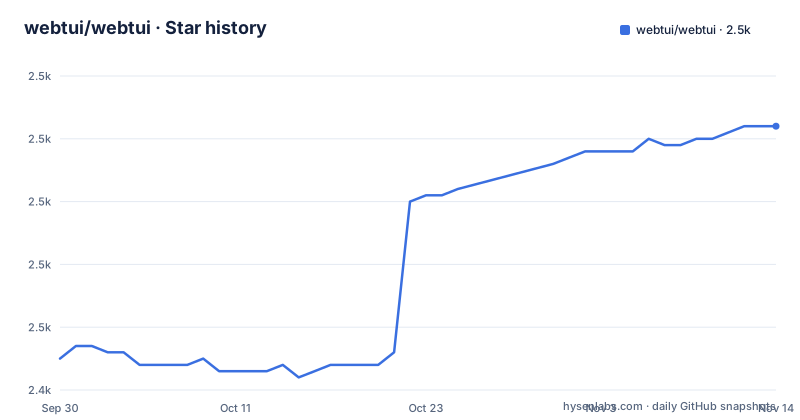
Star history
- webtui/webtui2,482 ★ · +37
| Repository | 2026-09-30 | 2026-11-14 |
|---|---|---|
| webtui/webtui | 2.4k | 2.5k |
37 Stars in the last 45 days, measured from the daily GitHub snapshot. Compare with other projects
Editorial analysis
The layer names you declare are the contract with the library
Installation is two lines of CSS, and the order matters more than it looks:
@layer base, utils, components;

@import '@webtui/css';
The `@layer` statement comes first, which is the only reason it is legal at all, since an import has to precede ordinary rules. The three names in that list, base, utils and components, are the library's own internal layers, and declaring them in advance is what fixes the cascade order when the stylesheet is parsed. Declare them in a different order, or leave the statement out, and the order falls back to whatever order the layers first appear in the imported file. So this one line is not optional decoration: it is the part of the setup that determines whether a utility class beats a component rule. The README states the rule in a single sentence, as "define the order of layers then import the library", and gives no hint that the names must match.
The whole demonstrated API is three elements and a trailing hyphen
Everything the quickstart shows about markup fits in six lines:
<button>click</button>
<button size-="large">click me too</button>
<div box-="square">
    <p>content</p>
</div>
A plain button needs nothing, `size-` takes a value, and `box-` is applied to a wrapper element whose children then inherit the shape. The convention is a trailing hyphen on the attribute name, which is legal HTML for a custom attribute but unlike anything in the surrounding ecosystem, and it means every piece of this library's API is a custom attribute whose value vocabulary is defined elsewhere. No option is enumerated here, no list of legal values for either attribute appears, and no class name is shown. What this does document is the shape of the design: styling is attached declaratively to tags rather than applied through utility classes you write yourself, which is a defensible choice and also the reason the docs site is not optional.
The pnpm line installs where the other three add
The quickstart offers four package manager invocations, and the first three follow the conventional form:
bun i @webtui/css
npm i @webtui/css
yarn add @webtui/css
pnpm install @webtui/css
`npm i`, `yarn add` and `bun i` all write the dependency into the project's manifest. `pnpm install` does not: it is pnpm's command for installing what the lockfile already describes, so a reader who copies that fourth line gets a lockfile install rather than a new dependency recorded anywhere. The four lines are presented as equivalent choices with no note attached to any of them, so the pnpm path is the one that can end in a confusion where the package is on disk but absent from `package.json`. Everything after that block assumes the import will resolve, so the failure would surface later and somewhere less obvious than the install step.
The contribution steps contain two separate items numbered 4
The development section is a five-item ordered list, and the numbering runs one, two, three, four, four. Build the project is item four, start the dev server is also item four, so a reader counting steps to check whether they have finished ends up with an ambiguous list. Each item is fenced separately, with `git clone https://github.com/webtui/webtui` for the clone, `bun i` for the install, `bun run build` and `bun run dev` for the last two. The requirement before all of it is that Bun is installed, which matters because every one of those commands is a Bun invocation rather than an npm script, so there is no npm path through the contribution flow at all. The repository is a monorepo containing the website and the official packages, so those commands run against the whole workspace rather than against the library you came to change.
The manifest pins one bun version and demands a newer one
The root package.json sets `"packageManager": "[email protected]"` while its `engines` block requires `"bun": ">=1.3.0"`. Both statements are in the same file. The engines field is what a runtime or a package manager checks when deciding whether the environment is acceptable, and the packageManager field is what tells tooling which bun to fetch, so a contributor following the second ends up with a version the first rejects. The engines block also declares Node at `>=18`, which is the only place Node appears in the constraints even though the repository is a web project. Neither README nor manifest explains which of the two bun numbers is the real one, and a mismatch like this surfaces as an install warning or a refusal rather than as a readable error.
The clean script deletes a lockfile this repository does not have
The clean script reads `rm -rf node_modules .turbo bun.lockb && turbo run clean`. The file it removes is `bun.lockb`, the binary lockfile Bun used before the text format. The lockfile actually committed in this tree is `bun.lock`. So the one command meant to return a checkout to a known state leaves the current lockfile in place while deleting a name that no longer exists, and the directory removal succeeds silently on a path that was never there. Everything else in the root script set delegates to turbo, build, dev, format, format:check and lint all run the same task across the workspace, and dev passes `--concurrency 99`. The root manifest also declares `"name": "basic"` with `"private": true`, so the workspace root has a placeholder name rather than a real one.
Seven packages, one install line, and a plugin nobody describes
The package list names seven officially maintained packages. One is the base CSS library, five are themes with names you will recognise from the wider terminal community, `@webtui/theme-catppuccin`, `theme-gruvbox`, `theme-nord`, `theme-vitesse` and `theme-everforest`, and the seventh is `@webtui/plugin-nf`. That plugin is listed with a link and nothing else: no description, no install line, no statement of what nf refers to or which element it attaches to. The five themes are equally unelaborated, with nothing about whether a theme is a stylesheet, a token file or a class you set on an element. Since the entire quickstart concerns declaring layers and importing one package, a reader who wants a different colour scheme has to work out from the package names alone that a theme is a second import.
Both documentation links resolve to the same address
The quickstart closes with two links whose text promises different things: a link labelled installation guide and a second one labelled framework specific installations. Both point at `https://webtui.ironclad.sh/start/installation`. So the framework specific material, which is where a React, Vue or Svelte integration would normally live, is either on that same page under another heading or is not published. The rest of the documentation surface is three paths on the same host, the docs, a page of examples, and a chat and support link served from the docs domain itself. Every route the README offers is a hosted page rather than a file in the repository, and the tree does contain a `web/` directory that holds the site, so the split between what is published and what is committed is maintained by hand.
Editorial conclusion
Use it if you want terminal styling without hand writing component CSS, and if you are comfortable with a cascade layer declaration that has to be correct or the styles will not apply in the order you expect. Do not expect more than that from the repository: the README is a hundred words long, it gives three elements as the entire API demonstration, and every option list lives on a documentation site that the README links but does not describe. Before you start, decide the layer names yourself, because `@layer base, utils, components;` has to precede the import for the cascade to resolve the way the library intends. Before you contribute, check which bun you actually have, since the manifest pins one version and demands another, and expect the clean script to miss the lockfile this repository commits. The version line is still 0.1.x with the newest tag from 2026-08-12, so read the changelog before depending on an option.
Frequently asked questions
How do I install WebTUI?
Install the base package with your package manager: `bun i @webtui/css`, `npm i @webtui/css`, `yarn add @webtui/css` or `pnpm install @webtui/css`. Longer instructions are hosted at the installation guide.
How do I use WebTUI styling in HTML?
Declare `@layer base, utils, components;` before `@import '@webtui/css';` in your global CSS, then attach styling with hyphen-suffixed attributes such as `size-="large"` on a button or `box-="square"` on a wrapper element.
Which theme packages does WebTUI ship?
Five, one per theme: `@webtui/theme-catppuccin`, `@webtui/theme-gruvbox`, `@webtui/theme-nord`, `@webtui/theme-vitesse` and `@webtui/theme-everforest`. The README names them without describing how a theme is applied.
What does the WebTUI plugin package do?
`@webtui/plugin-nf` appears in the list of officially maintained packages with a link to its npm page and no description anywhere in the README of what it does or how it is installed.
How do I build the WebTUI repository?
Install Bun, clone `https://github.com/webtui/webtui`, then run `bun i`, `bun run build` and `bun run dev`. The root scripts delegate to turbo across the `web` and `packages/*` workspaces.
Official sources
Add this badge to your README
If you maintain this project, the badge below links readers to this analysis and shows its maintenance status from the daily GitHub snapshot. Paste the markdown into your README; add ?metric=license or ?metric=stars to the image URL for a different field.

[](https://hysenlabs.com/projects/webtui-webtui)Star history chart for your README
[](https://hysenlabs.com/projects/webtui-webtui)Was this useful?