Photo Relic Editorial keeps the top half truthful and prints the bottom half
A Codex skill for transforming real photos into Photo Relic artworks: truthful photographs paired with quiet paper-memory prints.
At a glance
- What is it?
- This is a Codex skill that turns a photograph into a vertical two-part artwork, with the untouched photo above and a restrained paper-textured print below. It is MIT, it installs by copying one folder, and it depends on a model following instructions about how much to simplify.
- Who is it for?
- Use Photo Relic Editorial if you make a series from your own photographs and want a consistent visual treatment across a set, especially architecture, skylines or scenes with strong silhouettes. Do not use it when the subject needs to stay fully legible in the print half, since the format deliberately discards detail, and do not treat its example images as assets you can reuse without checking the licence note.
- Can I use it commercially?
- Yes. MIT is a permissive licence: you can use, modify and sell software built on it, as long as you keep its copyright and licence notices.
- Is it still maintained?
- Yes. The repository last received commits 79 days ago.
- What is it written in?
- GitHub does not report a main language for this repository.
Answers come from the project's GitHub data, last synced on October 23, 2026, and from our analysis. They are not legal advice.
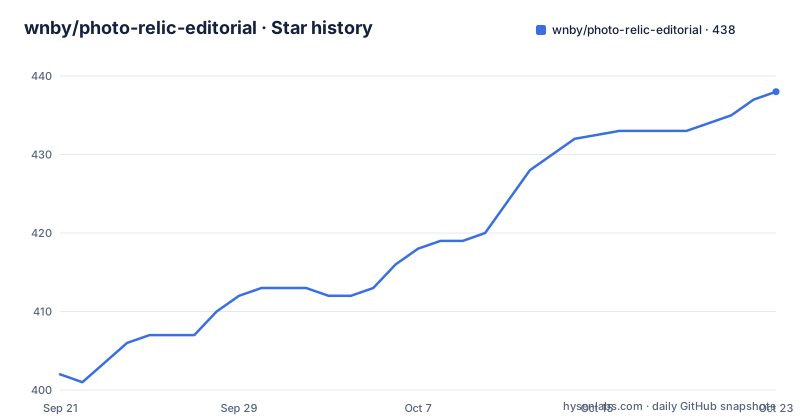
Star history
- wnby/photo-relic-editorial438 ★ · +36
| Repository | 2026-09-21 | 2026-10-23 |
|---|---|---|
| wnby/photo-relic-editorial | 402 | 438 |
36 Stars in the last 32 days, measured from the daily GitHub snapshot. Compare with other projects
Editorial analysis
The format is a split, and the top half is deliberately untouched
The output is one vertical image with two registers. The top half keeps the real photograph as it was, and the bottom half becomes a recognisable, restrained, paper-textured print.
Keeping the source visible in the same frame is the decision that defines this project. Most filters that turn a photo into artwork replace the photograph, which means you lose the reference. Here the photograph stays as evidence and the print reads as a comment on it, and the pairing is what makes a series look like a series rather than a set of unrelated treatments.
The compression is described as going after structure, light, colour, visual weight and mood, then rendering those into a modern printmaking language with quiet restraint and generous negative space. Those five extracted properties are the actual specification, and they are what a viewer can check the result against.
The skill states two things it must not do. It is not a generic illustration filter, and it should not simplify the subject until the shape disappears. Both sentences exist because that is the failure mode.
The subject list is narrow, and that is a feature
The skill names four categories of photograph that suit it, and they are more specific than a mood board.
Historic architecture, landmarks, skylines, bridges, towers and stadiums form the first. Scenes with strong silhouettes, light, reflections or visual order form the second, and that criterion is about the photograph rather than the location. Travel moments, crowds, animal processions and quiet street scenes form the third. The fourth is the actual filter: photographs that can be distilled into shape plus light plus a few colours.
That last line is the honest test, and it rules out more than the first three suggest. A portrait lit softly, a misty forest, or an interior lit by a window all have clear subjects but resist being reduced to silhouette and light, because what carries them is tonal gradation rather than outline.
So the format rewards photographs that already have structure. Architecture works because a bridge or a tower has an outline that survives reduction. A crowd works because repetition is legible at low detail. Portraiture is where this goes wrong, because the meaning sits in the face rather than the outline.
Installing is one folder copy, and the path differs by shell
There is no package to install and nothing to build. The skill is a folder, and it goes into the Codex skills directory.
On Windows PowerShell:
Copy-Item -Recurse .\photo-relic-editorial $env:USERPROFILE\.codex\skills\On macOS or Linux:
cp -R ./photo-relic-editorial ~/.codex/skills/The recursive flag matters in both cases, because the folder carries `SKILL.md`, an `agents/` directory and a `references/` directory alongside any other files, and a flat copy would leave the skill half installed.
If the skill does not appear after the copy, restart Codex. That instruction is worth taking seriously rather than retrying the copy, since a repeated copy is how you end up with two directories and an unclear one winning.
The repository tree holds `.gitignore`, `LICENSE`, `README.md`, `SKILL.md`, `agents/`, `examples/` and `references/`, so what you install is the whole thing including the reference material.
Six reference works, each carrying a four-character Chinese title
The `examples/paper-beijing/` directory holds the series the skill is calibrated against, and the README names all six works in both languages.
They are Gravel Falls Into Line, Nest Light Enters Water, Ordered Sky Light, Dusk Stands Still, A Road Along the Ridge, and Palace Wall in Water, each paired with a Chinese title of four characters: 碎石成队, 巢光入水, 天光有序, 暮色立住, 山脊有路, 水照宫墙.
The titles are doing more work than captions. Every one names a transformation rather than a place: gravel becoming a line, light entering water, dusk that stands still rather than fades. That is the same compression the skill applies to an image, written in four characters, and it tells you what the author thinks a successful treatment looks like.
The series name is Paper Beijing, and the skill takes it as an option. Asking for that series feel with a short four-character Chinese title produces a different result from the default request, which means the examples are functioning as a style anchor rather than decoration.
The instruction against over-simplifying is the whole reliability question
Here is the honest limitation. This project does not contain a renderer. It contains a skill definition, a reference set and instructions, and the output is produced by whatever model is running Codex interpreting those instructions.
That means two runs on the same photograph are not guaranteed to give the same print, and the result depends on whether the model follows the instruction not to simplify the subject until the shape disappears. A model that respects the constraint produces a recognisable structure. A model that does not produces an abstract wash that has lost the building.
There is no documented parameter to tune that trade-off, no setting for how far to reduce, and no comparison of outputs in the repository. The `references/` directory is named in the tree but its contents are not described in the README.
So the practical test is a small one: run two or three of your own photographs through it before committing to a series, and keep the ones where the shape survived. That is a workflow suggestion, not a documented feature.
MIT covers the code, and the licence note is about your photographs
The licence is MIT, and the README attaches a condition of use that has nothing to do with the code: use the skill with original photographs, licensed photographs, or images you have permission to transform.
That sentence is the correct one and it is worth separating from the licence grant. MIT governs the `SKILL.md`, the reference material and the example files. It says nothing about whether you may photograph a building, and it cannot.
The examples are covered separately, described as visual references for the skill's aesthetic rather than as assets to reuse. If you want one of those six prints on a product or a poster, that is a question for the copyright holder, not something the MIT grant answers.
The last push to `main` was on 2026-08-05, and there are no GitHub releases. So there is no tag to install from and no changelog to check; you are copying whatever is on the default branch today, which for a skill this small is a reasonable trade but not one the repository records.
Editorial conclusion
Use Photo Relic Editorial if you make a series from your own photographs and want a consistent visual treatment across a set, especially architecture, skylines or scenes with strong silhouettes. Do not use it when the subject needs to stay fully legible in the print half, since the format deliberately discards detail, and do not treat its example images as assets you can reuse without checking the licence note. Verify first that your photographs are ones you own or have permission to transform, and read `SKILL.md` and `references/` yourself, because the behaviour you are buying is a set of instructions the model follows rather than a filter that runs the same way twice.
Frequently asked questions
What does Photo Relic Editorial do to a photo?
It produces one vertical image where the top half keeps the real photograph truthful and the lower half becomes a restrained, paper-textured print. The skill extracts structure, light, colour, visual weight and mood from the source.
How do I install the Photo Relic Editorial skill?
Copy the whole folder into your Codex skills directory. On macOS or Linux run `cp -R ./photo-relic-editorial ~/.codex/skills/`, and restart Codex if the skill does not appear immediately.
Which photographs work best with Photo Relic Editorial?
Historic architecture, landmarks, skylines, bridges, towers and stadiums, plus scenes with strong silhouettes, light, reflections or order, and travel moments, crowds, animal processions and quiet street scenes. The stated test is whether the photograph distils into shape plus light plus a few colours.
What is the Paper Beijing series in Photo Relic Editorial?
The reference series the skill is calibrated against, held in `examples/paper-beijing/` and named in the README as six works with four-character Chinese titles. Asking for that series feel is a supported variation on the default request.
Can I use Photo Relic Editorial with photos from the internet?
The README says to use it with original photographs, licensed photographs, or images you have permission to transform. The MIT licence covers the skill files, not the photographs you feed it, and the bundled examples are visual references rather than reusable assets.
Official sources
Add this badge to your README
If you maintain this project, the badge below links readers to this analysis and shows its maintenance status from the daily GitHub snapshot. Paste the markdown into your README; add ?metric=license or ?metric=stars to the image URL for a different field.

[](https://hysenlabs.com/projects/wnby-photo-relic-editorial)Star history chart for your README
[](https://hysenlabs.com/projects/wnby-photo-relic-editorial)Was this useful?