Domain Digger, a browser front end for DNS, WHOIS and certificate history
Full Toolkit for Next-Level Domain Analysis
At a glance
- What is it?
- Domain Digger is a Next.js web application that gathers DNS records, IP geolocation, WHOIS data and certificate history for a domain and lays them out in one place, with a DNS map and a bookmarklet for quick access. It is a hosted tool first and a self-hostable codebase second, and the environment file shows the data sources it reaches for.
- Who is it for?
- Domain Digger suits someone doing OSINT on a domain who wants the DNS, WHOIS and certificate picture on one page rather than across several sites, and it suits a team that wants a self-hosted copy of that view.
- Can I use it commercially?
- Yes, with strict conditions. AGPL-3.0 is a network copyleft licence: if people use a modified version over a network, for example as a hosted service, you must offer them its source code under the same licence.
- Is it still maintained?
- Yes. The repository received new commits within the last day.
- What is it written in?
- Mainly TypeScript, according to GitHub's language statistics.
Answers come from the project's GitHub data, last synced on November 7, 2026, and from our analysis. They are not legal advice.
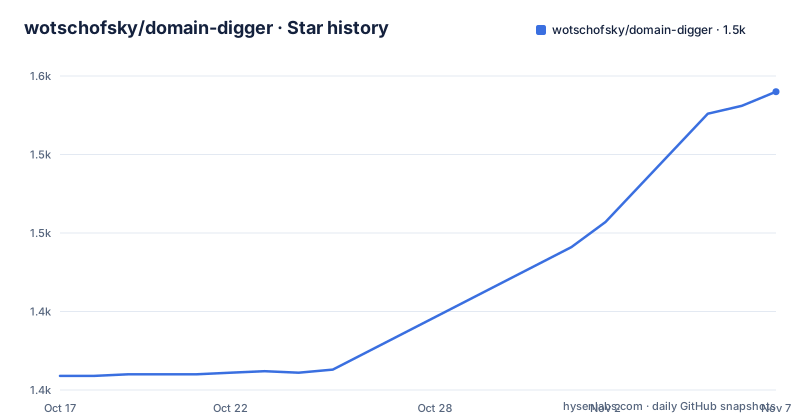
Star history
- wotschofsky/domain-digger1,540 ★ · +181
| Repository | 2026-10-17 | 2026-11-07 |
|---|---|---|
| wotschofsky/domain-digger | 1.4k | 1.5k |
181 Stars in the last 21 days, measured from the daily GitHub snapshot. Compare with other projects
Editorial analysis
The feature list, and what it actually aggregates
Domain Digger is described as a full toolkit for next-level domain analysis, with the tagline that you can discover in-depth details of any domain with just a few clicks, and there is a hosted version at digger.tools.
The feature list is the best description of the scope. There is a comprehensive DNS lookup giving detailed DNS information, and separately a global DNS lookup that performs lookups across different global servers, and multiple DNS resolvers so you can use various resolvers for diverse insights. There is IP details and geolocation with precise IP information including location data, and a DNS map visualisation that gives a visual representation of the DNS data.
There is a full and quick WHOIS lookup for rapid and detailed WHOIS data retrieval, and a certificate history view that tracks SSL/TLS certificate changes over time. The certificate history is the feature that distinguishes this from a plain DNS tool, because a certificate's issuance history shows which hosts have been associated with a domain over time, which is the sort of thing you want when you are looking at a domain you did not build.
The rest is interface work. There are smart suggestions for efficient searches, a quick-access bookmarklet for fast access, and light and dark mode.
The stack is stated plainly: React for building user interfaces, Next.js as the React framework for production, Vercel for hosting and serverless functions, and shadcn/ui as the UI toolkit. The screenshot table shows the four main views, DNS Lookup, DNS Map, IP Details and WHOIS Lookup, and the DNS map is the most distinctive of the four because it is a different kind of output rather than another table.
The project is AGPL-3.0 licensed, which the package.json records as AGPL-3.0-only, the default branch is main, and the last push was on 2026-10-17.
The dependency list tells you what the app does under the hood
The package.json is where the real architecture is visible, because the dependencies are specific about the techniques being used.
The DNS work is done at the packet level. The dns-packet package at 5.6.1 is a parser and serializer for DNS wire format, and the punycode package at 2.3.1 with the punycode types is there to handle internationalised domain names, which cannot be represented in raw ASCII and which would silently fail without it.
The visualisation stack is three dimensional. react-globe.gl is the globe renderer, Leaflet with react-leaflet handles the map, and leaflet-defaulticon-compatibility patches the default marker icons for use outside their original Leaflet context.
Around that is a fairly standard modern Next.js stack. React 19.2.8 with react-dom, Next 16.3.0, Tailwind CSS 4 through the @tailwindcss/postcss plugin with PostCSS 8.5.8, and the shadcn/ui component layer, which is why there are nine separate @radix-ui packages, since shadcn/ui composes primitives rather than shipping a styled component library. The components.json file at the repository root is the shadcn configuration, and the components/ directory holds the generated ones. Icons come from lucide-react and react-icons, and motion 12.38.0 handles animation.
The data plumbing is worth noting. dataloader batches and caches per request, and execa runs subprocesses, which connects to the subfinder install in the postinstall script. That script, ./scripts/install-subfinder.sh, means the project pulls in the Subdomain Finder binary at install time, so a self-hosted instance has a subdomain enumeration tool available. The GitHub data comes from the GITHUB_TOKEN used to display recent stargazers and sponsors, which is the same idea as the Vercel sponsor slot in the README.
Analytics are Plausible rather than a conventional tracker, with next-plausible and a NEXT_PUBLIC_PLAUSIBLE_DOMAIN in the environment, plus Vercel Analytics and Vercel Speed Insights. The node engine requirement is 24.
Why DNS is parsed at the packet level
One dependency choice explains how this tool differs from a site that just calls a public resolver API, and it is worth understanding before deciding whether the project fits your purposes.
The dns-packet package is a parser and serializer for the DNS wire protocol itself, and the project depends on it directly. That means the DNS lookups are being constructed and parsed as protocol messages rather than requested through an HTTP resolver interface, which matters for the global lookup and multiple resolver features the feature list describes.
There is a practical consequence. Querying several resolvers across several global servers and comparing the answers is only meaningful if you control the question being asked, because a resolver that returns a different answer for a differently formed query is not answering the same question. Parsing at the wire level lets you send an identical query to each resolver and see where the answers diverge, which is the actual point of a DNS map. A resolver API that rewrites the query for you, for instance by adding EDNS or a search suffix, would make the comparison meaningless.
The punycode dependency is the other half of that story and is easy to overlook. A domain name is not necessarily ASCII. Internationalised domain names are stored as punycode in the DNS, and a lookup with a Unicode name has to be encoded correctly or the query goes out for a domain that does not exist. Getting that wrong produces a lookup that returns nothing, which looks like a missing record rather than a bug, and the presence of the punycode types in the dev dependencies shows the case is handled deliberately.
Together, the two tell you that the DNS side of this project is a first-class implementation rather than a thin call to someone else's API, and that is what makes the multi-resolver and global features meaningful. It is also why the project needs a real server environment rather than a static page: the lookups happen server side, which is why the internal API secret and the deployment protection bypass exist in the environment file.
The environment file, and where the data actually comes from
The .env.example is short and it maps the application onto its data sources, which is the most useful thing a self-hosting reader can get.
SITE_URL is the public address of the website, and it defaults to the Vercel URL if available or localhost:3000. INTERNAL_API_SECRET authenticates internal API calls, and it is a secret you generate. VERCEL_AUTOMATION_BYPASS_SECRET is the Vercel Deployment Protection bypass secret, and the comment explains why it exists: it is required so self-referencing API calls can pass the firewall on protected, for example preview, deployments. That is a detail specific to running on Vercel, and it tells you the app makes calls to itself.
Then there is the Google Cloud side. GOOGLE_SERVICE_KEY_B64 is a GCP JSON service account encoded as base64, BIGQUERY_DATASET names the BigQuery dataset, and BIGQUERY_LOCATION is the code for the GCP region where that dataset lives. The presence of BigQuery is a significant architectural fact: a meaningful part of this tool's data is a dataset queried in BigQuery, which is where large public datasets about domains, certificates and infrastructure tend to live.
And GITHUB_TOKEN is a GitHub classic personal access token with public_repo and read:user scopes, used to display recent stargazers and sponsors.
Taken together, that is the honest picture of the project. It is a Next.js interface over a set of public and commercial data sources, with BigQuery for the heavy datasets and the DNS resolution done in-process through dns-packet rather than by calling a public resolver API.
The repository also has a .prettierrc.yaml, an eslint.config.mjs alongside a legacy .eslintrc.json, a vitest.config.mts with the test script running vitest, a proxy.ts and an instrumentation.ts, an env.ts using @t3-oss/env-nextjs for typed environment variables, and a scripts/ directory. There is a SETUP.md for running the app and a CONTRIBUTING.md for contributors, plus AGENTS.md and CLAUDE.md.
Editorial conclusion
Domain Digger suits someone doing OSINT on a domain who wants the DNS, WHOIS and certificate picture on one page rather than across several sites, and it suits a team that wants a self-hosted copy of that view. It is the wrong choice if you need a raw data source rather than a rendered interface, since the project is a web application with its own persistence layer rather than a library, and it is the wrong choice for bulk analysis, because the interface is built around one domain at a time. Before running your own instance, read SETUP.md, because the environment file expects a BigQuery service account, a GitHub token with public_repo and read:user scopes, and a self-referencing API secret, and check the AGPL-3.0 licence terms before you expose it publicly.
Frequently asked questions
What does Domain Digger let you look up?
Comprehensive and global DNS lookups across multiple resolvers, IP details with geolocation, a visual DNS map, full and quick WHOIS lookups, and certificate history that tracks SSL/TLS certificate changes over time, plus smart suggestions and a bookmarklet for quick access.
What is Domain Digger built with?
React with Next.js for the interface, Vercel for hosting and serverless functions, and shadcn/ui with Radix primitives and Tailwind CSS for the components. DNS is parsed at the wire level with dns-packet, and the map and globe views use Leaflet and react-globe.gl.
What do I need to run my own instance of Domain Digger?
The .env.example expects a public SITE_URL, an INTERNAL_API_SECRET for internal calls, a base64 encoded GCP service account key with a BigQuery dataset name and region, a GitHub classic personal access token with public_repo and read:user scopes, and Plausible analytics variables. SETUP.md covers the rest.
What licence is Domain Digger released under?
AGPL-3.0, recorded in package.json as AGPL-3.0-only. That is a strong copyleft licence, so if you host a modified version publicly you are obliged to offer the corresponding source to users of it.
Does Domain Digger need extra tooling installed to work?
The postinstall script runs ./scripts/install-subfinder.sh, which installs the Subdomain Finder binary at install time, so subdomain enumeration is available to a self-hosted instance. The scripts/ directory holds that and other setup helpers.
Official sources
Add this badge to your README
If you maintain this project, the badge below links readers to this analysis and shows its maintenance status from the daily GitHub snapshot. Paste the markdown into your README; add ?metric=license or ?metric=stars to the image URL for a different field.

[](https://hysenlabs.com/projects/wotschofsky-domain-digger)Star history chart for your README
[](https://hysenlabs.com/projects/wotschofsky-domain-digger)Was this useful?