Midea AC LAN keeps tokens that cannot expire, and the README explains why
Project brief: Auto-configure and then control your Midea M-Smart devices (Air conditioner, Fan, Water heater, Washer, etc) via local area network.
At a glance
- What is it?
- Midea AC LAN is a Home Assistant custom integration that discovers and controls Midea M-Smart appliances over the local network, covering thirty-seven device types from air conditioners to toilet bidets. Its most useful section is a warning: the cloud tokens it depends on have no expiry, because the protocol assumed encryption that other plugins broke, and the vendor may shut the token service down.
- Who is it for?
- Install it if you want local control of Midea appliances and you are willing to treat the token file as the thing worth protecting, because everything the integration can do depends on that file staying valid. Read the important notice before you start, since a migrated vendor account cannot retrieve a token and you would have to register a new one.
- Can I use it commercially?
- Yes. MIT is a permissive licence: you can use, modify and sell software built on it, as long as you keep its copyright and licence notices.
- Is it still maintained?
- Yes. The repository last received commits 1 day ago.
- What is it written in?
- Mainly Python, according to GitHub's language statistics.
Answers come from the project's GitHub data, last synced on November 14, 2026, and from our analysis. They are not legal advice.
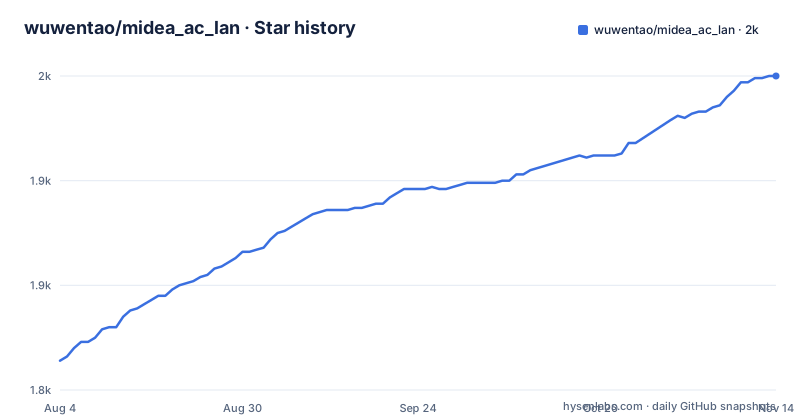
Star history
- wuwentao/midea_ac_lan1,950 ★ · +136
| Repository | 2026-08-04 | 2026-11-14 |
|---|---|---|
| wuwentao/midea_ac_lan | 1.8k | 2k |
136 Stars in the last 102 days, measured from the daily GitHub snapshot. Compare with other projects
Editorial analysis
The tokens cannot expire, and the chain of reasons is spelled out
The reason this integration warns users to back up a file, and the reason it may stop working one day, is the same paragraph, and it is unusually precise about causation.
When the Midea v1 local network API was first designed, client communication was assumed to be encrypted already. Tokens minted by the cloud service and used inside that encrypted channel were therefore given no expiry time, on the reasoning that the channel itself was the protection. The assumption did not hold. Many Home Assistant plugins on GitHub use cracked client encryption methods, which means the channel is not actually a trusted boundary. Tokens that cannot expire, issued into a channel that is not encrypted, cannot be rotated out on a schedule.
So the tokens sit there indefinitely. And that is the security problem the vendor is responding to: the cloud token services may be shut down gradually, the vendor may move to a second generation cloud control API, and the first generation local network control API would then become unusable.
That is the whole risk profile of running this, stated by the project itself rather than inferred.
A migrated vendor account cannot get a token, so register a new one
The credential requirement is narrow and the failure mode is silent. Token retrieval works only for personal Meiju and SmartHome accounts, and only when the appliance is bound to that account first. An account without the binding gets no token, and an integration with no token has nothing to control.
The sharper trap is the migration warning. If you moved your account over from another Midea app, you cannot retrieve appliance tokens from it, and the instruction is to register a new account and add your appliances there. So a user who consolidated their appliances into one vendor account, which is the obvious thing to want, is told to create a second account and bind the appliances again.
There is a leftover from an earlier approach too. NetHome Plus cannot retrieve tokens, and the integration still retains the related options and functions for it. So the settings screen carries controls that cannot succeed, kept in place for a path that is currently closed.
None of this is hidden, and that is to the project's credit. But it means the setup is gated on a vendor-side account decision made years ago, not on anything you do during installation.
The appliance credentials are one file you must copy off the appliance
Once an appliance is added, its configuration lives in a JSON file, and the instruction is to copy or back up that file to a device outside Home Assistant OS.
Outside the install, not inside it. The reasoning is the token situation in the previous section: if the vendor retires the cloud token service, the only way to keep control is to reuse a token you already hold, and the only copy of that token is the file. If it lives on the same storage the integration was installed on, a reinstall or a wiped card takes it with it.
There is a protocol split here too. Appliances on the older v2 protocol have no such file at all, so only v3 protocol appliances need the backup. Which means a mixed household has some appliances with a durable credential and some without.
The instructions point at a debugging document for the procedure rather than describing it inline, and the appliance's network address has to be stable for any of it to work. The router is where the static address gets set, because the integration holds a long-lived TCP connection open to keep status in sync, and a changed address breaks that connection rather than re-resolving it.
This is a continuation of another project, and the symptom is vanishing entities
The upgrade path from the previous project of the same name is five numbered steps and reads like a support article rather than a migration guide.
Remove the old integration. Install this one. Restart Home Assistant. Your devices will not be deleted and you do not need to discover or add them again. And then the one that matters: if an appliance's switch or sensor entities disappear, re-enable them under Settings, then Devices and Services, then the integration, then Devices, then CONFIGURE.
So the known failure mode of this migration is that half the entities vanish from a device that is still present, and the fix is to walk into the integration's own configure page and turn them back on. Nothing about that is automatic, and nothing warns you in advance.
The broader design follows from the same assumption. Discovery and configuration happen from the Home Assistant interface, the integration creates extra sensors and switches for control, and status is kept live over a persistent connection rather than polled. Those are the three behaviours most people are actually buying when they install this.
The protocol itself lives in a separate package pinned to the same date
The packaging is where the real dependency shows. The project file declares one runtime dependency:
dependencies = ["midea-lan==2026.9.2"]The actual local network protocol implementation is in that package, not in this repository. This repository is the Home Assistant integration wrapped around it, pinned to an exact version of the protocol library, and the comment beside the line says the pin mirrors the integration manifest so the import works in a development environment.
The version declared for the package itself is not real:
version = "0.0.0"
# Placeholder only. The real, released version lives in
# custom_components/midea_ac_lan/manifest.json (bumped by the release workflow).
So there are two version fields and one of them is deliberately a placeholder, with a release job writing the true value into the manifest. That is a normal arrangement for a Home Assistant integration, which is required to carry its version there, but it does mean the project file cannot tell you what you are running.
The tags follow the same convention. The three most recent are dated versions for September 2026, released on the third, ninth and twenty-eighth. The protocol library and the integration move on one calendar clock.
The Home Assistant floor changes with your Python version
The front page states one requirement: Home Assistant 2024.4.1 or higher. The development configuration states three, and they do not agree with a single flat floor.
  "homeassistant==2024.4.1  ; python_version == '3.12'",
  "homeassistant==2024.12.1 ; python_version == '3.13'",
  "homeassistant==2026.3.1  ; python_full_version >= '3.14.2'",
Environment markers select a different Home Assistant release per interpreter version, and the reason given is that each is the minimum supported version for that Python. The package supports interpreters from 3.12 up to but not including 3.15.
So the advertised minimum matches only the 3.12 case. Someone running 3.13 is on a different floor, roughly eight months of Home Assistant releases later, and someone on 3.14 is on a floor from the following year. The front page number is the oldest of the three, which is the correct conservative choice for a compatibility statement, but it does not tell you which floor your own interpreter gets.
The consolidated form is recent. The comment records that this dependency group replaced separate development requirement files, one per Python version, with a single group selected by markers.
Every development tool is pinned, and each pin carries its reason
The tooling block is unusual in a good way. Every entry is pinned to an exact version rather than a range, and the comments say why:
  "ruff==0.16.8",
  "mypy==2.3.1",
  "pylint==4.0.9",
  "pre-commit==4.6.2",
  "pydantic==2.13.5",
The formatter and linter version is aligned to whatever the pre-commit hook enforces, so a developer running the tools by hand and a developer running the hook get the same result. The validation library is required not by the integration but by the type checker, which loads it as a plugin, and the comment says it must stay installed for the type-check script to work. A library needed only by the tooling, pinned so the tooling cannot drift.
The repository is configured to match. There is a pre-commit configuration, a formatter ignore file, a static-analysis configuration for the type checker and another for the second linter, a pinned interpreter version file, and a lock file. Type checking, linting and formatting are three separate tools with three separate configurations rather than one tool doing all three.
Commit messages go through a linting tool with its own configuration, and there is a changelog generator configuration alongside it, so the release history is generated rather than written.
The brands section is five backslashes and the word more
The supported brands section does not render. What is there is:
   \
   \
   \
   \

And more.
Five escaped line breaks and a sentence. Whatever list was meant to be there, an image or a table, is gone, and the section now reads as a formatting accident. The appliances table directly below it is intact and considerably more informative.
That table lists thirty-seven device types by their protocol code, each with its own document file: air conditioners, both dishwashers, two heat pump controllers, refrigerators, front and top load washers, dryers, gas and electric water heaters, a gas stove, a rice cooker, a pressure cooker, a toaster, two ovens, a range hood, a robot vacuum, an air purifier, a humidifier, a dehumidifier, a toilet, and more. Codes are a mix of letters and digits, and nothing explains how a given appliance maps to its code.
The instruction attached to the table is a warning rather than a description: configure supported features per appliance type from the linked documents, and only enable a feature after confirming in the vendor's own app that the appliance supports it. Enabling a capability the hardware does not have is the failure this guards against.
Editorial conclusion
Install it if you want local control of Midea appliances and you are willing to treat the token file as the thing worth protecting, because everything the integration can do depends on that file staying valid. Read the important notice before you start, since a migrated vendor account cannot retrieve a token and you would have to register a new one. Set the static IP first, keep a copy of the appliance configuration outside the Home Assistant install, and expect to revisit this when the vendor moves to its second cloud API.
Frequently asked questions
What does Midea AC LAN need before it can add an appliance?
A personal Meiju or SmartHome account with the appliance already bound to that account, since the token cannot be retrieved otherwise. You also need a static IP address set in the router, because the integration holds a long-lived TCP connection to the appliance and does not survive an address change.
Why do I have to back up the Midea AC LAN appliance .json file?
It holds the appliance token, and the vendor may close the cloud token service that issues them, after which the older local control API stops working. Keeping a copy on a device outside the Home Assistant install is what lets the appliance be readded later. Appliances on the older v2 protocol have no such file.
Can Midea AC LAN log in with NetHome Plus?
No. NetHome Plus cannot retrieve appliance tokens at the moment, though the related options and functions are still retained in the integration. Only personal Meiju and SmartHome accounts work, and an account migrated from another Midea app cannot retrieve tokens either, so a new account has to be registered.
How do I install the Midea AC LAN integration in Home Assistant?
Three ways. Install it through HACS, run the install script in the Home Assistant terminal or SSH add-on, or download midea_ac_lan.zip from the latest release and copy the extracted files into /config/custom_components/midea_ac_lan so manifest.json sits directly inside it. All three end with restarting Home Assistant.
Official sources
Add this badge to your README
If you maintain this project, the badge below links readers to this analysis and shows its maintenance status from the daily GitHub snapshot. Paste the markdown into your README; add ?metric=license or ?metric=stars to the image URL for a different field.

[](https://hysenlabs.com/projects/wuwentao-midea-ac-lan)Star history chart for your README
[](https://hysenlabs.com/projects/wuwentao-midea-ac-lan)Was this useful?