CodeIsland puts agent status in the notch, and writes hook files into your tool configs
Real-time AI coding agent status panel in your MacBook notch — live status, approvals & replies for 13 AI tools, with iPhone & Apple Watch companions
At a glance
- What is it?
- A native panel that shows every coding agent session on your machine and lets you approve tool calls without switching windows, across a long list of agent tools. It installs itself by editing each tool's own configuration directory on launch and re-asserting those edits, which is the part to understand before you turn it on.
- Who is it for?
- CodeIsland suits someone running several agents at once who needs to know which one is blocked and wants to answer it from wherever they already are, and the design decisions behind the noise controls are better than most panels of this kind manage. Two things to weigh before you turn it on.
- Can I use it commercially?
- Yes. MIT is a permissive licence: you can use, modify and sell software built on it, as long as you keep its copyright and licence notices.
- Is it still maintained?
- Yes. The repository last received commits 17 days ago.
- What is it written in?
- Mainly Swift, according to GitHub's language statistics.
Answers come from the project's GitHub data, last synced on November 14, 2026, and from our analysis. They are not legal advice.
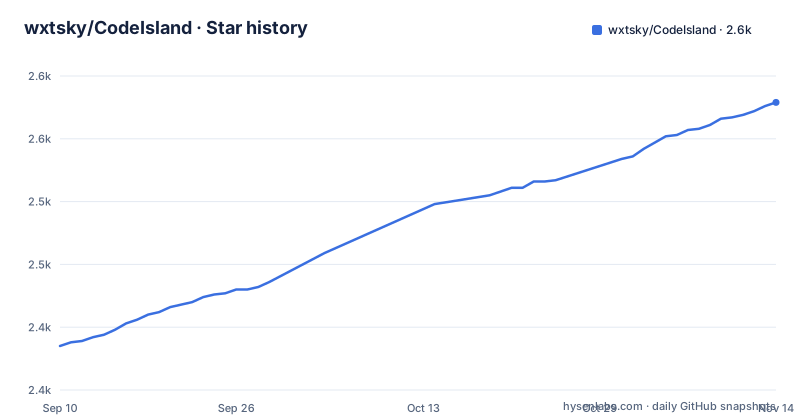
Star history
- wxtsky/CodeIsland2,579 ★ · +194
| Repository | 2026-09-10 | 2026-11-14 |
|---|---|---|
| wxtsky/CodeIsland | 2.4k | 2.6k |
194 Stars in the last 65 days, measured from the daily GitHub snapshot. Compare with other projects
Editorial analysis
Three different tool counts, on one page
The project describes itself in three numbers and none of them agrees with the others. The repository description says thirteen tools. The rationale section says it works with more than thirty. The grid on the page names twenty three and then hands off to a further list of variants: separate regional builds of two editors, three separate command line variants of one, a command line variant of a third, a desktop application's code tab, and one more. The escape hatch is stated after that list: any tool that uses the same hook shape can be added as a custom entry in settings.
So the honest reading is that the number of integrations is not fixed and is a function of how many regional and command line variants exist. A reader comparing the description against the page will reasonably conclude the project shrank or inflated, and neither happened. What the three numbers do tell you is that the count is a marketing field rather than a measured one, and that the grid is the most informative of the three because it names what is actually covered.
It edits your tool configuration on launch, and repairs its own edits
This is the behaviour to understand before installing it, and the page states it plainly.
CodeIsland writes these for you on launch (and repairs them if they drift)There is a table mapping each tool to the file it writes, and it is a list of dot-directories belonging to other programs: the settings file for one agent's home directory, the hooks file for a second, the configuration directory for a third, and so on through about a dozen. Each integration can be switched off individually in a settings pane, which is the right granularity. Two details are worth noting. Two different tools write into the same home directory tree under different file paths, so disabling one does not necessarily stop the other from being written. And the repair behaviour means that if you hand-edit a file it has claimed, the change will be reverted on the next launch rather than treated as a conflict. For an application whose entire value is being trusted with approval decisions, editing those files by hand is not a supported path.
Two tools are read only because their hooks cannot carry a decision
The page is unusually honest about where its own trick does not work.
Tools whose hooks can't carry a decision ... are shown read-onlyTwo are named. For the majority, the hook mechanism can hold a decision open, which is what lets the notch offer approve, deny and always allow, and answer prompts with several questions in them. For the two exceptions, the hook fires but cannot carry a user's answer back to the tool, so the panel shows you the state and you have to go to that tool's own interface to approve. The same section also names the tools whose approvals are interactive, which is a longer list than the grid, and that difference between the two lists is the real shape of the feature: the panel can act for most of what it displays and not for all of it. A user who assumes every row in the grid is actionable from the notch will be wrong about two of them.
Auto-proceed inherits a permission decision made somewhere else
One bullet is worth reading on its own, because it is the one place where this application makes a security decision rather than surfacing one.
> Auto-proceed for agents you already run in YOLO / Turbo mode
So if a tool is configured to approve its own calls without asking, the panel approves them too, rather than treating the panel as a second place where that decision has to be made independently. That is coherent and it avoids the nuisance of two conflicting authorities, but it means the panel's approval behaviour is derived from configuration that lives somewhere else and may have been set for a different reason. It also means the panel is not a control point: you cannot use it to hold back an agent you have already told to run unattended. The rest of the approval surface is more conventional, with a global shortcut for each of approve, deny, skip and jump, so a user who wants an explicit gate everywhere can turn the inherited behaviour off and use the shortcuts instead.
Notification volume is filtered by the directory you are working in
The section about staying out of the way is the longest in the highlights and contains one behaviour with privacy weight. Silence rules can be set for directories you never want to hear about, which means the application inspects the working directory of a session to decide whether to notify you at all. That is a reasonable feature for someone with four agents and one project that is genuinely noisy, and it is also the panel knowing which projects you are working on and making a per project decision about your attention.
The rest is carefully tuned. It suppresses a notification while you are already looking at that session's terminal tab. It has quiet hours, per event eight bit sounds, and a completion mode that replaces a banner with a small dot. It hides in full screen, moves around menu bar icons it would otherwise cover, and has adjustable open and close speed. It mutes itself when the screen is locked or the machine is asleep. And one rule is worth singling out because it is the kind of detail that only comes from watching people get startled: a failed tool call no longer plays the error sound, only a turn that actually dies does.
The page is written in macOS terms and the tree targets three more platforms
Every highlight is described with a platform assumption baked in. The panel is a notch. It steps around menu bar icons and hides in full screen. It is signed, notarised and auto-updating, which are three words that belong to one platform's release vocabulary. The companion is a phone and watch app with its own name, its own store listing, and surfaces for the dynamic island, the lock screen and a standby mode.
Against that, the repository carries directories for a Windows build, for an Android watch target, for a phone companion, for a separate Apple companion, and for hardware, which is where the desk device described in the highlights lives. It also carries an appcast file, which is the auto-update feed format of one platform's update library. So the picture is a project with a macOS-first product and several other targets in the tree, described on a page written entirely for the first one. If you are on any of the others, the page tells you almost nothing about what you are installing, and the phone companion's separate store identity is a reminder that these are different products rather than one build.
One integration has its own changelog file
The root carries the usual changelog and, beside it, a second file scoped to a single agent tool's integration. That is a small thing and it is the clearest signal in the tree about where the maintenance effort goes: one integration changes often enough to need release notes of its own, separate from the application's. The rest of the layout is native application as you would expect, a package manifest with a resolved dependency file so builds are reproducible, a sources directory with a tests directory beside it, an entitlements file and a property list, an asset catalogue and a separate icon file, a build script, and directories for documentation and helper scripts.
The release cadence matches the pattern. Three patch tags in September 2026, and the newest one carries a timestamp identical to the last recorded commit on the branch, down to the second. On a project with more than thirty integrations, a patch every few days is a reasonable rhythm, and the per integration changelog is what lets you tell whether an update touched the tool you care about.
Editorial conclusion
CodeIsland suits someone running several agents at once who needs to know which one is blocked and wants to answer it from wherever they already are, and the design decisions behind the noise controls are better than most panels of this kind manage. Two things to weigh before you turn it on. It writes hook files into a dozen configuration directories belonging to other programs and re-asserts them on launch, so treat those files as owned by this application rather than as yours to edit. And the auto-proceed behaviour inherits an agent's own unattended approval setting rather than acting as an independent gate, so if you want a place where every call is decided by you, you have to turn that inheritance off and use the shortcuts. On platforms other than macOS the page tells you almost nothing, whatever the repository contains.
Frequently asked questions
What does CodeIsland do?
It puts a live status panel for your coding agents in the MacBook notch, showing which session is working, which needs an approval and which finished, and letting you approve a tool call or answer a question without switching to the agent's window.
How does CodeIsland connect to my coding tools?
It writes hook files into each tool's own configuration directory on launch, and repairs them if they drift. The page lists the exact file for each tool, and every integration can be switched off individually in settings.
Which agents can I approve from the notch?
The ones whose hooks can hold a decision open, which the page names in a list longer than the supported-tools grid. Two tools cannot, and are shown read only, with approval left in their own interface.
Does CodeIsland run on Windows?
The repository carries a Windows directory, but the page describes the product entirely in macOS terms, including notarisation, the notch and menu bar behaviour, and says nothing about a Windows build. The highlights and the supported list cover the macOS app and its phone and watch companion.
Can CodeIsland see agents running on a remote machine?
Yes. Sessions on remote hosts reached over SSH appear alongside local ones, and the application can push to your phone or to chat services, or forward raw events to a webhook for your own automations. It also carries an optional hardware companion that connects over Bluetooth.
Official sources
Add this badge to your README
If you maintain this project, the badge below links readers to this analysis and shows its maintenance status from the daily GitHub snapshot. Paste the markdown into your README; add ?metric=license or ?metric=stars to the image URL for a different field.

[](https://hysenlabs.com/projects/wxtsky-codeisland)Star history chart for your README
[](https://hysenlabs.com/projects/wxtsky-codeisland)Was this useful?