Zed Globalization: a localized Zed build that also patches agent credentials
Localized/multilingual build of the Zed editor with an AI-powered automatic translation pipeline, supporting Simplified/Traditional Chinese, Japanese and Korean.
At a glance
- What is it?
- Zed Globalization rebuilds the Zed editor with its interface strings translated into Chinese, Japanese and Korean, and ships the Python toolchain that does it. The same build pipeline also rewrites how Zed passes agent API keys to Claude Code.
- Who is it for?
- Adopt Zed Globalization if your day is spent in a Chinese, Japanese or Korean interface and you never plan to edit Zed's Rust source, because the translation is compiled into the binary rather than exposed as a setting. Leave it if you carry your own patches or your own agent credentials, since the build also rewrites how ANTHROPIC_API_KEY reaches Claude Code.
- Can I use it commercially?
- Yes. MIT is a permissive licence: you can use, modify and sell software built on it, as long as you keep its copyright and licence notices.
- Is it still maintained?
- Yes. The repository last received commits 15 days ago.
- What is it written in?
- Mainly Python, according to GitHub's language statistics.
Answers come from the project's GitHub data, last synced on October 25, 2026, and from our analysis. They are not legal advice.
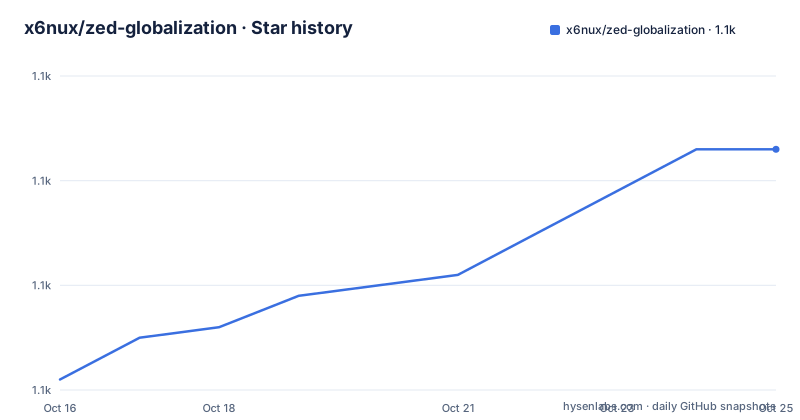
Star history
- x6nux/zed-globalization1,103 ★ · +22
| Repository | 2026-10-16 | 2026-10-25 |
|---|---|---|
| x6nux/zed-globalization | 1.1k | 1.1k |
22 Stars in the last 9 days, measured from the daily GitHub snapshot. Compare with other projects
Editorial analysis
A fork that ships translated binaries instead of language files
Zed is an editor written in Rust, and this repository takes the route that keeps translated text inside the binary. No language catalogue is shipped for the editor to read at runtime: Rust sources are scanned, their user-facing strings are rewritten in place, and the result is compiled into a second editor, named ZedG in the macOS and Windows install paths and zedg in the Linux file layout. Prebuilt packages cover macOS Universal, Apple Silicon and Intel, Windows x64 and ARM64, and Linux x86_64 and aarch64 in tar.gz, deb and rpm form.
Four languages are named: Simplified Chinese, Traditional Chinese, Japanese and Korean. The audience is narrow and obvious, a developer whose editor ships in English only and who wants menus, settings and dialogs readable without opening a second window to translate them.
Replacement has three layers, and each one is a place where a string can be lost. A scan pass decides which .rs files hold text worth translating, extraction pulls double quoted strings together with the surrounding code so a translator can tell a button label from an error message, and the writer applies a filter, a syntax correction pass and a skip list for protected regions in that order. A JSON to Excel round trip sits beside this for proofreaders who would rather check a spreadsheet than a terminal.
Four pipeline stages turn source strings into downloadable packages
Automation runs in GitHub Actions as four numbered jobs. A translate job fires on a schedule or by hand, finds a new Zed version, and extracts and translates its strings. A build job compiles for three platforms and applies patch_agent_env.py. Two sibling jobs then refresh distribution metadata: 03-update-scoop rewrites the Scoop manifest and 04-update-homebrew rewrites the Homebrew cask.
That last pair explains why the project maintains its own bucket at https://github.com/x6nux/scoop-zedg and its own tap under x6nux/zedg. Both sit between a build that succeeded and a machine where brew install --cask zedg actually resolves, so a manifest or cask that stops matching the artifact breaks the documented install path even though nothing in the build reported an error.
Versioning runs on two tracks, and the README does not explain why. The three most recent release tags track the editor, with v1.21.0-pre on 2026-09-17, v1.21.0 on 2026-09-23 and v1.22.0-pre on 2026-09-24, and a 1.22.0 pre-release landing one day after the 1.21.0 stable. The tool that produces them declares its own version as 2.0.0 in pyproject.toml, so the number in pip metadata and the number in a download filename cannot be compared.
A four step command line that also collapses to one call
The tool installs from the repository root with pip, and the extras decide what it can do.
# 基础安装(仅替换功能)
pip install .

# 含 AI 翻译功能
pip install ".[ai]"

# 全部功能
pip install ".[all]"
The base install is deliberately the replacement code alone, so a machine without the AI extra can rewrite source but cannot produce a translation. The ai extra adds the OpenAI client, the excel extra adds pandas and openpyxl for the spreadsheet round trip, and the all extra asks for both. The entry point is registered as `zedl10n = "zedl10n.cli:main"`, and Python 3.11 or newer is required.
Four commands do the work in order.
# 1. AI 扫描:识别哪些 .rs 文件需要翻译
zedl10n scan --source-root zed

# 2. 提取字符串
zedl10n extract --source-root zed --output string.json

# 3. AI 翻译
zedl10n translate --input string.json --output i18n/zh-CN.json --mode full

# 4. 替换源码
zedl10n replace --input i18n/zh-CN.json --source-root zed
Scan reports which files need work, extract writes the string table to string.json, translate consumes it and writes the language file, and replace writes that file back into the tree. The same four stages collapse into one command:
zedl10n pipeline --source-root zed --lang zh-CN --mode fullThe `--mode full` flag appears in both examples with no documented list of alternatives, and a test file sitting at the repository top level, test_zedl10n.py, is the only visible hint at how the stages get checked.
Three fallback formats decide what happens to a stubborn string
Four environment variables drive the translation stage, and each has a command line twin: AI_BASE_URL with --base-url, AI_API_KEY with --api-key, AI_MODEL with --model and AI_CONCURRENCY with --concurrency. Two carry defaults. The address falls back to the OpenAI endpoint and the model to gpt-4o-mini. The key carries no default at all, which makes it the one field a local run cannot skip, and concurrency starts at 5, a modest number for pushing a whole string table through one model.
The request format is not fixed either. When a model will not answer in the expected shape, the pipeline drops through three formats in order: JSON, then XML CDATA, then a numbered format. That last rung is the one to watch, because a numbered format yields placeholder identifiers rather than finished text, and no documented setting turns that fallback into a hard failure. The string side has its own guard, a filter that drops what it cannot use, but the filter and the fallback live in different stages and never meet.
One more limitation shows up without reading far. The README's final line stops in the middle of a phrase, so the sentence that would name which endpoints and providers are accepted is cut off instead of written, and the configuration table above it documents only the four variables.
A Homebrew cask, an unsigned build and a 12 hour upgrade timer
Homebrew is the documented route on macOS, and the package names differ by channel.
# 首次安装
brew tap x6nux/zedg
brew install --cask zedg

# 手动更新
brew update && brew upgrade --cask zedg
The stable line is the cask zedg, and the early channel is a separate cask named zedg-preview, so moving between them means installing a different package rather than passing a flag. Later upgrades run through the normal brew update and brew upgrade --cask pair.
The DMG path has one sharp edge. These builds carry no Apple signature, so macOS reports the application as damaged on first launch, and the documented fix strips the quarantine attribute from the installed app:
sudo xattr -rd com.apple.quarantine /Applications/ZedG.appThat command needs sudo, and it removes the marker macOS attaches to downloads it has not verified. Accepting it is a decision about trust in the build, not about language.
The optional timer deserves the same attention. Enabling automatic updates runs brew autoupdate with an interval of 43200 seconds, which is the 12 hour cadence, and the README states plainly that this upgrades every installed formula and cask because scheduling a single package is not supported. On a machine with a large Homebrew installation, turning on the ZedG timer changes the upgrade behaviour of unrelated tools; brew autoupdate stop reverses it.
Scoop, dpkg and the zed.exe name collision on Windows
Windows has two documented front ends over one shared bucket. Scoop takes the bucket and the package:
# 首次安装
scoop bucket add zedg https://github.com/x6nux/scoop-zedg
scoop install zedg

# 手动更新
scoop update zedg
The zedg package registers only the zedg command and leaves an official Zed alone. zedg-compat installs the same editor and adds a zed command, so git difftool, a terminal `zed .` and the default editor picker resolve to ZedG instead. Because a shim and an already installed application can both claim that name, the README advises uninstalling or renaming the official zed.exe first, and the two packages swap at any time with scoop uninstall zedg followed by scoop install zedg-compat. The NSIS installer is the third route and needs no package manager at all: a component checkbox in the wizard backs up the official binary and restores it on uninstall.
Linux gets the same two architectures in three package shapes. A tar.gz unpacks into /usr/local, a deb installs with `sudo dpkg -i *.deb`, and an rpm installs with `sudo dnf install *.rpm`. The deb and rpm packages register zedg.desktop and associate it with text/plain, so the editor appears in the application list, while the tar.gz layout leaves you the explicit file removal that the uninstall section lists.
Automatic updates on Windows run through Task Scheduler rather than through Scoop itself. The command `schtasks /create /tn "ZedGUpdate" /tr "powershell -Command 'scoop update zedg'" /sc daily /st 12:00` creates a daily task at noon and needs administrator rights, while `schtasks /delete /tn "ZedGUpdate" /f` removes it.
The build also rewrites how Zed passes agent credentials
Two edits land in Zed's own source before anything is compiled, and neither has anything to do with language. In agent_server_store.rs the editor forces ANTHROPIC_API_KEY to an empty string, which wipes a key already set in the user's environment. In claude.rs the connect() method does not read that environment the way the Codex and Gemini integrations do. The first patch deletes the forced clear line; the second injects passthrough logic so that ANTHROPIC_API_KEY, ANTHROPIC_BASE_URL, the Bedrock and Vertex variables, and everything prefixed AWS_ or GOOGLE_CLOUD_ reach the Claude Code process.
A local build applies them between string replacement and the Rust compile:
git clone https://github.com/zed-industries/zed.git
zedl10n replace --input i18n/zh-CN.json --source-root zed
python3 patch_agent_env.py --source-root zed
cd zed && cargo build --release
The script edits the tree in place and stays safe to run twice: a marker written as [ZED_GLOBALIZATION_PATCH] records which hunks are applied, a repeat run skips them, and --dry-run shows the changes without writing. On a tree where you keep your own patches, that dry run is the first command worth reaching for.
Be explicit about the consequence. Every prebuilt binary ships this credential change, so installing ZedG also means taking an agent fix that upstream has not made, and a local build that skips the script keeps the original key clearing behaviour with no warning at all. The build job treats the patch as mandatory.
Three routes to hand the zed name over, and the gap in one of them
Making the editor answer to zed is what separates a second copy of ZedG from a replacement for Zed. Git difftool, the file manager's Open With menu and a plain `zed .` in a repository root all look for that name, and three mechanisms hand it over.
Through the NSIS installer the override is a component checkbox in the wizard: it backs up the official binary as zed.exe.official.bak, puts ZedG in its place, and restores the backup when ZedG is uninstalled. Through Scoop the same outcome is a second shim in the zedg-compat package, with a documented command to move between the two packages.
On macOS and Linux the switch is a script, documented for the manual tar.gz, deb and rpm installs:
zedg-activate.sh            # 激活:创建 ~/.local/bin/zed 链接 + 注册 desktop 入口
zedg-activate.sh --status   # 查看当前接管状态
zedg-activate.sh --revert   # 一键还原官方状态(官方 zed 已自动备份为 zed.orig)
Running it creates the link in ~/.local/bin and registers the desktop entry, --status reports whether the takeover is currently in place, and --revert removes both, leaving the original binary behind as zed.orig.
The gap sits on the cask. Activation is described for the manual Linux packages and Scoop documents its own shim, but nothing here explains how a cask installed with brew install --cask zedg gives up the zed name, or how to take it back. Someone who installs on a Mac with Homebrew and wants editor association has no documented path in this repository and has to write a link of their own.
Editorial conclusion
Adopt Zed Globalization if your day is spent in a Chinese, Japanese or Korean interface and you never plan to edit Zed's Rust source, because the translation is compiled into the binary rather than exposed as a setting. Leave it if you carry your own patches or your own agent credentials, since the build also rewrites how ANTHROPIC_API_KEY reaches Claude Code. Check first whether AI_API_KEY and AI_MODEL point at a provider you already pay for. It ships under MIT, the last push was on 2026-09-27, and the fastest test is brew tap x6nux/zedg followed by brew install --cask zedg.
Frequently asked questions
How do I install Zed Globalization on macOS and on Windows?
On macOS, tap the project and install the cask with `brew tap x6nux/zedg` followed by `brew install --cask zedg`, or use `zedg-preview` for the pre-release line. On Windows, add the bucket with `scoop bucket add zedg https://github.com/x6nux/scoop-zedg` and then run `scoop install zedg`; `scoop update zedg` handles later upgrades.
What is the difference between zedg and zedg-compat on Windows?
Both install the same ZedG editor. The zedg package registers only the zedg command and leaves an official Zed install untouched, while zedg-compat also registers zed so tools such as git difftool resolve to ZedG. If an official Zed is already installed, the README advises removing or renaming its zed.exe first, and the packages swap with one uninstall plus the other install.
Do I need an API key to run the zedl10n translation pipeline?
The AI stages need one: AI_API_KEY has no default and is required, while AI_BASE_URL falls back to the OpenAI endpoint and AI_MODEL to gpt-4o-mini. The base install `pip install .` carries the replacement code only, so translation requires the ai extra.
Why does macOS report ZedG as damaged the first time it opens?
The builds are not signed by Apple, and the README states that macOS reports the application as damaged on first launch. The documented fix clears the quarantine attribute with `sudo xattr -rd com.apple.quarantine /Applications/ZedG.app`.
Can I undo the takeover of the zed command after installing ZedG?
On macOS and Linux, `zedg-activate.sh --revert` removes the link and the desktop entry and keeps the original binary as zed.orig. On Windows through the NSIS installer, uninstalling ZedG restores zed.exe from zed.exe.official.bak, and with Scoop you uninstall one package and install the other. The cask route has no documented reversal.
Official sources
Add this badge to your README
If you maintain this project, the badge below links readers to this analysis and shows its maintenance status from the daily GitHub snapshot. Paste the markdown into your README; add ?metric=license or ?metric=stars to the image URL for a different field.

[](https://hysenlabs.com/projects/x6nux-zed-globalization)Star history chart for your README
[](https://hysenlabs.com/projects/x6nux-zed-globalization)Was this useful?