BruteSpray has throttles and a circuit breaker but no per-target scope check
Fast, multi-protocol credential brute-forcer. Parses Nmap, Nessus, and Nexpose output to automatically test default and custom credentials across 30+ protocols.
At a glance
- What is it?
- BruteSpray takes its targets from an Nmap, Nessus or Nexpose file and fires credential tests at every address in it in parallel, which makes it a tool for engagements you are authorized to run and a liability anywhere else. It ships rate limiting, lockout-aware spraying, and a resume checkpoint, and none of those is a scope boundary.
- Who is it for?
- Use BruteSpray only inside a written scope you can produce on request, and keep the scan file narrower than the engagement: no CIDR ranges, no masscan pipeline feeding it, no target list carried over from an earlier run. The controls it ships are about avoiding account lockouts and finishing faster, not about deciding whether a host belongs to you, so the boundary has to come from the operator.
- Can I use it commercially?
- Yes. MIT is a permissive licence: you can use, modify and sell software built on it, as long as you keep its copyright and licence notices.
- Is it still maintained?
- Yes. The repository received new commits within the last day.
- What is it written in?
- Mainly Go, according to GitHub's language statistics.
Answers come from the project's GitHub data, last synced on November 25, 2026, and from our analysis. They are not legal advice.
Star history
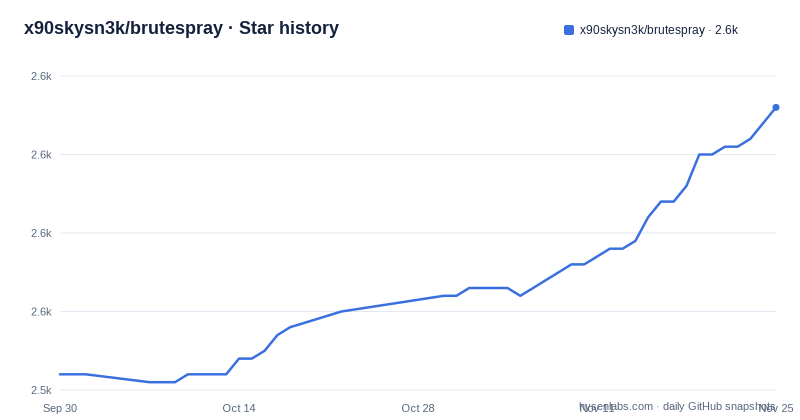
- x90skysn3k/brutespray2,576 ★ · +34
| Repository | 2026-09-30 | 2026-11-25 |
|---|---|---|
| x90skysn3k/brutespray | 2.5k | 2.6k |
34 Stars in the last 56 days, measured from the daily GitHub snapshot. Compare with other projects
Editorial analysis
The target list is whatever the scanner found
BruteSpray does not decide what to test; it inherits its scope from whatever produced the scan. It reads Nmap GNMAP and XML output, Nessus and Nexpose results, JSON, and plain lists, and it takes a single target as a scheme, host, and port when you already know what you are after. Two of those input paths widen the blast radius without anyone choosing to. One accepts CIDR notation, so a single range such as a slash-24 address handed in as one value becomes every host inside it. The other is a pipeline on standard input, documented against naabu, fingerprintx, and masscan, which means the hosts can arrive from a mass scan with no human in the loop at all. A scan file can also be asked to only print the services it contains, so reconnaissance and credential testing are separate steps that happen to share a parser. Everything else, including fixed username and password pairs, arrives as flags, so the record of what was attempted lives in a shell history or a YAML config rather than in an engagement log. One instruction in the page has no example under it: the line telling you to print discovered services from a scan file with two flags is followed by the documentation heading instead of the output.
Throttling exists, a per-target authorization record does not
The controls this project does ship are all about avoiding lockouts and finishing sooner. Spray mode is described as lockout-aware with configurable delays, so it can spread attempts across accounts instead of hammering one; rate limiting, a circuit breaker, and dynamic threading sit next to it; the terminal interface can pause and resume individual hosts; and an interrupt with Ctrl+C writes a checkpoint you can resume from later. What none of that does is ask whether a host is yours. There is no allowlist of owned systems, no dry run that reports what would be attempted without attempting it, and no scope file the tool reads and enforces. The checkpoint is the part worth thinking about, because a stored target list on disk is what a later run picks up, which means yesterday's scope becomes today's scope by default. For a tool whose normal input is a list of other people's servers, the absence of a scope boundary is the design decision, not an oversight in the documentation. Proxy support points the same way: SOCKS5 with authentication, and rotation of it in the comparison table, mean the traffic can leave from somewhere other than the operator's address, which changes who the connections look like they came from without narrowing who they are aimed at.
The comparison table counts 41 services and the list names 32
The project grades itself against hydra, medusa, ncrack, and brutus in a table where almost every row is a feature it has and the others do not: single static binary, interactive TUI, checkpoint and resume, spray mode, per-attempt JSONL, SOCKS5 with rotation, embedded SSH bad keys, pipeline input, and per-module parameters. The service count row reads 41 for BruteSpray against 50 or more for hydra, 34 for medusa, 14 for ncrack, and 23 for brutus, and the prose above it says 40 or more protocols, while the list of service names printed on the page contains 32 entries. A footnote under the table notes that the symbols reflect documented behaviour at the time of the pull request and that competing tools change quickly, which is an admission that the whole grid is a snapshot of other people's projects rather than a measurement. One row goes past credential guessing entirely: pre-auth RDP recon through NLA and sticky keys, with the SSH bad keys marked by CVE.
Embedded wordlists put the credential lists inside the binary
Wordlists are compiled into the executable through a layered manifest system, and the documentation gives the layering its own guide with overrides and customization. Combined with a Go build that sets CGO_ENABLED to zero and ships as one file, the result is a single artifact containing the connection logic and the candidate credentials together, with nothing fetched at run time. That has two consequences worth stating plainly. The operator does not have to host or update lists, and there is no download callback for anyone watching an install. At the same time every copy on every machine is byte-identical and self-contained, which is the shape a defender's endpoint tooling looks for. It also moves the effective wordlist out of the version number: two builds of the same release can test different lists because the layers were chosen on the machine, so the version alone does not describe what was tried.
Module parameters choose the authentication mode per protocol
A single flag passes per-module settings as key and value pairs, covering authentication type, target path, and NTLM domain among them, and the surrounding feature list names the modes that follow from it: HTTP Basic, Digest, and NTLM in automatic or forced form, SMTP PLAIN and LOGIN, IMAP and POP3 through SASL, and SMB pass-the-hash. The module list in go.mod shows who implements those: Azure's NTLM library for the NTLM exchange, hirochachacha's SMB2 package, masterzen's WinRM client, emersion's IMAP and SASL pair, plus database drivers for SQL Server, MySQL, Postgres, Cassandra, Redis, Oracle, and Neo4j, an FTP client, an SNMP library, an LDAP library, an XMPP library, a VNC client, and the project's own RDP package under the same author name. Pass-the-hash is the entry that changes the economics, since it removes the password from the question and leaves wordlist size as a much smaller constraint. The pinned versions are uneven, too: the Redis client is still on its v8 module path while the database drivers are on current majors, WinRM sits at a pseudo-version from September 2025, and the VNC client's pseudo-version points at a commit from 2015.
Findings leave as a script for another tool to run
The reporting options are summary reports in JSON and CSV, Metasploit resource scripts, NetExec scripts, and a per-attempt JSONL stream. Read together they describe a pipeline stage rather than a terminal utility: the last thing this program does is convert a working credential into a fragment that a different framework consumes. That is also where the risk concentrates, because the handoff format is designed for a tool whose next action this program does not control, and a report directory that accumulates those fragments becomes a store of working credentials on the operator's disk. The interface around it is a Bubble Tea application built on bubbletea, bubbles, lipgloss, and the charm terminal helpers, with tabbed views for findings, live settings, and pausing hosts. YAML config files exist for per-engagement settings, which is the right place for scope, and nothing in the visible files uses them for that.
golang:latest for the image, go 1.26.1 in the module file
The module declares go 1.26.1, and the container build does not honour that pin: the Dockerfile starts from golang:latest, downloads modules, and builds with
go build -a -o brutespray -trimpath -ldflags "-s -w -X github.com/x90skysn3k/brutespray/v2/brutespray.version=${VERSION}"before moving to alpine:latest, adding ca-certificates, and dropping to a non-root user before the entrypoint runs. Locally the Makefile derives the same version string from git describe and passes the same linker flags, with test, lint through golangci-lint, and vet targets alongside it, and release binaries come from the goreleaser configuration. Installing from source is a single line, and the alternative paths are the release binaries, a build-from-source guide, and a Docker section:
go install github.com/x90skysn3k/brutespray/v2@latestBoth unpinned base images mean a rebuilt container can differ from what the module file names, which matters for a tool whose findings are meant to be reproducible and later turned into scripts. The source tree splits the same concerns into directories named for the modules, the brute forcing core, the command, the terminal interface, and the wordlists, with a test directory beside them.
Editorial conclusion
Use BruteSpray only inside a written scope you can produce on request, and keep the scan file narrower than the engagement: no CIDR ranges, no masscan pipeline feeding it, no target list carried over from an earlier run. The controls it ships are about avoiding account lockouts and finishing faster, not about deciding whether a host belongs to you, so the boundary has to come from the operator. Before running anything, check three things in your own environment: whether the engagement permits credential testing at all, whether the host list has been reduced to assets you own, and who else can read the checkpoint and the report directory, because those hold the target list and any credentials that worked. The output formats deserve the same care, since the Metasploit RC and NetExec scripts are designed to hand a result to a tool whose next action BruteSpray does not control.
Frequently asked questions
What input does BruteSpray need before it tests anything?
Scan output. It reads Nmap GNMAP and XML, Nessus, Nexpose, JSON, and plain lists, or takes one scheme, host, and port directly. A scan file can also be asked to only print the services it found.
Does BruteSpray check whether a host belongs to me?
No. There is no allowlist of owned systems, no dry run, and no scope file. Authorization has to come from the scan you feed it and from the targets you choose to name.
What safety controls does BruteSpray have?
Lockout-aware spray mode with configurable delays, rate limiting, a circuit breaker, dynamic threading, per-host pause in the terminal interface, and a Ctrl+C checkpoint that a later run resumes from.
How many protocols does BruteSpray claim to support?
The comparison table counts 41 and the prose says 40 or more, while the service list printed on the page names 32 entries. Ports and per-service notes live in a separate services document.
What format do BruteSpray findings come out in?
Summary reports as JSON and CSV, Metasploit resource scripts, NetExec scripts, and a per-attempt JSONL stream. The script formats exist to hand a result to another tool.
Official sources
Add this badge to your README
If you maintain this project, the badge below links readers to this analysis and shows its maintenance status from the daily GitHub snapshot. Paste the markdown into your README; add ?metric=license or ?metric=stars to the image URL for a different field.

[](https://hysenlabs.com/projects/x90skysn3k-brutespray)Star history chart for your README
[](https://hysenlabs.com/projects/x90skysn3k-brutespray)Was this useful?