Cameradar's only authorisation control is a sentence in the instructions, and one flag makes it more aggressive
Cameradar hacks its way into RTSP videosurveillance cameras
At a glance
- What is it?
- A network scanner for RTSP endpoints: targets can be a single address or a range that expands silently, every container example runs with the host network attached, the one flag that sounds like a safety switch skips discovery and targets a known inventory instead, and the file states its own default port list twice with two different answers.
- Who is it for?
- Cameradar fits an assessor working inside a network they are responsible for, with a written scope and an inventory, and it is a poor fit for a shared machine or an operator who mistypes a range. Three things to know before a run.
- Can I use it commercially?
- Yes. MIT is a permissive licence: you can use, modify and sell software built on it, as long as you keep its copyright and licence notices.
- Is it still maintained?
- Yes. The repository last received commits 1 day ago.
- What is it written in?
- Mainly Go, according to GitHub's language statistics.
Answers come from the project's GitHub data, last synced on November 15, 2026, and from our analysis. They are not legal advice.
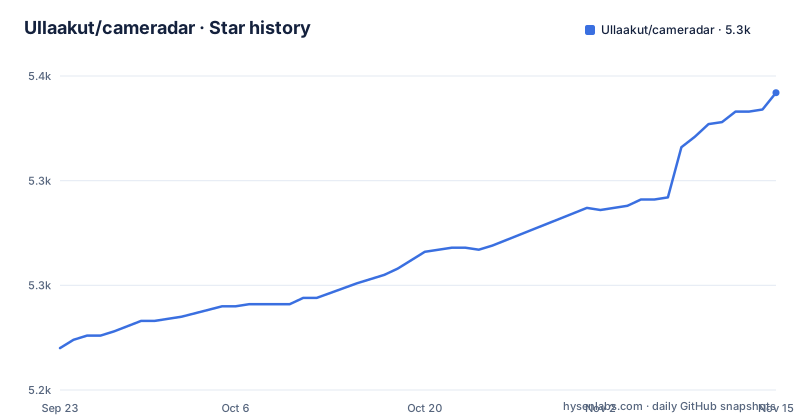
Star history
- Ullaakut/cameradar5,342 ★ · +122
| Repository | 2026-09-23 | 2026-11-15 |
|---|---|---|
| Ullaakut/cameradar | 5.2k | 5.3k |
122 Stars in the last 53 days, measured from the daily GitHub snapshot. Compare with other projects
Editorial analysis
The scope control is a sentence in the instructions
The body of this README is more careful than the repository's one-line description, and the difference is worth holding on to.
The description says the tool hacks its way into network cameras. The body says it scans endpoints on authorized targets, and every target example in the file is a private range or a loopback address, and the Termux run step closes with an instruction to replace the target placeholder with an address, range, host or subnet you are authorized to test.
That is the entire mechanism. There is no per-host authorisation check, because a scanner has no way to know who owns a camera. And there is a section on security and responsible use in the table of contents, which is the right place for the guidance and not the same thing as enforcement.
So the scope is a property of the operator, not of the tool. For a person with a written engagement and an inventory that is exactly right. For a person on a laptop who types a range into a container attached to the host network, the tool will do what it was told.
The mitigations that do exist are two sentences of advice, and they appear where you would expect: near the range syntax, and at the end of the Termux instructions.
A range expands silently, and the container runs with your network
Two details decide how wide a mistake goes.
The first is the target syntax. Targets can be a block, a single address, a range, or a hostname, and the file gives an example of each, including a range written as a start and end address. In the mode that skips discovery the file spells out what that means: blocks and ranges expand to every address in them, and hostnames resolve through DNS. Then the advice: large ranges create many targets, so use them carefully.
A single character of mistyping changes the size of the operation by orders of magnitude.
The second is the network mode. Every documented container invocation includes a flag that attaches the container to the host's network namespace, and it is presented as the normal way to run the tool, with no discussion of what that means for reach.
For a tool whose job is to find devices, attaching to the host network is arguably the only useful mode: a container with its own namespace would see a different network from the laptop. The cost is that the position the scan runs from is the position of the machine the operator is sitting at, and on a laptop that is whatever network the laptop is on.
So the two facts compound. The argument accepts a range, the range expands, and the position the scan runs from is the operator's own. Nothing between those three steps asks a question.
Every documented container invocation in this file carries the host-network flag, and the private-range example looks like this:
docker run --rm -t --net=host ullaakut/cameradar --targets 192.168.100.0/24The flag that skips discovery is not a safety switch
There is a flag that turns discovery off, and it is easy to read as the cautious option. It is the opposite.
In that mode the tool does not run discovery and does not detect device models. Each target and port is treated as a stream candidate directly. The file says the mode can be useful on restricted networks, or when you want to attack a known inventory.
Read that second clause carefully. Skipping discovery removes the step that would have discovered devices you did not know about, and keeps the step that tries credentials against everything you did name. So the flag narrows the blast radius in one sense and concentrates the action in the other.
That is a reasonable engineering trade for an operator with an inventory, and the file presents it honestly. It is a hazard for an operator without one, because the mental model of scanning is usually discover-then-look, and this flag removes the looking.
The other side of the same section is the expansion warning again, and the mention that hostnames resolve while blocks do not, which means a name in the target list is a DNS lookup the tool performs on your behalf.
The configuration sections describe how to point the tool; guidance on whether you should is left to the separate security and responsible use section.
The default port list is stated twice and the two answers differ
A small inconsistency, and a useful one, because it shows which parts of the file are maintained by hand.
The quick start says the example command scans three ports on the target subnet, and names them: the standard stream port and two alternates. The configuration section then says the default ports are six values, and the list includes those three plus three more, one of which, http, is named rather than numbered.
So the same file gives two answers to the question of what happens when you do not pass a port option, and the more prominent one is the shorter one.
The longer list is the authoritative one, since the sentence introducing it says that if you do not specify ports, the tool uses those, and the example immediately after it shows a way to override them. So the quick-start prose is the stale copy, and it is stale in the direction that understates what a bare invocation does.
That matters more than a documentation nit, because the default port list is the difference between a scan that touches a standard stream port and one that also touches a web interface and two administrative-looking ports on the same device.
The port syntax itself accepts a list and a range, and the file gives an example of both, so the same expansion concern that applies to targets applies here too.
Both scanner bindings are the author's own forks
The dependency list is short, and two entries in it are more interesting than the rest.
The tool supports two discovery backends, chosen with a flag, and the default is one of them. Both are port scanners, and both are consumed through Go bindings that live under the same account as this project. So the bindings for the default scanner and for the alternative are maintained by the author of the tool rather than taken from the wider Go ecosystem.
That is not a criticism: for a tool whose core is RTSP rather than scanning, the scanner is a component rather than the product.
The rest of the list is what you would expect from a tool that speaks a media protocol and draws a terminal interface. There is a current-generation library for the streaming protocol, a real-time transport library beside it, a command-line framework, a table-driven helper, a string-case helper, a terminal package, and three separate libraries for building a text interface, with two more packages supporting colour output and a handful more for cell rendering and measurement.
Three libraries for the interface is a framework rather than a printer, which is why the Android instructions include a flag to select a plain output mode. The user-facing half of this tool is a small application, not a list of log lines.
A self-signed certificate is rejected until you point the tool at it
One configuration section deals with encrypted streams, and it is the most practically useful thing in the file.
Secure streaming is reached with a different URL scheme. From there the file splits into the normal case and the awkward one. If the stream's certificate comes from a trusted public authority, nothing needs to be done. If it is self-signed, or issued by a private authority, the operating system's trust store may reject it, and the remedy is to point a certificate-file environment variable at the authority certificate, or at the server certificate itself in the self-signed case.
Both routes are given, because a local tool and a container need different instructions. The local example sets the variable in the command line before the binary. The container example passes it into the container with a flag, and mounts a certificate directory with the read-only suffix so the container cannot modify what it is being asked to trust.
The last paragraph is the one to note: if you would rather not set the variable, add your authority certificate to the system trust store your runtime uses. That is a machine-wide change to how certificates are validated, offered as an alternative to a per-invocation variable.
For an assessor working through a self-signed camera on a bench, this section is the difference between the tool working and the tool reporting nothing. And it is a reminder of what the tool is: it speaks the real protocol, negotiates with the device, and is subject to the same certificate rules as anything else that does.
The stated Go floor is two releases below the module's own requirement
The dependency file and the installation instructions disagree about what version of the toolchain builds this.
The module file declares a language version that is newer than the one the README tells you to install. The README says the binary route needs Go 1.25 or later, while go.mod declares go 1.26.7, one release line ahead.
That is the ordinary relationship between a library's floor and a consumer's. What makes it worth a section is the direction: the instruction a new user follows is the permissive one, and the tool that enforces the stricter one is the Go toolchain itself. So a user on the documented floor is below what the module itself declares, and the installation section does not mention it.
The Android instructions are worse in a different way, because there the toolchain is assembled by hand. The steps install a terminal environment from a specific source and a version, explicitly not from the platform's own app store, then install a proot-based Linux distribution, then install a package manager, a compiler, a C library development package and a build tool inside it, then create a module path by hand, clone into it, and install. The binary is then run from a path in that environment, with the dictionaries copied to a temporary directory first.
None of that is wrong; it is a genuine set of steps for a phone. It is also the one installation route in the file with no fallback, and it ends with a build from source on a device.
The rest of the build story is conventional. The release is produced by a release tool in snapshot mode, the Makefile shows how to pass flags through to it, tests run with coverage and the race detector, formatting uses the standard toolchain with simplification, and linting is a separate binary with its own configuration file.
Editorial conclusion
Cameradar fits an assessor working inside a network they are responsible for, with a written scope and an inventory, and it is a poor fit for a shared machine or an operator who mistypes a range. Three things to know before a run. The only authorisation control is a sentence telling you to replace the target with an address you are permitted to test; the quick start and configuration sections describe no per-host check, confirmation or dry run, and every documented container invocation attaches the host network so the scan runs from your machine's position on the network. The target argument accepts a range or a block, and a range expands to every address in it, with a sentence of advice rather than a limit. And the flag that skips discovery is not a caution: it narrows the scan while removing the model detection, and the file describes it as useful when you already know what you are attacking.
Frequently asked questions
What is Cameradar?
A network scanning tool for real-time streaming endpoints. On targets the operator is authorised to test, it detects open streaming hosts, identifies the device model, attempts dictionary-based discovery of stream routes and of camera credentials, and produces a report of findings.
How do I check if someone is accessing my camera?
This repository does not answer that. It is a scanning and credential-discovery tool for targets you are authorised to test, and it reports on devices it reached rather than on a device that may already be compromised. Nothing in it describes detecting an intrusion.
How do I install Cameradar?
One container command, or a Go install with Go 1.25 or later. There is also a documented Android path that installs a terminal environment, a proot-based Linux distribution, and the build toolchain, then builds from source and runs the binary with its dictionaries copied to a temporary directory.
Which ports does Cameradar scan by default?
The configuration section lists six default ports, including one, http, named rather than numbered. The quick start says the example scans three, so the same file gives two answers about what a bare invocation does, and the longer list is the one the configuration text treats as authoritative.
Is there a way to preview what Cameradar would do before running it?
The quick start and configuration sections do not describe one, and the flag that skips discovery does not do that: it removes discovery and model detection so that everything you name is treated as a candidate, and the file describes it as useful for attacking an inventory you already know. The only stated scope control is an instruction to replace the target with an address you are authorised to test.
Official sources
Add this badge to your README
If you maintain this project, the badge below links readers to this analysis and shows its maintenance status from the daily GitHub snapshot. Paste the markdown into your README; add ?metric=license or ?metric=stars to the image URL for a different field.

[](https://hysenlabs.com/projects/ullaakut-cameradar)Star history chart for your README
[](https://hysenlabs.com/projects/ullaakut-cameradar)Was this useful?