agent-shell puts nineteen ACP agents in an Emacs buffer, and keeps its version history in a blog instead of tags
A native Emacs buffer to interact with LLM agents powered by ACP
At a glance
- What is it?
- xenodium/agent-shell is a GPL-3.0 Emacs Lisp package that talks to coding agents over the Agent Client Protocol, with the protocol layer living in a separate package, acp.el. Its readme is an Org file with blog posts and screenshots in it, the root carries per-agent modules for two agents it does not advertise, and there are no releases on the platform at all.
- Who is it for?
- agent-shell is worth trying if you already live in Emacs and want your coding agents in a real buffer rather than a terminal multiplexer, because the ACP abstraction is the point: nineteen agents behind one interface is a lot of adapters to write yourself, and the protocol client already exists as a separate package. Three things to check first.
- Can I use it commercially?
- Yes, with conditions. GPL-3.0 is a copyleft licence: if you distribute software that includes it, you must release that software's source code under the same licence. Running it internally without distributing it does not trigger that obligation.
- Is it still maintained?
- Yes. The repository last received commits 2 days ago.
- What is it written in?
- Mainly Emacs Lisp, according to GitHub's language statistics.
Answers come from the project's GitHub data, last synced on November 22, 2026, and from our analysis. They are not legal advice.
Star history
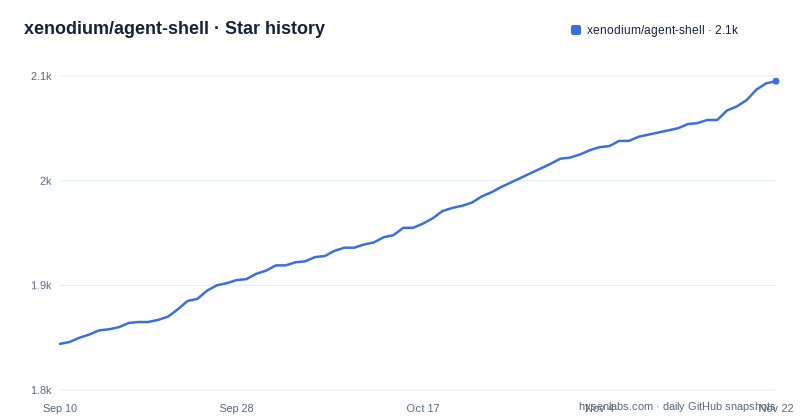
- xenodium/agent-shell2,095 ★ · +251
| Repository | 2026-09-10 | 2026-11-22 |
|---|---|---|
| xenodium/agent-shell | 1.8k | 2.1k |
251 Stars in the last 73 days, measured from the daily GitHub snapshot. Compare with other projects
Editorial analysis
The readme is an Org file with a blog post and screenshots inside it
There is no README.md here. The readme is README.org, written in Org mode, with an Org title line and an author line naming Alvaro Ramirez, star-prefixed headings, =agent-shell= used for verbatim text and square-bracket links. The contribution guide is CONTRIBUTING.org for the same reason, and a blog-post.org sits at the root beside it.
The media follows from that choice. Four images are committed at the top level: the screenshot shown under the title, a picture of the slash commands, a repository traffic graph, and a YouTube thumbnail. The first video link uses that thumbnail file as its own link text, so the same image is both the button and the label. Four video entries follow, the last of them an episode about prototyping an iOS app with agent-shell, artist-mode and Claude Skills, which is the clearest statement in the file that this is one component in a wider Emacs setup rather than a standalone tool.
The file also runs out mid-sentence. The last visible line is the start of an entry for a landing page project, cut after the equals sign that begins its verbatim name. So the list of related projects is longer than what the readme text shows.
The interface is this package, the protocol is another one
agent-shell does not implement the Agent Client Protocol. It depends on a separate package, acp.el, to do that, and the readme names it in the related projects section as the thing agent-shell relies on to communicate with agents. The news section reinforces the split by announcing the two as separate projects, with one post introducing agent-shell as powered by ACP and another introducing acp.el on its own.
That division matters when something does not work. A missing or stale ACP client is a different failure from a bug in the buffer, and a reader debugging an agent connection has to know which repository to look at. It also means the set of agents agent-shell can drive is bounded by what acp.el speaks to, not by what this package's own modules know about.
Distribution runs through MELPA, the Emacs package archive, which the readme links with a badge in the header. One of the version news posts is titled as the 0.17 improvements together with MELPA, which places the point at which the package became installable from the archive rather than only from source.
Nineteen agents listed, and two module names with no entry behind them
The list names nineteen agents: Claude Agent, Codex, Gemini CLI, Goose, Grok Build, Cursor, Kimi Code CLI, CodeBuddy, Kiro CLI, Qoder CLI, Qwen Code, Auggie, Mistral Vibe, Factory Droid, Pi, Oh My Pi, OpenCode, Antigravity and Junie. Two of them are reached through an adapter rather than directly: Codex through a repository named codex-acp and Pi through one named pi-acp, which means the ACP conversation is with a shim around the agent, not the agent itself.
The root directory is named after vendors and products in the same convention, and that is where the list can be checked. There is an anthropic file for Claude Agent, an xai file for Grok Build, an openai file for Codex, a google file for Gemini CLI, a droid file for Factory Droid and an omp file for Oh My Pi, alongside files named for Auggie, CodeBuddy, Cursor, Goose, Junie, Kimi, Kiro, Mistral, OpenCode, Qoder, Qwen and Antigravity.
Two files follow that pattern with nothing behind them in the list: agent-shell-cline.el and agent-shell-hermes.el. Either the list has fallen behind the code, or those two are not agent adapters, and the tree does not say which. A reader who wants the full supported set has to read the directory as well as the readme.
Three agent instruction files at the root of an Emacs package
The root holds AGENTS.md, CLAUDE.md and GEMINI.md, which is the same three-way convention that coding agents read from a project directory. Their presence here, in the repository of an Emacs package rather than in a project a user works on, suggests the package consumes that convention and the author follows it for the same agents the package drives.
There is a matching module name, agent-shell-devcontainer.el, which points at the other place these files matter: a development container is where a project pins its own toolchain and its own agent instructions. Whether the package reads these files automatically, exposes a setting to point at them, or simply tolerates their presence is not something the visible readme text explains.
That is worth flagging rather than guessing at. A package that reads a project's agent instructions is doing something with real authority over how a session behaves, and a reader assessing it needs to know whether the file is parsed, when, and whether a project can override it. The readme section on the interface does not answer any of that, so the file list is all the evidence there is.
An experimental module, a mock agent, and file names as documentation
Two files in the root are worth knowing about before reading anything else. agent-shell-experimental.el exists as its own module, so some of what the package can do sits behind a flag rather than in the default configuration. And agent-shell-mock-agent.el sits beside the real per-agent modules, which is what a package that tests its buffer behaviour without launching somebody's agent would need.
The rest of the naming convention does the documentation work. Reading the directory gives you the feature list without opening a single file: a worktree module, a diff module, a markdown module, a usage module, a heartbeat module, a prompt queue, project and viewport handling, drag and drop, an active-message module, list editing, a work buffer, a chat mode, completion, configuration, and separate interface, style and face modules. There is a github module too, and a few files whose names describe a role rather than an agent.
A tests/ directory sits alongside them. For a package of this size, with one root-level file per agent and one per feature, the file names are the API documentation, and anyone extending it will be reading the directory before the readme.
Twenty-four repositories for the extensions, most by other authors
The related projects section is longer than the feature documentation. It names twenty-four add-ons, and nearly all of them live in somebody else's repository: a sidebar, a bookmark helper, a tab-bar workspace, a tabulated manager, a code review interface, a mode-line attention tracker, desktop notifications, a macOS enhancement set, Org-mode transcripts, Org-mode configuration kept in org-roam, an Org Babel backend, a transcript search and resume tool, a LaTeX math renderer, Tramp integration, a floating status overlay, desktop save mode, bookmarks and Org links, and a status overlay with a small pet that broadcasts session state.
A few extend the idea outward. One drives sessions from a phone or another device over Slack. One runs coding agents in sandboxed Docker containers. One coordinates multiple agents with inter-agent communication, task tracking and project-level dispatch. The author's own contribution to the count is three, including a notifications package that itself depends on a separate Emacs notification package called knockknock.el.
Two things follow. The extension layer is a dozen repositories rather than one package with modules, so adopting a sidebar plus notifications plus a HUD means three installs from three maintainers. And the file ends partway through an entry, so the count is a floor.
No releases, and a version history written as blog titles
The repository has no GitHub releases, so the platform shows no tags to install from and no release notes. The version history that does exist lives in the readme's news section, as eight links to the author's blog whose titles carry the version numbers: 0.63, 0.55, 0.47, 0.25, 0.17 and 0.5, plus the two introductory posts for agent-shell and acp.el. The readme says these posts cover most of the package's features, which makes them the actual documentation for anything introduced after the initial release.
Two things are worth reading off that list. The package has never left the 0.x range across versions as high as 0.63, so nothing about the numbering suggests a stability promise. And the newest post a reader is pointed at is a version number, not a date, so there is no quick way to tell from the readme how old the current feature set is.
The readme also opens, before anything else, with a request for sponsorship that ties the cost directly to the thing the package consumes, noting that paying for LLM tokens is what makes the maintenance possible. The project metadata records the author's blog as the homepage, which means the blog and the package documentation are the same surface.
Editorial conclusion
agent-shell is worth trying if you already live in Emacs and want your coding agents in a real buffer rather than a terminal multiplexer, because the ACP abstraction is the point: nineteen agents behind one interface is a lot of adapters to write yourself, and the protocol client already exists as a separate package. Three things to check first. Read the agent list against the root directory, because two per-agent modules there are named for agents the list does not mention, and a file called agent-shell-experimental.el means some of what you can see is not what is on by default. Decide how you will track versions, since there are no releases and the only version history is eight blog posts whose titles carry numbers from 0.17 to 0.63. And if you want notifications or a sidebar, expect to install a second or third repository, since the extension layer is twenty-four separate projects rather than one package.
Frequently asked questions
What is agent-shell in Emacs?
A native Emacs buffer for interacting with LLM agents over the Agent Client Protocol, a protocol documented at agentclientprotocol.com. The package is written in Emacs Lisp and licensed GPL-3.0.
Which agents can agent-shell talk to?
Nineteen are named, including Claude Agent, Codex, Gemini CLI, Goose, Grok Build, Cursor, Kimi Code CLI, Kwen Code, OpenCode, Mistral Vibe, Factory Droid and Junie. Codex and Pi are reached through adapter repositories named codex-acp and pi-acp rather than directly.
How is agent-shell installed?
From MELPA, the Emacs package archive, which the readme links with a badge in its header. One of the author's version posts is titled as the 0.17 improvements together with MELPA, which is when the package became installable from the archive.
Where does agent-shell keep its version history?
On the author's blog rather than on the platform. The repository has no GitHub releases, and the readme's news section links eight posts whose titles carry versions including 0.63, 0.55, 0.47, 0.25 and 0.17, which the readme says cover most of the package's features.
What are AGENTS.md, CLAUDE.md and GEMINI.md in the agent-shell repository?
All three sit at the root of the Emacs package next to the Lisp sources and the tests directory. The visible readme text does not describe them, so whether the package parses them, when it does so, and whether a project can override them is not explained there.
Is there a sidebar or notification add-on for agent-shell?
Several exist as separate community repositories, including agent-shell-sidebar, agent-shell-notifications for desktop alerts and agent-shell-attention.el for a mode-line tracker. The author's own agent-shell-knockknock adds notifications and itself builds on another Emacs package called knockknock.el.
Official sources
Where developers are discussing it
Posts on Hacker News, dev.to and Lobsters that link to this repository, found by our scan of those communities. 0 in the last 30 days; newest first.
- How Our Engineering Team Uses AI, Part II: Meat Proxiesdev.to · Oct 8, 2026 · 36 points · 9 comments
Add this badge to your README
If you maintain this project, the badge below links readers to this analysis and shows its maintenance status from the daily GitHub snapshot. Paste the markdown into your README; add ?metric=license or ?metric=stars to the image URL for a different field.

[](https://hysenlabs.com/projects/xenodium-agent-shell)Star history chart for your README
[](https://hysenlabs.com/projects/xenodium-agent-shell)Was this useful?