chatgpt-shell: deprecated by its own readme, with two providers undocumented
A multi-llm Emacs shell (ChatGPT, Claude, DeepSeek, Gemini, Kagi, Ollama, Perplexity) + editing integrations
At a glance
- What is it?
- This is an Emacs comint shell for querying language models, and the first block of its documentation says development has moved to a successor package. Eight providers are documented in the setup table, ten provider files ship in the repository, and the repository's own description names seven. There is one test file and no continuous integration to run it.
- Who is it for?
- chatgpt-shell suits an Emacs user who wants model access through the shell they already use, with existing shell bindings and history, rather than a separate client. It does not suit anyone starting fresh, because the documentation tells you to use a different package and the successor also covers the shell-creation command this one used to provide.
- Can I use it commercially?
- Yes, with conditions. GPL-3.0 is a copyleft licence: if you distribute software that includes it, you must release that software's source code under the same licence. Running it internally without distributing it does not trigger that obligation.
- Is it still maintained?
- Yes. The repository last received commits 65 days ago.
- What is it written in?
- Mainly Emacs Lisp, according to GitHub's language statistics.
Answers come from the project's GitHub data, last synced on November 22, 2026, and from our analysis. They are not legal advice.
Star history
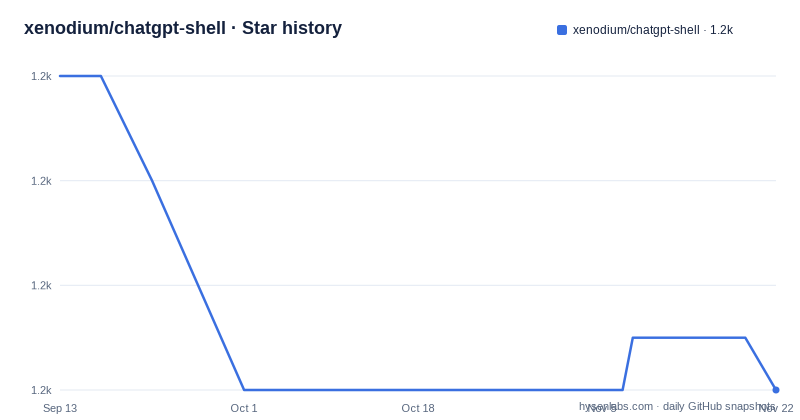
- xenodium/chatgpt-shell1,210 ★ · -6
| Repository | 2026-09-13 | 2026-11-22 |
|---|---|---|
| xenodium/chatgpt-shell | 1.2k | 1.2k |
-6 Stars in the last 70 days, measured from the daily GitHub snapshot. Compare with other projects
Editorial analysis
The first block says the work has moved
The documentation opens with a deprecation notice, not a description. It says the project is largely superseded by a different package in the same account, that the successor is far more capable and actively developed, and that this package may continue to work but that new development happens elsewhere. It then gives the one migration a reader actually needs: a command in the successor package replaces the throw-away shell creation this package provided. The repository was pushed two weeks before this document was read, so the commits and the notice are describing different things. A reader who lands here from a search result sees a deprecation banner above an otherwise complete manual, and has to decide whether the rest is history or still relevant.
Ten provider files, eight documented, seven described
Three places count the supported providers and no two agree. The setup table has eight rows. The repository listing has ten files named after a provider, two of which appear in no table row at all: one for a Chinese model provider and one for a European one. The repository's short description names seven, omitting the aggregator row that the table does list. So a user reading the description cannot discover the aggregator, a user reading the table cannot discover the two unlisted providers, and a user browsing the source finds two files that no document explains how to configure. The gap is not dangerous, but it is the kind of thing that makes a package look more finished than its documentation is.
Eight rows, seven keys, one local install
The setup column is one key variable per provider, named after the provider, and the exception is the local one, whose setup is an instruction to install a local server rather than a key to paste. A note under the table says that with the exception of that one, you typically have to pay the cloud services for API access, and to check with each service. So the shape of the feature is eight remote models behind a subscription or a per-token bill, plus one that runs on your own machine. The keys are Emacs custom variables rather than environment variables or a secrets file, which means they live in the same configuration as everything else Emacs knows about you.
It is a comint shell, which is the whole design
The package is not a new kind of buffer with its own interaction model. It is a comint shell, and the documentation links to the Emacs manual's own page on shell prompts to make the point, twice. The stated consequence is that your existing shell flows come along: the familiar submit binding, the familiar history, the familiar mode-line. That decision explains the rest of the design, including the compose buffer, which is built from the two bindings an Emacs user already presses to open and submit a region. It also explains why swapping models mid-session is a first-class operation rather than a restart, since a comint process can be killed and replaced while the buffer and its history stay.
Submitting turns the buffer read-only and switches to single keys
The main interaction is described as the author's most frequently used mechanism. Select a region, invoke the compose command with a chord, and an editable buffer opens with the region copied in, ready for a longer query. Submit with the familiar double-control-c binding. At that point the buffer becomes read-only and single-character bindings take over. Inside that mode you navigate source blocks with one letter in either direction or with tab and shift-tab, including previous submissions in the history, and the block is selected as you move. You reply with a follow-up with one letter, request more of the same kind of data with another, and ask for a truncated snippet to be sent in full with a third.
One of those single keys discards the buffer
The same single-letter set includes a key that quits, and the documentation is unapologetic about it, describing the author as a fan of quickly disposing of Emacs buffers with that key. The reasoning is that a model reply is disposable and a compose buffer is scratch space. The mechanism makes it more consequential than it sounds, though. Those bindings are live precisely when the buffer is read-only, that is, at the moment a reply has arrived and is being read, and they are single keystrokes with no modifier. A reply you wanted to keep, and a compose buffer holding a query you had not yet submitted, are both one letter away from gone.
The quick-action menu binds one key twice
The package adds a transient menu, a temporary keymap overlay from a separate well-regarded package, invoked with a chord inside a shell buffer. The menu is documented as a box-drawing table of groups: shells, composing, inline editing, session, history, navigation, source blocks, transcript and code actions. Read across the table and one key is bound in two of those groups inside the same menu. The letter for a minibuffer prompt appears under composing, and the same letter for the previous navigation item appears under navigation. In a single suffix keymap that is a collision rather than a convenience, and the table is the only place in the document where the menu's contents are enumerated.
One test file, no continuous integration
The repository has a single test file for the package, named after the package itself and sitting at the root beside the sources. There is no workflow directory, no configuration directory and no other automation in the top-level listing, so nothing in the repository runs that test automatically. Given the deprecation notice, that is defensible: a frozen package does not need a pipeline. It does mean the one signal a maintainer could have about whether the package still loads after an Emacs or provider change is a file nobody is required to run. The documentation is written in Org mode, with the menu example embedded as an exportable source block, so the manual is literate even though the tests are not automated.
Editorial conclusion
chatgpt-shell suits an Emacs user who wants model access through the shell they already use, with existing shell bindings and history, rather than a separate client. It does not suit anyone starting fresh, because the documentation tells you to use a different package and the successor also covers the shell-creation command this one used to provide. Check three things before adopting it. Check whether the successor project already does what you need, since that is the first thing the readme says. Check which providers you can actually use, since the local one is the only row that needs no paid key. And read the compose buffer's key list before you type into it, because submitting switches the buffer to single-key mode and one of those keys discards it.
Frequently asked questions
Is chatgpt-shell still being developed?
The readme carries a deprecation notice saying the project is largely superseded by a successor package in the same account, that this one may continue to work, and that new development happens in the successor. It also points out that the successor provides the throw-away shell command this package used to.
Which LLM providers does chatgpt-shell support?
The setup table documents eight rows, seven of which need a key custom variable named after the provider and one of which is a local server you install. The repository ships ten provider files, so two implemented providers are not in the table.
Do I need a paid API key to use chatgpt-shell?
For most of them, yes. The table's note says that with the exception of the local provider you typically have to pay the cloud services for API access, and to check with each service.
How does the chatgpt-shell compose buffer work?
You select a region, invoke the compose command, and an editable buffer opens with the region copied in. Submitting with the usual double-control-c binding makes the buffer read-only and switches it to single-character bindings for navigating source blocks, replying, asking for more, requesting a full snippet and quitting.
How is chatgpt-shell installed and does it have tests?
It is available from MELPA and from the stable MELPA channel. The repository has a single test file at the root and no workflow directory in its top-level listing, so nothing in the repository runs it automatically.
Official sources
Add this badge to your README
If you maintain this project, the badge below links readers to this analysis and shows its maintenance status from the daily GitHub snapshot. Paste the markdown into your README; add ?metric=license or ?metric=stars to the image URL for a different field.

[](https://hysenlabs.com/projects/xenodium-chatgpt-shell)Star history chart for your README
[](https://hysenlabs.com/projects/xenodium-chatgpt-shell)Was this useful?