XERJ: a local Rust search binary for coding agents, and the trust boundaries it asks you to respect
XERJ is the new way for AI to search data. Its autoindex capability activates agents to know your data without the token waste of grep and sed. One command indexes code, docs, logs and PDFs for search, RAG, security audits and agent memory, using 40x fewer tokens than grep. Elasticsearch compatible, so existing clients just work.
At a glance
- What is it?
- XERJ is a single Rust binary that indexes folders for BM25, vector and hybrid search behind an Elasticsearch-compatible API and an MCP server. Its token savings come from one controlled study, and its quick-start flag removes all authentication.
- Who is it for?
- XERJ suits a single developer who runs a coding agent on a personal machine and wants indexed retrieval instead of file-by-file grep. It is a poor fit for shared hosts or any network where the --insecure node would be reachable.
- Can I use it commercially?
- Yes. Apache-2.0 is a permissive licence: you can use, modify and sell software built on it, as long as you keep its copyright and licence notices.
- Is it still maintained?
- Yes. The repository received new commits within the last day.
- What is it written in?
- Mainly Rust, according to GitHub's language statistics.
Answers come from the project's GitHub data, last synced on November 14, 2026, and from our analysis. They are not legal advice.
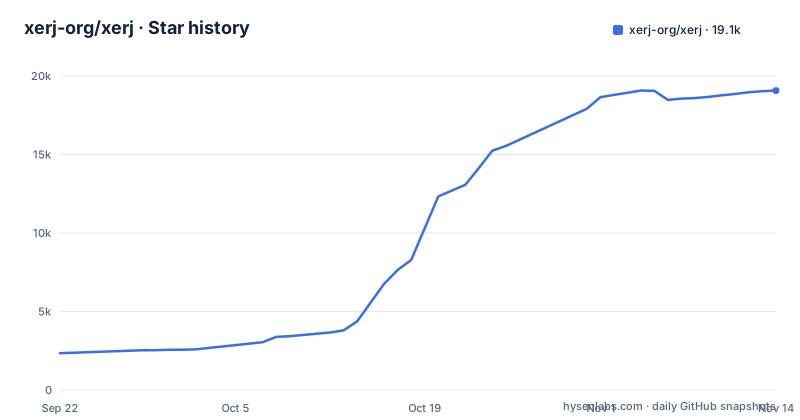
Star history
- xerj-org/xerj19,071 ★ · +16,728
| Repository | 2026-09-22 | 2026-11-14 |
|---|---|---|
| xerj-org/xerj | 2.3k | 19.1k |
16,728 Stars in the last 53 days, measured from the daily GitHub snapshot. Compare with other projects
Editorial analysis
The quick-start flag --insecure makes every caller a superuser
The first run in the project's instructions is `xerj --insecure --data-dir ~/xerj-data &`. That flag switches off TLS and API-key authentication together. After that, anything able to reach the port can read and delete every index, including every `/_memory` namespace where agent memory lives.
The project's own wording is that this is a trust boundary and not a formality. A fresh node binds 127.0.0.1 only, and a cleartext bind on any other interface refuses to start unless you explicitly allow it. That guard helps on a laptop, but it does not help if you later allow a wider bind and keep the flag. The consequence is simple: use it for one user on a development machine, and read docs/SECURITY_MODEL.md before putting the node anywhere another person or process can connect.
Indexing a folder that contains the data directory makes the node eat itself
The data directory is where XERJ stores its indices, and `data/` is not in the built-in ignore list. If you start the node with `--data-dir ./data` inside a project and then run `xerj autoindex` on that project, the node ends up indexing its own storage files.
The documented fix is placement: keep the data directory outside any folder you will autoindex. The quick-start does this with `~/xerj-data` for the store and `~/my-project` for the source. The cost of getting it wrong is polluted search results and an index that grows because of its own writes, so the safest habit is to choose the data path once, outside every project, and reuse it.
A different data directory makes your old indices and owner account look gone
At startup the node prints three lines. `Data dir` is the resolved absolute path, `Data source` says whether the path came from the flag, a selected config file or the default, and `Data status` says whether this launch created the directory.
Those lines matter because XERJ does not discover or migrate other data directories automatically. Start it from a different working directory, or with a different `--config`, and a new empty directory can be created. Older indices and the owner account then appear missing even though they are untouched on disk. The remedy is to restart with the previous `--data-dir` or `--config`. If you script the launch, pin the path explicitly instead of relying on the default, and check `Data status` after any upgrade or move.
The one-command setup and what each line of it commits you to
The manual route is a short sequence, copied here as published:
curl -fsSL https://xerj.org/get | sh
xerj --insecure --data-dir ~/xerj-data &
xerj init                                        # wire XERJ into Claude Code/Cursor (MCP + skill), one command
xerj autoindex ~/my-project
xerj search "how do we rotate the WAL segment"   # ranked passages, file:line
xerj def "euler_to_rotationmatrix"               # go-to-definition: file:line + signature
xerj gain                                        # what it did for you — counted, not estimated
The first line pipes a script from xerj.org into a shell, so you are trusting that domain at install time. A hand-verified route and a Windows route are listed under an Install by hand heading in the project's instructions. The `xerj init` step edits how Claude Code or Cursor connects, so run it only in a setup you are willing to have changed. For many queries at once there is `xerj batch-search --input queries.json`, with an MCP twin named `xerj_batch_search` that returns ordered results, citations and per-item errors.
The 2.7x token figure comes from one controlled study of reference coding
The headline number is not a general search benchmark. It comes from a case study of 8 tasks in 4 languages, 16 runs per arm, using real `claude -p` token counts. Output tokens were 260,916 from memory only, 26,477 for a grep-driven agent and 9,982 with XERJ. Cost was $11.18, $3.27 and $1.58. Solve rates were 11/16, 16/16 and 16/16.
So at an equal solve rate XERJ used 2.7x fewer output tokens than grep, and memory alone both cost more and solved fewer tasks. The project also states up to 278x fewer on a single Java task and relays roughly 5x from user field reports, which are self-reported. The study used code the model had not memorised. If your agent mostly edits code it already knows well, or your task is not looking up how another project solved something, the gap you see may be smaller than these numbers.
Reference coding depends on cloning other people's repositories
The main use case is not searching your own tree. You point an agent at a task, and it downloads the open-source repositories closest to that task, indexes them and reuses how they solved the problem before writing its own code. The one-prompt install tells the agent to clone and index the open-source repos closest to what you are building.
Two consequences follow. The agent will pull third-party code onto your disk and into your index, so licence and provenance questions are yours to settle before anything from those repos ends up in your product. And the value is gated by whether a close enough repository exists. A task with no good public precedent gives the index little to retrieve, and the token saving then comes only from not reading your own files one by one.
Free Apache-2.0 binary, with a field report as the stated price
The licence is Apache-2.0, and the project asks for one thing back: a short field report as a single commit or PR. It should say what you pointed XERJ at, what you used it for and your honest verdict, and a negative verdict counts. Field-report PRs are CLA-exempt, so they merge without a signature.
The path that works on any build is a plain `gh pr create` that adds exactly one markdown file under user-feedback/16-agent-field-reports, with nothing else in the diff. Some builds also have `xerj feedback`, which drafts the report and fills in version, OS and what was indexed, and `xerj feedback --open-pr` opens the PR. Check `xerj --help` to see whether your binary includes the command. The ask is described as a request, but a PR to a public repository does publish what you indexed, so describe it at a level you are happy to make public.
Editorial conclusion
XERJ suits a single developer who runs a coding agent on a personal machine and wants indexed retrieval instead of file-by-file grep. It is a poor fit for shared hosts or any network where the --insecure node would be reachable. Before relying on the 2.7x figure, check that your own work resembles the 8-task, 4-language study, and keep the data directory outside every folder you index.
Frequently asked questions
Is XERJ safe to run with the --insecure flag?
Only for one user on a dev machine. The flag disables TLS and API-key auth, so any caller who can reach the port can read and delete every index. A fresh node binds 127.0.0.1 only.
Why does XERJ seem to lose my indices after a restart?
A different working directory or config can make XERJ create a new data directory. It does not discover or migrate other directories, so restart with the previous --data-dir or --config to see the old indices.
How much does XERJ actually reduce token use for coding agents?
In the project's case study of 8 tasks and 16 runs per arm, XERJ used 9,982 output tokens against 26,477 for grep, at the same 16/16 solve rate. Field reports mention roughly 5x in everyday work.
Official sources
Add this badge to your README
If you maintain this project, the badge below links readers to this analysis and shows its maintenance status from the daily GitHub snapshot. Paste the markdown into your README; add ?metric=license or ?metric=stars to the image URL for a different field.

[](https://hysenlabs.com/projects/xerj-org-xerj)
[](https://hysenlabs.com/projects/xerj-org-xerj)Star history chart for your README
[](https://hysenlabs.com/projects/xerj-org-xerj)Was this useful?