wiliwili: a gamepad-first Bilibili client built on nanovg and mpv, with a different install path per console
A third-party Bilibili client that currently runs on all PC platforms, PS Vita, PS4, Xbox and Nintendo Switch.
At a glance
- What is it?
- wiliwili is a GPL-3.0 C++ client for Bilibili that targets desktops, Switch, PS Vita and PS4. Its useful details are the per-platform decoding limits, the Switch launch path and a build that depends on custom ffmpeg and libmpv packages.
- Who is it for?
- Pick wiliwili if you want Bilibili on a Switch, PS Vita, PS4 or a desktop and are fine with a Chinese-language README and wiki. Skip it if you need Android or iOS, which the project excludes outright.
- Can I use it commercially?
- Yes, with conditions. GPL-3.0 is a copyleft licence: if you distribute software that includes it, you must release that software's source code under the same licence. Running it internally without distributing it does not trigger that obligation.
- Is it still maintained?
- Yes. The repository last received commits 15 days ago.
- What is it written in?
- Mainly C++, according to GitHub's language statistics.
Answers come from the project's GitHub data, last synced on November 15, 2026, and from our analysis. They are not legal advice.
Star history
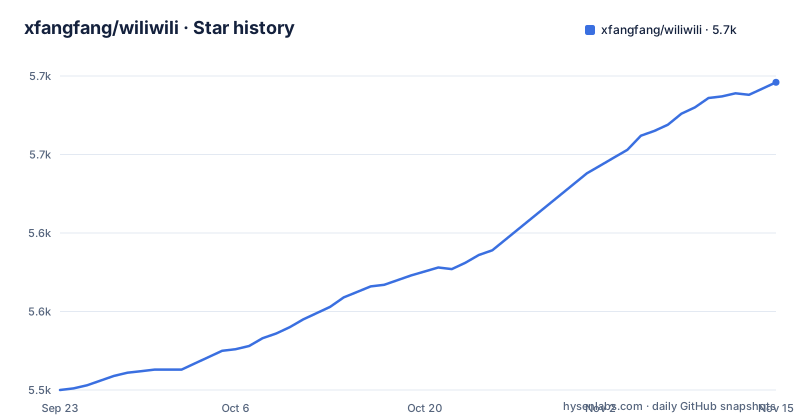
- xfangfang/wiliwili5,696 ★ · +196
| Repository | 2026-09-23 | 2026-11-15 |
|---|---|---|
| xfangfang/wiliwili | 5.5k | 5.7k |
196 Stars in the last 53 days, measured from the daily GitHub snapshot. Compare with other projects
Editorial analysis
On Switch the app is a .nro that hbmenu has to launch
The Switch release is a zip named wiliwili-NintendoSwitch.zip on the GitHub releases page. Inside is wiliwili.nro, and it goes into the switch directory on the SD card. To start it you hold the R button while opening any game from the home screen, which drops you into hbmenu, and then pick wiliwili from the list.
There is an optional step to install a desktop icon from inside the app, under settings, utilities, then the usage tutorial. That icon is a forwarder, and it looks for switch/wiliwili.nro first. If that file is missing it tries switch/wiliwili/wiliwili.nro, and if neither exists it opens hbmenu and leaves the choice to you. The practical consequence is that moving the file into a folder of your own naming breaks the icon silently and sends you back to hbmenu.
The default Switch build renders with OpenGL and stops at 4k@30
The release zip contains the OpenGL build. The project states that it can play at most 4k@30. A deko3d build, which uses the console's native graphics API, is available from the nightly workflow artifacts for the dev branch, and it is described as smooth at 4k@60 but liable to crash now and then.
So the choice is between a release build that is stable and capped, and a nightly build that is faster and less predictable. Nightly artifacts also come from the dev branch, not from a tagged release, so you give up the version labelling that the releases page provides. If your content is 1080p or lower, the cap never matters and the release zip is the sensible choice.
PS Vita and PS4 are limited by what their decoders can do
On PS Vita you download wiliwili-PSVita.vpk from the releases page and install it. With hardware decoding switched on, the Vita plays 720P landscape video and 480P portrait video smoothly, and some live streams at 1080P original quality. Without hardware decoding you should not expect those numbers.
On PS4 you install wiliwili-PS4.pkg. Only software decoding is supported there. To play 4k@60 you must turn on the low quality decoding option in settings, which means the 4k@60 figure comes with a reduced decode mode rather than a full quality one. Neither platform has a setting that removes these ceilings, so a Vita is a 720P device for Bilibili and a PS4 is a software decoder with a workaround for high frame rates.
Desktop users get hardware decoding, mouse mapping and a store listing
The PC client can switch between hardware decoders and is described as quick to open on old computers. The mouse is mapped so that left click selects, right click goes back and middle click refreshes. Windows and other desktop users download the package for their system from the releases page.
Linux and Steam Deck users have a shorter route, because the app can be found by searching for wiliwili in a software store such as Discover or GNOME Software. Packaging badges on the project page also point to Copr, Scoop, the AUR and Flathub. Which of those channels carries the current release is not something you can read from the badges, so compare the version number there against v1.6.0, the latest tagged release, dated 2026-04-25.
Building on desktop means CMake with PLATFORM_DESKTOP and a system libmpv
After cloning with submodules, the macOS path installs mpv and webp through Homebrew and then runs CMake with the desktop platform flag.
# 拉取代码
git clone --recursive https://github.com/xfangfang/wiliwili.git
cd wiliwili# macOS: install dependencies
brew install mpv webp
cmake -B build -DPLATFORM_DESKTOP=ON
make -C build wiliwili -j$(sysctl -n hw.ncpu)On Ubuntu the dependencies are libssl-dev, libmpv-dev and libwebp-dev.
# Ubuntu: install dependencies
sudo apt install libssl-dev libmpv-dev libwebp-dev

cmake -B build -DPLATFORM_DESKTOP=ON
make -C build wiliwili -j$(nproc)
Other Linux distributions differ in dependencies, and the author points to discussion #89 for a collection of per-distribution build notes. For a system install with a desktop icon, add the INSTALL flag, Release build type and a /usr prefix. Removal is a separate command that reads install_manifest.txt, so keep the build directory if you plan to uninstall.
# 如果你想安装在系统路径,并生成一个桌面图标,请使用如下内容编译
cmake -B build -DPLATFORM_DESKTOP=ON -DINSTALL=ON -DCMAKE_BUILD_TYPE=Release -DCMAKE_INSTALL_PREFIX:PATH=/usr
make -C build wiliwili -j$(nproc)
sudo make -C build install

# uninstall (run after install)
sudo xargs -a build/install_manifest.txt rm
Cross-compiling for Switch needs ffmpeg and libmpv packages that devkitPro does not supply
Docker is the recommended way to build wiliwili.nro, because a local toolchain is fiddly to set up. The container is pinned to a devkitpro/devkita64 tag.
docker run --rm -v $(pwd):/data devkitpro/devkita64:20251117 \
  bash -c "/data/scripts/build_switch.sh"
A local build is worth the trouble only when you want to swap the underlying ffmpeg or mpv for debugging. It installs devkitPro, then switch-glfw, switch-libwebp, switch-cmake, switch-curl and devkitA64 through dkp-pacman. The step that catches people is the third one: the ffmpeg and libmpv shipped by devkitPro cannot play network video, so you install two packages from the v0.1.0 release of the wiliwili repository instead, switch-ffmpeg-7.1-1 and switch-libmpv-0.36.0-3. The deko3d variant is built with scripts/build_switch_deko3d.sh rather than the OpenGL script.
The PS Vita build has a similar catch. It uses custom mbedtls, curl and ffmpeg, so a local build requires you to uninstall the matching libraries from vitasdk before installing the pinned ones from scripts/psv.
Porting works through nanovg, mpv and GLFW or SDL, and Android and iOS are ruled out
The interface is drawn with nanovg, which can be pointed at any graphics library and already has OpenGL, Vulkan and Metal backends. Video is decoded with FFMPEG and drawn with MPV, defaulting to OpenGL, with D3D11, Deko3d, Gxm and software rendering also available. Touch, buttons and text input come from GLFW or SDL, or are implemented directly as on the Gxm-based Vita port.
A device that supports OpenGL or OpenGL ES can usually just be compiled. A device with another graphics library needs nanovg ported first so the main interface works, and then ffmpeg hardware decoding and mpv rendering support for acceptable performance. The author asks for an issue before porting work and states that Android and iOS are not up for discussion. New pull requests go to the dev branch, while yoga is the branch holding the latest released code.
Before filing a bug, a black screen on Switch has a known fix
The project lists steps to complete before reporting a problem. For network trouble, attach the network diagnostic screenshot from settings, utilities, network diagnostics. Check that the system clock is correct, that DNS and network settings are sound, and that any proxy is switched off while you retest.
Switch users have three extra items. Atmosphere and the system firmware must be on the latest versions, the SD card must be FAT32, and if the app shows a black screen for too long you can delete the config/wiliwili directory on the card and launch again. That last step resets the app's saved configuration, so any settings you changed are lost.
On the unfinished side, the project's own to-do list still has searching for users, long press to triple-tap, a personal profile page, comment jump links, vote comments and interactive videos unchecked. The repository was last pushed on 2026-10-31 and is not archived.
Editorial conclusion
Pick wiliwili if you want Bilibili on a Switch, PS Vita, PS4 or a desktop and are fine with a Chinese-language README and wiki. Skip it if you need Android or iOS, which the project excludes outright. Before installing on a Switch, update Atmosphere and the system firmware and confirm the SD card is FAT32.
Frequently asked questions
What is wiliwili?
wiliwili is a third-party Bilibili client written in C++ and licensed GPL-3.0, designed for gamepad users. It runs on PC platforms, PS Vita, PS4, Xbox and Nintendo Switch.
How to use wiliwili on Switch, PS Vita, PS4 or PC?
Download the matching file from the GitHub releases page: wiliwili-NintendoSwitch.zip, wiliwili-PSVita.vpk, wiliwili-PS4.pkg, or the package for your desktop system. On Switch, put wiliwili.nro in the switch folder of the SD card and launch it from hbmenu.
What is wiliwili on PS4, and what are its limits?
It is the PS4 build, installed from wiliwili-PS4.pkg. It supports software decoding only, and playing 4k@60 requires turning on the low quality decoding setting.
What is the wiliwili app and which interfaces does it support?
It is a Bilibili browsing app with search, a filter page, a dynamics feed, live streams, a player with danmaku and comments, and a profile page with QR login. Input works with touch, mouse, keyboard and gamepad.
Official sources
Add this badge to your README
If you maintain this project, the badge below links readers to this analysis and shows its maintenance status from the daily GitHub snapshot. Paste the markdown into your README; add ?metric=license or ?metric=stars to the image URL for a different field.

[](https://hysenlabs.com/projects/xfangfang-wiliwili)Star history chart for your README
[](https://hysenlabs.com/projects/xfangfang-wiliwili)Was this useful?