HiKid and the four local processes behind a child's English practice
HiKid - Your AI English Pal. A desktop app built with React and TypeScript, targeting children in non-English-speaking countries who want to practice English speaking and listening.
At a glance
- What is it?
- HiKid is a free Electron desktop app that lets children practise English speaking with a full AI stack running on one Mac and nothing leaving the machine. The voice loop is genuinely local, but four separate processes stand between a clone and the first spoken answer, so it fits a single household computer rather than a classroom.
- Who is it for?
- Adopt HiKid if you have a Mac, a child who wants to talk in English, and a real objection to sending that voice to somebody else's server. Every part of the loop runs on that machine, and all four components are named, so one household can assemble it.
- Can I use it commercially?
- Yes. MIT is a permissive licence: you can use, modify and sell software built on it, as long as you keep its copyright and licence notices.
- Is it still maintained?
- Activity is slowing. The repository last received commits 6 months ago.
- What is it written in?
- Mainly TypeScript, according to GitHub's language statistics.
Answers come from the project's GitHub data, last synced on November 7, 2026, and from our analysis. They are not legal advice.
Star history
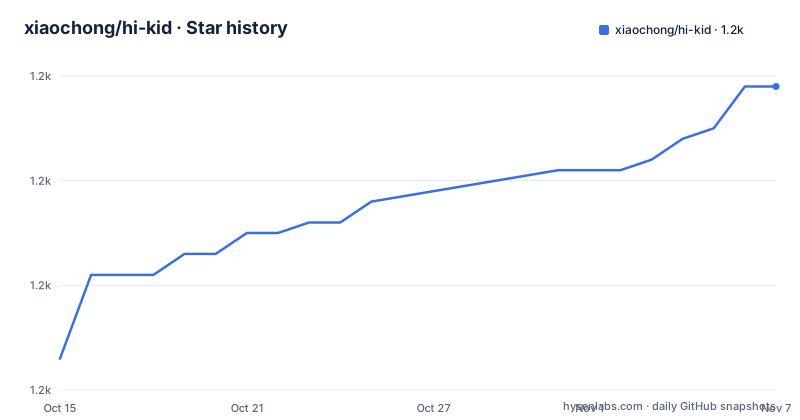
- xiaochong/hi-kid1,179 ★ · +26
| Repository | 2026-10-15 | 2026-11-07 |
|---|---|---|
| xiaochong/hi-kid | 1.2k | 1.2k |
26 Stars in the last 23 days, measured from the daily GitHub snapshot. Compare with other projects
Editorial analysis
Built for children whose first language is not English
HiKid has one audience: a child in a non-English-speaking country who can read English letters and has nobody at home to talk to in English. The desktop app takes voice in and answers in English without an account, a subscription or a network call. Recording, recognition, the language model and speech synthesis all sit on the same computer, which is why no cloud transcript exists to leak and why the app keeps working when the router is off.
Teachers and parents are not the stated users. They are the adults who install it on a Mac and leave it running. The cost of that privacy choice is paid at setup time rather than at runtime, because four programs have to be healthy before the interface says anything at all. Every claim the project makes about speed or accuracy therefore lands on whatever laptop happens to sit on the kitchen table.
SoX, two servers and Ollama carry the voice loop
The pipeline is four components with narrow jobs. SoX records through the microphone, plays the answer back, converts formats and analyses the audio, while voice activity detection decides that a child has stopped talking. The transcript comes from a local asr-server built on Qwen3-ASR-0.6B, a 0.6B parameter speech model. The reply is generated by a language model served locally through Ollama, where qwen3:0.6b is the default. Synthesis happens in a third server, kitten-tts-server, which streams raw PCM audio back over SSE rather than handing over whole files.
One sentence from a child therefore crosses three long-lived processes and comes home as audio. Those servers keep their own copies of their models in memory, so they do not start when the app starts, and nothing in the repository makes them start automatically.
Two commands build the shell but not the voice
Requirements are short: macOS 12.0 on Apple Silicon or Intel, Node.js >= 20, and npm. Clone the repository and move into it:
git clone https://github.com/xiaochong/hi-kid.git
cd hi-kid
Then install, which also fires the postinstall hook that rebuilds native dependencies for Electron:
npm installThe daily loop is three scripts:
npm run dev
npm run typecheck
npm run format
The first starts electron-vite dev with hot reload, so a change in the React renderer shows up without restarting the window. The second runs two passes, one over tsconfig.node.json for the Electron main process and one over tsconfig.web.json for the renderer. What you should not expect from any of them is a working conversation: neither `npm run dev` nor `npm install` starts Ollama, the asr-server or the synthesis server, so the interface opens silent until the external setup described in INSTALL.md is finished.
The script named build never reaches electron-builder
The build section a reader meets first and the scripts behind it do not agree. The README presents npm run build as the all-platforms path, yet that script stops after compilation:
"build": "npm run typecheck && electron-vite build",
"build:mac": "electron-vite build && electron-builder --mac",
"build:linux": "electron-vite build && electron-builder --linux",
The script labelled for every platform produces the compiled JavaScript in the out directory and no installer, because electron-builder is never called from it. Read the other two lines and the inversion sharpens: build:mac and build:linux do package an application, and both skip the type check that build runs first. A packaged build can therefore carry a type error that the generic build would have refused. build:unpack is the only one of the three that keeps both halves, because it runs npm run build and then electron-builder --dir.
Windows and Linux scripts sit behind a macOS banner
The platform note says the app is macOS only for now and that Windows and Linux versions are planned, contributions welcome. package.json disagrees in the quietest possible way: build:win, build:mac and build:linux all exist, the repository carries both electron-builder.yml and electron-builder.bundled.yml, and a fourth script, build:mac:bundled, prepares bundled assets before packaging a Mac build.
What is absent is any statement that the voice loop has been exercised on the two other platforms. SoX, which the README handles under external installation rather than under npm, is part of that untested surface. Treat the macOS banner as the accurate description of what has been run, and treat the Windows and Linux scripts as untested scaffolding.
An MIT grant beside a no-commercial-use disclaimer
Two texts in the repository disagree about what you may do with this code. The LICENSE file and the licence section of the README both say MIT, which in plain terms permits commercial use, modification and redistribution. The disclaimer a few lines below restricts the project to personal learning, research and non-commercial demonstration, and prohibits commercial use, resale and profit-making in any form.
Those two statements cannot both be the complete rule, and nothing in the top-level file listing reconciles them. No contributor agreement and no usage note sit beside the grant to narrow it for a school, a tutoring business or an app-store listing. This is not a footnote for anyone intending paid use; the question has to be settled with the author before the code goes near money.
The voice stack never appears in the npm dependency list
The six runtime dependencies are all JavaScript: the Electron toolkit preload and utilities helpers, the agent orchestration and event streaming core from @mariozechner/pi-agent-core, its companion pi-ai package, the animal-island-ui component set, and dotenv. SoX, the asr-server, kitten-tts-server and Ollama are none of them. They are binaries and services that package.json never downloads, starts or versions, and the one automated bridge is a shell script:
"install:deps": "bash scripts/install-dependencies.sh",That script is invoked by the install:deps task and points at exactly the components the README hands off to INSTALL.md. Nothing in the top-level listing pins a configuration key for the Ollama model, the asr-server address or the synthesis endpoint, so whether an operator can retarget any of the three without editing source is not something the repository answers.
The interfaces are documented even where the configuration is not, which opens the real alternative to adopting the app. The synthesis server streams PCM over SSE and the recognition server turns speech into text, so an engineer who needs the same offline speaking loop inside a different product can drive those two servers directly and skip Electron, React and the entire child-facing interface. What HiKid adds on top is a conversation flow and a cartoon skin; what it costs is a Node and Electron toolchain wrapped around what is effectively a microphone talking to two local HTTP services.
One operating system, one machine, no progress record
Two situations rule the project out. The first is hardware you do not own: a Windows laptop, a shared classroom Chromebook or a phone cannot run it, and the requirements list names macOS 12.0, Node.js and npm without stating how much memory three local servers plus a language model need on a machine that is also running a video call and homework. For a school that wants every child on the same free tutor, that missing number is the blocker rather than the price.
The second is a parent who wants evidence of progress. What the repository describes is a chat surface for stories and word games, structured as a main process, a preload bridge and a React renderer. No account, no history store and no dashboard appear anywhere in the file listing, so what your child said last month is not retrievable from the application. The models are small by design, 0.6B for recognition and 0.6b for the reply, which suits a laptop rather than a server. The last push was on 2026-04-24, and the single published version 0.1.0 carries the date 2026-04-22, so the external setup is young enough to move under you.
Editorial conclusion
Adopt HiKid if you have a Mac, a child who wants to talk in English, and a real objection to sending that voice to somebody else's server. Every part of the loop runs on that machine, and all four components are named, so one household can assemble it. Skip it for classrooms on other hardware, for anyone who needs a record of what a child learned, and for paid deployment until the author explains what the README disclaimer means for a commercial product. Verify first that SoX, the asr-server, the synthesis server and an Ollama model all start on the machine you have.
Frequently asked questions
What does HiKid need before a child can actually talk to it?
macOS 12.0 or newer, Node.js 20 and npm get the application running, but the voice needs four more things: SoX, an asr-server, a kitten-tts-server and an Ollama model, with qwen3:0.6b as the default. Those live outside npm, and the install:deps script plus the INSTALL.md guide cover them.
Does HiKid send a child's voice or conversation to the cloud?
Not by design: recording, recognition, synthesis and dialogue all run through a local pipeline and nothing is uploaded. No telemetry or analytics behaviour is described anywhere in the repository, so no network call outside that loop is documented.
Can HiKid be used in a school or in a commercial app?
The repository states MIT in both the LICENSE file and the README, while the README disclaimer limits the project to personal learning, research and non-commercial demonstration and prohibits resale. Nothing in the repository reconciles the two, so get an answer from the author before any paid use.
Does HiKid run on Windows or Linux?
Not by the project's own account. The README says macOS only, with Windows and Linux planned, even though package.json already carries build:win and build:linux scripts. Packaging is one command away, but no statement anywhere says the voice pipeline works on those systems.
Which models does HiKid use for listening and for answering?
Recognition runs on Qwen3-ASR-0.6B through the local asr-server, the reply comes from Ollama with qwen3:0.6b by default, and synthesis comes from kitten-tts-server streaming PCM audio over SSE.
Official sources
Add this badge to your README
If you maintain this project, the badge below links readers to this analysis and shows its maintenance status from the daily GitHub snapshot. Paste the markdown into your README; add ?metric=license or ?metric=stars to the image URL for a different field.

[](https://hysenlabs.com/projects/xiaochong-hi-kid)Star history chart for your README
[](https://hysenlabs.com/projects/xiaochong-hi-kid)Was this useful?