xiaoyvyv/bangumi: a Compose Multiplatform client for bangumi.tv
Bangumi for CMP - A full-featured unofficial compose-multiplatform application for the bangumi.tv
At a glance
- What is it?
- Bangumi Multiplatform is an unofficial Kotlin Multiplatform client for bangumi.tv that runs on Android, iOS and the JVM desktop, sharing one core module across three front ends. It suits users who want the same progress tracking and community features on a phone and on a desktop.
- Who is it for?
- Adopt Bangumi Multiplatform if you use bangumi.tv daily and want progress tracking, community features and a workflow engine from a single codebase that already targets Android, iOS and the JVM desktop.
- Can I use it commercially?
- Not without permission. GitHub finds no licence file in the repository, and without a licence all rights are reserved by default: you may read the code but not reuse it. Check the README, or ask the authors, before using it.
- Is it still maintained?
- Yes. The repository last received commits 27 days ago.
- What is it written in?
- Mainly Kotlin, according to GitHub's language statistics.
Answers come from the project's GitHub data, last synced on November 7, 2026, and from our analysis. They are not legal advice.
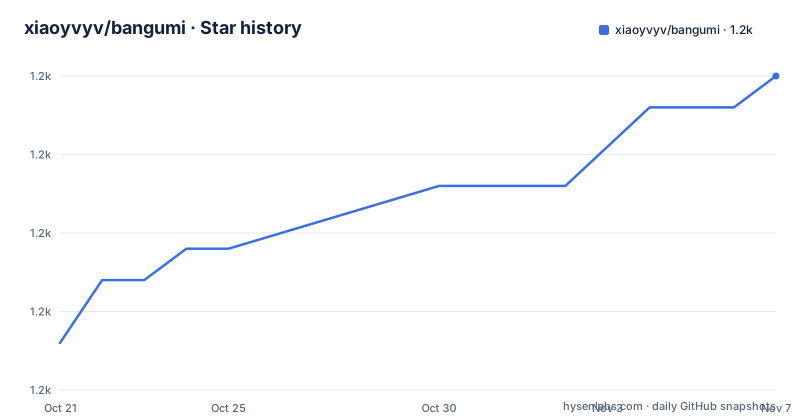
Star history
- xiaoyvyv/bangumi1,170 ★ · +17
| Repository | 2026-10-21 | 2026-11-07 |
|---|---|---|
| xiaoyvyv/bangumi | 1.2k | 1.2k |
17 Stars in the last 17 days, measured from the daily GitHub snapshot. Compare with other projects
Editorial analysis
What Bangumi Multiplatform replaces on Android, iOS and desktop
Bangumi Multiplatform is a third party client for Bangumi.tv, the Chinese site known as 番组计划. It is written in Kotlin, built on Kotlin Multiplatform and Compose Multiplatform, and the project describes itself as a full featured cross platform client covering the daily use and community functions of the site.
The interesting part is not the feature list, which is long, but the shape of the code. The previous version of the application was built on the traditional Android View architecture and now lives on a separate `view` branch that the project says is archived and no longer maintained. The `main` branch was rebuilt on Compose Multiplatform, and the project positions that rewrite as the current line of work. The result is one codebase with three delivery targets: Android, iOS and Desktop (JVM).
Feature coverage spans the categories a regular user touches. Progress management covers following a series, watching episodes, reading comics and playing games, including one click status updates and a progress grid. Item pages carry details for anime, books, real life subjects, games and music, plus character profiles, cast lists and a relationship graph. The community side includes trending group topics, the timeline, logs, comments on items, comment replies and notifications. Discovery includes the daily broadcast calendar, rankings, search across items, characters and catalogues, and a pilgrimage map.
Two additions go beyond a typical client: an automation workflow engine and a Live2D character model. More on both below.
The module layout that shares one core across three platforms
The repository tree is the clearest statement of the architecture. There is a `composeApp/` entry point for the desktop and shared application, an `android/` shell project, an `iosApp/` directory holding the Xcode project, a `shared/` directory with the core libraries, and a `features/` directory of independent business modules such as home, subject, workflow and settings.
Inside `shared/` the split is deliberate. `core/` holds the common base classes, the MVI architecture base classes, shared utilities and type definitions. `core-native/` holds the C++ and native extensions, described as the Live2D rendering engine among other things. `core-resource/` holds shared images, icons and the multi-language string resources, with the translation file for contributors at `shared/core-resource/src/androidMain/res/values/strings.xml`. `data/` carries the network layer and the models, `data-workflow/` the workflow DAG execution engine, `ui/` the shared components and navigation route definitions, `ui-platform/` the platform specific UI compatibility pieces, `ui-material3/` the Material Design 3 theme and style library, and `ui-video/` the video player and fullscreen controller components.
That division has a practical consequence for anyone reading the code or contributing. A feature module does not own its own networking or its own theme, it consumes the shared layers, which is how a single change to `shared/data/` can reach all three targets at once. It also means the platform specific parts are visible in one place, in `ui-platform/` and `core-native/`, instead of being scattered through the feature modules.
The build system is standard Gradle. The top level carries `build.gradle.kts`, `settings.gradle.kts`, `buildSrc/`, `gradle.properties`, the `gradlew` and `gradlew.bat` wrappers, plus `build.ios.sh` for the iOS build and a `baselineprofile/` directory.
MVI with Orbit, Ktor networking and Koin injection
State handling follows the MVI pattern, described in the project as Model-View-Intent, and the implementation relies on the Orbit MVI framework. The described data flow is `State` to `Event/Intent` to `SideEffect`, which is a reactive one: the screen renders a state, the user turns that into an intent, and one-off outcomes travel back as side effects rather than as new state fields. For a client with as many small interactions as this one, such as toggling a watched episode or a character follow, keeping transient outcomes out of the state object is what stops the state from turning into a catch-all.
Networking is handled by Ktor 3 together with Ktorfit, which the project credits with building a type safe API request layer. Type safe here means the endpoint and payload shape are described once and the client code is generated or checked against that description, which matters for a client that has to talk to a site API it does not own.
Dependency injection uses Koin, and the project points to it as the cross platform injection solution, which is a deliberate fit with the shared module structure since the same object graph can be created on a phone and on a desktop JVM. Other entries in the tree show the same pattern. `internal/` and `buildSrc/` hold build-time and internal logic, and the `shared/` modules are mirrored by per platform source sets such as `androidMain`, which is where the strings resource path points.
The project also advertises Material Design 3 dynamic color theming, a dark mode and a range of visual customisation options, and states that the code is fully open source with no ads, no privacy collection, and data that syncs across devices.
The workflow engine and the Live2D and resource aggregation layers
The most unusual feature is the built-in workflow engine, which the project links to a separate repository, xiaoyvyv/workflow-cmp, as the underlying implementation. It is described as a declarative DAG node orchestration system with parallel execution, fork and join branching, loop iteration and state tracking. Built in node types cover network requests, HTML and JSON parsing, regular expression extraction, a variable context, and custom UI interaction side effects.
What that means in practice is a user can describe a sequence of steps inside the client rather than clicking through a fixed screen flow. A step can pull a page, pull a field out of it with a pattern, feed the result into the next step as a variable, and branch on the result. The workflow module lives in `shared/data-workflow/`, with a matching `features/` module for the workflow feature, and `shared/ui-video/` provides a video player component for steps that need one.
The Live2D layer sits in `shared/core-native/` as a C++ and native extension. The project describes Live2D interaction, model swapping and personalisation configuration, which is the sort of feature that usually lives in a separate companion app rather than in the client itself.
There is also an aggregation layer for derivative resources. It pulls in Mikan 蜜柑计划 magnet links and subtitle group listings, and integrates Anime-Pictures and Pixiv for high resolution illustrations and artwork previews, along with image and video media previews and a built-in playback component. The aggregation is what makes the client more than a tracker, and it is also the part where the boundary with the underlying services matters most, since those services are separate from bangumi.tv and are not covered by anything this project controls.
Building the Android, desktop and iOS targets with Gradle
The build prerequisites are JDK 17 or newer, Android Studio with the latest Canary or release candidate, including the Kotlin and Multiplatform plugins, and Xcode if the iOS version is being built. The project publishes an Android release APK on its GitHub releases page and a Google Play listing under the package name `com.xiaoyv.bangumi`, and test builds are pointed at the GitHub Actions artifacts.
The Gradle tasks are short. For Android:
./gradlew :android:assembleDebugFor the desktop JVM application:
./gradlew :composeApp:runAnd for the shared data layer's Kotlin metadata and verification:
./gradlew :shared:data:kspCommonMainKotlinMetadataThe last command is listed as the step for building and validating, which is consistent with a project that generates code across the shared modules, since the data layer is where the API definitions live.
There is no single build-all command in the documentation, and the iOS target is not covered by a Gradle task in the README, only by the presence of `iosApp/` and `build.ios.sh`. A contributor working on the iOS application therefore follows the Xcode project rather than the Gradle wrapper, which is a split in the workflow worth knowing before starting.
Where this client is a weak fit, and what the licence situation is
The first limitation is the obvious one for any third party client: it depends on a service it does not control. The project makes no claim that the bangumi.tv API is stable for third party use, and the client ships no promise about behaviour when the site changes, rate limits a caller, or restricts an account. The workflow engine, which automates requests, is the feature most exposed to that constraint, since automated traffic is exactly what a site is most likely to restrict. Nothing in the documentation describes a rate limit handling policy or a fallback when an endpoint changes.
The second limitation is build complexity for contributors. A change to the shared core touches a Kotlin Multiplatform codebase with a native extension layer, an injected object graph and a generated API layer, and the iOS target needs a separate toolchain. A user who only wants an Android phone app is served by the published APK, but a developer who wants to change behaviour is signing up for that stack.
The third limitation is history. The earlier View based Android client was moved to the `view` branch and stopped being maintained, and the Compose Multiplatform rewrite is the current line. That history is worth understanding before contributing, since a fix may need to land in two different architectures or only in the newer one.
On licensing, the project states that it uses the GPL-3.0 licence and links to the GNU licence text, while the licence field in the repository metadata is left unstated. The project's own statement is the more specific of the two, and a fork, a modified build or a redistribution is a case where whoever handles compliance should confirm the terms rather than rely on a badge. The repository is not archived, and its last push was on 2026-10-11, with releases v2.0.3 on 2026-08-31 and v2.0.2 on 2026-08-30, so the project is still moving quickly against a fast moving site.
Editorial conclusion
Adopt Bangumi Multiplatform if you use bangumi.tv daily and want progress tracking, community features and a workflow engine from a single codebase that already targets Android, iOS and the JVM desktop. Do not adopt it if you need an official client with a guaranteed API contract, if you cannot accept an unofficial project whose licence metadata field in the repository is unset, or if you expect the older View based Android application, which the project moved to a separate `view` branch and stopped maintaining. Before building, confirm JDK 17, Android Studio with the Kotlin and Multiplatform plugins, and Xcode for the iOS target.
Frequently asked questions
What is Bangumi Multiplatform?
It is an unofficial full featured client for bangumi.tv built with Kotlin Multiplatform and Compose Multiplatform, targeting Android, iOS and Desktop (JVM) from one shared codebase.
How do I build the Android version of Bangumi Multiplatform?
With JDK 17 or newer and Android Studio with the Kotlin and Multiplatform plugins installed, run `./gradlew :android:assembleDebug`. The desktop JVM application is started with `./gradlew :composeApp:run`.
What happened to the old Android version of Bangumi?
The version built on the traditional Android View architecture was moved to a `view` branch, which the project describes as archived and no longer maintained. The `main` branch is the Compose Multiplatform rewrite.
Does Bangumi Multiplatform include an automation workflow engine?
Yes. It has a declarative DAG orchestration engine with parallel execution, fork and join branching, loops and state tracking, with built in nodes for network requests, HTML and JSON parsing, regular expression extraction and variable context. The underlying implementation lives in the separate xiaoyvyv/workflow-cmp repository.
Where can I get the Bangumi Multiplatform app?
Release APKs are published on the project's GitHub releases page, and there is a Google Play listing under the package name `com.xiaoyv.bangumi`. Test builds are available as GitHub Actions artifacts.
What licence does Bangumi Multiplatform use?
The project states that it uses the GPL-3.0 licence and links to the GNU licence text.
Official sources
Add this badge to your README
If you maintain this project, the badge below links readers to this analysis and shows its maintenance status from the daily GitHub snapshot. Paste the markdown into your README; add ?metric=license or ?metric=stars to the image URL for a different field.

[](https://hysenlabs.com/projects/xiaoyvyv-bangumi)Star history chart for your README
[](https://hysenlabs.com/projects/xiaoyvyv-bangumi)Was this useful?