xknx keeps its version in a Python module and its toolchain in two places
XKNX - A KNX library written in Python
At a glance
- What is it?
- An asynchronous KNX library whose runtime surface is three dependencies and a Python 3.11 floor. Building uses setuptools with the version read from a module attribute, while development runs on uv with a pinned lock file and a strict mypy configuration.
- Who is it for?
- Use xknx if you are writing Python against KNX and want an asyncio library that Home Assistant already depends on, or if you want a concrete feature surface to read before wiring hardware, since the examples directory names twenty five capabilities without prose. Do not pick it if you need synchronous code or a bus abstraction outside Python: the whole design is asynchronous, and the quickstart is an async context manager.
- Can I use it commercially?
- Yes. MIT is a permissive licence: you can use, modify and sell software built on it, as long as you keep its copyright and licence notices.
- Is it still maintained?
- Yes. The repository last received commits 4 days ago.
- What is it written in?
- Mainly Python, according to GitHub's language statistics.
Answers come from the project's GitHub data, last synced on October 22, 2026, and from our analysis. They are not legal advice.
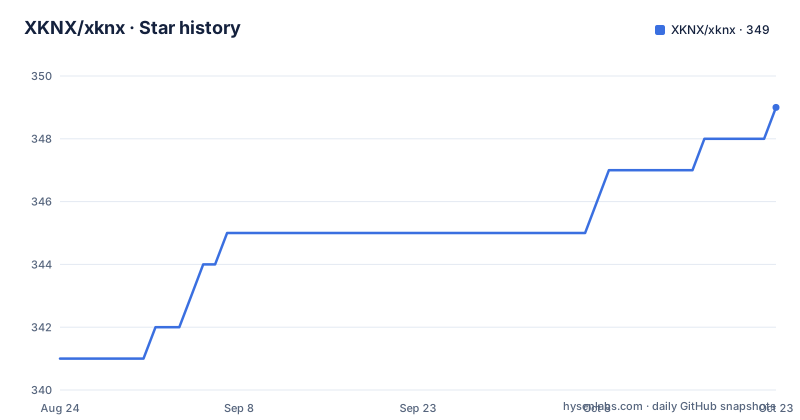
Star history
- XKNX/xknx348 ★ · +7
| Repository | 2026-08-24 | 2026-10-22 |
|---|---|---|
| XKNX/xknx | 341 | 348 |
7 Stars in the last 59 days, measured from the daily GitHub snapshot. Compare with other projects
Editorial analysis
Three runtime dependencies, and one only exists below Python 3.13
The runtime dependency list is short enough to read at a glance. `cryptography>=35.0.0`, `ifaddr>=0.1.7`, and `typing_extensions` under a marker that limits it to `python_version<'3.13'`. That last entry is the interesting one, since it means the backport is conditional rather than unconditional: on 3.13 and newer the library expects the standard library to carry what it needs. The declared floor is `requires-python = ">=3.11.0"`, and the development section repeats it as at least Python 3.11. The project classifiers stay deliberately broad, saying only Programming Language :: Python :: 3, alongside Development Status :: 5 - Production/Stable, Intended Audience :: Developers, and the topics Home Automation plus System :: Hardware :: Hardware Drivers.
The version number is read out of a module attribute
pyproject.toml does not contain a version string, because the version is declared dynamic and resolved at build time from `xknx.__version__.__version__` through setuptools' dynamic version support. The build backend is `setuptools.build_meta` with `setuptools>=62.3` required, and package discovery is limited to `xknx*`. In practice this means two things for anyone automating a release or a dependency pin: a grep of pyproject.toml will not tell you the version, and anything that imports the package and reads that attribute will. It also means the version lives in the source tree next to the code it describes, so a release tag and the declared string are two separate things that have to be kept in step by whoever cuts it.
setuptools builds it, uv develops it, and uv.lock pins it
There are two toolchains, split by purpose. The build side is plain setuptools. The development side is uv, and the three documented steps are to install uv, create the environment with `uv sync`, then install the git hooks with `uv run prek install`:
uv sync
uv run prek install
Dependencies are declared in pyproject.toml and pinned in uv.lock, so the lower bounds in pyproject.toml are what a consumer resolves against while contributors get an exact set. The dev group behind that lock is substantial: coverage, freezegun, mypy, prek, pylint, pytest, pytest-asyncio, pytest-cov, pytest-icdiff, ruff and tzdata. The root also carries .pre-commit-config.yaml, .codecov.yml and .coveragerc, which is a fairly complete hook, coverage and lint setup for a library of this size.
mypy runs strict, with unreachable code warnings switched on
The type checker configuration is the strictest shape available. `[tool.mypy]` sets `strict = true`, `python_version = "3.11"`, `show_error_codes = true` and `pretty = true`, then adds `ignore_missing_imports`, `implicit_reexport`, and `warn_unreachable`. That last flag is the one that shapes how the code reads: mypy will report code it believes can never execute, so dead branches left behind by a protocol change get flagged rather than sitting quietly. The pinned mypy floor in the dev group is 2.3. The tool is invoked through the same prek hook as everything else, and the README routes all linters, formatters and the type checker through a single command:
uv run prek run --all-filesThe one named test points straight at management error paths
The testing section gives you the full suite command and then a specific invocation that is more revealing than it looks:
uv run pytestRunning a single test means naming a file under test/management_tests and a test function called `test_nm_individual_address_serial_number_write_fail`. So the suite is organised around management procedures, and at least one case asserts a failure when a serial number write does not succeed. For a protocol library the interesting behaviour is usually the refusal path rather than the happy path, and this example shows the project keeps named tests for it. There is also a documented way to run against another supported interpreter, `uv run --python 3.11 pytest`, which matters because the library has to behave on more than the version you develop on.
The example filenames are closer to a feature list than any docs page
The examples directory carries twenty five files, and reading their names tells you more about the surface than a summary would. There is `example_gatewayscanner.py` and `example_telegram_monitor.py` for discovery and raw bus traffic, `example_secure.py` for the encrypted side, `example_manual_connection.py` and `example_disconnect.py` for connection control, and `example_daemon.py` for running headless. Device coverage spans `example_light_switch.py`, `example_light_dimm.py`, `example_light_rgbw.py`, `example_fan_percent_mode.py` and `example_fan_step_mode.py`, alongside `example_climate.py`, `example_weather.py`, `example_sensor.py` and `example_value_reader.py`. On top of that sit `example_powermeter_mqtt.py`, `example_read_serial_number.py`, `example_scene.py`, `example_callback.py`, `example_datetime.py`, `example_restart.py` and `example_send_telegrams.py`.
Home Assistant depends on it, and three vendors lend the hardware
The reach of this library is larger than its star count suggests, because XKNX is the underlying library for the KNX integration in Home Assistant, and Home Assistant ships one of the badges in the README. That makes the maintenance question a shared one: a regression here surfaces in somebody's smart home before it surfaces anywhere else, which is an argument for the pinned lock file and the strict type checking rather than against them. The hardware side is credited by name. Enertex Bayern GmbH, Weinzierl Engineering GmbH and MDT technologies GmbH are each thanked for providing a device to support testing and development, which tells you the test suite has touched real hardware rather than only simulated frames.
codespell is told to ignore hass and skip the min.js under docs
The last corner of pyproject.toml is a spell checker, and its configuration is more revealing than it looks. `[tool.codespell]` skips `*.min.js`, `docs/config-converter/lib/*` and `*.lock`, keeps an ignore list containing `hass`, and sets `quiet-level = 2`. Three separate skip patterns for one linter is a sign the repository holds generated and vendored code: minified JavaScript, a lock file, and a JavaScript library living under a config converter inside the docs directory. That converter is also why the docs are not purely Python, and it explains a chunk of the .codecov.yml and .coveragerc configuration at the root. The rest of the root is conventional: LICENSE, MANIFEST.in, README.md, changelog.md, AGENTS.md, plus docs/, examples/, script/, test/, uv.lock and the xknx package itself.
Editorial conclusion
Use xknx if you are writing Python against KNX and want an asyncio library that Home Assistant already depends on, or if you want a concrete feature surface to read before wiring hardware, since the examples directory names twenty five capabilities without prose. Do not pick it if you need synchronous code or a bus abstraction outside Python: the whole design is asynchronous, and the quickstart is an async context manager. Three things to check first. That you are on Python 3.11 or newer, since the floor is declared and typing_extensions is only pulled in below 3.13. That you read the version out of `xknx.__version__.__version__` rather than expecting it in pyproject.toml, because the version is declared dynamic. And that your KNX secure setup works against `cryptography` at 35.0.0 or newer, since that is a runtime dependency rather than an optional extra. Releases 3.18.0 through 3.20.0 landed in August 2026, and the last push to main is dated 1 October 2026.
Frequently asked questions
What is the KNX protocol?
KNX is the building automation protocol that xknx implements as an asynchronous Python library. The project classifies itself under Home Automation and System :: Hardware :: Hardware Drivers, and lists KNX, EIB, Home Assistant and home automation among its keywords.
What Python version does xknx need?
At least Python 3.11. pyproject.toml sets requires-python to >=3.11.0, and typing_extensions is only pulled in as a dependency when python_version is below 3.13, so on 3.13 and newer that backport disappears.
How do I set up a development environment for xknx?
Install uv, then run uv sync to create the environment and uv run prek install to install the git hooks. Dependencies are declared in pyproject.toml and pinned in uv.lock, and the dev group includes mypy, ruff, pylint, pytest, freezegun and pytest-icdiff.
How do I run the xknx tests and linters?
uv run prek run --all-files runs every linter, formatter and the type checker. Unit tests run with uv run pytest, a single test can be named with pytest -vv and a -k filter, and uv run --python 3.11 pytest runs the suite against another supported interpreter.
Where does Home Assistant come in with xknx?
XKNX is the underlying library for the KNX integration in Home Assistant. Testing was supported by hardware provided by Enertex Bayern GmbH, Weinzierl Engineering GmbH and MDT technologies GmbH.
Official sources
Add this badge to your README
If you maintain this project, the badge below links readers to this analysis and shows its maintenance status from the daily GitHub snapshot. Paste the markdown into your README; add ?metric=license or ?metric=stars to the image URL for a different field.

[](https://hysenlabs.com/projects/xknx-xknx)Star history chart for your README
[](https://hysenlabs.com/projects/xknx-xknx)