Xonsh treats your shell as a Python object, and the seams show
🐚 Python-powered shell. Full-featured, cross-platform and AI-friendly.
At a glance
- What is it?
- Xonsh is a cross-platform shell whose language is a superset of Python 3, so environment variables, aliases, filenames and keybindings are all Python objects. That unification is the appeal and the source of its sharp edges: bang mode abandons Python mid-line, @() writes Python values straight into a command line, and the parser tables are generated during the build.
- Who is it for?
- Xonsh earns a place on your shell if you already live in Python and want one interpreter instead of two, or if you need a real function returning a real object from a subprocess. Skip it if you want POSIX semantics you can copy from a colleague, if your tooling cannot survive a bang-mode line with no interpolation, or if you run an interpreter older than 3.11, which is a hard stop rather than a downgrade.
- Can I use it commercially?
- Check first. The repository uses a licence we do not classify automatically, so read its LICENSE file before any commercial use.
- Is it still maintained?
- Yes. The repository last received commits 1 day ago.
- What is it written in?
- Mainly Python, according to GitHub's language statistics.
Answers come from the project's GitHub data, last synced on November 15, 2026, and from our analysis. They are not legal advice.
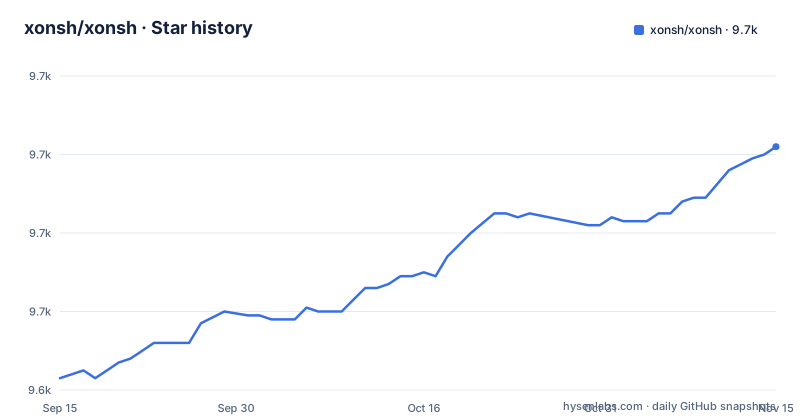
Star history
- xonsh/xonsh9,702 ★ · +59
| Repository | 2026-09-15 | 2026-11-15 |
|---|---|---|
| xonsh/xonsh | 9.6k | 9.7k |
59 Stars in the last 61 days, measured from the daily GitHub snapshot. Compare with other projects
Editorial analysis
The ! suffix turns Python off for the rest of the line
Appending a bang to a command name hands the remainder of the line to that program's own parser, which is why `osqueryi ! SELECT platform FROM os_version` is how the README writes that query. The same applies to `nudf!(ls -la)` and to `ai! how to remove images in podman`, where `ai` is simply an alias created by `aliases['ai'] = 'ollama run llama3'`. What you give up inside bang mode is the reason to run xonsh at all. There is no Python variable interpolation, no function call and no Python pipe on that line, because the shell has stopped parsing Python. If you need a value back, you write a Python function that wraps the subprocess and then call that function in bang mode, which is the shape `nudf` takes:
osqueryi ! SELECT platform FROM os_version

def nudf(cmd):
    return @.imp.pandas.DataFrame(
      $(@json nu -c @(cmd+'| to json')))
nudf!(ls -la)
That function is the whole workaround: Python on one side of the boundary, raw tool syntax on the other.
$(...) returns an object, which is why len() works on a curl
Captured subprocess output is an object rather than a string, so a length check on a curl is a sensible line instead of a type error. The same layer lets you parse before you index, as the podman example shows, where the command runs, the result is decoded as JSON and one key is pulled out:
len($(curl -L https://xon.sh))

$(@json podman ps --format json)['ID']
The catch is that the object's shape belongs to whatever produced it. A length only needs something countable, but `['ID']` needs that exact key. Once the subprocess layer is out of the way, Python reaches straight into shell state, treating the search path as an ordinary list you can mutate in place.
$PATH is a list you overwrite, and its default differs per platform
Environment variables are Python objects here, and the assignment form is the trap. Assigning `$PATH = ['/my/own/path']` replaces the entire search path, while the additive form is a method call on the list, and `$PROMPT = '@ '` applies the same idea to the prompt:
$PATH.append('/tmp')

$PATH = ['/my/own/path']
The default value also changes shape depending on where you are. The README shows `['/bin', '/sbin']` on Linux, `['/homebrew/bin']` on macOS, `['/usr/local/bin']` on FreeBSD, `['/mnt/c/Windows/System32']` under WSL, `r'c:\Windows\System32'` on Windows, `['/nix/store/0-python/bin']` under Nix, `['/data/termux/usr/bin']` on Termux, `['/tmp/.mount_x/usr/bin/']` for an AppImage and `['/app/bin']` inside Flatpak. Configuration that hardcodes any one of those lists works in exactly one of those environments, and the Windows entry is a raw string where the others are forward-slash paths.
@() splices values into filenames with no escaping layer
The `@()` operator writes Python values directly into a command line or a path. Set `name = 'snail'` and the redirect below produces a file named after the variable in both the argument and the target:
name = 'snail'
echo @(name) > /tmp/@(name)

with p'/tmp/dir'.mkdir().cd():
    touch @(input('File: '))

aliases['e'] = 'echo @(2+2)'
aliases['a'] = lambda args: print(args)
Path literals get the same treatment: `p'/etc/passwd'` becomes a pathlib object you can call `read_text()` on, and `mkdir().cd()` chains creation with a directory change inside a `with` block.
Lexer and parser tables are generated during the build, not shipped
The parser is not a checked-in artifact. `setup.py` keeps a `TABLES` list naming `xonsh/lexer_table.py`, `xonsh/parser_table.py` and `xonsh/completion_parser_table.py`, deletes whatever is present in `clean_tables()`, and rebuilds the lot in `build_tables()` by constructing `Parser(yacc_table="parser_table", ...)` and `CompletionContextParser(yacc_table="completion_parser_table", ...)` with debug output enabled and `XONSH_DEBUG` set in the environment. That step runs at build time, so installing from a source checkout pays for table generation before the package is usable. A second detail changes what you see afterwards: `dirty_version()` appends a devN suffix when the build runs inside a git directory rather than a conda install, so a local checkout reports a version matching no tag.
Zero runtime dependencies, and nothing useful arrives with them
The manifest sets `dependencies = []` and `requires-python = ">=3.11"`, so xonsh pulls in no other package at runtime and refuses to install on anything older than 3.11, which is a hard stop rather than a downgrade path. The parsing machinery is vendored instead: the package list includes `xonsh.parsers.ply` next to `xonsh.checker`, `xonsh.linter`, `xonsh.procs`, `xonsh.platforms`, `xonsh.webconfig` and `xontrib`, with `xonsh.lib` remapped to the `xonsh/lib` directory. The empty dependency list shows up in everything you want to add. Prompt styling, history encryption and the model integrations are xontribs loaded by name with `xontrib load`.
Four install routes, and the README prints the command for none
Installation is offered four ways, isolated environment, package, container or portable AppImage, all behind the install page at `xon.sh/install.html`, with a step by step introduction at `xon.sh/tutorial.html`. The AppImage path appears in the `$PATH` example, where an AppImage session runs out of `/tmp/.mount_x/usr/bin/`, meaning the binary path moves with the mount. The container path has an image on Docker Hub under the xonsh user. The Nix path has both a `flake.nix` and a `nix/` directory.
Prompt and keybinding changes are Python that runs on every keystroke
Customization happens through event hooks rather than a plugin manifest:
@events.on_ptk_create
def custom_keybindings(bindings, **kw):
    @bindings.add(Keys.ControlI)
    def say_whoami(event):
        echo $(whoami)

@events.on_postcommand
def _prompt_err_cmd(cmd, rtn, out, ts):
    if rtn != 0:
        $XONSH_PROMPT_NEXT_CMD = cmd.rstrip()
The tradeoff is that anything attached here is Python that runs whenever its event fires, such as after each command, so a slow handler is felt each time the prompt appears. Those hooks are also the shape of the extension system, where additions are called xontribs, listed under the GitHub xontrib topic and in the awesome-xontribs collection, with a separate template repository for new ones.
Editorial conclusion
Xonsh earns a place on your shell if you already live in Python and want one interpreter instead of two, or if you need a real function returning a real object from a subprocess. Skip it if you want POSIX semantics you can copy from a colleague, if your tooling cannot survive a bang-mode line with no interpolation, or if you run an interpreter older than 3.11, which is a hard stop rather than a downgrade. Before installing, read the install page for the isolated environment, package, container and AppImage routes and pick one deliberately. The project is moving: the last push to the default branch was on 2026-11-02, with release 0.25.0 published on 2026-10-22 after 0.24.2 on 2026-08-23 and 0.24.1 on 2026-07-31.
Frequently asked questions
What is meant by a Python shell in xonsh?
Xonsh describes itself as a Python-powered shell whose language is a superset of Python 3 with integration of shell functionality and commands. Environment variables, aliases and the prompt are Python objects you assign directly, for example $PATH = ['/my/own/path'] and $PROMPT = '@ '.
is xonsh posix compliant
Xonsh's language is a superset of Python 3 with integration of shell functionality, and a xontrib named sh sits in the load list next to fish_completer.
xonsh vs bash
The README shows that $PATH and aliases are Python objects you assign with = and extend with methods, and that conda, mamba, Starship and gitsome are listed among projects that use xonsh or are compatible with it.
xonsh alternatives
The README lists a wide set of projects that use xonsh or are compatible with it, from conda and mamba through Starship, zoxide, gitsome, xxh, kash, Snakemake, any-nix-shell, lix, x-cmd, rever and CrateDB.
xonsh vscode
The README lists Jupyter among the environments xonsh works in, with the xontrib-jupyter extension powering Jupyter, JupyterLab, Euporie and Jupytext.
Official sources
Add this badge to your README
If you maintain this project, the badge below links readers to this analysis and shows its maintenance status from the daily GitHub snapshot. Paste the markdown into your README; add ?metric=license or ?metric=stars to the image URL for a different field.

[](https://hysenlabs.com/projects/xonsh-xonsh)Star history chart for your README
[](https://hysenlabs.com/projects/xonsh-xonsh)Was this useful?