Markdig and the case for a pluggable Markdown pipeline in .NET
A fast, powerful, CommonMark compliant, extensible Markdown processor for .NET
At a glance
- What is it?
- Markdig parses Markdown into a located syntax tree, then lets you swap the parser, the pipeline and the renderer. That design is why it powers documentation sites, Markdown editors and static site generators inside the .NET ecosystem.
- Who is it for?
- Markdig earns its place by being the .NET library you reach for when correctness of the syntax tree matters, not just the HTML that comes out. For rendering user text it is the safest default in the ecosystem, and for tooling the roundtrip parser plus precise source locations are the reason the project backs a commercial Visual Studio Markdown editor.
- Can I use it commercially?
- Yes. BSD-2-Clause is a permissive licence: you can use, modify and sell software built on it, as long as you keep its copyright and licence notices.
- Is it still maintained?
- Yes. The repository received new commits within the last day.
- What is it written in?
- Mainly C#, according to GitHub's language statistics.
Answers come from the project's GitHub data, last synced on October 23, 2026, and from our analysis. They are not legal advice.
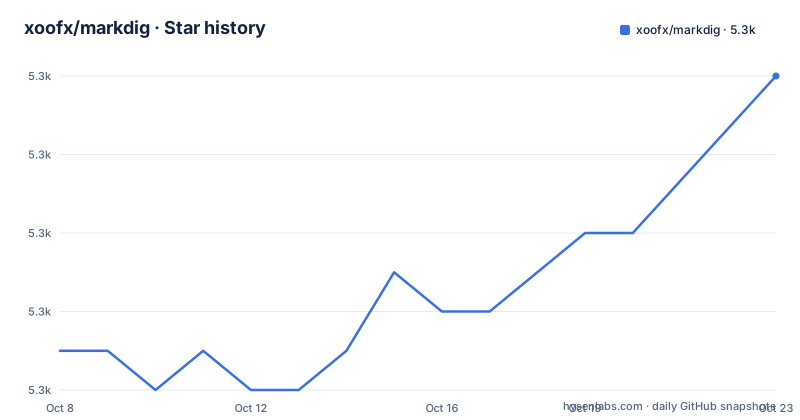
Star history
- xoofx/markdig5,348 ★ · +7
| Repository | 2026-10-08 | 2026-10-23 |
|---|---|---|
| xoofx/markdig | 5.3k | 5.3k |
7 Stars in the last 15 days, measured from the daily GitHub snapshot. Compare with other projects
Editorial analysis
A parser you can take apart, not just call
Markdig describes itself as a fast, powerful, CommonMark compliant, extensible Markdown processor for .NET. That phrasing is doing a lot of work. A processor that only converted Markdown to HTML would be a solved problem with a dozen competent options in every ecosystem. What Markdig offers is the layer underneath: a pipeline of blocks and inline parsers that you can inspect, reorder, disable and replace before anything reaches HTML.
The most concrete evidence for that claim is the feature list item about disabling built-in parsing outright, or changing which character opens a heading so that `@` works where `#` normally would. Very few Markdown libraries expose that lever. The README also notes that the core CommonMark parsing is pluggable, which means an extension can add syntax ahead of the built-in rules or take precedence over them.
The repository layout matches that philosophy. `src/` holds the library, `tools/` holds the command line tooling, and `site/` holds the documentation sources, including the extension pages the README links to. There is a `contributing.md` for humans and two agent instruction files, `AGENTS.md` and `CLAUDE.md`, which tells you something about how the project now expects contributions to arrive. The repo is licensed BSD-2-Clause, which is about as permissive as software licences get and a genuine advantage for a component you intend to embed in a commercial product.
Why the syntax tree carries source locations
The feature list leads with an abstract syntax tree that has precise source code location information for every node, and it says plainly why: it is useful when building a Markdown editor. That single design decision separates Markdig from converters. A converter can discard trivia and nobody notices. An editor cannot, because it needs to map a caret position in the buffer back to a node, highlight a matching delimiter, or reformat one paragraph without disturbing the rest of the file.
This is why the README points at a real commercial extension as proof. Markdown Editor v2 for Visual Studio 2022 is listed as being powered by Markdig. A Visual Studio Marketplace extension is a much harder customer to satisfy than a blog post, because it has to stay responsive on large files and it has to keep the author's formatting intact. The README's note that it is useful for Markdown previewing with front matter discarded backs that up: the YAML front matter extension parses the block and then drops it from the HTML output, which is exactly what a live preview pane needs and exactly what a plain converter will not do.
For anyone building a collaborative editor, a document pipeline, or a linting tool on top of Markdown, this is the feature that decides the library. Highlight and formatting quality become problems of tree manipulation rather than regular expression guesswork.
Spec conformance is a feature with a test count attached
The README states that Markdig passes more than 600 tests from the latest CommonMark specification, version 0.31.2, and that the library includes all the core elements of CommonMark including GFM fenced code blocks. This is a claim worth taking at face value more than most, because the tests are organised as spec files inside the test project and are named after the feature they cover. You can see `src/Markdig.Tests/Specs/` entries referenced throughout the extension list: `PipeTableSpecs.md`, `GridTableSpecs.md`, `EmphasisExtraSpecs.md`, `FootnotesSpecs.md`, `AutoLinks.md`, `TaskListSpecs.md`, and many more.
That layout is a practical advantage. When an extension misbehaves, the relevant spec file is the place to look, and the same files act as executable documentation of the syntax each extension accepts. Contributors adding a rule are expected to extend those specs rather than bolt on an isolated test somewhere else.
The current release, 1.4.0, published on the same day as the most recent push, is a good illustration of the project's actual maintenance rhythm. Its headline feature is strict GFM pipe table parsing, gated behind an opt-in option. The rest of the changelog is bug fixes against edge cases that only show up once a parser is used on real documents: heading auto-links hijacking nested link labels, an unmatched emphasis closer swallowing trailing content, indentation on the first list item, and an emoji parser rejecting input whose slice ends in two asterisks. Naming the contributor for each fix is also consistent, which helps when you need to understand why a particular case behaves the way it does.
Twenty extensions, all opt-in, and they can collide
The extension list is long enough that it is worth sorting into groups. There is GitHub style alerts with the `[!NOTE]` family of markers. There are two table implementations, pipe tables inspired by GitHub and Pandoc, and grid tables from Pandoc. There is an extra emphasis family covering strike through, subscript, superscript, inserted text and marked text, plus definition lists, footnotes, auto identifiers for headings, auto links, task lists, alpha and roman bullet lists, abbreviations, citations, custom containers, figures, footers, mathematics delimited by dollar signs, soft lines treated as hard lines, emoji, and SmartyPants.
Two of these are aimed squarely at tooling rather than rendering. The diagram extension converts a fenced code block containing a keyword such as `mermaid` or `nomnoml` into a div holding the content as-is, which lets the host page's own script do the rendering. The Bootstrap extension emits Bootstrap classes rather than generic markup. Both are examples of Markdig being used as a rendering engine inside a larger stack, where something downstream owns the final HTML.
The cost of breadth is that extensions are not always independent. The 1.3.2 release exists solely to fix an emoji table alignment regression, and the 1.4.0 notes include normalising pipe table support for GFM and checking strict GFM tables against native cmark-gfm. When a Markdown file mixes tables, emoji, and emphasis, you are combining three independent rule sets written by different contributors. In practice you enable only the extensions your content actually uses and treat the rest as off, which is the opposite of how most Markdown libraries are configured.
Roundtrip parsing is the feature nobody asks for until they need it
The README describes roundtrip support as parsing trivia, meaning whitespace, newlines and other characters, so that a parse and render cycle is lossless. The linked document sits in the source tree at `src/Markdig/Roundtrip.md`. The practical effect is that you can change a document without introducing unrelated formatting churn, which is the property that separates a formatter from a rewriter.
Think about what a Markdown formatter built on a conventional parser has to do. It re-renders every block from the tree, so any whitespace it did not capture is gone. Lists get renumbered or refilled, blank lines collapse, code fences get re-indented. Run it twice and the second run changes nothing, which is the usual sign the churn has already happened. With roundtrip parsing the trivia is retained in the tree, so a targeted edit to one block leaves every other line byte-identical.
This matters for anyone running Markdig in CI on a documentation tree, and it matters more for editor integrations where the buffer belongs to the user. It is also the reason to read `src/Markdig/Roundtrip.md` before assuming performance characteristics, since trivia retention has an obvious cost and the design makes that cost explicit rather than hiding it.
Where to start, and where the README stops
The README is a feature inventory with the documentation pushed off to a hosted site. Everything detailed about individual extensions, including how strict GFM table mode is configured through `PipeTableOptions.UseGfmRules`, lives in `site/docs/extensions/`, not in the repository README. If you are evaluating a specific extension, go to the extension page rather than inferring behaviour from the one-line summary here.
There is one rough edge worth flagging. The coveralls coverage badge in the README points at the `master` branch while the repository's default branch is `main`. Both branches may well exist, since the project has used both names over its life, but the badge is not tracking coverage for the branch you are reading. Treat the coverage figure as indicative rather than current, and read the CI workflow under `.github/` if you want to know what actually runs.
On performance, the README claims a very fast parser and HTML renderer with no regular expressions and low garbage collection pressure, and it points at benchmarks rather than publishing numbers in the repository. The absence of published figures is a reasonable thing to note: for a library whose selling point includes speed, you will want to run the benchmark suite yourself against your own documents before committing to it. The related searches for this project skew heavily toward documentation, extensions, Blazor, WPF and CSS, which is consistent with a library people adopt through an application they are building rather than one they evaluate standalone.
Editorial conclusion
Markdig earns its place by being the .NET library you reach for when correctness of the syntax tree matters, not just the HTML that comes out. For rendering user text it is the safest default in the ecosystem, and for tooling the roundtrip parser plus precise source locations are the reason the project backs a commercial Visual Studio Markdown editor. Its rough edges are operational rather than architectural: extensions are opt-in and can conflict, the docs push most detail off the repository, and the benchmark story is asserted on the README rather than published there.
Frequently asked questions
What is Markdig used for?
Markdig is a CommonMark compliant Markdown processor for .NET. In practice it is used to render Markdown to HTML, and more often to build tools on top of Markdown, since its syntax tree carries precise source locations and supports lossless roundtrip parsing.
Is Markdig CommonMark compliant?
Yes. The README states that Markdig passes more than 600 tests from the CommonMark specification version 0.31.2, and that all core elements of CommonMark are included, including GFM fenced code blocks.
What is roundtrip support in Markdig?
It means the parser retains trivia such as whitespace and newlines so that parsing and rendering a document is lossless. That lets you edit one block of a Markdown file without unrelated formatting changes appearing elsewhere. The design is documented in the source tree at src/Markdig/Roundtrip.md.
How do you install Markdig in a .NET project?
Markdig ships to NuGet as a package named Markdig, which the README links directly. The repository does not detail the CLI tooling beyond the tools directory, so the hosted documentation at xoofx.github.io/markdig covers installation options and the command line tool.
Official sources
Add this badge to your README
If you maintain this project, the badge below links readers to this analysis and shows its maintenance status from the daily GitHub snapshot. Paste the markdown into your README; add ?metric=license or ?metric=stars to the image URL for a different field.

[](https://hysenlabs.com/projects/xoofx-markdig)Star history chart for your README
[](https://hysenlabs.com/projects/xoofx-markdig)Was this useful?