gpt4free's cookie directory is the credential, and its two Docker guides disagree on the UID
The official gpt4free repository | various collection of powerful language models | opus 4.6 gpt 5.3 kimi 2.5 deepseek v3.2 gemini 3
At a glance
- What is it?
- GPT4Free is a GPL-3.0 Python client that puts several model providers behind an OpenAI-compatible API, a web GUI and a JavaScript client. The mechanics matter more than the feature list here. Some providers are reached with your own browser session rather than a key, the install asks you to mount a cookie directory into the container, the two documented Docker setups chown that directory to different user IDs, and the slim image can update packages on startup.
- Who is it for?
- Adopt gpt4free when you want one OpenAI-compatible endpoint across several providers and you are willing to manage a browser session as the credential. Do not adopt it expecting a key-based service, because for the browser-backed providers the secret is your cookie jar.
- Can I use it commercially?
- Yes, with conditions. GPL-3.0 is a copyleft licence: if you distribute software that includes it, you must release that software's source code under the same licence. Running it internally without distributing it does not trigger that obligation.
- Is it still maintained?
- Yes. The repository last received commits 4 days ago.
- What is it written in?
- Mainly Python, according to GitHub's language statistics.
Answers come from the project's GitHub data, last synced on November 15, 2026, and from our analysis. They are not legal advice.
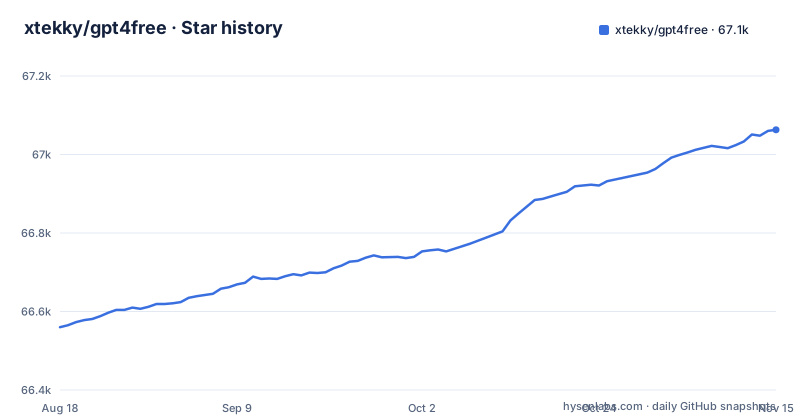
Star history
- xtekky/gpt4free67,063 ★ · +503
| Repository | 2026-08-18 | 2026-11-15 |
|---|---|---|
| xtekky/gpt4free | 66.6k | 67.1k |
503 Stars in the last 89 days, measured from the daily GitHub snapshot. Compare with other projects
Editorial analysis
The project answers to four different names in four different namespaces
The repository is xtekky/gpt4free. The README credits it as created by @xtekky and maintained by @hlohaus. The package on PyPI is named `g4f`, the container image is `hlohaus789/g4f`. The documentation sits at g4f.dev.
Then there is the repository's own declared homepage, which is a Telegram channel rather than any of those. The quick links list points at the website, the docs, PyPI, the Docker Hub image, the releases, the issues, and both a Telegram channel and two Discord servers.
The consequence is that there is no single canonical location, and the mismatches are specific rather than cosmetic. The Docker image you pull is published by the maintainer's account, not the repository owner. And the homepage field points at a chat channel while the README's own documentation link is the website.
If you are filing an issue or looking for a release, check which namespace the thing belongs to before you search, or you will spend time in a repository that does not contain it.
The credential for browser-backed providers is your own cookie jar
Look at what the Docker setup asks for.
The Docker instructions make that concrete. You create two directories, one called har_and_cookies and one called generated_media, chown them, and mount both into the container. The page also says port 7900 can expose a VNC-like desktop for provider logins, which is how you complete a login interactively inside a headless container, and that Chrome or Chromium is required for the providers that use browser automation.
So the thing being protected is your browser session, and the setup asks you to hand that directory to a container. The consequence is that har_and_cookies should be treated as a credential store rather than as a cache: anyone who can read it can act as you on the sites whose cookies are in it, and the cookies are the durable part, not the container.
For what a given adapter does, the README sends you to the provider docs.
The two documented Docker setups chown the cookie directory to different UIDs
The recommended full-image setup begins by creating the two directories and changing their owner:
mkdir -p ${PWD}/har_and_cookies ${PWD}/generated_media
sudo chown -R 1200:1201 ${PWD}/har_and_cookies ${PWD}/generated_media
The slim-image setup does the same two things with different numbers and without sudo:
mkdir -p ${PWD}/har_and_cookies ${PWD}/generated_media
chown -R 1000:1000 ${PWD}/har_and_cookies ${PWD}/generated_media
Two documented paths, two owner pairs, and the blocks are near enough identical that the difference is easy to miss when you are copying one to the other.
The README does not say why the two UIDs differ. Match the chown block to the image tag you actually pulled rather than to the one you read first. Note also that the full setup needs sudo and the slim one does not, which is a second small signal that they are aimed at different container users.
Only the full-image run command raises the shared memory limit, passing `--shm-size="2g"`, and the README says to increase it for heavier browser automation tasks; the slim example does not set it.
The slim image installs packages on startup, so its tag does not describe the code
The slim image section contains one sentence that changes how you should think about pinning it: the slim image can update the g4f package on startup and installs additional dependencies as needed.
So `hlohaus789/g4f:latest-slim` describes a base image, not the program that will be running inside it. The package version is resolved at container start.
The consequence is that the property you normally get from a pinned image, that the same tag always produces the same behaviour, does not hold here. Two containers started from the same tag on different days can run different versions of the library and different sets of dependencies, and the update can happen inside the container at start rather than at image build time. Rolling back does not mean re-pulling a tag, because the tag did not determine the version in the first place; it means rebuilding or pinning explicitly.
The slim instructions also map two host ports to the same container port, `-p 1337:8080 -p 8080:8080`, and say that the Inference API is mapped to 1337. Two host ports serving one container port is not wrong, since the API and the GUI can share a listener, but it is worth knowing which one your client should point at before you conclude something is not listening.
docker-compose mounts your whole checkout over the application directory
The compose file that ships with the repository declares a build context, a Dockerfile, an image tag, three published ports and one volume:
    volumes:
      - .:/app
    ports:
      - '8080:8080'
      - '1337:8080'
      - '7900:7900'
    environment:
      - OLLAMA_HOST=host.docker.internal
That single volume line is the one to look at. Mounting `.` over `/app` means the code that executes is your working copy, not the version baked into the image, so in this setup the image tag is close to decorative.
The consequence runs in both directions. What runs is whatever is in your directory, which is useful when you are editing the project and misleading when you think you are running a published release. And anything the container deletes under `/app` lands in your checkout, in the same parent directory as the cookie and media mounts. Both `image` and `build` are declared at the same time, so what compose actually does depends on which of the two invocations you use.
The environment line is the interesting one for local inference: pointing `OLLAMA_HOST` at `host.docker.internal` is how a container reaches a model server running on the host.
The core install is five packages, and the all extra adds a WebAssembly runtime with no explanation
setup.py splits requirements into a small core and a set of extras. The core install list is five packages: requests, aiohttp, brotli, pycryptodome and nest-asyncio2.
Everything else is an extra. The `all` group adds around twenty more, including ddgs, beautifulsoup4, aiohttp_socks, pillow, cairosvg, werkzeug, flask with the async extra, fastapi, uvicorn, a2wsgi, markitdown with all of its own extras, pystray and cryptography. Smaller groups exist for image, api and gui.
The important detail is that the extras are not nested. The `slim` group is not `all` with things removed: it drops platformdirs, cairosvg, setuptools and markitdown, and adds pypdf2 and python-docx instead. So choosing a smaller install changes which capabilities you have rather than which version of them.
Two consequences. A bare `pip install g4f` gives you a client core with no GUI, no API server and no image support, so the capability you actually want is an extra you have to name. And the repository carries three requirements files, requirements-min.txt, requirements-slim.txt and requirements.txt, so a source install does not obviously match any of the extras either. One loose end: requirements.txt lists wasmtime, a WebAssembly runtime, with no comment saying what it is for (it is not in setup.py's all extra, so the section heading is inaccurate).
setup.py deletes GitHub alert markers so the PyPI page differs from the README
One line in setup.py explains a difference you will notice if you read both pages:
long_description = long_description.replace("[!NOTE]", "")The README uses GitHub's alert syntax for its callouts. That syntax does not render on a package index, so the packaging step strips the marker text out of the long description rather than converting the callout into something the index can show.
The consequence is small but it changes what you are reading. The PyPI page and the GitHub page are not the same document. Any [!NOTE] alert on GitHub is missing its marker on PyPI; the replace call removes only that marker string.
A takedown policy sits next to the GPL licence, so the provider set is not a fixed asset
The repository ships LEGAL_NOTICE.md and SECURITY.md alongside the GPL-3.0 LICENSE, and the README has a table of contents section titled security, privacy and takedown policy. There is also a CODE_OF_CONDUCT.md, a CONTRIBUTING.md, a SKILL.md and an example.env at the top level, alongside a g4f-go/ directory, which the README describes as a self-contained Go launcher that downloads CPython and g4f on demand.
The takedown policy is the part that has practical consequences for anyone building on this. Source shows only that the README has a section with that title.
The release cadence makes that more likely rather than less. Three releases, v8.9.0, v8.9.1 and v8.9.2, landed on 2026-11-02, the same date as the last push to main. Fast releases are good for fixes and bad for pinning, they mean you should verify that the specific adapter you need still exists in the version you pin.
On the legal question, the code is GPL-3.0 and the repository carries a separate legal notice, and nothing here should be read as legal advice. Read LEGAL_NOTICE.md and the terms of the service you are reaching through, then decide.
Editorial conclusion
Adopt gpt4free when you want one OpenAI-compatible endpoint across several providers and you are willing to manage a browser session as the credential. Do not adopt it expecting a key-based service, because for the browser-backed providers the secret is your cookie jar. Four things to settle first. Which image you run, since the full and slim guides chown the cookie directory to different UIDs, so copy the block that matches your image. Whether you can accept a container that reads your browser cookies, and if so treat the har_and_cookies directory as a credential store. Whether you need reproducibility, because the slim image can install packages on startup so its tag does not describe the code that runs. And which version you pin, since three releases (v8.9.0, v8.9.1 and v8.9.2) landed on 2026-11-02. Read LEGAL_NOTICE.md and the takedown policy before deploying it anywhere that matters.
Frequently asked questions
Is gpt4free really free?
The code is free and licensed GPL-3.0, distributed on PyPI as `g4f` and as a Docker image you can pull without a paid tier. What the project supplies is not model access of its own: it describes itself as a community-driven project that aggregates multiple accessible providers and interfaces. So the software costs nothing while the upstream providers keep their own terms.
Is gpt4free legal to use?
The repository is licensed GPL-3.0 and ships a separate LEGAL_NOTICE.md, and the README has a section on its security, privacy and takedown policy. Whether a given adapter is permitted is a question about that provider rather than about this project. Read the legal notice and the provider's own terms; nothing here is advice on the question.
Is gpt4free safe to install?
The credential surface is the thing to weigh. The Docker instructions have you create and mount a directory called har_and_cookies, and port 7900 is offered to expose a desktop for completing provider logins. The repository ships a SECURITY.md, and the cookie directory is the part to protect.
How do you use gpt4free?
There are four surfaces. Run the container with `docker run -p 8080:8080 -p 7900:7900 --shm-size="2g"` and the two mounted directories. The web GUI is served on port 8080. The FastAPI-based OpenAI-compatible endpoint is called the Inference API, mapped to port 1337 in the slim example, and there are Python, async Python and browser JavaScript clients.
Does gpt4free have a VS Code extension?
The README's What's included list (client libraries, GUI, API, JS client, Docker images, provider adapters) names no VS Code extension. What it does offer is an OpenAI-compatible REST API, which is the integration point an editor would use: point any client that speaks the OpenAI API shape at the Inference API address instead of at a hosted endpoint. setup.py's gui extra includes Flask, and docker-compose.yml sets OLLAMA_HOST to host.docker.internal for local inference.
Official sources
Add this badge to your README
If you maintain this project, the badge below links readers to this analysis and shows its maintenance status from the daily GitHub snapshot. Paste the markdown into your README; add ?metric=license or ?metric=stars to the image URL for a different field.

[](https://hysenlabs.com/projects/xtekky-gpt4free)Star history chart for your README
[](https://hysenlabs.com/projects/xtekky-gpt4free)Was this useful?