AutomationTest: A Multi-Layer Python Test Automation Framework
自动化测试框架,支持接口自动化、WEB UI自动化、APP UI自动化、性能测试;支持多系统相互调用;支持接口与UI相互调用;支持dubbo接口调用
At a glance
- What is it?
- AutomationTest runs API, web UI, app UI and performance tests from one Python codebase, and it is built to cross boundaries: a test can call another system, an interface test can drive a UI, and a Dubbo service can be invoked. The cost of that ambition is a heavy setup, with Selenium servers, browser drivers, an Oracle client, OCR engines and a Java runtime.
- Who is it for?
- AutomationTest fits a team that runs a mixed estate, where the same scenario has to be checked at the interface layer, the browser layer and the mobile layer, and where a single system under test is called from several others. It is a poor fit for a small team that only needs one kind of test, since the setup cost alone is a day of installing Oracle clients, tesseract, allure and JDKs, and a poor fit if you cannot install native packages.
- Can I use it commercially?
- Not without permission. GitHub finds no licence file in the repository, and without a licence all rights are reserved by default: you may read the code but not reuse it. Check the README, or ask the authors, before using it.
- Is it still maintained?
- Yes. The repository last received commits 4 days ago.
- What is it written in?
- Mainly Python, according to GitHub's language statistics.
Answers come from the project's GitHub data, last synced on November 7, 2026, and from our analysis. They are not legal advice.
Star history
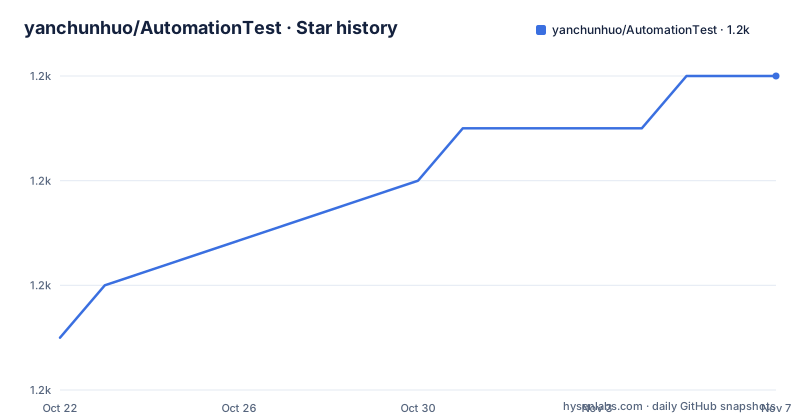
- yanchunhuo/AutomationTest1,232 ★ · +5
| Repository | 2026-10-22 | 2026-11-07 |
|---|---|---|
| yanchunhuo/AutomationTest | 1.2k | 1.2k |
5 Stars in the last 16 days, measured from the daily GitHub snapshot. Compare with other projects
Editorial analysis
Four Kinds of Testing in One Framework
AutomationTest describes itself as an automated testing framework that supports interface automation, web UI automation, app UI automation and performance testing, and the README makes a further claim about crossing layers: it supports calls between systems, calls between interfaces and UI, and Dubbo interface calls.
That last group is what separates it from a general purpose test framework. A framework that can invoke a UI from an interface test, or a Dubbo service from a UI test, is built around the idea that a scenario is not confined to one level of the stack. In an enterprise estate where a change to a service can break a page that calls it, being able to write the scenario once and drive it from either end is the point.
The performance testing is Locust based, and the repository has start_locust_master.sh and start_locust_slave.sh, which is the distributed Locust pattern, so a load test runs across several machines with one master and several slaves.
The overall structure is a set of runners, one per kind of test, and the four entry points are:
run_api_test.py
run_app_ui_test.py
run_app_ui_monkey_test.py
run_web_ui_test.py
The monkey variant of the app UI runner is the one to note, since it suggests a fuzzing style of UI testing rather than a scripted one.
The Layered Layout Shows the Design
The repository layout is conventional for a test framework with several layers, and the directory names map onto the concerns of a test project.
base/ holds the base layer that the other parts build on, cases/ is where the test cases live, common/ is the shared code, common_projects/ is for code shared across the projects a test run covers, config/ holds the configuration, init/ holds initialisation, models/ holds the data models, page_objects/ holds the page object model for UI tests, and pojo/ holds plain old Java objects for the data the tests assert against.
The split between cases, models, page objects and pojo is the part that matters. The page object model keeps the UI selectors out of the test cases, the models hold the API structures and the pojo hold the request and response bodies, so a test case reads as a sequence of steps rather than as a pile of selectors and JSON.
There are three report generators at the root, generate_api_test_report.py, generate_app_ui_test_report.py and generate_web_ui_test_report.py, one per kind of test, which suggests each layer produces its own report format rather than a single unified report across all of them.
The test_data/ directory holds the data the tests read, and logs/ is where the run output lands, both of which are the kind of directories that need to be in a .gitignore and often are not.
A Toolchain Wide Enough to Worry About
The README lists the tools the framework is built from, and the list is the best single description of what it can do.
For the test runner and reporting there is pytest, with pytest-xdist as the plugin that runs test cases in multiple processes at once, allure-pytest to generate the reports, and PyHamcrest as a framework of matcher objects for assertions. For the browser and the device there is Selenium for web UI and Appium for mobile.
For the data side there is requests for HTTP, PyMySQL for MySQL, cx_Oracle for Oracle, redis for Redis, python-binary-memcached for memcached and kazoo for ZooKeeper. SQLAlchemy provides the toolkit and the ORM, and sqlacodegen generates Python objects from the database table structure, which is how the framework gets a model layer for a schema it did not write.
Then there are the pieces that are less common. JPype1 executes Java code, which is how the Dubbo calls are made. Js2Py executes JavaScript, tess4j does image recognition through a Java OCR engine, and allpairspy performs orthogonal analysis over a list of parameters to achieve coverage of test cases with the minimum number of combinations.
The protocol side is covered by websockets for WebSocket requests and paramiko for SSH, and mitmproxy is in the requirements, which is a traffic interception proxy and therefore a component for inspecting what a mobile or browser client actually sends.
Setting It Up Is the Larger Task
The installation section is long, and the reason is that the framework needs native libraries for several of its capabilities.
The system dependencies differ by distribution. On Ubuntu there is apt-get install libpq-dev python3-dev for the psycopg2 binary, apt-get install g++ libgraphicsmagick++1-dev libboost-python-dev and apt-get install python-pgmagick for pgmagick. On CentOS the equivalents are yum install python3-devel postgresql-devel and yum install GraphicsMagick-c++-devel boost boost-devel. On Windows the requirement is the Microsoft Visual C++ 2019 Redistributable, which the README links, because jpype1 and the image recognition font libraries need it.
The Python dependencies go in with pip3 install -r requirements.txt, and then there is pgmagick at 0.7.6 on Linux or a Windows build, and the xmind-sdk-python package, which is downloaded rather than installed from an index.
Reporting needs allure, either from the qameta PPA on Ubuntu or manually from the 2.7.0 release archive, unzipped with its bin directory added to the PATH. Java code execution needs openjdk8, and the README gives the PPA route for it, plus Maven.
Then there is the Oracle Instant Client, with libaio installed first, the archive unzipped and LD_LIBRARY_PATH pointing at the extracted directory, and NLS_LANG set to SIMPLIFIED CHINESE_CHINA.UTF8 for Chinese encoding. The Windows instructions note that if you use 64 bit, both Python and the Instant Client must be 64 bit.
And the OCR path needs tesseract, with leptonica built from the 1.78.0 source release and the tesseract 4.1.1 source release, and the language data files placed in the common/java/lib/tess4j/tessdata/ directory. The README also states a hard constraint worth knowing early: if the project needs to execute Java code through jpype1, the path of the project directory must not contain Chinese characters.
The Selenium Server and the Browser Driver Rules
The web UI part of the framework needs a Selenium server, and the README sets out how it is run.
A JDK 1.8 is installed and configured with JAVA_HOME, JRE_HOME, CLASSPATH and PATH, and the server itself is selenium-server-standalone-3.141.0.jar, started as an administrator with java -jar selenium-server-standalone-3.141.0.jar -log selenium.log.
The browser drivers come next, with the Chrome driver linked from the chromedriver storage index and the Firefox driver from the geckodriver repository, and the directory holding the drivers is added to the system PATH of the Selenium server machine.
The Internet Explorer section is the most detailed part of the documentation, and it reads as a set of hard-won workarounds. IE is recommended at 32 bit because 64 bit is extremely slow. The protection mode in all four zones has to be set to the same value in Internet Options, Security, and the enhanced protection mode has to be turned off in the advanced settings. The browser zoom level must be set to 100 percent so that local mouse events map to the correct coordinates.
And for IE11 the registry has to be edited, with a FEATURE_BFCACHE entry under the Internet Explorer Main FeatureControl key, creating a DWORD named iexplore.exe with the value 0 if the entry does not exist, with separate 32 bit and 64 bit paths, and the recommendation to set both on 64 bit Windows.
That list is a good measure of what the framework was used against. The IE notes are the kind of thing that only accumulate from years of running tests on whatever the machines in the organisation happened to be.
The Dependency Pins Tell You the Age
The requirements file is the clearest single artefact for dating the project and for judging whether you can adopt it as it stands.
The pins are old. selenium is 3.141.0, which is the last release of Selenium 3 before the 4 rewrite. pytest is 5.0.0, locust is 1.6.0, mitmproxy is 5.0.1, Appium-Python-Client is 0.48, SQLAlchemy is 1.4.39, PyMySQL is 1.0.2, redis is 3.5.3, kazoo is 2.8.0, websockets is 9.1, Js2Py is 0.71, JPype1 is 0.7.5, Pillow is 5.3.0, opencv-python is 4.2.0.32, requests is 2.27.1 and PyHamcrest is 2.0.4. The test plugins are pinned in the same style, with pytest-xdist 1.30.0, allure-pytest 2.7.0, pytest-rerunfailures 8.0 and pytest-collect-formatter2 0.1.3.
The project documentation says it currently supports Python 3.6 and above and recommends 3.6.8, which matches the pins, since Selenium 3 and pytest 5 are from that era.
So the framework is a coherent snapshot of roughly 2019 and 2020 practice, kept together and extended since. The releases are V1.1.2 from 2024-03-29, V1.1.1 from 2022-11-07 and V1.1.0 from 2022-11-03, and the repository is not archived with the last push on 2026-06-23. The practical question for an adopter is whether the pinned versions still install and run on a current machine, and the answer for Selenium 3 in particular is that it will need attention.
Editorial conclusion
AutomationTest fits a team that runs a mixed estate, where the same scenario has to be checked at the interface layer, the browser layer and the mobile layer, and where a single system under test is called from several others. It is a poor fit for a small team that only needs one kind of test, since the setup cost alone is a day of installing Oracle clients, tesseract, allure and JDKs, and a poor fit if you cannot install native packages. Before adopting it, check the pinned dependency versions, since the requirements file is old enough that selenium 3, pytest 5 and SQLAlchemy 1.4 are the versions in use, and note that the framework expects Python 3.6 or newer and a project path without Chinese characters when it executes Java through JPype. The latest release is V1.1.2 from 2024-03-29, and the last push was on 2026-06-23.
Frequently asked questions
What kinds of testing does AutomationTest support?
It supports interface automation testing, app UI automation testing, web UI automation testing and performance testing, and it is built to cross levels, supporting calls between systems, calls between interfaces and UI, and Dubbo interface calls. The performance side is Locust based, with master and slave start scripts in the repository.
What does the directory layout of AutomationTest contain?
There are base/, cases/, common/, common_projects/, config/, init/, logs/, models/, packages/, page_objects/, pojo/ and test_data/, along with the runner scripts run_api_test.py, run_app_ui_test.py, run_app_ui_monkey_test.py and run_web_ui_test.py, and separate report generators for the API, app UI and web UI suites.
How do I install the Python dependencies for AutomationTest?
With `pip3 install -r requirements.txt`, followed by pgmagick at 0.7.6 on Linux or the equivalent Windows build, and the xmind-sdk-python package downloaded from its repository. System level dependencies differ by distribution, with libpq-dev and python3-dev on Ubuntu and python3-devel and postgresql-devel on CentOS, and Windows needs the Microsoft Visual C++ 2019 Redistributable.
What does the Selenium setup look like in AutomationTest?
A JDK 1.8 with JAVA_HOME, JRE_HOME, CLASSPATH and PATH configured, and the server run as java -jar selenium-server-standalone-3.141.0.jar -log selenium.log. Browser drivers for Chrome and Firefox are downloaded and their directory added to the PATH, and the README lists a set of Internet Explorer specific settings including a 100 percent zoom level and a FEATURE_BFCACHE registry entry.
How current is AutomationTest?
The requirements file pins versions from around 2019 and 2020, with selenium 3.141.0, pytest 5.0.0, locust 1.6.0 and SQLAlchemy 1.4.39, and the documentation recommends Python 3.6.8. The releases are V1.1.2 from 2024-03-29, V1.1.1 from 2022-11-07 and V1.1.0 from 2022-11-03, and the last push was on 2026-06-23.
Official sources
Add this badge to your README
If you maintain this project, the badge below links readers to this analysis and shows its maintenance status from the daily GitHub snapshot. Paste the markdown into your README; add ?metric=license or ?metric=stars to the image URL for a different field.

[](https://hysenlabs.com/projects/yanchunhuo-automationtest)Star history chart for your README
[](https://hysenlabs.com/projects/yanchunhuo-automationtest)Was this useful?