nodejieba: five cut functions over one C++ addon
GitHub describes it as Node.js version of the "Jieba" Chinese word segmentation library. The repository metadata lists JavaScript as its primary language. The metadata lists the MIT license. This article stays within the project description and details documented in the GitHub repository README.
At a glance
- What is it?
- A Node.js binding for jieba Chinese segmentation that fetches a prebuilt binary keyed to your Node ABI and falls back to a local build. Five cut functions, four optional dictionaries, and a speed claim resting on a benchmark written in 2015.
- Who is it for?
- nodejieba is the right pick if you need Chinese segmentation inside a Node.js service now and would rather land on a prebuilt binary than a compiler, and a poor fit if your runtime predates Node 18 or if you need the documentation in English. Verify first that a tarball named {module_name}-v{version}-{node_abi}-{platform}-{arch}-{libc}.tar.gz exists for your platform, because the fallback path in the install script compiles C++ out of submodules/ and needs a local toolchain.
- Can I use it commercially?
- Yes. MIT is a permissive licence: you can use, modify and sell software built on it, as long as you keep its copyright and licence notices.
- Is it still maintained?
- Yes. The repository last received commits 11 days ago.
- What is it written in?
- Mainly JavaScript, according to GitHub's language statistics.
Answers come from the project's GitHub data, last synced on October 23, 2026, and from our analysis. They are not legal advice.
Star history
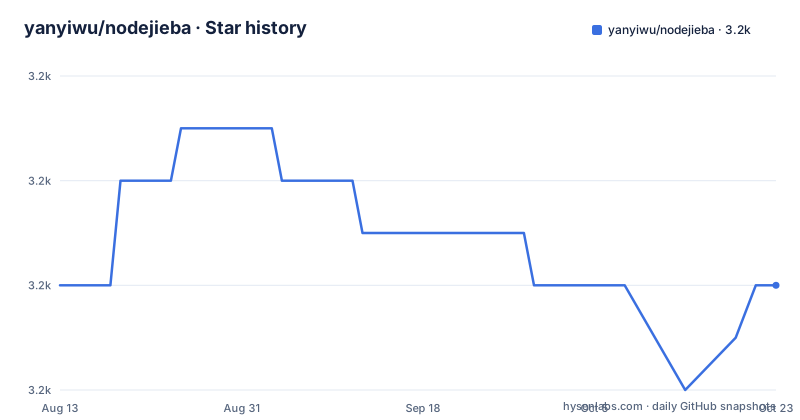
- yanyiwu/nodejieba3,234 ★ · +0
| Repository | 2026-08-13 | 2026-10-23 |
|---|---|---|
| yanyiwu/nodejieba | 3.2k | 3.2k |
0 Stars in the last 71 days, measured from the daily GitHub snapshot. Compare with other projects
Editorial analysis
Five entry points decide how hard 南京市长江大桥 gets split
The whole segmentation API is five functions over one sentence, and the difference between them is visible in their output. `cut` returns two tokens. `cutHMM` returns the same two tokens for the same input, using the hidden Markov model dictionary. `cutAll` returns every overlapping segment at once, six of them for this sentence, including 市长 and 大桥. `cutForSearch` puts short forms first and compounds after them, which is the shape a search index wants. `cutSmall` takes a granularity number as its second argument, and the example passes 3.
var nodejieba = require("nodejieba");
var result = nodejieba.cut("南京市长江大桥");
console.log(result);
//["南京市","长江大桥"]
Read that last pair carefully. The documented output of `cutSmall("南京市长江大桥", 3)` is `["南京市", "长江大桥"]`, character for character the same as the default `cut`. So the README never shows what the granularity argument changes, only that calling it with 3 does not change this particular result. Anyone choosing between `cut`, `cutHMM` and `cutSmall` for this input is choosing between three calls that agree, and the documentation gives no example where they disagree. The mode that behaves visibly differently is `cutAll`:
var result = nodejieba.cutAll("南京市长江大桥");
console.log(result);
// ["南京", "南京市", "市长", "长江", "长江大桥", "大桥"]Four dictionaries load lazily, and every load parameter is optional
Nothing is read from disk until you ask for it. If you never call the dictionary function, the defaults load automatically the first time `cut` or another function needs them. Calling `nodejieba.load()` with no arguments forces that to happen immediately and pulls in all of the defaults. Passing your own user dictionary looks like this:
nodejieba.load({
  userDict: './test/testdata/userdict.utf8',
});
The project is explicit that every parameter is optional and that anything you leave out is filled in for you, so the short call above is declared equivalent to this one:
nodejieba.load({
  dict: nodejieba.DEFAULT_DICT,
  hmmDict: nodejieba.DEFAULT_HMM_DICT,
  userDict: './test/testdata/userdict.utf8',
  idfDict: nodejieba.DEFAULT_IDF_DICT,
  stopWordDict: nodejieba.DEFAULT_STOP_WORD_DICT,
});
Four of those five are exported as `DEFAULT_*` constants. Two of the four exist only for keyword extraction: `idfDict` holds the inverse document frequency weights and `stopWordDict` holds the stop word list, so keyword work carries two extra files that plain `cut` never touches. The guidance is to leave `dict` and `hmmDict` on their defaults and to customise only `userDict`.
The install step looks for a binary named after your Node ABI
This is where installs go wrong, and the reason is written into package.json rather than into prose. The install script is `npx @mapbox/node-pre-gyp install --fallback-to-build`. Before compiling anything it looks for a prebuilt tarball on the project's GitHub releases, under a path shaped like `v{version}` with the filename `{module_name}-v{version}-{node_abi}-{platform}-{arch}-{libc}.tar.gz`. That name carries five variables, and a mismatch on any one of them sends the install down the build path. The Node ABI alone changes with every major Node release, and `libc` is there because a glibc build and a musl build are not interchangeable.
npm install nodejiebaThe fallback is not a soft warning. The segmentation algorithm is C++, supplied by the CppJieba project and pulled in as a git submodule, so the fallback compiles native code on the machine doing the install and leaves the result in `./build/Release/`. The package also states `engines.node` as `>= 18.0.0`, which is a floor, not a preference. So the two failure modes people search for under this package name are distinct: no prebuilt tarball matching your ABI and platform, or a local compile that cannot find a toolchain.
The test suite runs a missing native binding case on purpose
The test script is three separate mocha runs, each with `--timeout 10s -R spec`: `test/test.js`, `test/load_dict_test.js` and `test/missing_binding_test.js`. The third file only makes sense if loading the addon is allowed to fail, which tells you the project treats a missing `.node` binary as a state it has defined behaviour for rather than an accident. Combined with the binary path of `./build/Release/` and the fallback build in the install script, that is a deliberate contract: the JavaScript layer has to survive a native module that is not there, because that is exactly the state a mismatched ABI leaves behind after a partial install.
Development needs the submodule, which is why the clone step is not a plain one:
git clone --recurse-submodules https://github.com/yanyiwu/nodejieba.git
cd nodejieba
npm install
npm test
The tree confirms the arrangement: `.gitmodules` and a `submodules/` directory at the root, alongside `binding.gyp`, `index.js` and `lib/`. A clone that skips `--recurse-submodules` gets an empty C++ source tree, and the build fallback has nothing to compile.
Keyword extraction is documented twice at two different topN values
The API section covers the same two functions twice. The first pass runs them on a longer sentence at topN 5. A later section, headed 关键词抽取, reruns them on a shorter sentence at topN 4. Same functions, same return shape, two different sample sizes and no note that the examples differ in purpose.
var result = nodejieba.extract(sentence, 5);
console.log(result);
// [ { word: '升职', weight: 11.739204307083542 },
//   { word: '加薪', weight: 10.8561552143 },
//   { word: 'CEO', weight: 10.642581114 },
//   { word: '手扶拖拉机', weight: 10.0088573539 },
//   { word: '巅峰', weight: 9.49395840471 } ]
The two functions do not share a scale, and the README never says so. `extract` returns weights above 10, built from the idf dictionary. `textRankExtract` returns weights on a 0 to 1 scale, where the top hit scores exactly 1 and the runners-up cluster tightly: in one example 不用, 多久, 加薪 and 升职 all sit at 0.9897190043, and in the other they drift between 0.98 and 0.99. Any threshold you pick for one of these numbers is meaningless against the other. In both TextRank examples the highest ranked word is 当上, a verb, which is a reminder that neither function filters by part of speech even though `tag` can supply it.
insertWord edits the dictionary inside the running process
Adding a word does not require a restart, and the README shows both sides of the change on one snippet:
console.log(nodejieba.cut("男默女泪"));
// ["男默", "女泪"]
nodejieba.insertWord("男默女泪");
console.log(nodejieba.cut("男默女泪"));
// ["男默女泪"]
Before the call the four-character expression is cut as two words; after it, one. This is the dynamic dictionary feature the project lists as 支持动态补充词库, and it is the fast path for terms that only show up in production traffic. The gap is the reverse direction: no removal function is documented, so a term inserted this way stays in the dictionary for the life of the process. If you need the change to be reversible, or to survive a restart as data rather than as code, the `userDict` parameter of `load` is the documented route, since that dictionary is a file you control.
The speed claim is backed by a post from 2015
The performance section says 应该是目前性能最快的 Node.js 中文分词库, which translates as a claim that this is probably the fastest Node.js Chinese segmentation library available, and it links to a single benchmark post dated 2015-06-14. The hedge and the citation date are both in the text. Since then the release line has moved to v3.5.8 on 2026-03-23, following v3.5.7 on 2026-03-07 and v3.5.6 on 2026-03-06, and the last push to the repository was on 2026-09-13. None of those dates touch the benchmark.
The gap is wider than the calendar suggests. A 2015 comparison predates the `>= 18.0.0` engine floor this package now declares, so the runtime it was measured on is not the runtime it asks you to install. The two implementation notes the README points at are older still, one from 2014-02-22 on writing the C++ addon and one from 2015-03-21 on the asynchronous side. For an engineer choosing a segmenter this year, the honest reading is that no comparison has been published since 2015 and the package gives you no way to run one yourself.
Type definitions ship in the package while the documentation stays in Chinese
The feature list claims TypeScript support with complete type definitions, and the packaging backs that up. package.json sets `typings` to `types/index.d.ts`, the root carries `tsconfig.json`, a `types/` directory and `typescript_demo.ts`, and TypeScript is pinned as a dev dependency at `^5.0.4`. The runtime dependencies are kept to two: `@mapbox/node-pre-gyp` and `node-addon-api`, which is the expected shape for a package whose logic lives in a native addon.
The prose is the part that does not travel. Every heading in the API section, every explanation of the dictionary parameters, and every comment inside the example snippets is written in Chinese, as is the description field's own summary. The only English text in the file is the contributor boilerplate at the bottom and one heading that reads Develop NodeJieba. The demo repository is linked four separate times as the place for more examples, which is the practical answer for anyone who needs working code beyond the eight snippets shown here. Plan on reading the source or the linked demo rather than the documentation page.
Editorial conclusion
nodejieba is the right pick if you need Chinese segmentation inside a Node.js service now and would rather land on a prebuilt binary than a compiler, and a poor fit if your runtime predates Node 18 or if you need the documentation in English. Verify first that a tarball named {module_name}-v{version}-{node_abi}-{platform}-{arch}-{libc}.tar.gz exists for your platform, because the fallback path in the install script compiles C++ out of submodules/ and needs a local toolchain. Treat the claim that this is the fastest Node.js Chinese segmenter as unmeasured since 2015.
Frequently asked questions
What does nodejieba do, and what is it built on?
It is the Node.js implementation of jieba Chinese word segmentation. The segmentation algorithm comes from CppJieba, a C++ project, and nodejieba exposes it as a native addon. package.json declares `engines.node` as `>= 18.0.0`.
Why does installing nodejieba fail on some machines?
The install script runs `npx @mapbox/node-pre-gyp install --fallback-to-build`, which first looks for a prebuilt tarball on the project's GitHub releases named `{module_name}-v{version}-{node_abi}-{platform}-{arch}-{libc}.tar.gz`. If no tarball matches your Node ABI, platform, architecture or libc, the install compiles the C++ source locally instead, which needs a working toolchain.
How do I load my own dictionary in nodejieba?
Call `nodejieba.load({userDict: './test/testdata/userdict.utf8'})`. Every parameter is optional and anything omitted falls back to a default: `dict`, `hmmDict`, `userDict`, `idfDict` and `stopWordDict`. Without an explicit call, the default dictionaries load automatically on the first `cut`.
Which nodejieba function should a search index use?
`cutForSearch`, which returns short forms first and compounds after them: `["南京", "市", "长江", "大桥", "南京市", "长江大桥"]` for 南京市长江大桥. Plain `cut` returns only `["南京市", "长江大桥"]`, and `cutAll` returns every overlapping segment.
Can nodejieba add a word without restarting the process?
Yes. `nodejieba.insertWord("男默女泪")` changes the dictionary in place, so a `cut` that returned `["男默", "女泪"]` returns `["男默女泪"]` on the next call. No removal function is described, so the change lasts for the life of the process.
Does nodejieba ship TypeScript type definitions?
Yes. package.json points `typings` at `types/index.d.ts`, the repository root carries `tsconfig.json`, `types/` and `typescript_demo.ts`, and TypeScript is a dev dependency. The README and every API example are written in Chinese.
Official sources
Add this badge to your README
If you maintain this project, the badge below links readers to this analysis and shows its maintenance status from the daily GitHub snapshot. Paste the markdown into your README; add ?metric=license or ?metric=stars to the image URL for a different field.

[](https://hysenlabs.com/projects/yanyiwu-nodejieba)Star history chart for your README
[](https://hysenlabs.com/projects/yanyiwu-nodejieba)Was this useful?