Tacit CSS: A Classless Framework for Plain HTML5
CSS framework for dummies, without a single CSS class: nicely renders properly formatted HTML5 pages
At a glance
- What is it?
- Tacit CSS styles semantic HTML5 elements without requiring application-specific classes. It suits small sites, prototypes, documentation, and projects that prefer consistent defaults over a custom visual system.
- Who is it for?
- Tacit is a sensible fit for small HTML5 services, prototypes, documentation, and static pages whose maintainers want shared presentation without designing a class system. It is a poor choice for an application that needs distinct component variants, a bespoke brand, or extensive layout control.
- Can I use it commercially?
- Yes. MIT is a permissive licence: you can use, modify and sell software built on it, as long as you keep its copyright and licence notices.
- Is it still maintained?
- Yes. The repository received new commits within the last day.
- What is it written in?
- Mainly SCSS, according to GitHub's language statistics.
Answers come from the project's GitHub data, last synced on October 23, 2026, and from our analysis. They are not legal advice.
Star history
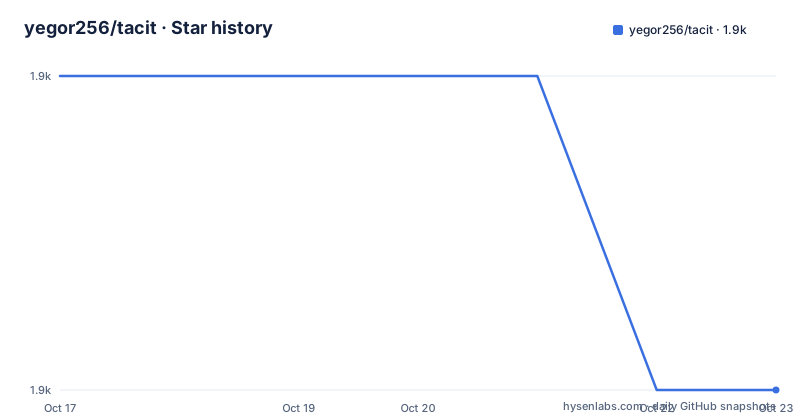
- yegor256/tacit1,879 ★ · -1
| Repository | 2026-10-17 | 2026-10-23 |
|---|---|---|
| yegor256/tacit | 1.9k | 1.9k |
-1 Stars in the last 6 days, measured from the daily GitHub snapshot. Compare with other projects
Editorial analysis
Why Tacit CSS Targets Class-Free HTML
Tacit addresses a specific styling problem: a developer has ordinary HTML5 markup but does not want to design a complete CSS layer or attach framework-specific classes throughout the application. The project describes itself as a primitive CSS framework and says its pages should look acceptable when developers write plain HTML. Its target audience includes people who do not know graphic design and teams that want a consistent appearance without introducing a large component vocabulary.
The central constraint is semantic HTML. Tacit does not ask developers to learn layout classes such as navigation containers, card modifiers, or grid columns. Based on the repository layout, the framework is written in SCSS and packaged as CSS, with the npm package pointing to `dist/tacit-css.css` as its main file. This makes it closer to a shared stylesheet for native elements than to a full application framework. The trade-off is apparent from the project's name and design goal: Tacit can reduce markup decisions, but it cannot distinguish two presentations of the same HTML element when the document contains no selector that tells it which presentation to use.
That model is useful when presentation follows document structure. A heading, paragraph, list, table, form control, or article can receive conventional styling from its element type. It also keeps the HTML readable without a layer of utility classes. Tacit is not intended to replace decisions required by a detailed design system. Its constrained scope is the feature, but teams should accept that scope only when they want similar defaults across pages.
How Tacit CSS Applies Defaults to HTML5 Elements
Tacit's documented mechanism is browser-native semantics rather than a JavaScript runtime or a JavaScript component model. The README shows a page containing only a `<link>` to `tacit-css.min.css`; no framework initialization or application-specific class appears in the example. The stylesheet then supplies the look associated with standard HTML5 elements. There is no README section describing a JavaScript API, runtime dependency, or client-side setup process.
The source is organized under `scss/`, while the distributed package contains a built `dist` directory. The release notes identify concrete examples of that source-level approach. Version 1.9.7 added form styling in `scss/_forms.scss` for two input types not defined by the current HTML5 specification. Version 1.9.6 changed `tr { border-bottom-width }` in `scss/_tables.scss` because a width alone paints nothing unless a border style is present. Version 1.9.5 removed the need to make `article` white. These changes concern native elements rather than named framework components.
Tacit also supports responsive behavior. The README describes it as responsive and mobile-friendly, but requires the page to include a viewport meta tag. That requirement is part of the effective setup: the CSS can provide responsive rules, while the browser still needs the viewport declaration for the intended mobile layout behavior. Tacit does not need to alter markup after it loads. This static, element-oriented design is easy to inspect and places little runtime logic between the browser and the stylesheet.
Adding Tacit Through jsDelivr for the First Page
The quickest documented installation is a CDN link in an HTML5 document. This uses the released CSS file and the integrity and cross-origin attributes shown by the README. The version is pinned rather than left as an unversioned package name.
<!DOCTYPE html>
<html>
  <head>
    <link rel="stylesheet"
      href="https://cdn.jsdelivr.net/npm/[email protected]/dist/tacit-css.min.css"
      integrity="sha384-D/LLHCkqHnoJ7y04sSEBX95s7wMjBn45wtHneRfp03QBgt6+a6Pz2eLUC4N1CAI0"
      crossorigin="anonymous"/>
  </head>
</html>
For a real first page, create semantic content rather than an empty `<body>`. Headings, paragraphs, lists, forms, and tables are the kinds of native structures Tacit is designed to style. The README does not document a required build step, configuration file, or initialization command for browser use.
A locally downloaded copy is also supported. The README names `tacit-css.min.css` as the file to place with the HTML and link from the document head:
<!DOCTYPE html>
<html>
  <head>
    <link rel="stylesheet" href="tacit-css.min.css"/>
  </head>
</html>
Tacit is described as responsive and mobile-friendly, but the viewport declaration is still required. Add it to the page head:
<meta name="viewport" content="width=device-width, initial-scale=1.0"/>Open the completed HTML file in a browser to inspect the styles applied to its HTML5 elements. A blank or non-semantic page will not provide a meaningful check because there are few structural elements for the framework to style.
Building Tacit from Its SCSS Sources
Source development uses Node.js and Grunt. The README directs contributors to install dependencies and run the full build before sending a pull request. The repository's `package.json` defines a `grunt` script that calls `grunt --no-color`, while the direct command documented for a full build is `grunt`.
npm install
grunt
The README does not enumerate every artifact produced by that command. Based on `package.json`, the npm package is named `tacit-css`, uses version `0.0.0` in the repository metadata, and publishes the `dist` directory, `Gruntfile.js`, and `LICENSE` according to its `files` field. The published release can have a different version number because the README's browser example links to `[email protected]`. Repository metadata should therefore not be treated as the release version used by an application.
For local SCSS work, the README says to open `index.html` in a browser and run the development task. Changes to `.scss` files are recompiled automatically after the browser is refreshed according to the documented workflow.
grunt devThe README records a separate Apple Silicon installation failure linked to `sass/node-sass` and offers a Docker route through the `yegor256/python` image. This is a documented workaround rather than evidence that every environment will encounter the same failure.
docker run -it --rm -v "$(pwd):/tacit" yegor256/python /bin/bashAfter entering that container, change to the mounted directory, install Node.js, install project dependencies, install `grunt-cli`, and run the build:
cd /tacit
/usr/bin/install-node.sh
npm install
npm install --force -g grunt-cli
grunt
The Docker sequence is longer than the CDN path and is intended for contributors or source builds, not ordinary page setup.
Where Element-Only Styling Becomes a Constraint
The absence of classes is the main strength and the main limitation. If a page needs a primary and secondary button, two navigation arrangements, several card treatments, or different content widths by context, the HTML must provide some way to distinguish them. Tacit's documented examples do not prescribe such a class API, so introducing selectors would move the project back toward custom styling. Developers choosing Tacit are choosing a small, consistent visual language rather than a complete component catalogue.
The current styling is tied to presentational assumptions about native elements. A release removing the need to make `article` white and another correcting table borders show that element-level presentation continues to receive adjustments. This is normal maintenance, but it also means adoption decisions should consider the desired relationship between semantic tags and colors. The README does not document theming through Sass variables, runtime configuration, or per-component customization hooks.
Browser support is documented rather than unlimited. The compatibility table marks Chrome 60 and later, Firefox 56 and later, Safari 11 and later, Opera 48 and later, Edge 14 and later, Chrome on iOS 60 and later, Safari on iOS, and Internet Explorer 11 as compatible. It also warns that some listed browsers have had minor issues reported through the issue tracker. Applications serving older versions outside that table have no guarantee from the README.
Tacit is also the wrong tool when visual differentiation is the product's main requirement. A class-based framework can expose reusable components and variants through explicit selectors. Tacit avoids that complexity by refusing to define a component vocabulary. A team should compare its need for predictable defaults against its need for distinct component states before choosing.
Tacit Compared with Kacit and Bahunya
Kacit is the closest documented alternative for readers who accept Tacit's element-based approach but need a different appearance. The README describes Kacit as a Tacit CSS classless framework with a yellow accent and Georgia font. The architectural approach remains classless and tied to ordinary HTML, while the visible theme changes. This makes Kacit a more direct comparison than an unrelated utility-first framework: it changes presentation while preserving Tacit's underlying preference for semantic markup without class names.
Bahunya is broader. The README describes it as a CSS framework inspired by Tacit with responsive typography, a navbar, syntax highlighting, and additional features. That indicates a different trade-off. Tacit deliberately limits itself to primitive defaults and contains no layouts, while Bahunya adds named features and extends the styling model. A project needing navbar and syntax-highlighting treatment may find that extra scope relevant, but the README does not document Bahunya's exact installation, configuration, or compatibility behavior, so those details should not be assumed.
Tacit is preferable when small markup and a stable set of defaults matter most. Kacit is preferable when the basic classless model is acceptable but the default visual identity is wrong. Bahunya is a candidate only when its added feature set matches identified requirements and its own documentation has been checked directly.
Tacit Release Activity, MIT Terms, and Upgrade Work
The repository is not archived, and its last push was on 2026-10-17. Recent releases include 1.9.7 on 2026-06-21, 1.9.6 on 2026-06-18, and 1.9.5 on 2025-11-25. These dates and release descriptions show recent repository activity, but they do not by themselves guarantee compatibility with every existing page.
The project uses the MIT license. The repository contains `LICENSE.txt` and a `LICENSES/` directory. The MIT designation permits use, modification, distribution, and inclusion in larger works under its conditions, but this review does not replace legal advice. Projects should preserve the applicable copyright and license notice when redistributing the CSS or incorporating it into a distributed bundle.
For web pages, upgrading may be as limited as changing the version in the CDN URL. Because the stylesheet has no documented JavaScript initialization step, there is no runtime migration described in the README. That convenience does not remove visual regression work: element defaults can change, as the recent table, form, and `article` updates illustrate. A controlled version change should be checked against forms, tables, articles, and the responsive behavior required by the viewport configuration.
For contributors, upgrades can involve the full Grunt build, SCSS linting, generated CSS, and package contents. The README does not document a formal release checklist beyond building before a pull request, so teams should inspect the `Gruntfile.js` and generated files when changing the build pipeline itself.
Editorial conclusion
Tacit is a sensible fit for small HTML5 services, prototypes, documentation, and static pages whose maintainers want shared presentation without designing a class system. It is a poor choice for an application that needs distinct component variants, a bespoke brand, or extensive layout control. Before adoption, check the generated appearance against the semantic HTML being served, confirm that the documented browser matrix fits the deployment audience, and verify whether the release pinned on your CDN remains the intended version. For a project that accepts element-based styling but needs a different visual identity, Kacit is the more direct starting point because it explicitly builds on Tacit with an accent color and Georgia font.
Frequently asked questions
How do I install Tacit CSS in an HTML5 page?
Link the released `tacit-css.min.css` file from the document head, either through the documented jsDelivr URL or from a local copy. The CDN version must be pinned to the release you intend to use.
Does Tacit CSS require adding classes to HTML elements?
No. The documented setup uses plain HTML5 and no application-specific CSS classes. The framework styles native page elements according to their semantic markup.
What must I add to make a Tacit CSS page mobile-friendly?
The README requires the viewport meta tag in the page head. Tacit is described as responsive, but omitting this declaration prevents the documented mobile setup from being complete.
How can I build and develop Tacit from its SCSS source?
Run `npm install` followed by `grunt` for the full build. For local development, run `grunt dev`, open `index.html`, and make changes to `.scss` files for automatic recompilation.
Official sources
Add this badge to your README
If you maintain this project, the badge below links readers to this analysis and shows its maintenance status from the daily GitHub snapshot. Paste the markdown into your README; add ?metric=license or ?metric=stars to the image URL for a different field.

[](https://hysenlabs.com/projects/yegor256-tacit)Star history chart for your README
[](https://hysenlabs.com/projects/yegor256-tacit)Was this useful?