A local roleplay world that keeps its state as JSON files you can read
Create your own AI characters and step into their story worlds. Chat, go on adventures and dive into stories with characters, building bonds through every interaction. Supports DeepSeek Harness plugins.
At a glance
- What is it?
- MuseAI is a Tauri desktop application for character chat, tabletop-style text adventures and stepping into a novel you already wrote, where the persistence layer is plain JSON and Markdown under a single Documents folder, per-module model configuration lets you mix providers, and every AI failure mode it documents is a strict-format extraction returning truncated or unparseable output.
- Who is it for?
- It fits a writer who wants one character to persist across sessions and who is already comfortable bringing their own API key, since the storage layout makes that persistence inspectable rather than hidden in a database. Three things to know before you start.
- Can I use it commercially?
- The repository metadata does not identify a licence. Check the project’s published terms and any component-specific licences before reuse.
- Is it still maintained?
- Yes. The repository last received commits 22 days ago.
- What is it written in?
- Mainly TypeScript, according to GitHub's language statistics.
Answers come from the project's GitHub data, last synced on November 25, 2026, and from our analysis. They are not legal advice.
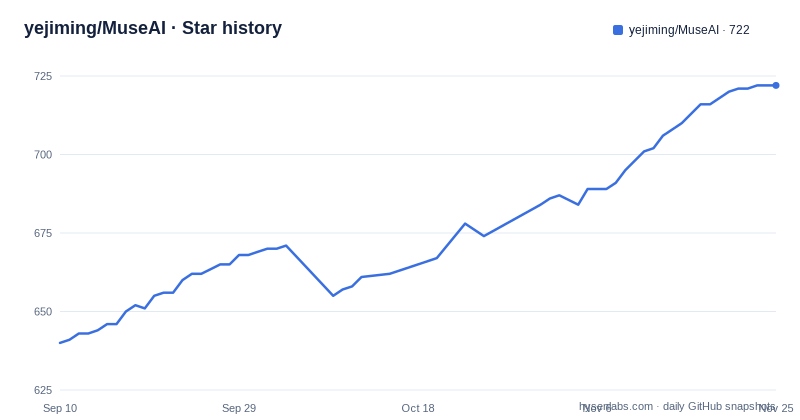
Star history
- yejiming/MuseAI722 ★ · +82
| Repository | 2026-09-10 | 2026-11-25 |
|---|---|---|
| yejiming/MuseAI | 640 | 722 |
82 Stars in the last 76 days, measured from the daily GitHub snapshot. Compare with other projects
Editorial analysis
Three modes share one set of world books and character cards
The application offers three distinct ways to interact, and they share the same setting objects rather than duplicating them.
Companion chat is one to one. You create a world book and character cards under the background settings section, pick a character in the companion chat screen, and talk. A character card holds a name, personality, relationship, bottom lines, catchphrases and backstory, and a character can be bound to a world book so it stays inside one fictional world. After a conversation you can ask the app to archive the memory, which distils key events and updates the card.
Story adventure is the tabletop mode. You select a world book and several character cards, and the model acts as narrator, driving scene description, character reactions and plot progression from three kinds of input: language, action, or plot instruction. Adventure logs can be archived into character memory.
Stepping-in mode is the third. It assembles an outline, a world book and character cards into a playable story world, lets you choose an entry point and an identity to play, and tracks scenes, beats, state and summary memory so a long plot can continue. Progress is saved so you can resume.
The reuse rule is the point: one world book and one card work in all three, plus the bond archive.
The application itself is distributed as installers from the releases page, as a disk image on macOS and an executable on Windows. Two installation notes are worth knowing before you start. Windows users are told to switch off antivirus software during installation because the installer may be blocked and behave oddly afterwards, re-enabling it once installed. And on macOS, an app that reports itself as damaged on first launch is fixed by clearing the quarantine attribute:
xattr -dr com.apple.quarantine /Applications/MuseAI.appThere is also a recovery path for a bad update: each module has a system prompt in the settings page with a restore-defaults button.
Everything lives in ~/Documents/MuseAI as files you can open
The data storage section is the most concrete part of the documentation, and it is a directory listing rather than a database diagram.
All user data is stored locally, with nothing uploaded to an external server except API calls. The files live under a single folder in the user's Documents directory, and the layout is given per data type.
Manuscripts go in an articles subfolder, the reference library in references, outlines in outline. Version history is a hidden versions folder alongside each file. Character cards and world books share a single JSON file named for the partner store. Sessions are separate files per mode with different name patterns: partner sessions, story sessions, and writing agent sessions. Application settings live in a settings store JSON file, and per-module interface state is stored as JSON in the config folder.
Three consequences follow from that design. The bond archive is not a database table, so a conversation can be read in a text editor years later. Backups need no tooling: copy the folder. And moving machines is a copy to the same path.
Nothing here describes encryption, and one of those files holds long roleplay transcripts by design. The documentation recommends periodic backups by copying the directory to a drive or cloud folder, which is convenient and also means the copy inherits whatever protection that destination has.
Each module gets its own model, and the connection is tested once
Model configuration is per module rather than global, and the settings page walks through four steps.
You enter an API key, supporting OpenAI, Anthropic, and any third-party service compatible with the OpenAI request format. You enter the base address, which is where a relay service goes. You choose a model name, with examples given such as a DeepSeek variant and a Claude Sonnet variant. Then you press a test connection button to confirm the configuration before using anything.
The per-module part is the useful design. Companion chat, adventure, stepping-in, the de-AI-ing module and the outline tools can each point at a different model with different parameters, so you can put a cheap fast model on bulk work and an expensive one on the conversations that matter.
The provider list in the FAQ names DeepSeek, Kimi, Zhipu and Qwen among the compatible services, which tells you the OpenAI-compatible shape is the integration point and that domestic relay services were a design target rather than an afterthought.
Pricing is explicit: the application does not charge, and cost comes from whichever provider you configured. There is also a documented failure checklist, covering a mistyped key with stray spaces, an incomplete base address that should start with a scheme and end in a version path, a network that cannot reach some providers, and an account with no balance left.
Every structured feature depends on the model returning strict JSON
The FAQ documents four separate failure modes, and three of them have the same root cause.
Extraction of world books and character cards needs strict JSON. If the model does not return that format, parsing fails. The documented causes are an unstable model service causing a network wobble or an abnormal response, and a model that returns the wrong format. The remedy is to retry, with one addition for character cards: list the character names manually in the input box so the model extracts them one at a time, which is said to raise the success rate noticeably.
Archived memory extraction has the same requirement and the same remedies, plus a specific one. If retries fail, go to the bond page settings and set the temperature for the chat-page or adventure-page memory archival to zero, which makes the output more stable.
Reverse outline extraction fails for a different reason: token limits. Condensing a whole novel into a structured outline can exceed the model's output allowance, so the reply is truncated. The prompt asks for no more than a certain number of characters and the model does not always comply, so there is a stated failure probability. The fix is to raise the maximum output token for the relevant agents in the outline page settings and to word the length limit more forcefully in the system prompt.
So the architecture's fragility is uniform: any feature that produces structured data is one formatting deviation away from failing.
Out-of-character replies have three documented causes and three fixes
The most common user problem is a character suddenly sounding like a generic assistant, and the FAQ treats it as a diagnosis exercise.
The first cause is that no setting is bound. Without a world book and character card, the model answers in a general mode. The check is whether the right cards are attached to the conversation.
The second cause is context exhaustion. In a long conversation the early settings fall out of the window. The fix is to start a new session, or to raise the maximum context token setting for the chat agent.
The third is tuning. The settings page exposes the chat agent's system prompt and its temperature, and the guidance is to adjust those to make roleplay steadier or more variable.
That third fix is worth pausing on, because it is the only place the documentation admits the temperature is a creative control rather than a correctness one. Every other setting in the app is about reliability: format compliance, token budgets, retry behaviour. Temperature is offered for making a character more vivid.
The temperature setting appears in three separate contexts: the chat agent, and separately the archived memory agents for the chat page and the adventure page. That last pair is where it stops being creative and becomes a correctness lever.
Mobile access means the same WiFi, not cloud sync
The phone story is the weakest documented area, and it is worth reading precisely because the answer is no.
The desktop app starts a local network service automatically. You find the address shown in the settings page and open it in a phone browser on the same network, with no app to install. The phone can then use the companion features, story adventure and the bond archive.
Data is not synchronised between devices, and the FAQ says so directly. Data lives on the computer. What you type on the phone is stored on the computer. As long as the computer stays on and the data is not deleted, the phone and the computer see the same thing.
So the phone is a remote view of the desktop's state, not a second client with its own state. The requirements are that both devices are on the same WiFi or the same router, and that the desktop application is running.
There is no mention of authentication on that local endpoint. A service listening on the local network that serves a companion chat and full manuscripts is exposed to anyone on the same WiFi, which in a café or a hotel means the whole network. Nothing in the documentation describes a token, a password, or a binding restriction, so treat the local network as trusted or put the app behind your own network controls.
The phone browser approach does at least mean there is no second build to maintain, since the interface is the web build served locally.
Writing tools exist, and the de-AI-ing module never overwrites your text
The authoring features are described as supporting the interactive work rather than competing with it, and the FAQ is explicit that the application is currently better suited to the roleplay side.
There is a unified workspace for manuscripts with a Markdown editor, live preview and syntax highlighting, per-file version history and automatic backup before a change. The version history is reachable from a context menu on a file in the left list, and any version can be restored.
The reference library imports example articles you like so the model can read them when assisting with writing or analysing style.
The outline tools come in four shapes: scoring an outline with optimisation advice, generating chapter structure from a story requirement, reverse-engineering a structured outline from a complete novel, and distributed parallel analysis of long fiction to feed the world book, character cards and stepping-in material.
The de-AI-ing module is the one with an explicit safety property. Detection quantifies how machine-like the writing is and points at problems paragraph by paragraph. The rewrite generates a new version saved as a separate new file. The original is never overwritten, and the documentation says so twice, once in the feature description and once in the FAQ.
That property is the one to check first if you try it, because a tool that rewrites your prose in place is a tool you cannot trust with a draft.
Editorial conclusion
It fits a writer who wants one character to persist across sessions and who is already comfortable bringing their own API key, since the storage layout makes that persistence inspectable rather than hidden in a database. Three things to know before you start. The model must return strict JSON for every structured feature, so extraction of world books, character cards and archived memories fails on formatting as often as on network trouble, and the documented remedy is raising the output token limit or dropping the temperature to zero. Token limits are the second constraint, and reverse outline extraction fails when the model runs out of output. And the local data story has no encryption story, so a folder of intimate roleplay transcripts sits in plain files that the recommended backup is to copy somewhere else.
Frequently asked questions
Is Muse AI free?
The application itself does not charge and there is no in-app purchase. You bring your own API key for OpenAI, Anthropic, or any service compatible with the OpenAI request format, and the provider bills you according to your own usage. Installers are published as releases for Windows and macOS.
Is Muse AI safe to use?
Your manuscripts, outlines, reference library, character cards, world books and session records stay on your own computer in a single Documents folder, and nothing is uploaded automatically. Context is sent to the provider you configured only when you send a message, analyse text or generate content. No encryption of that local folder is described.
What is the difference between chat, adventure and stepping-in modes in MuseAI?
Companion chat is one to one and binds a single character card, with memory archived afterwards. Story adventure is a tabletop mode that binds several character cards to one world book and lets the model act as narrator from language, action or plot input. Stepping-in assembles an outline, world book and cards into a playable novel world where you choose an entry point and identity, with scenes, beats and progress you can resume.
Where does MuseAI store my data?
In a single folder under the user's Documents directory. Manuscripts, the reference library and outlines each have a subfolder, version history sits in a hidden folder beside each file, character cards and world books share one JSON file in the config folder, and each kind of session is a separate JSON file with its own name pattern. Settings and per-module interface state are JSON in the same config folder.
Why do world book, character card or memory extraction features fail in MuseAI?
Usually because the model did not return strict JSON, or because the service returned an incomplete response. Retrying is the first remedy. For character cards, listing the character names in the input box so the model extracts them one at a time is said to raise the success rate. For archived memory, setting the temperature of the relevant archival agent to zero makes the output more stable.
Official sources
Add this badge to your README
If you maintain this project, the badge below links readers to this analysis and shows its maintenance status from the daily GitHub snapshot. Paste the markdown into your README; add ?metric=license or ?metric=stars to the image URL for a different field.

[](https://hysenlabs.com/projects/yejiming-museai)Star history chart for your README
[](https://hysenlabs.com/projects/yejiming-museai)Was this useful?