Awesome SwiftUI: a curated reading list where the WWDC sessions come first
A collaborative list of awesome SwiftUI resources. Feel free to contribute!
At a glance
- What is it?
- ygit/swiftui is a list of SwiftUI resources, and its organising principle is visible in the first entry, which is the Apple Developer Documentation with eleven WWDC 2019 sessions attached to it, from the first announcement through to accessibility, watchOS and building custom views. The rest of the list runs through video-first educators, a couple of sample repositories, and a cheat sheet.
- Who is it for?
- Awesome SwiftUI fits a Swift developer who has just installed Xcode and wants a path through the framework rather than a search results page, and it is genuinely useful as a starting map because the official material comes first and the third party material is sorted by what it covers.
- Can I use it commercially?
- Yes. MIT is a permissive licence: you can use, modify and sell software built on it, as long as you keep its copyright and licence notices.
- Is it still maintained?
- Yes. The repository last received commits 164 days ago.
- What is it written in?
- GitHub does not report a main language for this repository.
Answers come from the project's GitHub data, last synced on November 6, 2026, and from our analysis. They are not legal advice.
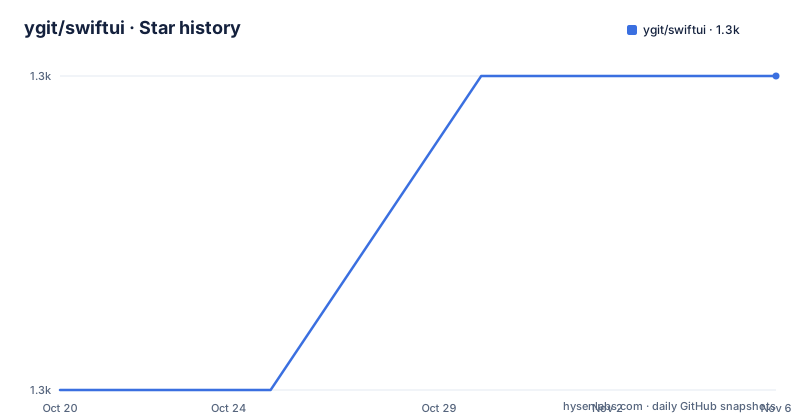
Star history
- ygit/swiftui1,309 ★ · +1
| Repository | 2026-10-20 | 2026-11-06 |
|---|---|---|
| ygit/swiftui | 1.3k | 1.3k |
1 Stars in the last 17 days, measured from the daily GitHub snapshot. Compare with other projects
Editorial analysis
The list starts with Apple, and that ordering is the design
The repository is a collaborative list of awesome SwiftUI resources, and the description invites contributions. The primary language is not recorded, the licence is MIT, the repository is not archived, and the last push was on 2026-05-27. There are no GitHub releases, and the topic tags list apple, awesome, declarative, framework, hacktoberfest, ios, ipados, list, mac, swift, swiftui, tvos, ui, uikit and watchos, with a badge showing pull requests are welcome.
What makes the list worth reading rather than just scanning is the structure of the first entry. SwiftUI on Apple Developer Documentation comes first, and under it sit eleven WWDC 2019 sessions: the keynote first announcement, the platforms state of the union with more SwiftUI, Introducing SwiftUI building your first app, SwiftUI Essentials, building custom views, integrating SwiftUI, data flow through SwiftUI, mastering Xcode previews, accessibility in SwiftUI, SwiftUI on all devices, and SwiftUI on watchOS. There is a platform badge in the header covering iOS, macOS, watchOS and tvOS, with a note that UIKit is also in scope for Mac.
Eleven sessions in one entry is a lot, and the reason they are grouped rather than scattered is that they answer different questions. A first look at the framework and the platforms overview are orientation. Xcode previews and data flow are workflow. Accessibility and integrating SwiftUI with existing UIKit code are the two questions every team migrating an existing app actually has. And a video of the keynote announcement is the historical anchor, the moment the framework was first shown.
There is also a practical detail that matters for anyone following a link list. The entries are typed by medium. A video gets a camera marker, a written article gets a book marker, and a code repository gets a laptop marker. So a reader looking for something they can skim in a browser and a reader looking for something they can build from are distinguishable without reading the URLs.
The list is not a search engine dressed up as a resource. It is a reading order.
The middle of the list is video-first educators, sorted by what they cover
Entries two through seven are individual educators and channels, and the pattern is worth naming precisely, because it is a pattern of the medium rather than of the person.
Paul Hudson on Hacking With Swift comes second, with a first look at SwiftUI article, a getting started article, a quick start guide, a video playlist of SwiftUI by example, another playlist of complete apps, a set of free tutorials, and two videos that are the most useful thing in the entry: a SwiftUI versus UIKit comparison of building the same app in each framework, and a video on the differences between @State, @ObjectBinding and @EnvironmentObject.
Those two are the reason to read the entry rather than skim it. A side by side comparison of the same app in two frameworks answers the question every team has when they are choosing, and a video on the differences between three property wrappers answers the question every team has when they are writing. Both are questions that documentation answers badly and a working example answers well.
The rest of the list follows the same pattern. Lets Build That App with a sneak preview demo project and a video on running SwiftUI on Mojave with Playgrounds, which is a genuine constraint for anyone starting with an older macOS. Code With Chris with a basics tutorial, a lists and navigation and JSON data app, a video on handling user input, and a video on property wrappers and @State and @EnvironmentObject. Kilo Loco with a scroll view and list video and a simple state management introduction. Rebeloper with the WWDC reaction video and a video arguing that you should not learn SwiftUI just yet, plus videos on using SwiftUI inside UIKit, which is the bridge question for a large existing codebase. Devslopes with a beginner tutorial on iOS 13. Brian Advent with a simple app and a complex UI built from start to finish.
Three of these entries are marked as opinion rather than tutorial. The Rebeloper reaction video, the video telling you not to learn SwiftUI yet, and the SwiftUI versus UIKit comparison are all arguments, and the list is willing to include them alongside the how-to material. That is a reasonable editorial choice for a framework in its first years, and it is also the part of the list most likely to be out of date now.
Entry seven contains the videos on bridging SwiftUI and UIKit in the other direction, the DuckUI talk, the SwiftUI modifiers in UIKit video and the visual debugging in UIKit video, three items in one entry on the same topic, which is either thorough or repetitive depending on your taste.
The code entries, and the two repositories worth cloning
Three entries in the list are code-oriented rather than video, and they serve different purposes.
The first is an example to-do list app using SwiftUI, at github.com/devxoul/SwiftUITodo. A to-do list is a deliberately small application, which is exactly why it works as a starting example. A person can read the whole thing in one sitting and see how a view, a list and a binding fit together without any of the complications of a real app.
The next is a written article, Inside SwiftUI's Declarative Syntax's Compiler Magic, which is the one piece of written theory in the list and stands out among the videos. It is the link to reach if you want to know why the declarative syntax works the way it does rather than how to use it.
The third is all of the Apple documented SwiftUI tutorials in one easy download, a repository that collects the sample code from Apple's own tutorials so you can have it locally rather than following the links one by one. That is a convenience of a particular kind, and it is the kind that ages worst, because a snapshot of sample code from a particular release is only as good as the release it was taken from.
There is also a cheat sheet at the end of the list, from the SimpleBoilerplates organisation, and a live coding entry by Swiftly Tilting Planet.
Two observations about the code entries as a group. They are all small, self-contained and illustrative rather than production, which is correct for a learning list and would be wrong for anything else. And they are the fastest ageing content in the list, because a sample project written against an early SwiftUI will not compile against a current one without work, while a video from 2019 will still play and still be informative even when the API it shows has moved on.
That is the general shape of the ageing problem for the whole list, and it is worth making explicit before you rely on it. The Apple documentation in entry one is maintained continuously, so it is current. The WWDC sessions are historical, so they are accurate about what was true in 2019 and increasingly different from the framework as it is now. The educator videos sit in between, and their value is increasingly conceptual rather than literal.
None of which makes the list less useful. It is a map drawn by someone who knew where the good material was, and the first entry alone is a better starting point than a search box, because the sessions are ordered by question rather than by date.
What the list does not do, and how to keep it useful
It is worth being clear about the limits of the artefact, because a link list of this kind is easy to mistake for something it is not.
There is no editorial commentary linking the entries together. The list is a sequence of sources, not a syllabus, and a reader who wants to know which of two videos to watch first is left to decide. The grouping into educators partly solves that, since each educator has a coherent focus, but the ordering within a section is not a learning path.
There is also no version information on the entries. Nothing in the list tells you which release of SwiftUI or which version of Xcode a given tutorial targets, and for a framework that was announced in 2019 and has changed substantially since, that absence is the thing that most affects how you should read it.
The list also stops at the point where a developer needs architecture guidance. It is about learning the framework, not about structuring an application around it, and there is nothing in the list about how to compose SwiftUI at scale, how to handle state across a large app, or how to decide between SwiftUI and UIKit for a specific codebase beyond the one comparison video in entry two.
The contribution model is the standard awesome list one, with pull requests welcome and a Hacktoberfest topic tag, and that model has an obvious consequence for how the list ages. New material gets added at the end of a section, and entries are not retired. So the list tends to accumulate, and the most valuable item in it, the Apple documentation, is at the top while the most dated items are scattered through the middle.
A reasonable way to use it is to read entry one, watch the keynote and the platforms overview, and then use the educators for the topic you are stuck on rather than working through the list in order. For the property wrappers and the SwiftUI versus UIKit comparison specifically, entry two is the one to prioritise, because those are the two questions whose answers do not go stale as quickly.
One last practical note. The list's own framing is that it is collaborative, so if you find a resource that is missing, the contribution path is a pull request, and the repository is set up for exactly that. The last push was on 2026-05-27, so the list is still being maintained rather than abandoned, which means additions are still welcome.
Editorial conclusion
Awesome SwiftUI fits a Swift developer who has just installed Xcode and wants a path through the framework rather than a search results page, and it is genuinely useful as a starting map because the official material comes first and the third party material is sorted by what it covers. It is the wrong resource if you are looking for a production architecture reference, since it is a link list with no guidance on how the pieces fit, and it is the wrong tool if you want code you can depend on, since the repositories it links are samples. Before using it, check the dates, because much of the list dates from the 2019 launch period when the framework was still changing shape, and read the documentation first rather than the videos, since Apple has rewritten the framework substantially since.
Frequently asked questions
What is the Awesome SwiftUI list and how is it organised?
It is a collaborative list of SwiftUI resources that starts with SwiftUI on Apple Developer Documentation and the WWDC 2019 sessions attached to it, then moves through video-first educators such as Paul Hudson, Lets Build That App, Code With Chris, Kilo Loco, Rebeloper, Devslopes and Brian Advent, then a few sample repositories and reference links, with entries marked by whether they are a video, an article or a code sample.
Which resources in the Awesome SwiftUI list are most worth reading first?
The Apple documentation entry is the one to start with, and within the educators section the two most useful are the SwiftUI versus UIKit comparison of building the same app in each framework, and the video on the differences between @State, @ObjectBinding and @EnvironmentObject, since both answer questions documentation handles poorly.
Can I contribute to the Awesome SwiftUI list?
Yes. The repository is described as a collaborative list and invites contributions, with a badge showing pull requests are welcome and a hacktoberfest topic tag, and the standard flow is to open a pull request adding a link to the appropriate section.
Which code samples does the Awesome SwiftUI list link?
An example to-do list app using SwiftUI, a repository collecting all of the Apple documented SwiftUI tutorials for download, and a SwiftUI cheat sheet. There is also a written article on the compiler magic behind SwiftUI's declarative syntax, which is the one piece of theory in the list.
Official sources
Add this badge to your README
If you maintain this project, the badge below links readers to this analysis and shows its maintenance status from the daily GitHub snapshot. Paste the markdown into your README; add ?metric=license or ?metric=stars to the image URL for a different field.

[](https://hysenlabs.com/projects/ygit-swiftui)Star history chart for your README
[](https://hysenlabs.com/projects/ygit-swiftui)Was this useful?