Hand an AI coding session to another agent with cli-continues
resume any AI coding session in another tool — Claude Code, Copilot, Gemini, Codex, Cursor
At a glance
- What is it?
- A TypeScript command line utility that reads where sixteen coding agents store their sessions and rebuilds that history as a text document the next agent can read. It is built for one specific outage, a provider rate limit, and it trades machine state for narrative.
- Who is it for?
- Adopt continues when a provider rate limit ends a debugging session and you need the story of that work in another agent. Skip it when the next step depends on machine state such as a diff or a failing test, because a handoff is a generated text document.
- Can I use it commercially?
- Yes. MIT is a permissive licence: you can use, modify and sell software built on it, as long as you keep its copyright and licence notices.
- Is it still maintained?
- Activity is slowing. The repository last received commits 6 months ago.
- What is it written in?
- Mainly TypeScript, according to GitHub's language statistics.
Answers come from the project's GitHub data, last synced on November 7, 2026, and from our analysis. They are not legal advice.
Star history
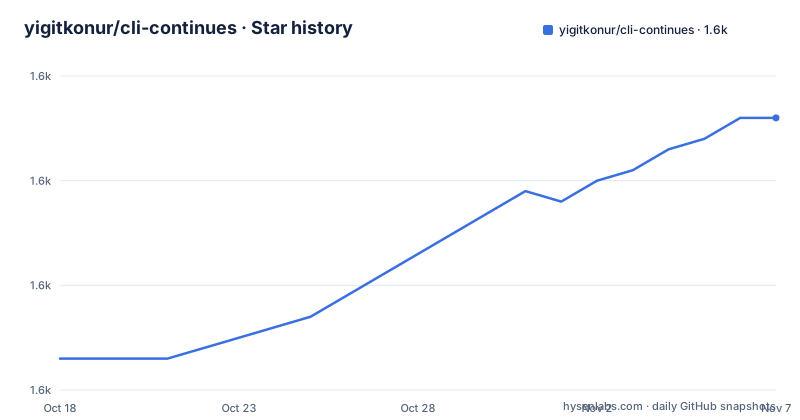
- yigitkonur/cli-continues1,596 ★ · +23
| Repository | 2026-10-18 | 2026-11-07 |
|---|---|---|
| yigitkonur/cli-continues | 1.6k | 1.6k |
23 Stars in the last 20 days, measured from the daily GitHub snapshot. Compare with other projects
Editorial analysis
A rate limit in one agent should not erase the session
The package exists for one specific failure: a long debugging session stops dead because a provider caps your requests, and the conversation then exists only inside the tool that hit the wall. The README frames that loss concretely, as 30 messages of context holding file changes, architecture decisions and half-finished refactors. Developers who move between Claude Code, Codex, Copilot, Gemini CLI and Cursor within a single week are the audience here, while someone who stays inside one agent has no reason to install this at all.
It ships under the MIT licence, the repository is not archived, and the last push was on 2026-05-07, with no GitHub releases published, so the only version number available outside a local install is whatever npm reports for you.
Four stages turn sixteen session formats into one document
The pipeline has four stages, and each one is a place where context can go missing. Discovery scans the session directories belonging to all 16 supported tools. Parsing reads whatever native format each of them wrote, and those formats are not interchangeable: JSONL, JSON, SQLite and YAML all appear in the storage table, while Cline, Roo Code and Kilo Code sit inside VS Code globalStorage rather than a home directory.
Extraction keeps recent messages, file changes, tool activity and AI reasoning. Handoff then writes a structured context document and injects it into the target agent, which is designed so the receiving agent understands what was being done, which files were touched, which commands ran and what remains unfinished.
The support claim is worth doing arithmetic on. Sixteen agents give 240 handoff paths, which is 16 multiplied by 15, so every same-tool pair is excluded from the count. Those excluded cases take a completely different route through the code.
Running npx continues without installing anything first
Installation is one line, or none at all. The package publishes a binary under two names and is meant to be run straight through npx when you do not want a permanent install on the machine.
npx continuesRun with no arguments, the tool scans everything it can find, shows a picker listing sessions across the agents that turned up, and then asks where you want to continue. Start it from a project directory and sessions from that directory are prioritized, which matters once your history spans several checkouts.
A global install puts both binary names on your PATH:
npm install -g continues # gives you `continues` and `cont`Short forms skip the picker completely and take the Nth most recent session for a named tool.
continues claude        # latest Claude session
continues codex 3       # 3rd most recent Codex
continues amp           # latest Amp
Those forms do not build a handoff document at all. They call the target tool's own resume mechanism, which is why the project describes that path as full history with no context injection.
Handing a session to a different agent with the resume verb
Cross-tool transfer is a separate command. You name the session and the destination, and everything after the destination flag is either translated or forwarded untouched:
continues resume abc123 --in gemini
continues resume abc123 --in codex --yolo --search --add-dir /tmp
continues resume abc123 --in codex --debug-prompt
Mapping covers model, sandbox, auto-approve and extra directories, each rewritten into whatever the destination calls the same idea. Anything the mapper does not recognize passes straight through, which is convenient on a good day and means a mistyped destination flag reaches the other agent verbatim.
The debug flag is the safety valve. It writes the handoff file exactly as it would normally, prints the prompt that would have been sent to the target, and exits without launching anything, so you can read what the receiving agent will actually know before it starts guessing about your refactor.
Where each of the sixteen agents keeps its session files
The storage table documents what other vendors write rather than anything this project owns, and it is the part worth reading closely. Claude Code sessions are JSONL under `~/.claude/projects/`, Codex uses JSONL under `~/.codex/sessions/`, and Copilot keeps YAML plus JSONL in `~/.copilot/session-state/`. Gemini CLI stores JSON under `~/.gemini/tmp/*/chats/`. Two agents need a database instead of a text log: OpenCode reads SQLite from `~/.local/share/opencode/storage/` and Crush reads `~/.crush/crush.db`. Amp keeps JSON in `~/.local/share/amp/threads/` and Factory Droid uses JSONL plus JSON under `~/.factory/sessions/`. Cursor transcripts sit in `~/.cursor/projects/*/agent-transcripts/`, Kiro on macOS reads `~/Library/Application Support/Kiro/workspace-sessions/`, and the three VS Code extensions use their own globalStorage directories.
Two gaps appear in the same table. It names fourteen agents rather than the sixteen in the support list, so Kimi CLI and Qwen Code have no published session location, and the Antigravity row stops mid-cell. Read as a layout contract, every one of those paths is a place where a vendor changing its storage format breaks exactly one leg of a handoff and leaves the other fifteen working.
Four presets decide how much history survives the transfer
Verbosity is set by four presets, and the numbers are the whole decision. `minimal` keeps 3 messages with no tool samples, `standard` keeps 10 messages with 5 tool samples and 500 chars of subagent detail, `verbose` raises that to 20 messages, 10 samples and 2000 chars, and `full` keeps 50 messages with every sample and everything from subagents. The target's context window is what makes this matter, because the document is prepended to a brand new conversation rather than replayed inside the original one.
Per-project defaults override the preset from a YAML file in the project root:
preset: verbose
recentMessages: 15
shell:
  maxSamples: 10
  stdoutLines: 20
Settings resolve in a fixed order: an explicit `--config <path>` first, then `.continues.yml` in the current directory, then `~/.continues/config.yml`, and finally the `standard` preset as the floor. `.continues.example.yml` holds the full key reference, and the shell keys show that command output is sampled rather than stored whole.
The install banner names the previous major line
The package manifest and the install banner disagree, and the banner is what a new user sees first. The manifest reads version 4.1.1, while the postinstall script prints `continues v3.0.0` followed by a note about typed schemas, library exports and Cursor support. With no GitHub releases published to reconcile the two, that string is the only version-facing text on installation, and it names the previous major line rather than the one npm actually installs. It is a small defect, but it is exactly the kind that makes an outside maintenance question hard to answer.
The same manifest shows how the project wants to be consumed. Two entry points are exported, the main one at `dist/index.js` plus a CLI subpath, and the package ships only the build output alongside its README. Build runs through tsc, tests run under `vitest`, and linting is `biome check src/`, with a `test-fixtures/` directory in the repository holding the parsed samples the test suite reads.
The alternative is waiting, or keeping raw session files
Two honest alternatives exist, and each gives up something the handoff document does not.
One is to sit out the rate limit window and use native resume on the source agent, which is what the short forms already do. That path keeps full history with nothing injected, and it is the right choice whenever the wait is tolerable.
The other is to stop generating handoff documents and keep the sessions as files. The dump verb writes every session to disk in markdown or JSON, named `{source}_{id}.md` or `{source}_{id}.json`, which you can diff, archive or feed to something else entirely:
continues dump all ./sessions
continues dump claude ./sessions/claude
continues dump all ./sessions --json
continues dump all ./sessions --limit 50
For work where the receiving agent must act on machine state rather than a summary of intent, the generated document is the wrong shape. A failing test, a diff, or a half-applied migration does not survive being rewritten as prose, and nothing in the four stages reconstructs it afterwards.
Editorial conclusion
Adopt continues when a provider rate limit ends a debugging session and you need the story of that work in another agent. Skip it when the next step depends on machine state such as a diff or a failing test, because a handoff is a generated text document. The short forms carry full history instead, so they beat a handoff whenever waiting for the original agent is tolerable. Before trusting a handoff, run continues resume abc123 --in codex --debug-prompt, read the printed prompt, and set preset in .continues.yml to match the target agent's context budget.
Frequently asked questions
Does cli-continues need to be installed before I can use it?
No. It is meant to be run straight through npx, and a global install is optional. The only setup step on offer is `npm install -g continues`, which adds two binary names: `continues` and `cont`.
How many AI coding agents can cli-continues hand a session off to?
Sixteen are named: Claude Code, Codex, GitHub Copilot CLI, Gemini CLI, Cursor, Amp, Cline, Roo Code, Kilo Code, Kiro, Crush, OpenCode, Factory Droid, Antigravity, Kimi CLI and Qwen Code. The claim of 240 paths works out to 16 multiplied by 15, so same-tool pairs are not counted there.
Can I inspect the handoff document before it reaches the other agent?
Yes. The debug flag writes the handoff file, prints the exact prompt that would have been passed, and exits without launching the target tool. For a fuller look, `continues inspect abc123 --preset full --write-md handoff.md` dumps the whole document to markdown.
How do I control how much history goes into a handoff?
Four presets set the volume: `minimal` keeps 3 messages, `standard` keeps 10, `verbose` keeps 20 and `full` keeps 50. Project defaults go into a `.continues.yml` file, and resolution falls back to `~/.continues/config.yml` before the `standard` preset applies.
Which supported agents does cli-continues not document a storage path for?
The storage table names fourteen agents while the support list names sixteen, so Kimi CLI and Qwen Code have no published session directory. The Antigravity row is also cut off after PB, so its format and location are not readable either.
Official sources
Add this badge to your README
If you maintain this project, the badge below links readers to this analysis and shows its maintenance status from the daily GitHub snapshot. Paste the markdown into your README; add ?metric=license or ?metric=stars to the image URL for a different field.

[](https://hysenlabs.com/projects/yigitkonur-cli-continues)Star history chart for your README
[](https://hysenlabs.com/projects/yigitkonur-cli-continues)Was this useful?