meatshell puts a FinalShell-style SSH client on Rust and Slint, and leaves its packaging metadata unfinished
A lightweight, low-memory SSH / terminal client.
At a glance
- What is it?
- A look at what yituorou/meatshell actually implements: SSH, SFTP, port forwarding, an MCP server and a CLI, plus the gaps in its manifest, its two conflicting Linux install layouts and the way automation depends on a manual GUI connection first.
- Who is it for?
- Treat meatshell as a young, fast moving client rather than a settled one. v0.7.4 was tagged 2026-09-21 and the last push landed 2026-10-02, so the code is moving faster than the packaging around it.
- Can I use it commercially?
- The repository metadata does not identify a licence. Check the project’s published terms and any component-specific licences before reuse.
- Is it still maintained?
- Yes. The repository received new commits within the last day.
- What is it written in?
- Mainly Rust, according to GitHub's language statistics.
Answers come from the project's GitHub data, last synced on November 25, 2026, and from our analysis. They are not legal advice.
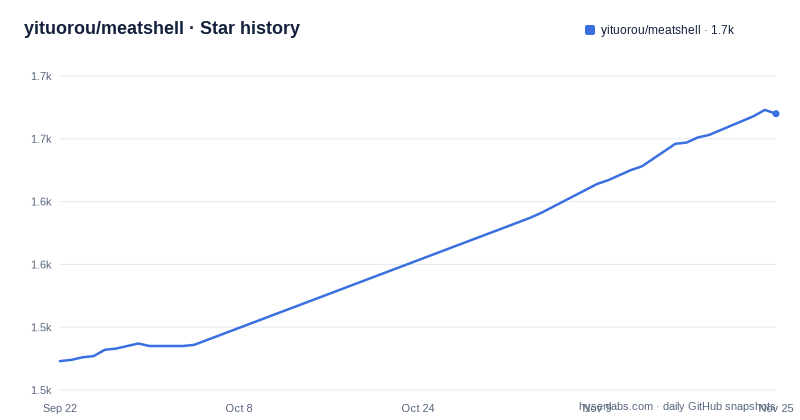
Star history
- yituorou/meatshell1,670 ★ · +197
| Repository | 2026-09-22 | 2026-11-25 |
|---|---|---|
| yituorou/meatshell | 1.5k | 1.7k |
197 Stars in the last 64 days, measured from the daily GitHub snapshot. Compare with other projects
Editorial analysis
The manifest still points at github.com/your/meatshell
The package describes itself as "A lightweight FinalShell-style SSH/terminal client written in Rust + Slint", and the version in the manifest matches the newest tag on the releases page. Its declared floor is Rust 1.75 on edition 2021.
name = "meatshell"
version = "0.7.4"
edition = "2021"
authors = ["meatshell contributors"]
license = "MIT OR Apache-2.0"
repository = "https://github.com/your/meatshell"
readme = "README.md"
rust-version = "1.75"
The `repository` key names the account `your` rather than `yituorou`, and there is no `homepage` or `documentation` key to carry the documentation address the project actually publishes. Anything that resolves a source link from the manifest will end up at an account that is not the author.
The published docs live somewhere else again. The README links to `https://ixbaicn.github.io/meatshell-docs/`, an address under a third account name, with nothing in the manifest or the visible configuration tying that host back to this code. Two of the three identity fields a packaging tool or a reader would rely on are therefore placeholders, and the third points outside the project. That is worth resolving before you point a team at either address.
Two Linux layouts place the same three files in different directories
Windows gets a zip with an executable you double click, macOS gets an app bundle, and Linux gets two different recipes that disagree with each other. The tarball route unpacks in place and runs from wherever you unpacked it, with a separate opt in script for a system wide install:
tar -xzf meatshell-*-linux-x86_64.tar.gz
cd meatshell-*-linux-x86_64
./meatshell                                  # 直接运行
# 可选:系统级安装程序、图标和启动器入口(需要 sudo)
chmod +x install-linux.sh && ./install-linux.sh
That script writes the binary to `/usr/local/bin/meatshell`, the launcher to `/usr/local/share/applications/meatshell.desktop` and the icon to `/usr/local/share/icons/hicolor/512x512/apps/meatshell.png`, then clears a user level launcher left behind by an older tarball. The Debian metadata sends the same three artifacts somewhere else and adds a fourth file:
[package.metadata.deb]
depends = "$auto"
# RDP sessions drive FreeRDP's `xfreerdp3` / `xfreerdp`, which is not linked
# into the binary, so `$auto` cannot see it. Recommended rather than required:
# RDP is one feature among many, and the package name differs per distribution
# (freerdp3-x11 on Debian/Ubuntu 24.04+, freerdp2-x11 on older releases). The
# Flatpak bundle builds FreeRDP in, so it needs nothing from the host.
recommends = ["freerdp3-x11 | freerdp2-x11"]
section = "net"
priority = "optional"
assets = [
    ["target/release/meatshell", "usr/bin/meatshell", "755"],
    ["assets/meatshell.desktop", "usr/share/applications/", "644"],
    ["assets/[email protected]", "usr/share/icons/hicolor/512x512/apps/meatshell.png", "644"],
    ["THIRD_PARTY_NOTICES.md", "usr/share/doc/meatshell/", "644"],
]
So the binary lands in `/usr/bin` instead of `/usr/local/bin`, the desktop entry in `/usr/share/applications/` instead of `/usr/local/share/applications/`, and only the package route installs `THIRD_PARTY_NOTICES.md` into `/usr/share/doc/meatshell/`. Anyone who installs from the tarball therefore ends up with no installed copy of the third party attributions that the emoji artwork's CC BY 4.0 license depends on. The same block documents an RDP dependency it cannot express: RDP sessions store host, port, username, password and domain, then hand the connection to `mstsc` on Windows or to FreeRDP's `xfreerdp3` and `xfreerdp` on Linux and macOS, which you install yourself, while the Flatpak bundle carries FreeRDP internally. The comment covers Debian and Ubuntu package names only, and says nothing about how a macOS user resolves those two binary names.
A dual license declaration with no license file at the top level
The manifest declares `MIT OR Apache-2.0`. The license shown for the project is unknown, and the top level of the tree holds no LICENSE file. What it does hold is a long list of directories and a handful of files: `.github/`, `.gitignore`, `CHANGELOG.md`, `Cargo.lock`, `Cargo.toml`, `README.en.md`, `README.md`, `THIRD_PARTY_NOTICES.md`, `assets/`, `audit.toml`, `build.rs`, `docs/`, `lang/`, `output/`, `packaging/`, `scripts/`, `src/`, `tests/`, `tools/`, `ui/`, `vendor/` and `wix/`.
That gap sits next to evidence that the project does think about licensing when it wants to. The emoji graphics come from Twemoji under CC BY 4.0, and the attribution is tracked in `THIRD_PARTY_NOTICES.md`, a file the Debian recipe goes out of its way to install as documentation. The care applied to a borrowed asset is not matched by any visible license text for the project's own grant.
This is not a reason to avoid the code, but it is a reason to ask before you vendor it, relicense it or ship it inside a product. A dual MIT or Apache-2.0 declaration in a manifest is a claim about intent; without the two license texts in the tree, a reader has nothing to check that claim against.
Every platform keeps sessions and encrypted passwords in one JSON file
Session management covers creating, editing, deleting and grouping entries, with local JSON persistence and import and export that is described as compatible with FinalShell connection files. Each platform gets its own path: `%APPDATA%/meatshell/sessions.json` on Windows, `~/.config/meatshell/sessions.json` on Linux, and `~/Library/Application Support/meatshell/sessions.json` on macOS. Session passwords are encrypted at rest with ChaCha20-Poly1305.
The same section of the documentation has one entry on the planned list that matters more than the encryption: moving those passwords into the OS keychain. Until that box is checked, the encrypted store sits in a single per user file whose permissions and ownership are not discussed anywhere in the visible text, and the encryption key has to live somewhere on the same machine as the ciphertext.
There is a smaller inconsistency in the run instructions. The section that tells you to build with `cargo run --release` and describes the very first launch names only the Windows path, `%APPDATA%/meatshell/sessions.json`, as the file created on first start, even though the feature list above it gives three. Anyone scripting first launch on Linux or macOS has to read the other section to learn where the empty session library appears.
CLI and MCP inherit the host key decision made in the GUI
The command line and the MCP server are thin entry points onto the same session store and the same SSH and SFTP implementation the window uses. That reuse has a visible consequence: you have to create a session and connect to it once in the GUI before either entry point will touch that host, because that first connection is what completes host key confirmation. Nothing in the visible text offers a flag, a known_hosts path or a policy setting for accepting keys without a human in the loop, so an unattended CI run inherits whatever trust decision a person already made on that workstation.
The command surface itself is small and explicit:
# 列出已保存的会话,第一列是后续命令使用的 session-id
meatshell cli sessions
meatshell cli sessions --json

# 查看单个会话的非敏感信息
meatshell cli session <session-id>

# 执行非交互式 SSH 命令;远端命令必须放在 -- 后面
meatshell cli exec <session-id> -- free -h
meatshell cli exec <session-id> --timeout 60 --json -- journalctl -n 100 --no-pager

# 浏览、读取和传输远端文件
meatshell cli files <session-id> /var/log
meatshell cli read <session-id> /var/log/example.log
meatshell cli upload <session-id> ./local.txt /tmp
meatshell cli download <session-id> /tmp/result.txt ./downloads
Two behaviors are stated without being explained. Downloads require the local target directory to exist already, and a download will not overwrite a file of the same name; no error text or exit code is given for either case, so a script that fetches a file twice has to discover the failure mode by running it. Session identifiers come from the `sessions` listing, and passwords and keys are kept out of what the CLI and MCP calls return.
Three toggles in the settings gate arbitrary remote commands over MCP
MCP is switched on in the settings under the interface section, then three separate permissions follow: allow use of stored credentials, allow arbitrary SSH command execution for remote diagnostics, and allow file transfer. That is the entire access model, and the middle toggle is the one to read twice, because an MCP capable client can then run any command the stored account is allowed to run on the remote host.
The service is registered over stdio with an absolute path to the binary:
{
  "mcpServers": {
    "meatshell": {
      "command": "/absolute/path/to/meatshell",
      //Mac OS
      //"command": "/Applications/MeatShell.app/Contents/MacOS/meatshell",
      //Linux
      //your path
      "args": ["mcp", "serve"]
    }
  }
}
Once a client connects it sees tools for listing sessions, reading a single session, running a remote command, browsing a remote directory, reading remote text, and uploading or downloading. The shipped JSON-RPC sample shows the expected shape and a concrete diagnostic: one request calls `free -h`, greps `dmesg` for `oom|out of memory|killed process`, and greps the process list for java, then another browses a heap dump directory under the path `/home/jeff/test/heapdumps`. That is a Java out of memory triage written for one particular incident, with one person's home directory left in the text, and it shows the intended shape of a command payload: shell fragments, a timeout in seconds and an output byte cap. Credentials are excluded from what these calls return, and the docs warn against putting plaintext passwords into prompts or MCP configuration.
Slint is pinned exactly and the build pulls a long system package list
The UI toolkit is held at a single version with default features switched off, and the feature list is explicit about what that costs and what it buys:
# Keep all desktop platforms on the native text layout patched below.
slint = { version = "=1.16.1", default-features = false, features = ["std", "backend-winit", "renderer-femtovg", "renderer-software", "accessibility", "compat-1-2"] }
Both a GPU renderer and the software renderer are compiled in, which is what lets the same binary run on machines without usable hardware acceleration, and the comment above the line says the pin exists to keep every desktop platform on a patched native text layout. The surrounding comment block explains a second consequence of the pin: ICU4X, pulled in by the toolkit's text layout, writes raw warnings to stderr such as `ICU4X data error: No segmentation model for language: ja` when its logging feature is off, because its shim falls back to direct printing. Turning that feature on routes the same messages through the logging crate and into the `tracing` subscriber the project already uses, which is why the build compiles both.
Building from source on Linux Mint, Ubuntu or Debian means installing the system development packages those renderers and backends need:
sudo apt update
sudo apt install -y --no-install-recommends \
  build-essential pkg-config cmake \
  libfontconfig1-dev libfreetype6-dev \
  libxcb1-dev libxcb-render0-dev libxcb-shape0-dev libxcb-xfixes0-dev \
  libxkbcommon-dev libxkbcommon-x11-dev libwayland-dev \
  libgl1-mesa-dev libegl1-mesa-dev libgtk-3-dev \
  libudev-dev
That list is the concrete cost of the feature choices above: font configuration, XCB, XKB, Wayland, OpenGL and EGL, GTK 3 and udev, all pulled in as headers rather than resolved at run time. The published binaries need glibc 2.35 or newer, which the docs map to Ubuntu 22.04 and Debian 12 or later, and the macOS bundle requires macOS 11 Big Sur or newer on either Apple Silicon or Intel. The macOS app is unsigned, so the documented workaround is `xattr -dr com.apple.quarantine` on the bundle before opening it, otherwise the system reports the app as damaged.
Several top level directories appear in the tree with no visible explanation
The tree lists `output/` alongside `src/`, `tests/`, `tools/`, `ui/`, `vendor/`, `docs/`, `lang/`, `packaging/`, `scripts/` and `wix/`. Some of these are predictable: `wix/` is the Windows installer toolchain that matches the zip and executable route, `vendor/` points at vendored dependencies, and `audit.toml` next to a `Cargo.lock` is the usual place for a dependency audit configuration. Others are not explained anywhere in the visible text. What `output/` holds, what languages live in `lang/`, and which build recipes sit in `packaging/` are all left to the reader.
The documentation has boundaries of its own that are worth knowing before you rely on it. The visible README is the Simplified Chinese one, which links to an English file listed at the root of the tree. Its last section begins a `read_remote_text_file` request and stops partway through that request's parameters. The build and run instructions cover Linux, macOS and Windows, the feature list is a long set of checked boxes covering SSH with password, key and encrypted key authentication, SFTP with drag and drop transfers, ZMODEM `sz` and `rz`, local, remote and SOCKS5 dynamic port forwarding, serial and Telnet sessions, quick commands that can be broadcast to every open session, out of bounds SOCKS5 and HTTP proxies, import of `~/.ssh/config`, tabbed terminals with split panes, and multiple windows managed as a single process with Chrome style shortcuts. Known host verification is listed alongside the SSH entry, and nothing in the visible text says whether the serial and Telnet session types go through the same check.
Editorial conclusion
Treat meatshell as a young, fast moving client rather than a settled one. v0.7.4 was tagged 2026-09-21 and the last push landed 2026-10-02, so the code is moving faster than the packaging around it. Before you depend on it, settle three questions for your own environment: which license files actually govern the tree, since the manifest names MIT OR Apache-2.0 and no license file sits at the top level, how session passwords will be kept while the OS keychain item is still an unchecked box on the planned list, and whether your automation can live with host key confirmation that today requires a successful GUI connection before the CLI or MCP server will touch a host. Teams that only need a thin terminal, with no SFTP browser, no resource sidebar and no tunnel manager, have plenty of lighter options.
Frequently asked questions
What is meatshell meant to replace?
It is a FinalShell style SSH and terminal client written in Rust with Slint, and the stated goal is to keep the resource monitoring sidebar, session management and tabbed terminals while cutting memory usage from the 400 MB or more a JVM build needs down to tens of megabytes natively.
Where does meatshell keep sessions and passwords?
In one JSON file per platform: `%APPDATA%/meatshell/sessions.json` on Windows, `~/.config/meatshell/sessions.json` on Linux and `~/Library/Application Support/meatshell/sessions.json` on macOS. Session passwords are encrypted with ChaCha20-Poly1305, and moving them into the OS keychain is still an unchecked item on the planned list.
Can I use the meatshell CLI without opening the GUI first?
Not for a host you have never connected to. You have to create the session and connect once in the GUI so the host key confirmation completes, and the CLI and MCP server reuse that stored session rather than taking a host key policy of their own.
Which Linux versions does the meatshell binary support?
The prebuilt binaries need glibc 2.35 or newer, which the docs place at Ubuntu 22.04 and Debian 12 or later. Building from source adds a long list of development packages, and after the opt in install script a Wayland session may need one logout and login before the new icon appears.
What does the meatshell MCP server let an AI client do?
Once enabled in the settings under the interface section, with separate permissions for stored credentials, arbitrary SSH commands and file transfer, a connected client can list sessions, run a remote command, browse and read remote files, and upload or download. Credentials are kept out of what those calls return.
Does meatshell need a separate RDP client for remote desktop sessions?
It stores only the host, port, username, password, domain and a resolution choice, then hands the connection to an external client: `mstsc` on Windows, FreeRDP's `xfreerdp3` or `xfreerdp` on Linux and macOS, which you install yourself. The Flatpak bundle builds FreeRDP in and needs nothing from the host.
Official sources
Add this badge to your README
If you maintain this project, the badge below links readers to this analysis and shows its maintenance status from the daily GitHub snapshot. Paste the markdown into your README; add ?metric=license or ?metric=stars to the image URL for a different field.

[](https://hysenlabs.com/projects/yituorou-meatshell)Star history chart for your README
[](https://hysenlabs.com/projects/yituorou-meatshell)Was this useful?