Your Next Store and the hosted API underneath it
AI-Native Open-Source Next.js commerce. Powered by Stripe. Ultra fast with typesafe Commerce SDK. Built for AI development (Claude, Codex, Cursor).
At a glance
- What is it?
- Your Next Store is an open source Next.js storefront template whose commerce logic lives on the YNS platform, reachable through the commerce-kit SDK or two bash scripts, with Stripe named in the prose rather than in the dependency list.
- Who is it for?
- Adopt it if you want a typed Next.js storefront talking to the YNS platform this week, and skip it if you need self-contained checkout. Before committing, confirm that scripts/publish.sh deploys your remote main, that the commerce-kit 0.74.2 methods cover the calls you need, and that the YNS plan price matches your order volume.
- Can I use it commercially?
- Yes. MIT is a permissive licence: you can use, modify and sell software built on it, as long as you keep its copyright and licence notices.
- Is it still maintained?
- Yes. The repository last received commits 2 days ago.
- What is it written in?
- Mainly MDX, according to GitHub's language statistics.
Answers come from the project's GitHub data, last synced on November 13, 2026, and from our analysis. They are not legal advice.
Star history
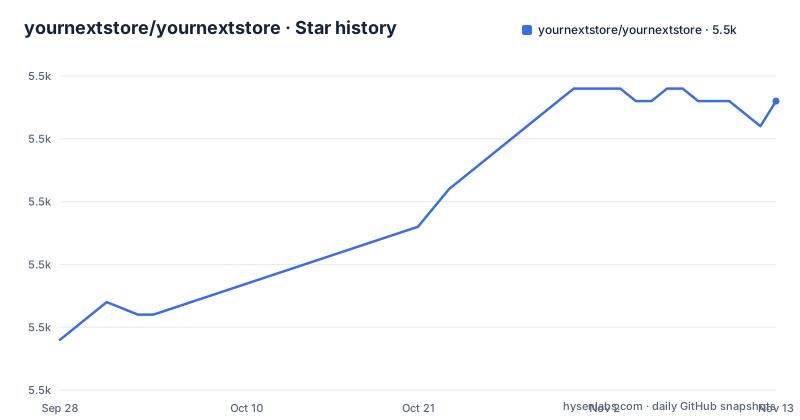
- yournextstore/yournextstore5,538 ★ · +19
| Repository | 2026-09-28 | 2026-11-13 |
|---|---|---|
| yournextstore/yournextstore | 5.5k | 5.5k |
19 Stars in the last 46 days, measured from the daily GitHub snapshot. Compare with other projects
Editorial analysis
Commerce Kit 0.65.0 is where the store logic lives
Commerce Kit 0.74.2 is where the store logic lives, and the dependency list is unusually specific. package.json pins commerce-kit 0.74.2 next to next 16.4.3 and react 19.3.1, with Tailwind v4 arriving through @tailwindcss/postcss 4.3.3 and a shadcn components.json at the root. The case for coding agents rests on that pinning: methods such as productBrowse() and cartUpsert() are described as having defined input and output shapes, and products, variants, carts and checkout are described as already existing as typed models. So the theme layer changes pixels while the domain stays fixed. Two version signals sit oddly together. package.json carries version 0.1.0 with private set to true, while the only tagged release is v1.0.0 from 2026-01-26. The last push landed on 2026-11-02. If you audit versions, trust bun.lock rather than either number.
bun install, YNS_API_KEY, and bun dev on localhost:3000
The quick start is four lines and one credential, and it assumes you already hold a YNS API key from https://yns.store/manage/settings/api:
git clone https://github.com/yournextstore/yournextstore.git
cd yournextstore && bun install
cp .env.example .env.local   # Add your YNS_API_KEY from https://yns.store/manage/settings/api
bun dev
The store then answers on localhost:3000. The only variable the setup instructions ask you to set is YNS_API_KEY, and the example file also ships a tenant base URL line marked optional:
# URL of the YNS instance
YNS_API_KEY=your_api_token_here
NEXT_PUBLIC_YNS_API_TENANT=optional_api_base_url
Prerequisites are Node.js 24 or newer and Bun 1.0 or newer. The Node requirement sits oddly beside a Bun-first quick start, and package.json makes Bun's role explicit: dev is bun next dev, start is bun next start, build is bun next build followed by bash scripts/check-shell.sh. Bun is not an optional layer here, it is the process that runs Next.js. Prerendered chrome on every route and optimizer-served icons are the stated defaults, so a first run should be a cached page rather than a spinner.
scripts/publish.sh ships remote main, so push before you publish
Two bash scripts are the whole platform interface, and both read the store's YNS_API_KEY from .env.local or .env:
bun run publish:store            # Trigger a production publish (same as the admin "Publish" button) and wait for the build
bun run publish:store --no-wait  # Fire and forget

bun run api GET  /products?limit=5                      # Call any Store API endpoint
bun run api POST /products '{"name":"Tee","price":29.99}'
scripts/publish.sh deploys the tenant repository's remote main, which means a commit you have not pushed is not in the build at all. The flag worth memorizing is --no-wait, because it trades a visible result for a silent one and no status command is documented to poll afterwards. scripts/api.sh is a thin wrapper around curl that handles auth, base-URL resolution and pretty JSON output for every /api/v1/* endpoint, so reading and writing store data needs no SDK code, only the right verb and path. One gap: bun run audit maps to scripts/audit.sh, and nothing in the documentation explains what that script checks or when you should run it.
149 theme branches, one commit deep, and a merge with no base
Visual variety ships as branches rather than as a theme config. There are 149 themes named theme-001 through theme-149, each a single commit on top of main whose message describes the vibe, and the stated rule is that themes touch only visual components and static assets, so products, cart and checkout stay untouched. Switching is a checkout:
git checkout theme-016Listing all of them with their descriptions takes a single ref query:
git for-each-ref --sort=refname --format='%(refname:short) %(subject)' 'refs/remotes/origin/theme-*'The catch is template updates. A YNS store is a copy of this repo with no shared history, so it never picks up template changes on its own. Stores update through the Upgrade button in Design, which runs the upgrade-storefront skill to bring in each template change file by file, keep the store's look, and record the template commit it reached in .yns/template.json. The README says not to merge or rebase a store onto the template.
Stripe is in the description, not in the dependency list
Payments deserve a closer look before you plan anything. The repository description says the project is powered by Stripe, the header line repeats it, and the feature table claims direct Stripe API integration for checkout, billing and subscriptions. The pinned dependency list contains no stripe package. What is there is @ai-sdk/react 4.0.163, @base-ui/react 1.9.0, tiptap 3.32.2 for the rich text editor, ai 7.0.159, class-variance-authority 0.7.1, clsx 2.1.1, commerce-kit 0.74.2, lucide-react 1.66.0, next 16.4.3, next-themes 0.4.6, react 19.3.1, react-dom 19.3.1, safe-try 0.0.4, sonner 2.0.8, streamdown 2.7.1 and tailwind-merge 3.7.0. The only reading that dependency list supports is that payment calls travel through the YNS platform's /api/v1 endpoints. Subscriptions appear in the feature table and nowhere in the graph, which is exactly the part you would want to own before launch. Native Stripe work means writing that client yourself, on top of the template.
What this template will not hand you
Four things are simply not in the box. The README names an admin panel (where the API key comes from), the admin Publish button and Design's Upgrade button, and product plus cart work goes through /api/v1 endpoints from the CLI or the SDK; order handling, tax rules and shipping configuration have no documented interface here. Neither script exposes a revert, a staging environment or a build log path, but the README says Design's version history restores published versions by their commit. The MIT licence covers the repository files and says nothing about the YNS plan or Stripe fees, and no platform price appears in the documentation, so your running costs cannot be derived from the project. Then the gates are stricter than a plain Next.js build. The full validation chain is one command:
bun run biome check && bun tsc --noEmit && bun testNote that lint is biome check --write --unsafe, which rewrites files and applies unsafe fixes, so expect a dirty tree after linting someone else's template.
AGENTS.md is the file a coding agent reads before the app code
The agent story is mostly files. The root of the repository carries AGENTS.md, CLAUDE.md, .agents/, .claude/, .mcp.json, .next-docs/ and skills-lock.json, and AGENTS.md is credited with full project context, SDK examples, Biome rules and a validation checklist, plus a performance and accessibility baseline of prerendered chrome on every route, optimizer-served icons, WCAG-AA colour tokens and tappable controls that bun run build and bun test verify. A production build runs bun next build and then bash scripts/check-shell.sh, so a failed deploy can come from the shell check rather than from Next.js output. husky installs on prepare and lint-staged.config.mjs runs on top. For a human maintainer the cost is real: AGENTS.md is a second specification that has to change whenever a contract changes, and the type surface it points at lives in the commerce-kit package, not here, so bumping that pin can invalidate the guidance the file hands an agent. instrumentation-client.ts, proxy.ts and proxy.test.ts at the root show the request proxy is covered by tests.
Editorial conclusion
Adopt it if you want a typed Next.js storefront talking to the YNS platform this week, and skip it if you need self-contained checkout. Before committing, confirm that scripts/publish.sh deploys your remote main, that the commerce-kit 0.74.2 methods cover the calls you need, and that the YNS plan price matches your order volume.
Frequently asked questions
What exactly is an e-commerce store in Your Next Store?
Here it is a Next.js App Router site where products, variants, carts and checkout are typed models in the Commerce Kit SDK, with methods such as productBrowse() and cartUpsert() doing the data work. A live build runs at demo.yournextstore.com, and the template is MIT licensed.
Will AI replace e-commerce in Your Next Store?
The project treats AI as the code-writing tool, not the store operator. AGENTS.md ships full project context, SDK examples, Biome rules and a validation checklist, and the README states that Claude Code, Cursor and Codex work out of the box. The commerce logic itself stays in the SDK methods and the /api/v1 endpoints.
How does e-commerce work in Your Next Store?
Products, variants, carts and checkout are already modelled with clear types, so a storefront is mostly a rendering layer. Reads and writes reach the platform through scripts/api.sh, a curl wrapper for every /api/v1 endpoint, and deployment goes through scripts/publish.sh building your remote main. Checkout, billing and subscriptions are named in the feature table, and the dependency list holds no stripe package.
How much does it cost to start an online store with Your Next Store?
The code carries an MIT licence and starts with a git clone, bun install and one YNS_API_KEY taken from https://yns.store/manage/settings/api, with Node.js 24+ and Bun 1.0+ as prerequisites. No platform price appears in the documentation, so YNS plan fees and Stripe transaction charges are numbers you have to get from those two services.
Official sources
Add this badge to your README
If you maintain this project, the badge below links readers to this analysis and shows its maintenance status from the daily GitHub snapshot. Paste the markdown into your README; add ?metric=license or ?metric=stars to the image URL for a different field.

[](https://hysenlabs.com/projects/yournextstore-yournextstore)Star history chart for your README
[](https://hysenlabs.com/projects/yournextstore-yournextstore)Was this useful?