mintlify/starter: A Deployable Mintlify Documentation Template
The starter kit for your mintlify project
At a glance
- What is it?
- mintlify/starter is a template repository for teams that want a Mintlify documentation site with example guides, navigation, customizations, API reference pages, and common components already represented. It is most useful to developers who prefer starting from a working project structure rather than assembling one from an empty repository.
- Who is it for?
- Adopt mintlify/starter when you want an editable Mintlify documentation project with examples already in place. Do not adopt it if you need a fully empty content scaffold or an offline publishing workflow.
- Can I use it commercially?
- Yes. MIT is a permissive licence: you can use, modify and sell software built on it, as long as you keep its copyright and licence notices.
- Is it still maintained?
- Yes. The repository last received commits 5 days ago.
- What is it written in?
- Mainly MDX, according to GitHub's language statistics.
Answers come from the project's GitHub data, last synced on October 23, 2026, and from our analysis. They are not legal advice.
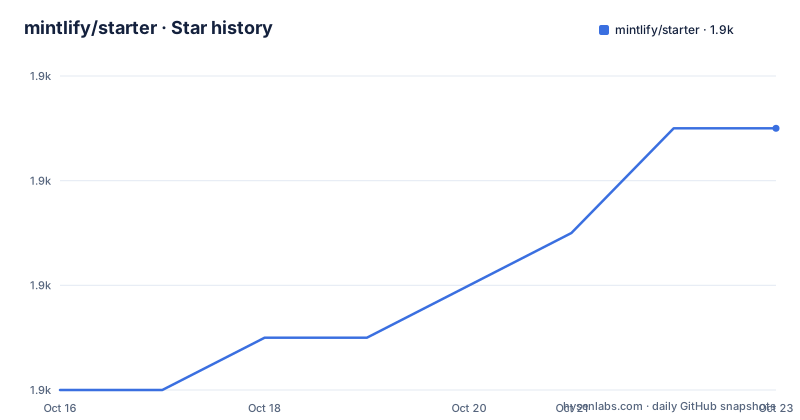
Star history
- mintlify/starter1,937 ★ · +5
| Repository | 2026-10-16 | 2026-10-23 |
|---|---|---|
| mintlify/starter | 1.9k | 1.9k |
5 Stars in the last 7 days, measured from the daily GitHub snapshot. Compare with other projects
Editorial analysis
What mintlify/starter Provides to Documentation Teams
mintlify/starter addresses the initial setup work required to launch a documentation site on Mintlify. The repository describes itself as “The starter kit for your docs deployed and ready to customize,” and the README specifically says it contains examples for guide pages, navigation, customizations, API reference pages, and popular components. That makes the target audience clear: developers and documentation teams starting a Mintlify site who want a populated example to edit.
The repository is based on MDX and includes top-level entries such as `index.mdx`, `quickstart.mdx`, `docs.json`, `.mintignore`, `AGENTS.md`, a favicon, and a `logo/` directory. Based on this layout, the starter combines authored MDX pages with Mintlify configuration and project guidance. It is a template rather than a finished documentation product. Its value is the initial structure and the examples a team can remove or rewrite.
The README does not describe a blank mode, a selected documentation framework, or a separate backend service. It also does not claim that the template validates every kind of documentation setup. Users who need to begin with nothing may find the examples unnecessary, while users who want working examples can use them as references before replacing them with project-specific material.
The MDX, docs.json, and Preview Structure
The visible project structure separates documentation content from Mintlify configuration. MDX files such as `index.mdx` and `quickstart.mdx` provide the content layer. The `docs.json` file sits at the top level and is the file the CLI expects when previewing the site. The README also points to `.mintignore`, `AGENTS.md`, `favicon.svg`, and `logo/`, indicating that the repository includes publishing controls, contributor instructions, and visual assets alongside the pages.
The documented local data flow starts with a change in the documentation project, which the Mintlify CLI reads from the directory containing `docs.json`. Running `mint dev` starts a local preview, and the README places that preview at `http://localhost:3000`. The repository does not document the internal renderer, deployment architecture, or production hosting pipeline, so those details should not be inferred from the MDX layout.
For publishing, the documented path moves through GitHub. The README says to install the Mintlify GitHub app from the dashboard, then states that changes are deployed to production automatically after pushing to the default branch. That arrangement separates local preview from repository-driven publishing: `mint dev` is for inspecting changes, while the GitHub app connects pushes on `main` to a production deployment. The README does not document branch previews, rollback commands, custom deployment actions, or environment-specific publishing controls.
Installing the Starter and Running a Local Mintlify Preview
The README presents two possible starting routes. A user can select the `Use this template` button at the top of the repository to copy the starter into a new project, or can follow the linked full quickstart guide. The repository does not provide CLI flags for creating the template from a command, so the GitHub template action is the only installation procedure documented here.
After obtaining the project, install the Mintlify CLI globally. The README gives this exact command:
npm i -g mintRun the development command from the documentation root, which the README identifies as the directory containing `docs.json`:
mint devThe expected local preview is `http://localhost:3000`. If the development environment does not start, the README gives `mint update` as the troubleshooting command. It also identifies a missing or invalid `docs.json` as the thing to check when a page returns 404. The repository does not document Node.js versions, npm versions, environment variables, or an offline preview mode, so those compatibility details remain unverified.
The starter also includes an optional AI-assisted writing setup. Its documented command installs Mintlify documentation guidance for configured AI tools such as Claude Code, Cursor, and Windsurf:
npx skills add https://mintlify.com/docsThe README says the installed skill contains a component reference, writing standards, and workflow guidance. This command is separate from launching the documentation preview and should not be treated as part of the local server setup.
Publishing Through main and the Mintlify GitHub App
The publishing model is deliberately narrow in the README. Install the Mintlify GitHub app from the organization dashboard, connect the repository through that integration, and push changes to the default branch. The default branch for this repository is `main`, and the README states that changes are deployed to production automatically after such a push.
This approach is appropriate for teams that treat the repository as the source of truth and want reviewed changes to reach the documentation site through ordinary Git operations. It also avoids requiring a separate production command in the README. However, the repository does not explain how deployments are viewed, whether a failed deployment blocks a later one, or how a bad published change is restored. There is no documented rollback command to copy into a tutorial.
The distinction between local preview and production publishing is important. `mint dev` previews the current directory at localhost, but it does not itself publish. The GitHub app and a push to the default branch are the documented publication route. A team whose release policy requires manual approval outside the GitHub app, or whose documentation is generated from another source, would need additional controls that this repository does not describe.
Template Copying Versus the Full Mintlify Quickstart
The repository offers a real alternative to copying the template: follow the full quickstart guide linked from the README. These paths differ in starting point rather than in the underlying Mintlify platform. `Use this template` copies an existing example project containing guide pages, navigation, customizations, API reference pages, and component examples. The full quickstart guide is the documented path for users who want setup guidance before or instead of copying that example repository.
For an experienced team with an established information architecture, the quickstart route may produce less example content to remove. For a team that is unfamiliar with the repository layout, the template route gives concrete files to inspect, including `docs.json` and MDX pages. The README does not claim that either route is faster, more complete, or supported by a specific command-line workflow, so the practical choice comes down to whether the bundled examples are useful or unwanted.
This comparison also reveals a limitation of the repository. It is a starter kit, not a documented menu of clean versus minimal templates. The included `logo/`, favicon, guide pages, and API examples may need replacement. The repository does not provide a project-specific customization checklist beyond linking to the quickstart and AI tools guides.
Maintenance Signals, Licensing, and Upgrade Boundaries
The repository is licensed under MIT. That identifies the license associated with the repository, but it is not a guarantee about the licensing of content, trademarks, hosted services, or third-party packages used after deployment. The README does not provide legal interpretation, and this review does not supply any.
The recorded last push was on 2026-09-28. There are no GitHub releases listed for the repository. The README provides one concrete update path for local tooling, `mint update`, but it does not describe how to upgrade the starter template itself or whether existing projects should merge later changes from the upstream repository. There is also no documented release process for the template.
The project is not archived, based on the repository metadata available for this review. Its maintenance cost is best understood as content maintenance plus template maintenance: MDX pages and `docs.json` must remain compatible with the Mintlify workflow, while global CLI updates can affect local previews. The repository does not state compatibility ranges for the CLI or describe a migration process for a customized fork.
Editorial conclusion
Adopt mintlify/starter when you want an editable Mintlify documentation project with examples already in place. Do not adopt it if you need a fully empty content scaffold or an offline publishing workflow. Verify first that `docs.json` is valid, review the included pages for material you do not need, and confirm that the Mintlify CLI preview and GitHub app deployment path fit your repository process. For this template, the strongest reason to adopt it is that it supplies a concrete starting structure, not that it replaces decisions about documentation architecture or content ownership.
Frequently asked questions
How do I run mintlify/starter locally?
Install the Mintlify CLI with `npm i -g mint`, then run `mint dev` from the directory containing `docs.json`. The README says the local preview is available at `http://localhost:3000`.
What files are included in mintlify/starter?
The top-level repository entries include `index.mdx`, `quickstart.mdx`, `docs.json`, `.mintignore`, `AGENTS.md`, `favicon.svg`, and `logo/`. The README also says the starter includes examples for guides, navigation, customizations, API reference pages, and popular components.
How are mintlify/starter changes published?
Install the Mintlify GitHub app from the dashboard and push changes to the default branch. The README states that changes are deployed to production automatically after pushing to the default branch, `main`.
Official sources
Add this badge to your README
If you maintain this project, the badge below links readers to this analysis and shows its maintenance status from the daily GitHub snapshot. Paste the markdown into your README; add ?metric=license or ?metric=stars to the image URL for a different field.

[](https://hysenlabs.com/projects/mintlify-starter)Star history chart for your README
[](https://hysenlabs.com/projects/mintlify-starter)Was this useful?