YouTube Music Desktop App v2: an unofficial Electron client whose docs still lag its rewrite
A Desktop App for YouTube Music
At a glance
- What is it?
- ytmdesktop is a GPL-3.0 desktop app for YouTube Music, rebuilt on Electron Forge and Vite for its 2.x line. Installing it is easy on Windows, Linux and Mac, but building it means working around Yarn instructions in a pnpm repository and unfinished macOS and v2 guides.
- Who is it for?
- ytmdesktop suits people who want YouTube Music in its own desktop window on Windows, Linux or Mac and are comfortable with an unofficial client; Windows users get a first-party winget route, while Mac and Arch users rely on community-maintained packages. People who want to build from source should expect friction: the setup steps say Yarn while the repository pins pnpm, macOS build instructions are a TODO, and there is no v2 usage guide.
- Can I use it commercially?
- Yes, with conditions. GPL-3.0 is a copyleft licence: if you distribute software that includes it, you must release that software's source code under the same licence. Running it internally without distributing it does not trigger that obligation.
- Is it still maintained?
- Yes. The repository last received commits 9 days ago.
- What is it written in?
- Mainly TypeScript, according to GitHub's language statistics.
Answers come from the project's GitHub data, last synced on November 15, 2026, and from our analysis. They are not legal advice.
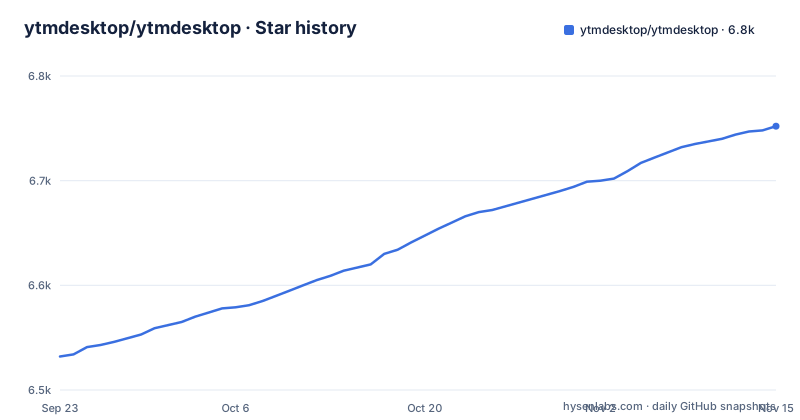
Star history
- ytmdesktop/ytmdesktop6,752 ★ · +220
| Repository | 2026-09-23 | 2026-11-15 |
|---|---|---|
| ytmdesktop/ytmdesktop | 6.5k | 6.8k |
220 Stars in the last 53 days, measured from the daily GitHub snapshot. Compare with other projects
Editorial analysis
An unofficial client rebuilt from scratch for v2
The project's package.json describes it as an unofficial cross platform desktop app for YouTube Music, published under the product name YouTube Music Desktop App and licensed GPL-3.0-only. Unofficial is the word to keep in mind: this is a community project, not something YouTube ships, and the code is TypeScript under the ytmdesktop organization on GitHub.
The heading under the title announces a fresh new codebase, and the toolchain shows what that means. The app runs on Electron 45.0.0, is bundled with Vite ^8.3.5 through @electron-forge/plugin-vite, and uses @vitejs/plugin-vue for its interface. Packaging, publishing and starting the app all go through Electron Forge ^8.0.1, with forge.config.mts at the top level holding that configuration. The entry point is .vite/main/index.cjs, the compiled output of the Vite build. Because the 2.x line is a rewrite, anything you read about version 1 behavior, including old wiki pages, may not apply.
Half the install channels are community maintained
Each platform gets a package manager route plus the binaries on https://github.com/ytmdesktop/ytmdesktop/releases. On Windows, winget accepts either the display name or the package id:
winget install "YouTube Music Desktop App"
winget install Ytmdesktop.Ytmdesktop
Scoop needs the extras bucket first:
scoop bucket add extras
scoop install ytmdesktop
On Mac the cask is:
brew install --cask ytmdesktop-youtube-musicArch Linux users get the AUR package at https://aur.archlinux.org/packages/ytmdesktop. The Scoop, Brew and AUR entries all carry the label Community Maintained, which means the people packaging them are not necessarily the app's developers and an update can reach those channels later than the GitHub release. Chocolatey and Snap entries sit inside a commented block marked UPDATE THESE PLATFORMS, so neither is offered as a current route. If you need the newest version on the day it ships, the GitHub binaries are the channel the project itself publishes.
The setup steps say Yarn, the repository is pinned to pnpm
The developer instructions ask for Git and Node.js v20, then:
git clone https://github.com/ytmdesktop/ytmdesktop.git
cd ytmdesktop
followed by:
corepack enable
yarn install
yarn start
The repository itself points elsewhere. package.json sets packageManager to [email protected], and the top level holds pnpm-lock.yaml and pnpm-workspace.yaml, with no Yarn lockfile among the top-level entries. The consequence is that following the written steps resolves dependencies without the lockfile the maintainers commit, so the versions you install are not guaranteed to be the ones they tested. A patches/ directory sits beside the lockfile as well, and dependency patches only help if the package manager that applies them is the one in use. Contributors should treat the pnpm configuration as the source of truth and expect the Yarn commands to lag behind it. The package.json scripts themselves are manager-neutral: start runs electron-forge start and make runs electron-forge make.
yarn make on Linux builds both deb and rpm by default
To build an installer you run `yarn make`, which calls electron-forge make. The makers in devDependencies are maker-deb, maker-rpm, maker-squirrel and maker-zip, so the same command targets Debian packages, RPM packages, a Squirrel installer for Windows and zip archives.
On Linux the build note is short: Debian-based distributions such as Ubuntu need fakeroot and dpkg, and RedHat-based distributions such as Fedora need rpm or rpm-build. The catch is the next line, which says both packages are built by default when you build on a Linux distro. A Debian machine with only fakeroot and dpkg is therefore set up for half the default work. Either install the RPM tooling too or change the maker list in forge.config.mts.
On Windows the recommended route is Electron's build tools bundle, which pulls in Visual Studio, Python and other tools and stops for a few prompts while it installs:
npm i -g @electron/build-toolselectron-winstaller ^5.4.0 is declared as a peer dependency for the Windows installer step.
macOS build steps and v2 usage guides are still TODO
Two pieces of documentation are missing in ways that affect different readers. For builders, the MacOS section under Building the Project exists only inside a comment that reads to do, so there are no official instructions for producing a Mac build even though Mac users can install a cask. Anyone building on a Mac has to work it out from forge.config.mts and the Electron Forge makers, without project guidance on signing or required tools.
For users, the How to use and FAQ links to the GitHub wiki are commented out under a note saying guides for v2 still need to be written and that the existing ones are geared towards v1. Since v2 is a new codebase, those wiki pages describe a different program. The practical place to ask how something works in 2.x is the project's Discord, linked from the badge at the top of the page. A commented note also says the project currently has no locales, so the interface is not translated.
Fastify and multicast DNS packages ship inside a music player
The visible start of the runtime dependency list is @fastify/cors ^11.3.1 and @fastify/rate-limit ^11.2.1, and the dev dependencies include @types/multicast-dns ^7.2.4. Fastify is an HTTP server framework, and multicast DNS is how devices advertise and find services on a local network. Together they indicate that the app carries network-facing code, not only a window around a web page.
That has a cost for anyone who cares about what listens on their machine. A desktop player with an HTTP layer and local discovery is something to review before running it on a shared or untrusted network. The source in src/ is where to confirm which features use these packages, what address they bind to and whether they are enabled by default. Rate limiting and CORS handling being present is a sign the authors expected requests from outside the app, so read that code before exposing the port beyond your own computer.
The development branch, Forge publishing and recent releases
The default branch is development, not master, even though the license badge still links to blob/master/LICENSE. Cloning the repository gives you whatever is on development, which is not necessarily the code behind the latest release. To build what users run, check out the release tag instead.
Recent tags are v2.0.11 on 2026-02-12, v2.0.12 on 2026-09-08 and v2.1.0 on 2026-10-29, and package.json on the default branch already reads 2.1.0. The last push landed on 2026-11-01. Releases are produced through Forge as well: the release script runs electron-forge release, release:frommake runs electron-forge release --from-make, and @electron-forge/publisher-github sends the artifacts to GitHub Releases.
Code quality checks use the oxc tools rather than ESLint and Prettier. lint runs oxlint && oxfmt --check, lint:fix runs oxlint --fix && oxfmt --write, with settings in .oxlintrc.json and .oxfmtrc.json, and typecheck runs tsc --noEmit against TypeScript ^6.0.3. The build also includes @electron-forge/plugin-fuses and @electron/fuses, which set Electron fuse options on the packaged app.
Editorial conclusion
ytmdesktop suits people who want YouTube Music in its own desktop window on Windows, Linux or Mac and are comfortable with an unofficial client; Windows users get a first-party winget route, while Mac and Arch users rely on community-maintained packages. People who want to build from source should expect friction: the setup steps say Yarn while the repository pins pnpm, macOS build instructions are a TODO, and there is no v2 usage guide. Before installing, decide whether you trust the community package for your platform or would rather take the binaries from the GitHub releases page, and look at what the bundled Fastify dependencies serve.
Frequently asked questions
how to install ytmdesktop
On Windows use winget install Ytmdesktop.Ytmdesktop or the community-maintained Scoop package from the extras bucket. Mac users can run brew install --cask ytmdesktop-youtube-music, Arch users can use the AUR package, and every platform can download binaries from the GitHub releases page.
how to use ytmdesktop
ytmdesktop does not yet have usage guides for v2; the older wiki guides are marked as geared towards v1. Questions about the current version are best taken to the project's Discord.
ytmdesktop vs youtube music
ytmdesktop is an unofficial cross platform desktop app for YouTube Music, built by a community team on Electron rather than by YouTube. It is licensed GPL-3.0-only.
is ytmdesktop safe to use
ytmdesktop's TypeScript source is public under GPL-3.0, and official binaries are published on its GitHub releases page. The Scoop, Brew and AUR packages are community maintained, and the app depends on Fastify server packages, so review src/ if network exposure matters to you.
Official sources
Add this badge to your README
If you maintain this project, the badge below links readers to this analysis and shows its maintenance status from the daily GitHub snapshot. Paste the markdown into your README; add ?metric=license or ?metric=stars to the image URL for a different field.

[](https://hysenlabs.com/projects/ytmdesktop-ytmdesktop)Star history chart for your README
[](https://hysenlabs.com/projects/ytmdesktop-ytmdesktop)Was this useful?