NanoKVM across Cube, PCIe and Pro: what each board adds and each one drops
Affordable, Multifunctional, Nano RISC-V IP-KVM. It lets you remotely access and control computers as if you were sitting in front of them, making it useful for servers, embedded systems, and other headless machines.
At a glance
- What is it?
- The sipeed/NanoKVM repository carries the firmware and application for a RISC-V IP-KVM device family in which the Cube, PCIe and Pro boards differ in codec, network speed, serial channels and storage.
- Who is it for?
- NanoKVM suits a headless machine where 1080P@60fps, 100M Ethernet, a web terminal, two serial channels and ATX power control are enough, and where the Cube or PCIe form factor fits the chassis. Pick Pro when you need 4K@30fps, audio transmit, HDMI loopout or 1Gbps Ethernet, and look at the separate NanoKVM-USB repository when USB is the transport you actually have.
- Can I use it commercially?
- Yes, with conditions. GPL-3.0 is a copyleft licence: if you distribute software that includes it, you must release that software's source code under the same licence. Running it internally without distributing it does not trigger that obligation.
- Is it still maintained?
- Yes. The repository last received commits 1 day ago.
- What is it written in?
- Mainly TypeScript, according to GitHub's language statistics.
Answers come from the project's GitHub data, last synced on November 13, 2026, and from our analysis. They are not legal advice.
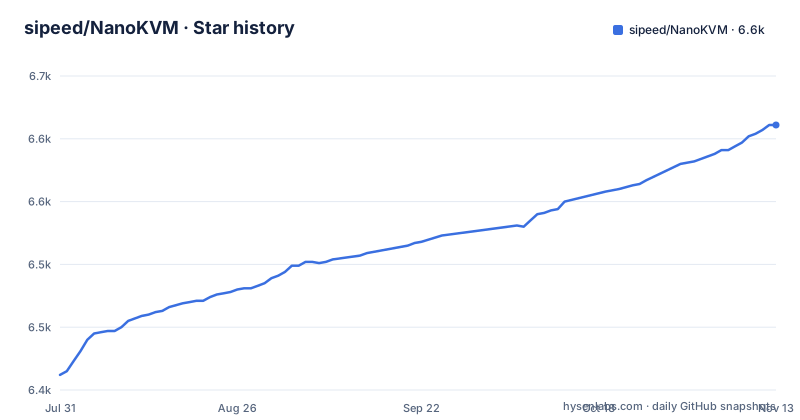
Star history
- sipeed/NanoKVM6,611 ★ · +199
| Repository | 2026-07-31 | 2026-11-13 |
|---|---|---|
| sipeed/NanoKVM | 6.4k | 6.6k |
199 Stars in the last 105 days, measured from the daily GitHub snapshot. Compare with other projects
Editorial analysis
Four kits, four SoCs, one shared app package
The repository covers hardware choices that run the same software stack. Cube Lite is a barebones kit aimed at DIY users and bulk deployments. Cube Full adds a case, accessories and a pre-flashed system SD card, so it is the variant that boots without a card flashing step. PCIe is a bracket that mounts inside a chassis and draws power from the slot itself, with optional Wi-Fi and PoE on top. NanoKVM-Pro sits in its own repository and pairs the NanoKVM or PiKVM system images with an AX630C (2xA53 at 1.2G) instead of the SG2002 with one C906 core at 1.0G that Cube and PCIe use. Those differences are not cosmetic. Memory moves from 256M DDR3 plus a 32G microSD to 1G LPDDR4X plus 32G eMMC, the top resolution moves from 1080P@60fps to 4K@30fps or 2K@60fps, and Ethernet moves from 100M to 1000M. Two further boards, GxxKVM on RV1126 and JxxKVM on RV1106, appear in the same comparison table, which is where you can see that the family reaches past the Cube.
The server binary is cross-compiled for one RISC-V core
The Go service is not built for the machine running the build. The Makefile hardcodes the target triple and the instruction set the SG2002 expects, down to the C906 vector extensions in a -march string. MaixCDK is sourced out of the container before the low level modules are built, and every module is compiled twice: once for the binary, then again with add_to_kvmapp, which is what places it inside the update package. The vision module follows the same route under a different target name.
GO_BUILD_CMD := cd /home/build/NanoKVM/server && go mod tidy && CGO_ENABLED=1 GOOS=linux GOARCH=riscv64 CC=riscv64-unknown-linux-musl-gcc CGO_CFLAGS="-mcpu=c906fdv -march=rv64imafdcv0p7xthead -mcmodel=medany -mabi=lp64d" go build
SUPPORT_BUILD_CMD := . ./home/build/MaixCDK/bin/activate && cd /home/build/NanoKVM/support/sg2002 && ./build kvm_system && ./build kvm_system add_to_kvmapp
Plan for two side effects of that setup. The builder image name is derived from your UID and GID, and the run passes both into the container, so two accounts on one host do not share an image. The IMAGE_NAME, VERSION and DOCKER_TTY assignments use ?= so they can be overridden, with a comment noting that a prebuilt image can be used instead of building one locally, which is the difference between a first build and a first build that also compiles a cross toolchain.
kvmapp carries a legacy upgrade path for older installs
Updates do not replace the whole application. kvmapp is the package the device updates from, and its five subdirectories spell out the update path.
├── kvmapp          # APP update package
│   ├── jpg_stream  # Legacy support for direct updates from older versions
│   ├── kvm_new_app # Triggers components for kvm_system updates
│   ├── kvm_system  # Core KVM application
│   ├── server      # Front-end and back-end integration
│   └── system      # Essential system components
├── web             # NanoKVM Front-end (UI)
├── server          # NanoKVM Back-end (Service)
├── support         # Auxiliary modules (Image subsystem, status, updates, OLED, HID, etc.)
Two of those names exist for backwards compatibility rather than for current work: jpg_stream is there so devices running older versions can still take a direct update, and kvm_new_app is there to trigger the components that kvm_system updates. Alongside kvmapp sit three source trees covering the same split, with web holding the front-end UI, server holding the back-end service, and support holding the auxiliary modules (the Image subsystem, status, updates, OLED, HID). The top level adds docker/, scripts/, tools/ and a .devcontainer/, so the build and editor tooling lives next to the application instead of in a separate tree, and the support build runs from a support/sg2002 subdirectory named after the SG2002 chip.
Installing means a board, a card and a release image
There is no install script, because there is nothing to install on a workstation. The device boots a system image, and firmware is distributed as GitHub releases tagged with a nanokvm@ prefix: 2.5.1 on 2026-09-09, 2.5.2 on 2026-09-29 and 2.5.3 on 2026-11-03. The README header links out to the quick start guide on the Sipeed wiki, to a hardware details page on the vendor share URL, and to the releases page. Which kit you buy decides how much of that you do yourself: Cube Full arrives with a pre-flashed system SD card, Cube Lite leaves the card and the image to you, and PCIe takes power from the slot. For work on the software itself, the Makefile default target and the container plumbing are the entry points.
all: app support
DOCKER_RUN_BASE := docker run -e UID=$(UID) -e GID=$(GID) -v $(PWD):/home/build/NanoKVM --rm
RELEASE_BUILD_CMD := /home/build/NanoKVM/scripts/build-in-container.sh
Note what that plumbing does and does not give you. The host directory is mounted read-write at /home/build/NanoKVM and the container is removed on exit, so nothing outside the source tree is cached for you, and the release build runs a script under scripts/.
The Cube keeps images on a 12MB/s microSD card
The storage row is the one that shapes daily use. Cube and PCIe carry 32G of microSD rated at 12MB/s. Pro replaces that with 32G of eMMC at 300MB/s, and the two boards listed alongside them sit at 120MB/s for GxxKVM's 8G eMMC and 60MB/s for JxxKVM's. Those are card and chip ratings rather than measured image rates, and the Image subsystem in the support directory still has to live with the spread. The same table marks HDMI loopout, a sync LED strip and a smart assistant as Pro only, and audio transmit as available on Pro and GxxKVM. Display options differ too: Pro can carry a 1.47 inch 320x172 LCD alongside the 0.96 inch 128x64 OLED that Cube and PCIe use, while JxxKVM carries a 1.68 inch 280x240 panel and GxxKVM has no display row filled at all. Power draw is listed as 0.2A at 5V for Cube, PCIe and JxxKVM against 0.6A at 5V for Pro, which matches the power input row where only Pro accepts USB-C or PoE.
Custom scripts and serial channels do not survive across the family
The row that reads yes for Pro and Cube and no for both GxxKVM and JxxKVM is Custom Scripts. If your recovery plan is a script that runs on the KVM side while the target machine is hung, Cube and PCIe are the boards here that allow it, and Pro allows it too. Serial Terminal is 2 channels on Pro and Cube, none on GxxKVM and 1 channel on JxxKVM, so a dual serial console needs Cube, PCIe or Pro. Video encoding on Cube and PCIe stops at MJPEG and H.264, with H.265 appearing only in the Pro column, and the resolution ceiling on those two is 1080P@60fps against 4K@30fps or 2K@60fps for Pro and GxxKVM. IPMI is marked for Pro, Cube and GxxKVM but not for JxxKVM, so out of band management does not carry across the whole range. What all four boards share is the set that decides whether the device is usable on a headless machine: emulated USB keyboard and mouse, emulated USB ISO, UEFI and BIOS access, Wake-on-LAN, and a web terminal.
The README hands credentials and network setup to the wiki
The README is short by design. Its header points at a quick start guide on the Sipeed wiki, a hardware details page and the releases page, and the body covers the product family, the specification table, the project structure and a set of pointers to per-area guides. Anyone putting a NanoKVM on a shared network should check credentials and network setup against the linked quick start guide before plugging it in. The project itself is not archived, its last push was on 2026-10-21, and firmware releases landed on 2026-09-09, 2026-09-29 and 2026-11-03. The tracker carries 473 open issues, so a question tied to one specific model can sit there a long time, and the per-area guides behind those pointers are where the answers are most likely to live.
Editorial conclusion
NanoKVM suits a headless machine where 1080P@60fps, 100M Ethernet, a web terminal, two serial channels and ATX power control are enough, and where the Cube or PCIe form factor fits the chassis. Pick Pro when you need 4K@30fps, audio transmit, HDMI loopout or 1Gbps Ethernet, and look at the separate NanoKVM-USB repository when USB is the transport you actually have. Before buying, settle the credentials and network setup by reading wiki.sipeed.com/nanokvm, and if you intend to build the software rather than flash it, confirm your host can run the Docker builder with a riscv64 musl toolchain, because the Makefile cross-compiles for the SG2002's C906 core.
Frequently asked questions
What is a NanoKVM?
NanoKVM is a series of compact, open-source IP-KVM devices based on the LicheeRV Nano (RISC-V). It gives remote keyboard, video and mouse access to headless machines, and the application, firmware support code and web interface are published in this GPL-3.0 repository alongside a cross-compiled back-end service.
How much power does a NanoKVM consume?
The specification table lists 0.2A at 5V for Cube, PCIe and JxxKVM, 0.4A at 5V for GxxKVM, and 0.6A at 5V for NanoKVM-Pro. Power input is USB-C on the smaller boards, while Pro accepts USB-C or PoE.
How does NanoKVM compare to other KVM solutions?
The comparison table in the README covers four boards. Cube and PCIe run an SG2002 with one C906 core at 1.0G, 1080P@60fps, 100M Ethernet and a 12MB/s microSD, while GxxKVM and JxxKVM move to RV1126 and RV1106 parts and Pro reaches 4K@30fps on 1Gbps Ethernet. Custom scripts are absent on GxxKVM and JxxKVM, and serial channels differ too.
Where can I buy a NanoKVM board?
The README header links to a hardware details page on cn.dl.sipeed.com/shareURL/KVM/nanoKVM and to the quick start guide at wiki.sipeed.com/hardware/en/kvm/NanoKVM/introduction.html. It does not list prices or stock, so those come from the vendor page rather than from the repository.
Is NanoKVM open source?
The application, firmware support modules and web interface are published under GPL-3.0. The top-level tree holds kvmapp, web, server, support, docker, scripts and tools, with no board design, schematic or firmware image directory listed among those entries.
Official sources
Add this badge to your README
If you maintain this project, the badge below links readers to this analysis and shows its maintenance status from the daily GitHub snapshot. Paste the markdown into your README; add ?metric=license or ?metric=stars to the image URL for a different field.

[](https://hysenlabs.com/projects/sipeed-nanokvm)Star history chart for your README
[](https://hysenlabs.com/projects/sipeed-nanokvm)Was this useful?