Jonex: the default branch is spelled mian, the build downloads from Chinese mirrors by default, and the Makefile ships a database password of change-me
All-in-One Multimodal Parsing Engine + Ontology-Powered, LLM Wiki-Driven AI-Ready Knowledge Engine
At a glance
- What is it?
- Jonex is a multimodal parsing and knowledge engine for enterprise agents, deployed as a Docker Compose stack with a knowledge graph, a retrieval layer, an MCP server and five frontend applications. The Makefile is where its character shows: one variable decides which package mirrors every dependency comes from, another includes the deployment environment file and exports every secret in it to every subprocess, and the database defaults are prefilled with a placeholder password.
- Who is it for?
- Jonex is aimed at a team building a governed retrieval service rather than at someone trying a demo, and the visible parts of the documentation are candid about the parts that are still rough. Four things to settle before a first deployment.
- Can I use it commercially?
- Check first. The repository uses a licence we do not classify automatically, so read its LICENSE file before any commercial use.
- Is it still maintained?
- Yes. The repository last received commits 10 days ago.
- What is it written in?
- Mainly Python, according to GitHub's language statistics.
Answers come from the project's GitHub data, last synced on November 14, 2026, and from our analysis. They are not legal advice.
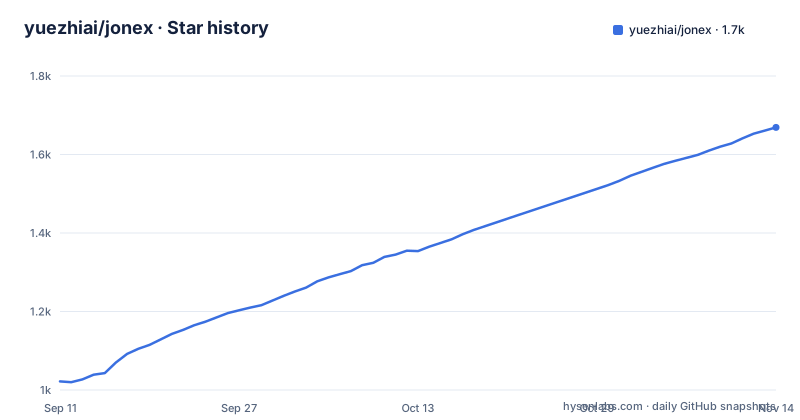
Star history
- yuezhiai/jonex1,669 ★ · +647
| Repository | 2026-09-11 | 2026-11-14 |
|---|---|---|
| yuezhiai/jonex | 1k | 1.7k |
647 Stars in the last 64 days, measured from the daily GitHub snapshot. Compare with other projects
Editorial analysis
The default branch is spelled mian
The branch this repository treats as its default is named mian, not main. That single character matters more than it looks. The quick start asks you to clone the repository and change directory, which works fine on any host, but anything that assumes the modern default will look in the wrong place: release automation, badge links that name a branch, documentation tooling, and the dependency bots that open changes against a default branch. The repository also contains a PowerShell wrapper for Windows and a Makefile for the other platforms, and neither corrects the spelling, because neither needs to: they operate on the checkout you already have. If you write your own automation against this project, read the branch name from the platform rather than assuming, and if you fork it, decide deliberately whether to keep the name, because changing it breaks every existing link at once. The current state of that branch is a commit dated 2026-09-22, and the package manifest declares version 0.1.0 with no published releases.
Two files must agree on the embedding model name or the index is built wrong
Model configuration for this platform lives in two environment files, and the documentation spends a paragraph on how to keep them consistent, which tells you it matters. The platform file and the retrieval file each define the LLM model name and the embedding model name. If your model names differ from the defaults you update the matching keys, and one of them has to be byte identical in both files, because it is the value used to build the vector index. A second key, the retrieval service's own API key, must also be identical across the same two files. Two separate credentials for the large language model and for the embedding model are configured in the platform file, with a host and an API key each, all behind a gateway prefix, and the vision and speech recognition connections are added there too. The failure mode here is quiet: a mismatch between the two files does not fail the deployment, it produces an index built with one model and queried with another, and that shows up as poor recall weeks later.
One variable decides whether every dependency comes from a mirror
The Makefile declares a single switch that selects the source of every package the build downloads:
USE_OVERSEAS_MIRROR ?= falseThe comment beside it explains the two settings in detail. False selects domestic sources for Python and system packages, for the Node registry and for the tool that resolves Python environments, and true selects the official upstream equivalents instead. Then it adds the sentence that keeps this from being a footnote: the setting only affects downloads at build time and not runtime behaviour. That is true and it is also the whole risk. A build made with the default setting pulls your Python packages, your system packages, your Node packages and your environment tooling from a set of mirrors chosen by the project, and the resulting image records which artifacts were fetched. Anyone reproducing that build later, or auditing what is inside it, has to know which mode was used. The default is not wrong, it is regional, and for a team outside that region it means the first build is not the build most people will make.
The Makefile includes the deployment environment file and exports it
Two lines near the top of the Makefile govern how configuration reaches every command the Makefile runs:
ENV_FILE ?= deploy/.envfollowed by an include of that file and a bare export. The effect is that every variable in the deployment environment file becomes a make variable and is then exported into the environment of every recipe, which includes the Docker Compose invocations, the frontend package commands and anything else the Makefile shells out to. That is convenient, because services and their configuration stay in one place. It also means the credentials you typed into that file are present in the environment of every subprocess, including anything a build script runs, and that a variable meant for Compose silently reaches a command that has no business seeing a database password. The database defaults are defined in the same file and are placeholders rather than secrets, which is the right shape:
DB_PASSWORD ?= change-meThe user, database name and host are similarly prefilled, with the host set to loopback.
The demo account is published with a checklist attached to it
The quick start ends at a URL and three lines of credentials, and then immediately qualifies them. The account is an administrator named admin with the password admin123, in a tenant called tenant_jonex_demo. The warning beneath says the credentials are for local evaluation only, and that the default administrator account should be changed or removed before the platform is bound to anything other than a loopback interface, before the deployment is shared, and before it is exposed to any network, with a pointer to a production checklist in the security file. That is the correct way to ship a default account. Two supporting details are worth noting. The tenant is passed as a request header rather than as a field in the login body, so multi tenancy is carried by the client on every call. And the login endpoint is under the versioned path with a token returned for later use, with the search endpoint taking that token as a bearer credential, a set of knowledge base identifiers, a retrieval mode, a result count and a flag for including a reasoning trace.
FastAPI is held below its next release because the project stays on pydantic v1
The dependency declarations explain their own pins in comments, and the important one is a version ceiling rather than a floor. The framework requirement is capped just below its next minor release, and the comment gives the reason as compatibility with the first major version of the validation library, which is itself pinned below 2. That is a deliberate architectural choice rather than neglect, but it has consequences: the web framework cannot take a new minor release, and every transitive dependency is resolved against a two year old constraint. The same libraries are then declared twice, once in the packaging manifest and once in the requirements file, with the requirements file adding the test packages as runtime entries under a testing heading while the manifest puts them in a development extra. The manifest also carries two separate development groups, a standard extra with the test and lint tooling and a dependency group with an async SQLite driver and an eventing helper. Three places to add a dependency, one of which is documentation nobody reads.
Two deployment paths, five frontend environments, and eight steps in a five minute guide
The documentation covers two setups that share almost nothing. The Docker path generates configuration under the deploy directory, in separate files for the platform, the retrieval stack and the MCP server, plus one environment file per frontend application, of which there are five. The local development path instead copies root level example files, tells you to set middleware addresses to loopback or replace a server address variable with a remote host, and moves backend startup into an editor debug configuration, with an explicit note that the Makefile no longer starts host backend processes. Toolchain floors differ too, with a Python floor, a Node floor, a package manager floor and a requirement for a current environment resolver. Against that, the guided first search is headed as a five minute exercise and then lists eight numbered steps, from signing in through creating a knowledge base, picking a parser profile, ingesting content, inspecting the compiled ontology and submitting feedback. The heading is a promise the list does not keep, which is worth knowing before someone times it.
The published package contains three directories and leaves out the rest
The packaging configuration includes three packages and excludes five. Included are the API gateway, the capabilities directory and the core, with a data pattern that pulls the message definition files inside the core into the wheel. Excluded are the reference material, the data directory, the deployment directory, the frontends and the tests. That is a sensible library boundary, and it also means the thing you install is not the thing you read on the repository page. The MCP server directory is not in the include list, so an installed copy of the package does not carry the MCP server, even though the deployment generates a dedicated environment file for it. The capabilities directory ships, and the runtime configuration example for it sits at the root rather than inside the package, so a consumer of the wheel does not get a working example. Also worth noting for an evaluation: the graph database client in the dependency list is one specific product, the segmentation library is chosen for Chinese full text search, and the object storage and security token clients are for one cloud vendor, both required rather than optional.
Editorial conclusion
Jonex is aimed at a team building a governed retrieval service rather than at someone trying a demo, and the visible parts of the documentation are candid about the parts that are still rough. Four things to settle before a first deployment. Where your dependencies come from, because the default build resolves packages from domestic mirrors and a single make variable changes that for everything, including the container image bases and the frontend registry. Which configuration file is authoritative, because the Docker path and the local development path use different files, two of them must agree on the embedding model name, and the Makefile exports whatever it reads into every subprocess it launches. Which secrets you keep out of the make layer, since the deployment environment file is included as make variables and exported. And whether the published package is what you need, since it includes three of the project's directories and leaves out others, including the MCP server. The default account is documented with a security warning and a checklist, which is the right shape for a project that expects people to change it.
Frequently asked questions
What are the default login credentials for Jonex?
An administrator account named admin with the password admin123, in the demo tenant tenant_jonex_demo. The readme states these are for local evaluation only and that the default account should be changed or removed before the platform is bound to a non loopback interface or exposed to any network, with a production checklist in the security file.
Which branch does Jonex use as its default?
The branch is named mian rather than main. The quick start only asks you to clone the repository and change directory, so read the default branch name from the platform rather than assuming, especially if you write automation against it.
What middleware does Jonex need to run locally?
One make target brings up PostgreSQL, Redis, etcd, MinIO and Milvus, and another brings up the same middleware plus the retrieval service and an atomic retrieval component. The dependency list also includes a Neo4j client for the ontology graph.
Why is FastAPI capped below its next release in Jonex?
The requirement comment says the cap exists for compatibility with the first major version of the validation library, which the project also pins below version 2. That is why the framework cannot take its next minor release.
Where do I configure the models for Jonex?
In the deployment environment file, with a gateway host and API key for the large language model and a separate host and key for the embedding model, plus vision and speech recognition connections for audio and video. The embedding model name has to be identical in the deployment file and the retrieval file, because it is what builds the vector index.
How do I call the Jonex search API?
Through the unified gateway. Post to the login path with a tenant header, keep the returned access token, then post to the ontology search path with the bearer token, a list of knowledge base identifiers, a retrieval mode, a result count and a flag asking for the reasoning trace.
Official sources
Add this badge to your README
If you maintain this project, the badge below links readers to this analysis and shows its maintenance status from the daily GitHub snapshot. Paste the markdown into your README; add ?metric=license or ?metric=stars to the image URL for a different field.

[](https://hysenlabs.com/projects/yuezhiai-jonex)Star history chart for your README
[](https://hysenlabs.com/projects/yuezhiai-jonex)Was this useful?