dvpm runs Vim plugin setup from a TypeScript entrypoint on Deno
dvpm - Denops Vim/Neovim Plugin Manager
At a glance
- What is it?
- A plugin manager for Vim and Neovim that sits on top of denops.vim and Deno, where plugins are declared in TypeScript, cloned into a cache tree, and timed per loading phase.
- Who is it for?
- Pick dvpm if your editor config is already TypeScript and you want plugin startup measured rather than guessed. Skip it if your setup is Vimscript only, since it adds Deno and denops.vim before it touches a single plugin.
- Can I use it commercially?
- Yes. MIT is a permissive licence: you can use, modify and sell software built on it, as long as you keep its copyright and licence notices.
- Is it still maintained?
- Yes. The repository last received commits 3 days ago.
- What is it written in?
- Mainly TypeScript, according to GitHub's language statistics.
Answers come from the project's GitHub data, last synced on October 22, 2026, and from our analysis. They are not legal advice.
Star history
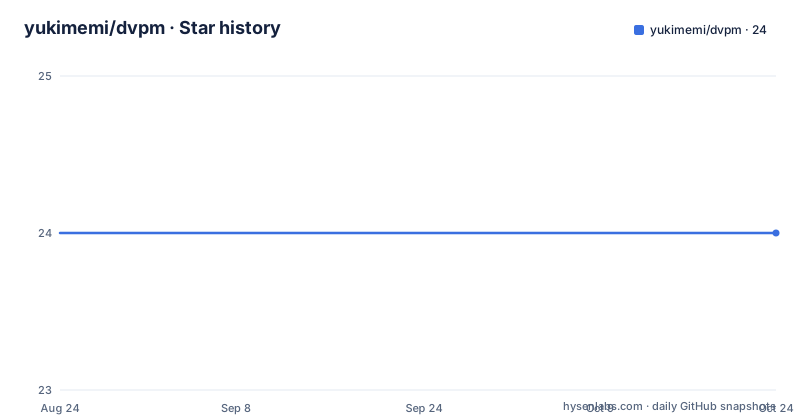
- yukimemi/dvpm24 ★ · +0
| Repository | 2026-08-24 | 2026-10-22 |
|---|---|---|
| yukimemi/dvpm | 24 | 24 |
0 Stars in the last 59 days, measured from the daily GitHub snapshot. Compare with other projects
Editorial analysis
Plugin registration happens inside a TypeScript entrypoint
dvpm is a plugin manager for Vim and Neovim that runs on top of denops.vim, so the runtime that manages your plugins is Deno, not Vimscript. The only requirement listed for it is Deno. You write an async entrypoint that receives a `Denops` object, resolve a base directory, construct the manager, and register each plugin with `Dvpm.add`. The base path is chosen per editor at runtime:
export const main: Entrypoint = async (denops: Denops) => {
  const base_path = (await fn.has(denops, "nvim")) ? "~/.cache/nvim/dvpm" : "~/.cache/vim/dvpm";
  const base = (await fn.expand(denops, base_path)) as string;

  const dvpm = await Dvpm.begin(denops, { base });
`fn.has(denops, "nvim")` is the branch that keeps one config working under both editors. Registration is one call per plugin, and the url field takes a GitHub `username/repo` shorthand such as `yukimemi/autocursor.vim` or a full git URL. `Dvpm.end` closes the sequence: it adds the collected plugins to runtimepath and sources `plugin/*.vim` and `plugin/*.lua` from them. The package is published on JSR as `@yukimemi/dvpm`, and the author points at a dotfiles repository for a fuller main.ts than the short example here.
The denops.vim bootstrap clones into the cache tree dvpm later owns
For Neovim the denops.vim bootstrap lives in `~/.config/nvim/init.lua`, which is `~/AppData/Local/nvim/init.lua` on Windows:
local denops = vim.fn.expand("~/.cache/nvim/dvpm/github.com/vim-denops/denops.vim")
if not vim.loop.fs_stat(denops) then
  vim.fn.system({ "git", "clone", "https://github.com/vim-denops/denops.vim", denops })
end
vim.opt.runtimepath:prepend(denops)
Vim gets the same clone from `~/.vimrc`, or `~/_vimrc` on Windows, using `isdirectory` instead of `fs_stat` and an `execute` line carrying `silent!` instead of `vim.fn.system`:
let s:denops = expand("~/.cache/vim/dvpm/github.com/vim-denops/denops.vim")
if !isdirectory(s:denops)
  execute 'silent! !git clone https://github.com/vim-denops/denops.vim ' .. s:denops
endif
execute 'set runtimepath^=' . substitute(fnamemodify(s:denops, ':p') , '[/\\]$', '', '')
Where the clone lands is the detail worth noticing. denops.vim is written to `~/.cache/nvim/dvpm/github.com/vim-denops/denops.vim`, inside the same tree that `base` points at later, so the manager inherits a layout the bootstrap already established. The Vim variant resolves that path with `fnamemodify` and strips a trailing separator before prepending it to runtimepath. Both snippets wrap the clone in an existence check, which is what decides on the next start whether the clone runs again.
deno.json has to land in one of four platform paths
On denops.vim v8 or later the workspace has to be declared. The file goes at `~/.config/nvim/deno.json` for Neovim on Mac and Linux, `~/AppData/Local/nvim/deno.json` for Neovim on Windows, `~/.vim/deno.json` for Vim on Mac and Linux, or `~/vimfiles/deno.json` for Vim on Windows. Its content is a single key:
{
  "workspace": ["./denops/config"]
}
That relative path is where main.ts belongs, `~/.config/nvim/denops/config/main.ts` under Neovim or `~/.vim/denops/config/main.ts` under Vim. Dependencies are added from inside that directory:
cd ./denops/config
deno add jsr:@denops/std jsr:@yukimemi/dvpm
Two packages land in the config: `@denops/std` for the Denops types and helper functions, and `@yukimemi/dvpm` for the manager itself. The workspace array has a single entry, and the four deno.json locations differ by editor and platform rather than by anything inside the file. Nothing on this path installs your Vim plugins. That happens later, through `Dvpm.add` calls written inside main.ts.
DvpmOption decides how much of the plugin work happens at startup
`Dvpm.begin(denops, dvpmOption)` takes one mandatory field and a set of optional ones. `base` is the only required entry, the path used for git clones. `cache` takes a file path for the startup cache, and `profiles` takes a list of active profile names that per plugin `profiles` fields are matched against. `concurrency` caps concurrent processes and defaults to 8. `notify` switches log output over to `vim.notify` and is marked Neovim only, defaulting to false. `logarg` carries git log arguments into the `:DvpmUpdate` output and defaults to an empty array. `health` enables `:checkhealth` support, also Neovim only, default false. `profile` turns on performance profiling, which is the prerequisite for `:DvpmProfile`. The option table ends on the `profile` entry, so any field past it would be undocumented. The same lazy pattern repeats per plugin: `enabled` defaults to true and accepts a function, and a plugin level `profiles` list gates it against the manager level one.
build runs on every update, so guard it with isInstalled and isUpdated
`PlugInfo` is what callbacks receive instead of the `Plug` you passed in, with values already resolved so `enabled` arrives as a plain boolean rather than a function. On top of that it exposes five read-only status fields: `isLoaded` for whether the plugin reached runtimepath in this session, `isInstalled` for whether it was cloned for the first time, `isUpdated` for whether a git pull touched it, `isCache` for whether it came from the startup cache, and `elaps`, the loading time in milliseconds. The warning attached to them is what you design around: `build` is called after every update even when nothing changed, so heavy build steps belong behind `info.isInstalled || info.isUpdated`. Elsewhere on the same type, `name` is auto calculated when you leave it out, `depth` asks for a shallow clone and `rev` pins a branch or revision. `dst` overrides the clone path. Both `dst` and `rev` accept an async function, and the info passed to those functions has `url`, `dst` and `name` already resolved.
Cache pulls plugin loading ahead of VimEnter
Set `cache` on `Dvpm.begin` and plugins load before `VimEnter` fires. The path points at a generated script: `~/.config/nvim/plugin/dvpm_plugin_cache.vim` for Neovim, or `~/.vim/plugin/dvpm_plugin_cache.vim`, which becomes `~/vimfiles/plugin/dvpm_plugin_cache.vim` on Windows.
const dvpm = await Dvpm.begin(denops, { base, cache });

// Simple: just set cache.enabled
await dvpm.add({ url: "tani/vim-artemis", cache: { enabled: true } });
Passing `cache` at the manager level covers everything, while the per plugin form above opts one plugin in at a time, and the longer example in the README attaches before and after scripts to a plugin. The lower level `Dvpm.cache({ script, path })` writes a single script and reports whether it wrote one by returning true, which suits hand written Vim or Lua snippets you want evaluated at startup. Two nearby flags are not the same thing: `notify` changes where log output goes, `health` changes which health command exists.
Five commands cover update, list, health and profiling
:DvpmUpdate [url]     " Update all plugins, or only the specified one.
:DvpmList             " Show plugin list in dvpm://list buffer.
:checkhealth dvpm     " Health check. (Neovim only, requires health: true)
:DvpmCheckHealth      " Health check in dvpm://checkhealth buffer. (Vim / Neovim)
:DvpmProfile          " Show plugin performance profile. (requires profile: true)
`DvpmUpdate` takes an optional url so one plugin can be updated on its own, and `logarg` decides what git log output accompanies the run. `DvpmList` renders into a `dvpm://list` buffer, which is the command side of the `Dvpm.list()` method that hands back the registered plugins as an array. Health has two entry points because editor support differs: `:checkhealth dvpm` exists under Neovim only and only when `health: true` was passed, while `:DvpmCheckHealth` works in Vim and Neovim and writes to `dvpm://checkhealth`. `DvpmProfile` needs `profile: true` and splits each plugin into six columns, `total`, `init` for the init hook, `before`, `load` covering runtimepath, sourcing and denops plugin loading, `after`, and `build`, counted on first install only.
autoload/ and lua/ sit next to seven TypeScript modules at the root
The repository root is more than a single module. Next to `mod.ts` sit `dvpm.ts`, `git.ts`, `logger.ts`, `plugin.ts`, `types.ts` and `util.ts`, with `deno.json` for the workspace and `tests/` and `scripts/` for the rest. `autoload/` and `.vim/` are the Vim side of the tree and `lua/` is the Neovim side, which fits a manager that sources plugins from `plugin/*.vim` and `plugin/*.lua`. There is also a dense row of assistant and automation configuration at the top level: `.agents/`, `.claude/`, `.gemini/`, `.kata/`, `AGENTS.md`, `CLAUDE.md`, `GEMINI.md`, `OPENCODE.md`, `magi.toml`, `renri.toml`, `apm.yml`, `apm.lock.yaml` and `opencode.json`, plus `.coderabbit.yaml` and `renovate.json` for dependency updates. The project carries an MIT licence, one open issue, and no GitHub releases. Its last push landed on 28 September 2026.
Editorial conclusion
Pick dvpm if your editor config is already TypeScript and you want plugin startup measured rather than guessed. Skip it if your setup is Vimscript only, since it adds Deno and denops.vim before it touches a single plugin. Verify the four deno.json paths against your own platform and check that the per plugin build hook guards on isInstalled or isUpdated before you rely on it.
Frequently asked questions
What does dvpm need before it can manage any plugin?
Deno is the only listed requirement. denops.vim is bootstrapped first, from ~/.config/nvim/init.lua under Neovim or from ~/.vimrc under Vim, and the manager itself is added with deno add jsr:@denops/std jsr:@yukimemi/dvpm.
Where does dvpm expect deno.json and main.ts to live?
deno.json goes at one of four paths: ~/.config/nvim/deno.json, ~/AppData/Local/nvim/deno.json, ~/.vim/deno.json, or ~/vimfiles/deno.json, depending on editor and platform. main.ts then lives at ~/.config/nvim/denops/config/main.ts under Neovim or ~/.vim/denops/config/main.ts under Vim.
How do I make dvpm load plugins before VimEnter?
Pass a cache file path to Dvpm.begin, pointing at ~/.config/nvim/plugin/dvpm_plugin_cache.vim under Neovim or ~/.vim/plugin/dvpm_plugin_cache.vim under Vim, or ~/vimfiles/plugin/dvpm_plugin_cache.vim on Windows. A single plugin can opt in on its own with cache: { enabled: true } in its add call.
Why does my dvpm build hook run on every update?
The build hook is called after every update even if nothing changed. Guard expensive steps with info.isInstalled || info.isUpdated, using the status fields PlugInfo exposes to callbacks.
How do I see where dvpm startup time goes?
Set profile: true when calling Dvpm.begin, then run :DvpmProfile. Each row is split into total, init, before, load, after and build, where load covers runtimepath plus sourcing plus denops plugin loading.
Official sources
Add this badge to your README
If you maintain this project, the badge below links readers to this analysis and shows its maintenance status from the daily GitHub snapshot. Paste the markdown into your README; add ?metric=license or ?metric=stars to the image URL for a different field.

[](https://hysenlabs.com/projects/yukimemi-dvpm)Star history chart for your README
[](https://hysenlabs.com/projects/yukimemi-dvpm)