GhostLock refuses to guess an offset, and says a successful run proves nothing about your phone
GhostLock One-Tap Execution App (CVE-2026-43499)
At a glance
- What is it?
- An Android app that runs a privilege escalation built on a numbered kernel vulnerability and loads a kernel module through a root manager. The engineering worth reading is the honesty layer: profiles match one exact kernel string, every extracted profile is labelled an unverified candidate, and one vendor is documented as failing at the first stage.
- Who is it for?
- Read GhostLock for two things and ignore the third. The interesting material is the profile system and the extractor's refusal to fill gaps, which is unusually disciplined engineering for a tool in this category, and the documentation of one vendor where the primary path is known to fail.
- Can I use it commercially?
- Yes. Apache-2.0 is a permissive licence: you can use, modify and sell software built on it, as long as you keep its copyright and licence notices.
- Is it still maintained?
- Yes. The repository last received commits 4 days ago.
- What is it written in?
- Mainly C, according to GitHub's language statistics.
Answers come from the project's GitHub data, last synced on November 15, 2026, and from our analysis. They are not legal advice.
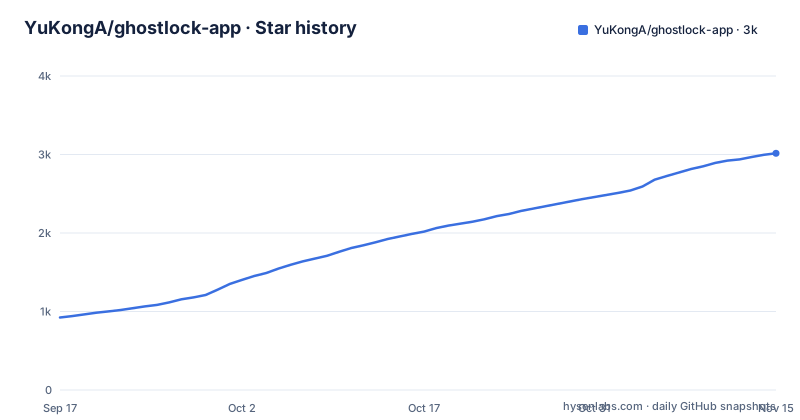
Star history
- YuKongA/ghostlock-app3,015 ★ · +2,091
| Repository | 2026-09-17 | 2026-11-15 |
|---|---|---|
| YuKongA/ghostlock-app | 924 | 3k |
2,091 Stars in the last 59 days, measured from the daily GitHub snapshot. Compare with other projects
Editorial analysis
Every extracted profile is an unverified candidate, and that is the design
The extractor's output contract is stated more carefully than most tools state their success condition.
The extractor reads a boot image, an optional companion image, a full distribution archive, or an address, and derives the offsets it needs from what the image actually contains. Where symbols are absent it recovers them from a table embedded in the image, and two specific offsets come from a built-in disassembler for the target architecture.
The important part is what it refuses to do. It emits every field the image yields and omits the rest. It does not fill a gap from a neighbouring kernel family's values, and the file names the specific things it will not invent: an unverified family, a default it would otherwise substitute, the constants belonging to an older branch, and a physical address default.
Every output is labelled an unverified candidate. It is importable and parseable, and missing or invalid fields are blocked by the app's validation before anything executes, so a successful run does not imply the device is supported.
That last clause is the whole thing. Most tools in this category would treat a clean parse as a green light. This one treats it as the beginning of a second, separate question, and keeps the two apart in the documentation.
The output format itself is also worth noting: a flattened, self-contained configuration with no include lines and shared constants inlined, so a profile can be passed around as one file without resolving anything.
Profiles match one exact kernel string, with templates as the authoring format
The gating mechanism is an exact string comparison, and the file is explicit that unsupported builds are rejected rather than approximated.
GhostLock matches kernels by the exact release string the system reports and rejects anything not covered, showing the status at the top of the app so the failure is not silent. There is no partial match, no nearest-family fallback, and no attempt to guess.
The profile store has three levels. Authoring happens in a template per version family. Each release then gets its own configuration file in the built-in assets. And an index file is the runtime lookup, so the app reads one file to decide whether it will proceed.
A generated profile opens with the two fields that carry the whole contract: the exact release string it describes, and a schema version.
release = "6.12.38-android16-5-g844001fb8721-ab14552068-4k"
schema_version = 1
That first value is the string the app will compare against the running kernel, character for character. A device with a kernel one patch level away is a device this will refuse.
That structure is a direct answer to the problem this class of tool has. A kernel release string is long, specific, and different for every vendor build, so a tool that wants to run has to know exactly which string it is on and refuse everything else. Templates keep the authoring sane across a family; per-release files keep the runtime honest.
The documentation set backs the structure up, with a porting guide, a supported device list, a schema document describing the full profile structure and data flow, and a document devoted to the shared execution defaults that gives every tuning field, its default value, and the reasoning behind it. That last one is the rarest document in the repository and the most useful, because a field whose reason is written down is a field a maintainer can change later without breaking anyone.
Preflight disassembles the fix and exits 6 on a patched kernel
Before the extractor does any work, it checks whether the kernel is still vulnerable, and it checks by reading the code rather than by trusting a version number.
The extractor disassembles the function that removes an object from the kernel's wait queue. Kernels carrying the fix are rejected, with a specific non-zero exit code. Only kernels without it continue past the gate.
A version check would be cheaper and worse. Kernel backports exist, vendors backport selectively, and a version string is the wrong place to look for the presence of a patch. Reading the instruction sequence tells you whether the fix is in the build you are actually on.
The chosen exit code is also doing work. It gives a caller, including a script and including the in-app path, a way to distinguish refusal from failure without parsing anything.
This gate is the reason the rest of the design can be permissive. The extractor is allowed to produce profiles for kernels it has never seen, because the preflight has already established that the kernel is in the vulnerable state those profiles describe. The order matters: check the code, then produce the artifact.
It also means the tool is honest about the other direction. On a patched device, the correct outcome is a refusal, and a refusal with a named exit code is something the app and a person can both act on.
One vendor is documented as failing at the first stage
One hardware vendor has its own section in the documentation, and the section is an admission.
Images from that vendor ship without the companion configuration image the extractor normally reads, and usually without the embedded type information that the other families have. The consequence is specific: the extractor cannot derive the two physical load addresses, so it leaves both of them null.
Then the runtime falls back to a formula based on the system-on-chip, and the file says in plain terms that this fails at the first stage of the escalation. Not at a later stage, not intermittently: at the first one.
The documented route is manual. A separate extractor for that vendor must be run on a rooted device, where it reads the physical memory map from the running kernel, and the resulting values are pasted into the app's advanced overrides.
That is a real limitation stated in the repository rather than discovered by a user, and it comes with the second half of the story: because the native side accepts its configuration on standard input from the app, a profile assembled by hand and imported behaves identically to one the extractor produced.
Which is the pattern the whole project is built on. Where automation fails, the user supplies the two missing numbers, the validation catches anything else that is missing, and the exact-match gate still refuses anything the profile does not describe.
Three kernel families, three routes, and a CPU pair the profile chooses
The execution chain is a pipeline of three components, and the parts are named in the file.
There is a frontend, described in terms of startup and handoff. There is a backend, which is the vulnerable kernel primitive itself. And there is a route in between, described as a middleware layer. The catalogue of valid combinations is instantiated when the project is built, and the resolved profile is what selects which combination runs.
The route is not one thing. Three kernel families are named, and each has its own wait primitive, so the profile selects the mechanism as well as the offsets. Two CPU cores are used, and the file is explicit that the pair also comes from the resolved profile rather than from a fixed configuration.
The escalation itself is staged, and the stages are referred to throughout the documentation by short names. There is a stage reached on the target device through a root manager, which supplies a helper binary used for module loading; without that helper the earlier stages still succeed in obtaining root but no module is loaded. And there is a third stage that is skipped when the calling shell has no kernel sandbox filter at all, which is why an ADB shell is described as a convenient way to verify quickly: it exercises the path without the condition that makes the third stage necessary.
A tool with three stages and one vendor where stage one fails is not a smooth product. It is a set of narrowly-scoped claims, each gated.
The native side holds no state and reads its configuration from stdin
The import architecture is the part that makes the whole profile system maintainable by more than one person.
The native component always starts from a single configuration document that the app sends it on standard input, and before doing anything it matches the current kernel release string against the resolved profile and rejects the kernel if they differ. There is no profile file on the device that the native side reads for itself, which means there is no second copy of the truth to drift.
Adding support for a new kernel no longer requires rebuilding the application. There are two import paths: the flattened configuration format the extractor produces, and a version one report format for older work, which is converted in the app so nothing has to be pushed to the device by hand.
Two behaviours in the import are worth calling out because they are the difference between a usable system and an unusable one. Imports merge across files, so a user can add corrections incrementally instead of hand-assembling one document. And a release that is already stored prompts before being overwritten, so a second phone import does not silently replace a profile that took a day of reverse engineering to produce.
The app can also run the extractor itself. One entry point takes a full distribution archive address; another takes a boot image with an optional companion. Both run in the same process as the app and write a flattened profile into the app's data directory on success.
A full distribution can also be analysed entirely on the phone, with a work directory flag for when the extractor is running inside the application sandbox.
Two releases, and neither of them is a version number
The repository's version history is two entries, and they are the wrong shape for a tool whose entire premise is exact matching.
One release is tagged for a single vendor's testers, and its name is a note in two languages asking for people with those devices to test the development branch. The other is tagged as a pre-release and named as a pre-release. Neither is a version number.
For most projects that would be untidy naming. Here it matters more, because the app rejects any kernel it does not have a profile for and a user who wants to reason about which build they have has no tag to check out and no version to compare against. There is no way to answer, from the repository alone, which combination of app build and profile set anyone else was running.
The language mix is similarly understated in the metadata. The primary language is recorded as C, which matches the native component, but the tree also holds a Gradle build in Kotlin for the application, a separate module for shared profile logic, a Rust extractor with its own cross-compilation targets, and a build system for the native source. Four languages, one recorded.
Two absences are worth noting too. There is no test directory at the top level, in a project whose central claim is that it refuses to run against a patched kernel. And the old native header registry that used to hold offsets has been deprecated and removed, replaced by the configuration files described above, which is a clean migration with the tombstone left behind on purpose.
Editorial conclusion
Read GhostLock for two things and ignore the third. The interesting material is the profile system and the extractor's refusal to fill gaps, which is unusually disciplined engineering for a tool in this category, and the documentation of one vendor where the primary path is known to fail. The third thing is the escalation itself, which needs a vulnerable kernel, a root manager, and a device you are willing to experiment on. This is not software to put on a phone you depend on: it modifies kernel state, it loads a module, and it has a published identifier for the bug it relies on, which means every device it can run on is a device whose patch level you have decided to override. Four things to check first. Whether a profile exists for your exact kernel build, because the match is by exact release string and there is no fallback. Whether the vendor is one of the documented-broken ones. What the app's pre-execution validation rejects, since an unverified profile is only as good as that check. And what the stage split means on your device, because a shell without a kernel sandbox takes a different path than the app does.
Frequently asked questions
What is GhostLock?
An Android app that runs a privilege escalation built on a numbered kernel vulnerability and uses a root manager to load a kernel module. It ships per-kernel configuration profiles plus an extractor that derives the offsets it needs from a boot image, a companion image or a full distribution archive.
Why does GhostLock only run on some phones?
Because it matches the kernel release string exactly against a built-in profile and rejects anything not covered, showing the status at the top of the app rather than failing silently. There is no nearest-version fallback, so a device needs a profile for its exact build, which is why the extractor and the import paths exist.
Does a successful GhostLock extraction mean the device is supported?
No, and the project says so explicitly. Every extractor output is an unverified candidate: importable and parseable, with missing or invalid fields blocked by the app's pre-execution validation, so a successful run never implies device support. The extractor emits only the fields the image yields and never fills gaps from a neighbouring kernel family's values.
What happens to GhostLock on MediaTek devices?
Those images ship without the companion configuration image and usually without the embedded type information, so the extractor cannot derive the two physical addresses and leaves them null. The runtime falls back to a system-on-chip formula that fails at the first stage, so the documented route is a separate extractor run on a rooted device that reads the physical memory map, with the values pasted into the app's advanced overrides.
How does GhostLock handle a kernel that has already been patched?
The extractor disassembles the function that removes an object from the kernel's wait queue before extracting any offsets, and rejects a kernel carrying the fix with a specific non-zero exit code. Only vulnerable kernels continue, which is the check that licenses the rest of the pipeline to be permissive about kernels it has never seen.
Official sources
Add this badge to your README
If you maintain this project, the badge below links readers to this analysis and shows its maintenance status from the daily GitHub snapshot. Paste the markdown into your README; add ?metric=license or ?metric=stars to the image URL for a different field.

[](https://hysenlabs.com/projects/yukonga-ghostlock-app)Star history chart for your README
[](https://hysenlabs.com/projects/yukonga-ghostlock-app)Was this useful?