The pip line needs a PyTorch wheel index on Linux and nowhere else
grep for images – local, offline image search for the terminal
At a glance
- What is it?
- Local semantic photo search for the terminal: a query language with addition and subtraction, an interactive thumbnail grid, and a claim that your photos never leave your machine. The install matrix has an asymmetry nobody explains, the model ships with its own licence files beside the project's, and two released versions of one dependency are pinned out for a reason.
- Who is it for?
- This is a well-built tool with a real point of view about local first, and the query algebra is the part that makes it more than a demo. Four things to check before you rely on it.
- Can I use it commercially?
- Yes. MIT is a permissive licence: you can use, modify and sell software built on it, as long as you keep its copyright and licence notices.
- Is it still maintained?
- Yes. The repository last received commits 2 days ago.
- What is it written in?
- Mainly Python, according to GitHub's language statistics.
Answers come from the project's GitHub data, last synced on November 25, 2026, and from our analysis. They are not legal advice.
Star history
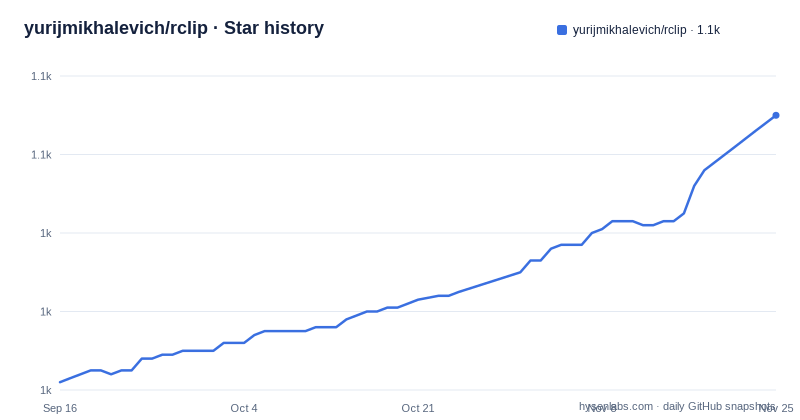
- yurijmikhalevich/rclip1,070 ★ · +68
| Repository | 2026-09-16 | 2026-11-25 |
|---|---|---|
| yurijmikhalevich/rclip | 1k | 1.1k |
68 Stars in the last 70 days, measured from the daily GitHub snapshot. Compare with other projects
Editorial analysis
One platform needs a wheel index the others do not
The alternative install for Linux adds an extra index pointing at the CPU-only PyTorch wheel repository before the package name:
pip install --extra-index-url https://download.pytorch.org/whl/cpu rclipThe alternative installs for macOS and Windows are the bare package name with no index. The same command line therefore works on two platforms and fails on the third unless you remember the flag, and the page gives no reason for the difference. It is arguably stranger still given the runtime dependency list, where the inference engine is a different accelerator stack entirely and the package also carries a model repository and a model hub client. Whatever pulls weights at install time, it is not obviously the reason for that index, so the asymmetry is a fact rather than a design you can infer from the dependencies.
The weights are not covered by the project's own licence
The licence field says MIT, which is true of the code. What is more interesting is the list of licence files the package ships, which has four entries rather than one. Two are the project's own. The other two live inside a compliance directory for a model repository: a licence text, a notice naming an open image model, and a third-party notices file. So the distribution carries two licensing regimes at once, and a user who reads only the licence badge learns about half of what they need to. That directory is also where the notices for the model come from, which means the attribution work is deliberate rather than accidental, and it is the one part of the packaging that is unusually well handled.
Two released dependency versions are pinned out over a private API
The dependency list carries a comment that explains an exact pin better than any changelog would. The terminal image library is held at one specific version because the stable image component it needs relies on a private interface, and the two immediately newer releases of that library ship without their package code at all. So the project is stuck two versions back on a user interface library, with a comment recording why and what would let it move. That is a good practice and a bad constraint: the pin will keep working until that private interface changes, and when it does, the failure will arrive as a broken grid rather than a message about a version. The same pattern of an exactly held version appears nowhere else in the list.
Offline is a promise about your photos, not about the first run
The feature list says the tool works fully offline and that your photos never leave your computer, and the headline repeats it. Both are true of the search itself: features are extracted locally and the query never leaves the machine. What is not covered is the first run. The dependency list includes a model hub client, and the tree contains a compliance directory holding a model repository, so weights have to arrive from somewhere on a fresh install. The timings given on the page make the same point from the other side, since the first search in a directory is the expensive one and everything after it is incremental. Treat offline as a property of steady state, which is the correct promise for this kind of tool and is worth stating more explicitly than the page does.
Three terminal version requirements across a handful of shortcuts
The interactive grid needs a terminal with graphics support and a placeholder mode, and the page names the terminals that qualify. Then the individual shortcuts add their own floors. Copying an image needs a recent terminal release and a helper executable to be discoverable on your path. Downloading an image over a remote session needs a newer release again, plus a helper on the remote host, plus a confirmation prompt. And on a local machine that same download shortcut does nothing except show the file path. So one key does three different things depending on where the terminal is, across three different minimum versions, with the local case being the no-op one that is easiest to hit by accident.
The interactive grid is text only, and ranks once
The interface is built on a terminal widget library and it is genuinely well specified: focus search, toggle between grid and detail, copy the image or its path, download, quit, each with both a control key and a single letter, plus mouse behaviour for double-clicking into detail and clicking a filmstrip thumbnail. Two design choices are worth knowing. Ranking happens once and the results are paged in as you scroll, in batches of up to a hundred, with a flag to make that batch smaller, so a very large match set does not stall the interface. And image queries are not available inside the interface at all; the page states they stay on the non-interactive command line, which means the grid is a browser for text results only.
The release recipe pushes straight to the branch you are on
The build file ends with a release target that takes a version argument, refuses to run without it, bumps the version, rewrites the version inside the packaging manifest, commits everything, pushes the current branch, creates a tag and pushes the tag. There is no test run in that sequence and no changelog check, so the quality gate in a release is whatever ran before it. The file also handles a portability gap at the top, choosing the GNU variant of a text tool when it is present because the release automation uses expressions only that version understands, which is the sort of detail that quietly breaks a release on a Mac. The author's own indexing figures sit next to all this: fifteen hours for a large photo library on a NAS behind an old low-power processor, seven minutes for fifty thousand images on a laptop, three hours for well over a million.
Editorial conclusion
This is a well-built tool with a real point of view about local first, and the query algebra is the part that makes it more than a demo. Four things to check before you rely on it. The architecture story is not uniform: no native image on Linux outside the package route, no Intel Mac at all, and a Python install that needs a different index depending on the platform. The model is not covered by the project's own licence, and the licence files in the package make that explicit. The interactive grid is text only, so image queries stay on the command line. And the offline promise is about your photos, not about the first run, which may still need to fetch weights.
Frequently asked questions
How do I install rclip on Linux?
The documented route is a single install command through the snap packaging system. Alternatives are a self-contained AppImage for x86_64, moved into a local binary directory after making it executable, or a Python install that needs an extra index pointing at the CPU-only PyTorch wheel repository, which the macOS and Windows Python lines do not use.
Does rclip send my photos anywhere?
No. Feature extraction and search both run locally and the page says your photos never leave your computer. The caveat is the first run, which may need to fetch model weights, since the project depends on a model hub client and ships a model repository directory.
Can rclip search by an example image?
Yes, pass a local path or a URL, and a relative local path must be prefixed so the tool does not read it as a text query. Image queries can be combined with text using addition, subtraction and a numeric weight prefix on a term.
Which platforms does rclip support?
Linux, macOS and Windows, with one asymmetry per platform: the macOS package is Apple Silicon only, the AppImage alternative is x86_64 only, and the Windows route is an installer from the releases page. The manifest requires Python 3.12 or newer and below 3.14.
What licence is rclip under?
The code is MIT. The package also ships licence files for a model repository, including a notice naming an open image model and a third-party notices file, so the weights are covered by separate terms rather than the project's own.
Official sources
Add this badge to your README
If you maintain this project, the badge below links readers to this analysis and shows its maintenance status from the daily GitHub snapshot. Paste the markdown into your README; add ?metric=license or ?metric=stars to the image URL for a different field.

[](https://hysenlabs.com/projects/yurijmikhalevich-rclip)Star history chart for your README
[](https://hysenlabs.com/projects/yurijmikhalevich-rclip)Was this useful?