TokenTracker: a local dashboard for AI coding token usage, with hooks installed on first run
Project brief: Local-first AI token usage & cost tracker for 28 coding tools incl. Claude Code, Codex, Cursor, Gemini & Qoder-with native apps. Never reads prompts.
At a glance
- What is it?
- TokenTracker is a Node.js CLI plus native desktop apps that reads usage from 47 AI coding tools and shows tokens and cost in a dashboard on localhost:7680. The first command already changes your tool configuration, and the Linux and Cursor paths have sharp edges.
- Who is it for?
- Use TokenTracker if you run several AI coding tools on one machine and want one local dashboard for tokens and cost without creating an account. Skip it if you cannot accept a first run that installs hooks, and check Node 20+, the sqlite3 situation for Cursor, and your Linux package format before you rely on it.
- Can I use it commercially?
- Yes. MIT is a permissive licence: you can use, modify and sell software built on it, as long as you keep its copyright and licence notices.
- Is it still maintained?
- Yes. The repository received new commits within the last day.
- What is it written in?
- Mainly JavaScript, according to GitHub's language statistics.
Answers come from the project's GitHub data, last synced on November 15, 2026, and from our analysis. They are not legal advice.
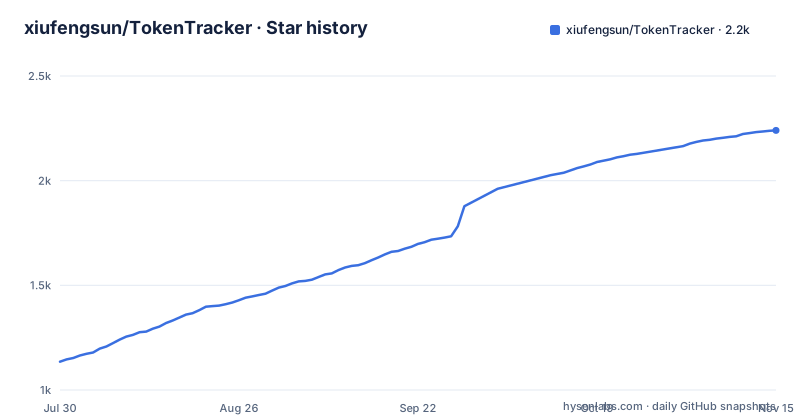
Star history
- xiufengsun/TokenTracker2,240 ★ · +1,105
| Repository | 2026-07-30 | 2026-11-15 |
|---|---|---|
| xiufengsun/TokenTracker | 1.1k | 2.2k |
1,105 Stars in the last 108 days, measured from the daily GitHub snapshot. Compare with other projects
Editorial analysis
The first npx run installs hooks before you have looked at anything
The entire quick start is one command, and it does more than open a page.
npx tokentracker-cliOn first run it installs hooks for every supported AI tool it detects on your machine, syncs your data, and then opens the dashboard at http://localhost:7680. The dashboard shows usage trends, a model breakdown and cost analysis. The pitch is local-first: it parses logs on your machine, and no account or API keys are needed. The repository description adds that it never reads prompts.
The consequence is that trying it out is not a read-only act. Hooks are written into the configuration of tools you already use, so a person who only wants a quick look should run tokentracker status afterwards to see what was attached. The package requires Node.js 20 or newer. The CLI runs on macOS, Linux and Windows, so the hook step is the same decision on all three, and the native apps are a separate download rather than something npx gives you.
Four binary names, one script, and a global install for shorter commands
The npm package is called tokentracker-cli, and its package.json maps four binary names to the same file, bin/tracker.js: tokentracker-cli, tracker, tokentracker and tokentracker-tracker. That is why a global install lets you type the short form. The published package ships only bin/, src/, dashboard/dist/, the license, the third party notices and the README, so the dashboard you see is the prebuilt bundle, not something compiled on your machine.
npm i -g tokentracker-cli

tokentracker              # Open the dashboard
tokentracker sync         # Manual sync
tokentracker status       # Check hook status
tokentracker status --json     # Machine-readable summary (pipe to jq, ingest from AI agents)
tokentracker status --light    # Plain ASCII table (CI / SSH, no spinner)
tokentracker doctor       # Health check
status has two output modes worth knowing. The --json form is meant for piping into jq or feeding an AI agent, and --light prints a plain ASCII table with no spinner for CI or SSH sessions. sync is the manual trigger, which matters when you want numbers refreshed right now instead of waiting for whatever the hooks last collected.
Cursor numbers depend on a sqlite3 binary or a recent enough Node
For Cursor it uses the system sqlite3 command line tool when one is available and falls back to the built in node:sqlite module on supported Node releases. That wording leaves a gap. If your machine has no sqlite3 on the path and your Node release does not provide node:sqlite, the Cursor numbers have no source to come from, and the dashboard will not be able to include that tool.
The practical check is to run tokentracker doctor and tokentracker status after the first sync and compare what is listed against the tools you actually use. This matters more than it sounds because the headline claim is coverage. The README and package.json both say 47 tools, while the GitHub description still says 28, so the number moves between releases and is not a safe thing to quote. The list includes Claude Code, Codex CLI, Cursor, Gemini CLI, Antigravity, Kiro, OpenCode, GitHub Copilot, Kimi Code and Kilo Code among many others, and each one has its own way of storing usage.
The Debian 12 .deb cannot install, and the GNOME tray behaves differently
Linux gets three artifacts per release: an AppImage, a .deb and an .rpm. The AppImage is one self contained file of about 120MB that carries its own GTK3, WebKitGTK and appindicator, so it installs nowhere and needs nothing from the distribution beyond a current glibc. The .deb and .rpm are about 55MB because they link the distribution's webkit2gtk-4.1, gtk3 and appindicator instead. All three bundle their own Node runtime and the dashboard.
chmod +x TokenTracker-linux-x86_64.AppImage
./TokenTracker-linux-x86_64.AppImagesudo apt install ./TokenTracker-linux-x86_64.deb # Debian / Ubuntu
sudo dnf install ./TokenTracker-linux-x86_64.rpm # Fedora / RHELThe .deb depends on libappindicator3-1, which Debian 12 bookworm dropped in favour of libayatana-appindicator3-1, so apt refuses it and the AppImage is the only route there. On GNOME the tray icon needs the AppIndicator extension, and clicking the tray icon opens the menu rather than the window, which is described as a libayatana-appindicator limitation. The stated test platform is Arch with KDE Plasma, so GNOME users are on the less exercised path. An Arch PKGBUILD exists under TokenTrackerLinux/packaging/arch/tokentracker-linux for a local pacman install, but it is not published to the AUR.
Homebrew offers a cask for the menu bar app and a separate formula for the CLI
On macOS there are two distinct Homebrew installs, and picking the wrong one gives you a different product. The cask installs the menu bar app from the DMG. The plain formula installs only the command line tool. Neither needs a separate tap step.
# macOS menu bar app (DMG)
brew install --cask xiufengsun/tokentracker/tokentracker

# CLI only
brew install xiufengsun/tokentracker/tokentracker
Upgrades use brew upgrade --cask xiufengsun/tokentracker/tokentracker, and the tap is said to bump itself within an hour of every new release. That delay is the cost of the Homebrew route: right after a release you may briefly be a version behind what npm or the releases page offers. The three most recent tags are v1.5.4 on 2026-11-03, v1.5.3 on 2026-11-02 and v1.5.2 on 2026-10-31, and the last push to main was on 2026-11-02, so the project is moving fast enough for that hour to matter.
The macOS app is a menu bar status icon with desktop widgets and the dashboard inside a WKWebView. The Windows build is a per user installer that needs no admin rights, a system tray app with the dashboard in WebView2, plus a portable zip on the releases page.
The environment template carries cloud shaped settings next to a local-first promise
The .env.example file is where the local-first story gets complicated. Alongside harmless entries such as TOKENTRACKER_TZ, TOKENTRACKER_TZ_OFFSET_MINUTES and TOKENTRACKER_HTTP_TIMEOUT_MS, it lists TOKENTRACKER_DEVICE_TOKEN, TOKENTRACKER_ACCESS_TOKEN and TOKENTRACKER_INSFORGE_BASE_URL, plus INSFORGE_BASE_URL, INSFORGE_ANON_KEY, INSFORGE_SERVICE_ROLE_KEY and INSFORGE_API_KEY. Those names point to an optional hosted backend that the dashboard and CLI can talk to. OPENROUTER_API_KEY appears under pricing sync, which suggests model prices are refreshed from an external source rather than hard coded forever.
For a reader, the consequence is that the claim of no cloud account describes the default path, not the whole codebase. If you intend to leave every variable empty, you are on the documented local path. If you are handed a device token or an INSFORGE URL by someone else, you are opting into a service whose terms this template does not describe.
Sentry error reporting is optional. The template says public client DSNs are safe to embed and that leaving them unset keeps Sentry fully off, and it refers to the same telemetry opt-out switches without naming them in those lines. Check the opt-out names in the source before assuming telemetry is silent.
OpenCode Go quota tracking needs its own key, and the cookie fallback is a legacy hack
Token counts for most tools come from local files. Quota windows for OpenCode Go are different, because the 5 hour, weekly and monthly usage limits live on the provider's side. The preferred route is the official API: you create a Go API key in OpenCode and set OPENCODE_GO_API_KEY in your local environment only.
There is also a legacy compatibility fallback that scrapes the signed in workspace dashboard. It needs OPENCODE_GO_WORKSPACE_ID and OPENCODE_GO_AUTH_COOKIE, and the cookie is sent verbatim as Cookie: auth= followed by the value. Handing a session cookie to a local tool is a bigger trust decision than handing over an API key, and it can stop working whenever the web dashboard changes, so use the API key route when you can.
A third switch, TOKENTRACKER_OPENCODE_GO_LOCAL_ESTIMATE=1, is commented out and explicitly labelled unverified. It would show a cost estimate computed from the local opencode.db. If cost accuracy is the reason you installed TokenTracker, leave it off, because the template itself says nobody has verified that number. The repository also ships an audit:tokens script, node scripts/audit-token-correctness.cjs, which is the place to look when you want to check totals yourself.
Desktop pet, widgets and achievements are extras you pay for in install size and attention
Beyond the dashboard, the project bundles a desktop pet that celebrates streaks and follows your cursor, four native widgets (usage, activity heatmap, top models and rate limits) and 15 achievement tracks. There is also an optional Skills tab that browses 250+ public skills and syncs them across Claude, Codex, Grok, Antigravity, Gemini, OpenCode and Hermes.
None of this changes the token numbers, but it changes what you are installing. The Skills sync writes to the skill directories of other tools, which is a second kind of side effect on top of the hooks, so enable it deliberately. The macOS app is the one described with desktop widgets, while the Linux and Windows apps are described as tray apps with the dashboard in a web view, so check the widget set on your platform. The repository also contains TokenTrackerBar, TokenTrackerLinux and TokenTrackerWin directories next to the Node source, which means three separate native codebases sit beside the CLI. Releases land within days of each other, but a fix for a less used platform still has to ship as its own release.
Editorial conclusion
Use TokenTracker if you run several AI coding tools on one machine and want one local dashboard for tokens and cost without creating an account. Skip it if you cannot accept a first run that installs hooks, and check Node 20+, the sqlite3 situation for Cursor, and your Linux package format before you rely on it.
Frequently asked questions
What is token tracking, and what does TokenTracker do about it?
Token tracking means counting how many tokens your AI coding tools consume and what they cost. TokenTracker does this locally by parsing logs on your machine and showing usage trends, a model breakdown and cost analysis at localhost:7680.
How much is 1000 tokens in dollars when I use TokenTracker?
TokenTracker does not give one fixed rate. It is a cost dashboard that shows cost analysis per model from your own usage, and its environment template lists an OpenRouter key under pricing sync.
Is there a TokenTracker VS Code extension?
No extension is mentioned. TokenTracker installs as the tokentracker-cli npm package, a Homebrew formula or cask, or native macOS, Windows and Linux apps, and it reads usage from tools such as Cursor, GitHub Copilot and Kilo Code.
Official sources
Add this badge to your README
If you maintain this project, the badge below links readers to this analysis and shows its maintenance status from the daily GitHub snapshot. Paste the markdown into your README; add ?metric=license or ?metric=stars to the image URL for a different field.

[](https://hysenlabs.com/projects/xiufengsun-tokentracker)Star history chart for your README
[](https://hysenlabs.com/projects/xiufengsun-tokentracker)Was this useful?