Open-AutoGLM: it installs an input method on your phone and reads the screen
An Open Phone Agent Model & Framework. Unlocking the AI Phone for Everyone
At a glance
- What is it?
- Open-AutoGLM drives a phone through ADB with a vision language model, so it can act on what it sees rather than on accessibility labels. The mechanics that decide whether you can use it are unglamorous: developer mode and USB debugging, an input method APK installed on the device, a 9B model served locally or by a third party, and a set of launch flags the documentation insists you follow exactly.
- Who is it for?
- Open-AutoGLM fits a researcher or developer who needs to script phone interactions against a device they own, has USB debugging already enabled, and can host or reach a 9B vision model.
- Can I use it commercially?
- Yes. Apache-2.0 is a permissive licence: you can use, modify and sell software built on it, as long as you keep its copyright and licence notices.
- Is it still maintained?
- Activity is slowing. The repository last received commits 8 months ago.
- What is it written in?
- Mainly Python, according to GitHub's language statistics.
Answers come from the project's GitHub data, last synced on November 13, 2026, and from our analysis. They are not legal advice.
Star history
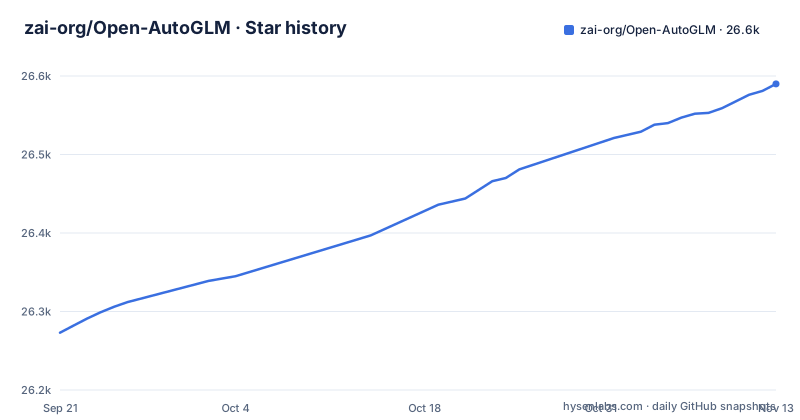
- zai-org/Open-AutoGLM26,590 ★ · +317
| Repository | 2026-09-21 | 2026-11-13 |
|---|---|---|
| zai-org/Open-AutoGLM | 26.3k | 26.6k |
317 Stars in the last 53 days, measured from the daily GitHub snapshot. Compare with other projects
Editorial analysis
The install instructions are written to be pasted into a coding agent
The README opens with what it calls a lazy quick install, and the mechanism is that you hand the setup to an AI coding agent rather than following it yourself. You configure a GLM Coding Plan, then give the agent a prompt telling it to visit the documentation and install AutoGLM for you, alongside a raw URL pointing at the project's own README on the main branch.
A separate `README_coding_agent.md` sits at the repository root next to `README_en.md`, so this is a supported path rather than a trick.
What that path does to a machine is worth being concrete about. Following the documented setup means installing Python packages, putting ADB on your PATH, enabling developer mode and USB debugging on a phone, sideloading an APK onto that phone, and enabling it as a system input method. An agent following a prompt will do all of that without stopping to ask whether the handset is your only phone.
The README carries its own warning, that the project is for research and study, that using it to illegally obtain information or interfere with systems is prohibited, and that the terms of use should be read. Treat the agent-driven install as convenient and read the steps before you delegate them.
Text entry means taking over the device's input method
On Android the framework needs a keyboard it can drive, and the documented solution is a third-party application rather than anything from the platform. You download the ADB Keyboard APK, install it on the device, and then it has to be switched on in the input method or keyboard list in Settings. There is also a command line route:
adb shell ime enable com.android.adbkeyboard/.AdbIMEThat is the sharpest privilege in the whole setup, and it is easy to miss because it is filed under text input. Enabling it means the device now has an input method that accepts text injected from the host, so anything the agent decides to type is typed through it.
HarmonyOS is treated differently and needs none of this. Devices on HarmonyOS NEXT or above use HDC instead of ADB, and the documentation states that they use a native input method so ADB Keyboard is not required.
The same split applies to the rest of the toolchain. Android uses the platform tools from the Android developer site, and the macOS path example simply extends `PATH` with the extracted platform-tools directory. HarmonyOS takes its HDC tool from the Huawei SDK, checked with `hdc list targets` in place of `adb devices`. A device on Android 7.0 or newer, or on HarmonyOS, with developer mode and USB debugging enabled, is the stated baseline.
Two models, and the difference is language coverage
There are two checkpoints and they are not regional editions of the same thing. `AutoGLM-Phone-9B` is described as optimised for Chinese phone applications. `AutoGLM-Phone-9B-Multilingual` supports English scenarios and is intended for applications containing English or other language content.
That distinction matters more than the size suggests. The system perceives the screen with a vision language model rather than reading accessibility labels, so it is inferring intent from pixels, and inference quality on an unfamiliar interface is exactly where a model trained for one app ecosystem diverges from one trained for several. Choosing the Chinese-optimised checkpoint to drive a screen full of English text is a decision you will discover through failures rather than through documentation.
Both are distributed from the same organisation on Hugging Face and on ModelScope, and the naming follows the `zai-org` and `ZhipuAI` prefixes respectively. The weights are 9B, and the documentation notes the model structure is the same as `GLM-4.1V-9B-Thinking`, pointing at the GLM-V repository for deployment guidance.
If you are choosing today, the deciding question is not size or licence but the language of the apps you need to automate.
Serving the model yourself means following the launch flags exactly
Self-hosting the weights is documented as option B, and the instructions are unusually prescriptive about the server flags. The core of the vLLM command (the full version in the README adds further flags and `--model zai-org/AutoGLM-Phone-9B`):
python3 -m vllm.entrypoints.openai.api_server \
 --served-model-name autoglm-phone-9b \
 --allowed-local-media-path /   \
 --max-model-len 25480  \
 --port 8000
The intermediate flags matter as much as these. `--mm-encoder-tp-mode data` and `--mm_processor_cache_type shm` change how the vision encoder is parallelised and cached, `--chat-template-content-format string` sets how the chat template is rendered, and `--limit-mm-per-prompt` caps how many images one prompt may carry. The documentation says to follow the provided launch parameters strictly, which is a reasonable instruction given a vision model will not behave correctly under defaults.
`--allowed-local-media-path /` deserves your attention on its own. That tells the server any path on the host filesystem may be loaded as media, so the inference endpoint can read files well outside the model directory. On a dedicated GPU box that is a convenience. On a machine with credentials, keys or personal files on disk, it widens the blast radius of anything that can reach port 8000, so bind it to a private interface and do not expose it.
The SGLang equivalent is given too, using `--context-length 25480` and `--mm-enable-dp-encoder`, and both engines are expected to expose an OpenAI-format service.
requirements.txt tells you to install a release candidate and ignore conflicts
The dependency story has two sources that do not agree, and the instructions are permissive about breakage. The packaging script declares only two requirements:
    install_requires=[
        "Pillow>=12.0.0",
        "openai>=2.9.0",
    ],
The requirements file adds a third, `requests>=2.31.0`, marked as being for iOS support.
The rest is comments. The file tells you that after installing sglang or vLLM you should run `pip install -U transformers` again to upgrade to `5.0.0rc0`, and that any dependency conflicts related to Transformers can be ignored. The engine pins themselves are commented out, `sglang>=0.5.6.post1` and `vllm>=0.12.0`.
Being told to upgrade to a release candidate and to disregard conflicts is a real risk in a shared environment, because a Transformers upgrade forced by one task can break an unrelated one and the instruction to ignore it is written for a machine you own. Use a dedicated virtual environment, which the setup steps effectively assume, and record the Transformers version you end up with.
For the third-party path none of this applies, since inference happens on someone else's servers and `main.py` only needs an OpenAI client.
Sensitive steps get a confirmation, logins get handed back to you
The framework is described as building in a confirmation mechanism for sensitive operations, and as supporting human takeover when a login or a verification code is required. That is the right shape for an agent that taps through real interfaces, and it changes what a long-running task looks like.
The consequence is that flows stop. A task that reaches a login screen, a one-time code or a destructive confirmation will wait for a person, so an unattended run is not unattended in the way a script is. If you are scheduling this, the schedule has to tolerate pauses.
The framework also offers remote ADB debugging, connecting over WiFi or the network for flexible remote control and development. Combined with the confirmation mechanism this is a deliberate design: the human stays in the loop for the sensitive part. It also means the device is reachable over the network rather than only over a cable, so the debugging convenience is also an additional way in, and the same caution about networks applies as for any debug interface.
The integration route through Midscene.js, a visual model driven UI automation SDK with JavaScript or Yaml flow syntax, means AutoGLM can also be used as a model inside another framework, and Midscene.js has completed the adaptation for both iOS and Android.
The package metadata still points at a placeholder repository
`setup.py` describes the project as version `0.1.0` with a development status of Alpha, author Zhipu AI, and it registers a console script named `phone-agent`. It also carries a URL that was never filled in:
url="https://github.com/yourusername/phone-agent",For anyone installing from a package index that reads this metadata, the declared source is a placeholder URL rather than this repository. Small, but it is the kind of placeholder that makes it obvious the distribution path was assembled rather than prepared.
The console script is worth a second look. It maps to `main:main`, and `main.py` sits at the repository root while the library code lives in the `phone_agent/` package. That means the entry point resolves because of an editable install that puts the project root on the path, not because the packaging is arranged for a wheel. Anyone converting this into a distributable package will hit that.
On activity, the facts are modest. The repository publishes no GitHub releases, the last push to the main branch was on 2026-03-06, and the weights rather than the code are what the project expects you to obtain. The licence is Apache 2.0.
Editorial conclusion
Open-AutoGLM fits a researcher or developer who needs to script phone interactions against a device they own, has USB debugging already enabled, and can host or reach a 9B vision model. It is a poor fit for a device holding accounts you care about, for a locked or non-debuggable handset, or for a production automation requirement, since the package metadata still carries a placeholder repository URL, the version is 0.1.0 with an Alpha development status, and the last push to main was on 2026-03-06. Before running it, decide three things: whether the phone's input method can be taken over, whether you will self-host the model with `--allowed-local-media-path /` on a machine with anything private on disk, and which of the two models matches the apps you need to drive.
Frequently asked questions
What does Open-AutoGLM need before it can control a phone?
Python 3.10 or newer, ADB for an Android device or HDC for HarmonyOS NEXT and above, and a device with developer mode and USB debugging enabled, which on Android means tapping the version number about ten times. Android also needs the ADB Keyboard app sideloaded and enabled, either in Settings or with `adb shell ime enable com.android.adbkeyboard/.AdbIME`, while HarmonyOS uses its native input method. You verify the connection with `adb devices` or `hdc list targets`.
Do I have to run the AutoGLM 9B model myself?
No. The documentation offers third-party inference through Zhipu BigModel at `https://open.bigmodel.cn/api/paas/v4` with model `autoglm-phone`, or ModelScope at `https://api-inference.modelscope.cn/v1` with model `ZhipuAI/AutoGLM-Phone-9B`, passing `--base-url`, `--model` and `--apikey` to `main.py`. Self-hosting is the alternative, using SGLang or vLLM to expose an OpenAI-format service, with the model weights available on Hugging Face and ModelScope.
Which AutoGLM-Phone model should I use?
AutoGLM-Phone-9B is the checkpoint optimised for Chinese phone applications, while AutoGLM-Phone-9B-Multilingual supports English and is intended for apps containing English or other language content. Both are published on Hugging Face and ModelScope, and the model structure is the same as GLM-4.1V-9B-Thinking.
Official sources
Add this badge to your README
If you maintain this project, the badge below links readers to this analysis and shows its maintenance status from the daily GitHub snapshot. Paste the markdown into your README; add ?metric=license or ?metric=stars to the image URL for a different field.

[](https://hysenlabs.com/projects/zai-org-open-autoglm)Star history chart for your README
[](https://hysenlabs.com/projects/zai-org-open-autoglm)Was this useful?