copilot.lua is a Lua client, and its first run downloads a language server
Fully featured & enhanced replacement for copilot.vim complete with API for interacting with Github Copilot
At a glance
- What is it?
- copilot.lua replaces the original Vim plugin with a Lua implementation, and the reason it exists is written down in the readme as two complaints: the machine overheated, and the large blocks of inline suggestion text collided with the completion suggestions it was already showing. What it ships is a client for the same native language server, with a panel, a suggestion layer, documented settings and a token based login that the readme marks as unsupported.
- Who is it for?
- The plugin suits a Neovim user who wants completion suggestions inline without the larger plugin's overhead, and who is willing to let the first run fetch a language server. It does not suit a musl based system without accepting the Node route, and it does not offer an officially supported token login.
- Can I use it commercially?
- Yes. MIT is a permissive licence: you can use, modify and sell software built on it, as long as you keep its copyright and licence notices.
- Is it still maintained?
- Yes. The repository last received commits 3 days ago.
- What is it written in?
- Mainly Lua, according to GitHub's language statistics.
Answers come from the project's GitHub data, last synced on November 19, 2026, and from our analysis. They are not legal advice.
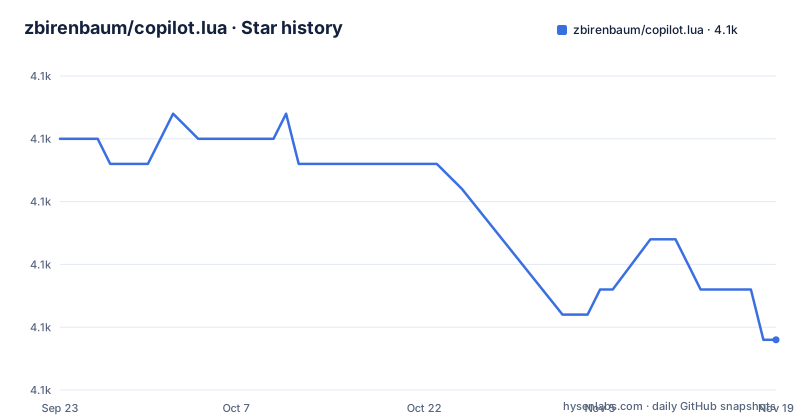
Star history
- zbirenbaum/copilot.lua4,092 ★ · -8
| Repository | 2026-09-23 | 2026-11-19 |
|---|---|---|
| zbirenbaum/copilot.lua | 4.1k | 4.1k |
-8 Stars in the last 57 days, measured from the daily GitHub snapshot. Compare with other projects
Editorial analysis
It exists because of heat and duplicated ghost text
The motivation is written in the author's own words and it is a short paragraph. While using the original plugin, the laptop began to overheat for the first time since the author started using the editor. The same paragraph names a second problem: large chunks of inline suggestion text moved around inside the code and interfered with the suggestions from an existing completion engine, so two completion sources were fighting over the same screen. The conclusion is that the language is more efficient and easier to integrate with modern plugins. There is also a credit near the top, thanking a contributor for the code behind one specific feature, which is the note next suggestion feature, described as optional and provided by a separate plugin rather than by this repository.
The first run downloads a server, verified and staged
The requirements are short and one of them is conditional. The editor version floor is given first. The scripting runtime is needed only when the server is configured to run under Node rather than natively. The default is the native language server, and the readme then describes what first use does on a supported platform: it asynchronously downloads a payload whose size depends on the pinned release and the platform, and that figure is given as a range of roughly seventy five to a hundred and ten megabytes. The cache location is inside the editor's data directory, keyed by version, platform and a checksum, and downloads are pinned and verified with a hashing algorithm. A first install or a cache miss therefore needs a fetch tool, a hashing tool and an extraction tool.
The download is published atomically, and concurrency is expected
The paragraph about installation is longer than the paragraph about using the plugin, and the reason is that a language server arriving asynchronously is a source of corruption. Successful installs are extracted into a private staging area and then published atomically to the cache path, so a cache entry is either complete or absent. Staging directories left behind by an interrupted run are ignored and cleaned up later. Two first runs started at the same time may each download the payload, and the readme says plainly that they then reuse the first complete install. The platform caveat is in the same place: a cache hit on a Unix system or on a custom path needs no external tool, while a cache hit on Windows uses the system's scripting host to validate the permissions of the cached files, which is a check you would not have thought to ask for and which is there because that platform has an access control list to get wrong.
Node is the fallback, and it is the only route on musl
The supported platform matrix is a list of processor architectures on three desktop systems, with a qualifier on the Linux entry that it requires the standard C library. Anything outside that list, and the readme names musl based Linux explicitly, has to use the Node server type instead, which is why the scripting runtime is in the requirements at all. So the fallback is not a preference. It is the only supported path on those systems. The alternative is also why the plugin can be installed without any runtime installed on a supported machine: the native server arrives as a downloaded binary and needs nothing else on the machine to run.
Authentication is a command, and the token path is a workaround
Three authentication routes are documented and the middle one carries a warning that it is not officially supported. The recommended route is a permanent sign in, started with a single command once the plugin is running. The token route exists because tokens from the command line tool do not support the service, so the documented procedure is to sign in permanently first, extract the token with an information command, and then delete the credentials folder the editor created, so that only the token remains. Two environment variable names are accepted, and the readme adds a trap worth knowing: if the variable is set at all, even to an empty value, the server will try to log in with it. Signing out and switching accounts are two more commands, an information command prints the current state, and the credentials themselves are a database file in a per platform configuration directory.
There is also a short subsection on authenticating against a different instance, and it is the feature that makes the plugin usable where the public service is not offered. If access comes from a corporate deployment, you set the authentication provider to a custom address, with a hosted enterprise URL given as the example, and everything else about the login is unchanged. The readme is clear that this is a configuration key rather than a build option, so switching an installation between a public and a corporate endpoint is an edit to a settings table.
The install snippet that precedes all of this is three lines long, and the second line is the optional suggestion feature plugin, which is the only reason a user would touch the example at all:
use { "zbirenbaum/copilot.lua"

  requires = {

    "copilotlsp-nvim/copilot-lsp", -- (optional) for NES functionality

  },

}
Omitting that one line gives you the client without the feature, and the readme thanks the author of the other project for the code behind it.
use { "zbirenbaum/copilot.lua"
  requires = {
    "copilotlsp-nvim/copilot-lsp", -- (optional) for NES functionality
  },
}
Omitting that one line gives you the client without the feature, and the readme thanks the author of the other project for the code behind it.
One setup call, and the readme asks you to lazy load it
The configuration section opens with the only mandatory line in the whole project: you have to call the setup function with your options, and if you pass nothing the defaults are used. Then the recommendation, which is about performance rather than style. The server takes some time to start, so the plugin is supposed to be loaded on demand, and the example shows the two hooks that accomplish it: a command hook and an event hook that fires when you enter insert mode, with the setup call inside the configuration callback. The install snippet is the same idea, with the optional suggestion feature plugin listed as a requirement alongside it, so a user who does not want that feature simply omits the line.
The panel is a window with a function API and a command bridge
The panel is the part of the interface that shows a suggestion in a split window, opened with a command, and the default configuration shows what it is made of. It is enabled, it does not refresh by itself, it has a position and a ratio, and it has five key bindings: jump to the previous suggestion, jump to the next, accept, refresh, and open. The module underneath exposes those actions as named functions, including opening with a position and a ratio, closing, toggling and asking whether it is open, and the readme is explicit that every one of them is also reachable through the command interface with the function name as an argument. So a keymap is a convenience and the command is the contract, which is the arrangement that lets a user rebind without losing anything.
The build runs two linters, a test framework and a release bot
The repository is small and its tooling is four things. Formatting is one binary with a configuration file, and the lint target runs it in check mode over the source and then runs a second linter with a single global allowed, which is the editor itself. Tests run the editor headless with plugins disabled and a minimal configuration from the test directory, invoking a test framework that is not vendored: the make target depends on a directory that is created by cloning two repositories, one of them with a blob filter. Releases are automated as well, with a manifest and a configuration file for a release bot, and a separate document in the root collects the settings options that the readme's table of contents points at.
Editorial conclusion
The plugin suits a Neovim user who wants completion suggestions inline without the larger plugin's overhead, and who is willing to let the first run fetch a language server. It does not suit a musl based system without accepting the Node route, and it does not offer an officially supported token login. Before switching, read the authentication section rather than reaching for a token, and check the download behaviour, because a first install needs a fetch tool, a hashing tool and an extraction tool, and on one platform it also validates file permissions with a scripting host.
Frequently asked questions
How do I use copilot.lua in Neovim?
Install it with your plugin manager, run the setup function with your options or with nothing at all for the defaults, and start it with the authentication command once. The readme recommends lazy loading the plugin, because the server takes time to start, and shows a command hook and an insert mode event hook as the way to do it.
What is the difference between copilot.lua and the copilot lsp plugin?
The separate language server plugin is an optional dependency listed next to copilot.lua in the install snippet, and the readme credits its author for the code behind the next suggestion feature. So the relationship is a dependency for one feature, not a replacement of the client, and the client works without it.
How do I authenticate copilot.lua?
The recommended way is a permanent sign in started with an authentication command once the plugin is running. A token route is documented but marked as not officially supported, and it warns that if the token environment variable is set at all, even to an empty value, the server will attempt to log in with it. Signing out, signing in to a different account and printing the current status are three more commands.
Why does copilot.lua download something on first use?
The native language server is the default and is fetched on first use, with the readme giving a size range of roughly seventy five to a hundred and ten megabytes depending on the release and platform. The download is version pinned and checksum verified, extracted into a staging area and published atomically to a cache path, and an interrupted run leaves nothing usable behind.
Can copilot.lua work with a corporate GitHub instance?
Yes, by setting the authentication provider to a custom address in the configuration, with a hosted enterprise URL given as the example. Everything else about the login stays the same, so switching between a public and a corporate endpoint is a change to a settings value rather than a rebuild.
Official sources
Add this badge to your README
If you maintain this project, the badge below links readers to this analysis and shows its maintenance status from the daily GitHub snapshot. Paste the markdown into your README; add ?metric=license or ?metric=stars to the image URL for a different field.

[](https://hysenlabs.com/projects/zbirenbaum-copilot-lua)Star history chart for your README
[](https://hysenlabs.com/projects/zbirenbaum-copilot-lua)Was this useful?