Zenbones: a colourscheme built from contrast instead of colour
🪨 A collection of contrast-based Vim/Neovim colorschemes
At a glance
- What is it?
- A Vim and Neovim colourscheme family that spends almost no hue on code, giving contrast and font variation the job of distinguishing syntax, and reserving colour for diagnostics, diffs and search matches. Twelve variants are shipped, from a fully monochrome one to adaptations of Nord, Tokyo Night, Rosé Pine and Everforest.
- Who is it for?
- Zenbones suits a user who finds a fully colourful syntax theme tiring, or who works in an editor next to a terminal where colour is already busy, and who wants diagnostics to stand out because everything else is muted. It does not suit a user who identifies syntax by colour, since the whole design removes hue from ordinary tokens, and it does not suit a setup without true colour and without a bold and italic capable font, because the theme depends on both.
- Can I use it commercially?
- Yes. MIT is a permissive licence: you can use, modify and sell software built on it, as long as you keep its copyright and licence notices.
- Is it still maintained?
- Yes. The repository last received commits 135 days ago.
- What is it written in?
- Mainly Vim Script, according to GitHub's language statistics.
Answers come from the project's GitHub data, last synced on November 7, 2026, and from our analysis. They are not legal advice.
Star history
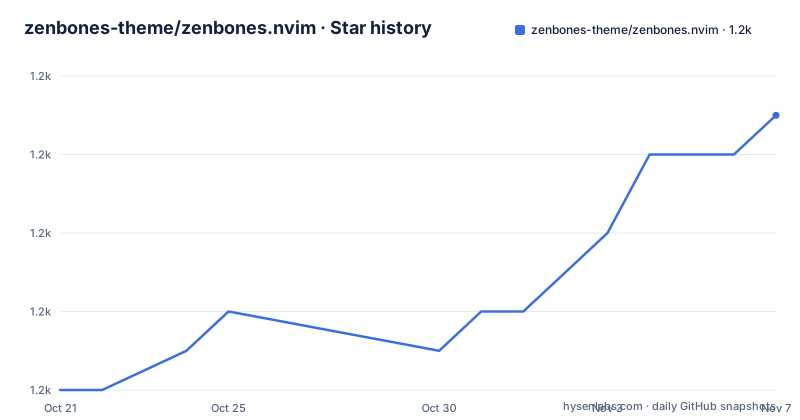
- zenbones-theme/zenbones.nvim1,161 ★ · +7
| Repository | 2026-10-21 | 2026-11-07 |
|---|---|---|
| zenbones-theme/zenbones.nvim | 1.2k | 1.2k |
7 Stars in the last 17 days, measured from the daily GitHub snapshot. Compare with other projects
Editorial analysis
The idea, which is that colour is rationed
Zenbones is a collection of Vim and Neovim colourschemes designed to highlight code using contrasts and font variations. Colours are tasked only for other roles such as diagnostics, diffs and search matches.
That single sentence is the whole design, and it is more interesting than it first appears. Most themes spend the strongest hues on keywords and types, which means the screen is uniformly saturated and a genuine error looks the same as a function name. Zenbones inverts that. Ordinary syntax is distinguished by weight, by intensity and by italic, and the colour budget goes to the things that are actually abnormal.
The name is explained in the README, a rock garden at Ryōan-ji, which is the reference for the arranged-stones idea the family is built on.
The requirement is Neovim v0.8.0, with v2.0.0 needed for older versions, or Vim 8.1.
The recommended setup lists a Neovim with true colour support, which means `set termguicolors`, with the note that Vim works but only in compatibility mode. There is also a requirement for a font with bold and italic, and for a terminal or GUI with bold and italic support.
That font requirement is not incidental. If the contrast is carried by weight and slant, then a terminal that cannot render them collapses the entire scheme into a single flat tone, and the theme would have nothing left to distinguish anything. This is a theme that fails loudly on the wrong setup rather than subtly.
The project is MIT licensed, the primary language in the metadata is Vim Script, the default branch is main, and the last push was on 2026-06-26, with releases v4.12.0 from 2026-05-10, v4.11.0 from 2026-02-11 and v4.10.0 from 2025-12-02.
Installing it with lazy.nvim, and the Lush question
The installation example is a lazy.nvim plugin specification, and the comments in it are the useful part.
{
    "zenbones-theme/zenbones.nvim",
    -- Optionally install Lush. Allows for more configuration or extending the colorscheme
    -- If you don't want to install lush, make sure to set g:zenbones_compat = 1
    -- In Vim, compat mode is turned on as Lush only works in Neovim.
    dependencies = "rktjmp/lush.nvim",
    lazy = false,
    priority = 1000,
    -- you can set set configuration options here
    -- config = function()
    --     vim.g.zenbones_darken_comments = 45
    --     vim.cmd.colorscheme('zenbones')
    -- end
}
Lush is the optional dependency, and it buys two things: more configuration and the ability to extend the colourscheme. The comment explains the fallback, because Lush only works in Neovim, so in Vim the compatibility mode is turned on, and if you do not want to install Lush at all you set `g:zenbones_compat = 1` yourself.
The commented config block shows the shape of the configuration, and one option is enough to show the kind of control available. `vim.g.zenbones_darken_comments = 45` sets how far comments are dimmed, which is a lightness value on a scale rather than a colour, which is exactly the kind of knob this design produces.
The repository layout backs the two paths up. There is a `lua/` directory for the Lua implementation, an `autoload/` directory for the Vim compatible path, a `colors/` directory for the colourscheme entry points, and a `doc/` directory holding the help file and the documentation, with `:help zenbones.txt` and `doc/zenbones.md` both named as references.
Twelve variants, from monochrome to the popular themes
The collection table is the best summary of what the project has become, because it shows the monochrome core and the adaptations in one list.
`zenwritten` is the zero hue and saturation version, and it is the clearest expression of the idea. Then there are the ones inspired by other projects: `neobones` from neovim.io, `vimbones` from vim.org, `rosebones` from Rosé Pine, `forestbones` from Everforest, `nordbones` from Nord, `tokyobones` from Tokyo Night, `seoulbones` from Seoul256, `duckbones` from Spaceduck, `zenburned` from Zenburn, and `kanagawabones` from Kanagawa. The last entry, `randombones`, picks randomly from the collection.
The naming convention is consistent, bones for the Zenbones core and the original theme name for the adaptation, and the list of source themes is a decent map of the terminal colour scheme scene: Rosé Pine, Everforest, Nord, Tokyo Night, Seoul256, Spaceduck, Zenburn and Kanagawa between them cover most of what people install in a terminal today.
The adaptations are not palettes with the hues swapped. Since the design is that colour is rationed, each variant has to decide what to do with the hue the original theme is known for, and that is the interesting part of each one. The showcase pages in `doc/showcase.md` are where the differences are shown, with the vimcolorschemes page linked as well.
The showcase is also where the two axes of variation beyond the hue are visible. There is a lightness axis with 'bright', default and 'dim', and a darkness axis with 'stark', default and 'warm', each shown with its own screenshot row.
Applying a scheme, and the two lines that matter
Applying the colourscheme is the ordinary Vim incantation:
set termguicolors
set background=light " or dark

colorscheme zenbones
Two lines in that are doing the work rather than the third. `set termguicolors` is what tells Vim to emit 24-bit colour instead of the older 256-colour approximations, and without it a scheme built on subtle lightness differences is quantised into a palette that was not designed. The `set background` line selects the light or dark variant, and the comment notes that both exist.
The syntax is deliberately plain, with no plugin manager required, and the README says to just apply the colourscheme as usual. That matters more than it sounds: a theme that needs a plugin framework to activate is a theme that will break for someone, and the fact that this one activates with one line and degrades to compatibility mode under Vim is the same compatibility thinking as the Lush fallback.
The documentation is split between the help file and the Markdown document, and the README points to both, `doc/zenbones.md` and `:help zenbones.txt`, for configuration and the rest of the documentation.
For a theme, the documentation is the product, because the code is a few hundred lines of colour definitions and every decision the author made is expressed in the configuration options rather than in the source.
Building your own scheme from the base
The README says the project is carefully crafted for extensibility, and points to a documentation page on creating your own zenbones-based colourscheme, as well as to the built-in collection.
That is the distinguishing feature of the project against a list of static theme files. A static theme is a file of colour assignments, and to change one you copy it and edit it. A theme built on a generator produces a family, and every variant in the collection is the same base with different decisions, so a new variant is a matter of choosing how much saturation to keep and which hue to spend where.
The repository structure is consistent with that. There is a `makefile` rather than a `Makefile`, a `zenbones.json` file that is presumably the source of truth for the palette, `colors/` for the entry points that a user selects with `colorscheme`, and `lua/` and `autoload/` for the two implementation paths.
The tooling is modern for a Vim project. There is a `selene.toml` and an `nvim_selene.yml` for the Selene Lua linter, a `.stylua.toml` for formatting the Lua, a `.prettierrc` for the documentation, and an `.editorconfig`.
There is also an `extras/` directory, and the repository topics list colourschemes for Alacritty, iTerm2, Kitty and WezTerm, which is the usual sign that a terminal theme project has grown companion configurations for the terminals people actually use.
Where Zenbones is the wrong choice
The first wrong case is a user who reads syntax by colour. This theme removes hue from ordinary tokens on purpose, and if you are the kind of person who spots a `const` because it is blue, the scheme is actively working against you. That is a preference and not a defect, but it is a preference the theme is built to invert.
The second is a terminal without true colour, without bold and italic, or with a font that has no italic. The requirement list is explicit, and Vim is limited to compatibility mode, so the design's main mechanism is simply not available there.
The third is a user who wants a themed icon set and matching terminal. Zenbones is a code colourscheme, and while the `extras/` directory and the topics suggest companion terminal configurations, the emphasis in the repository is on the editor side.
The fourth is a project that wants the theme to cover a plugin it uses. The plugin support section is a list, and it names Git Signs, Git Gutter and others, and it says that aside from LSP and basic Tree-sitter support these are the plugins currently supported. The list is a work in progress, and a user of an unlisted plugin will be styling it by hand.
The fifth is a user on a very old editor. The requirement is Neovim v0.8.0 or Vim 8.1, and older Neovim versions use v2.0.0.
For the user the theme was made for, and that is a lot of people who work in a terminal for eight hours a day, the result is a screen where the diagnostics are the only colour on the page, which is a different proposition from a theme that is merely pleasant.
Editorial conclusion
Zenbones suits a user who finds a fully colourful syntax theme tiring, or who works in an editor next to a terminal where colour is already busy, and who wants diagnostics to stand out because everything else is muted. It does not suit a user who identifies syntax by colour, since the whole design removes hue from ordinary tokens, and it does not suit a setup without true colour and without a bold and italic capable font, because the theme depends on both. Before installing it, read the requirement list, since the Neovim and Vim paths differ, with the full colour path needing `set termguicolors` and Vim limited to compatibility mode, and decide whether you want Lush, since without it you have to set `g:zenbones_compat = 1`.
Frequently asked questions
What is the idea behind the Zenbones colourscheme?
It highlights code using contrasts and font variations rather than colour, and saves colour for other roles such as diagnostics, diffs and search matches. The result is a screen where the brightest things on it are the things that are wrong.
Which versions of Neovim and Vim does Zenbones support?
Neovim v0.8.0 or newer, with v2.0.0 needed for older versions, or Vim 8.1. The recommended setup is Neovim with `set termguicolors`, since Vim works only in compatibility mode, plus a font with bold and italic and a terminal or GUI that supports them.
How do I install Zenbones with lazy.nvim?
Add the plugin specification with the `zenbones-theme/zenbones.nvim` repository, optionally with the `rktjmp/lush.nvim` dependency for more configuration. Without Lush, which only works in Neovim, set `g:zenbones_compat = 1`, and the example sets `priority = 1000`.
Which colourscheme variants ship with Zenbones?
Twelve: the monochrome `zenwritten`, adaptations named neobones, vimbones, rosebones, forestbones, nordbones, tokyobones, seoulbones, duckbones, zenburned and kanagawabones, and `randombones`, which picks one at random from the collection.
Can I build my own Zenbones-based colourscheme?
Yes, and the README says the project is carefully crafted for extensibility, with a documentation page on creating your own zenbones-based colourscheme alongside the built-in collection. The repository also carries a `zenbones.json` file and a makefile for generating the variants.
Official sources
Add this badge to your README
If you maintain this project, the badge below links readers to this analysis and shows its maintenance status from the daily GitHub snapshot. Paste the markdown into your README; add ?metric=license or ?metric=stars to the image URL for a different field.

[](https://hysenlabs.com/projects/zenbones-theme-zenbones-nvim)Star history chart for your README
[](https://hysenlabs.com/projects/zenbones-theme-zenbones-nvim)Was this useful?