terminal-browser: a Chromium canvas painted into a terminal
A browser inside your terminal
At a glance
- What is it?
- terminal-browser renders a real browser inside a terminal by reading frames straight off the GPU and sending only the changed regions over the kitty graphics protocol, with a React interface drawn on a Rust engine. The interesting details are in the seams: a background helper application written in Swift supplies the input events a terminal cannot deliver, and the same key does different things depending on which operating system you are on.
- Who is it for?
- terminal-browser earns its place when you want a real browser in a terminal session, especially if a coding agent is driving it, because the agent-facing command line and the element-selection shortcut are designed for exactly that loop rather than bolted on. Three things to check first.
- Can I use it commercially?
- Yes. MIT is a permissive licence: you can use, modify and sell software built on it, as long as you keep its copyright and licence notices.
- Is it still maintained?
- Yes. The repository received new commits within the last day.
- What is it written in?
- Mainly TypeScript, according to GitHub's language statistics.
Answers come from the project's GitHub data, last synced on November 15, 2026, and from our analysis. They are not legal advice.
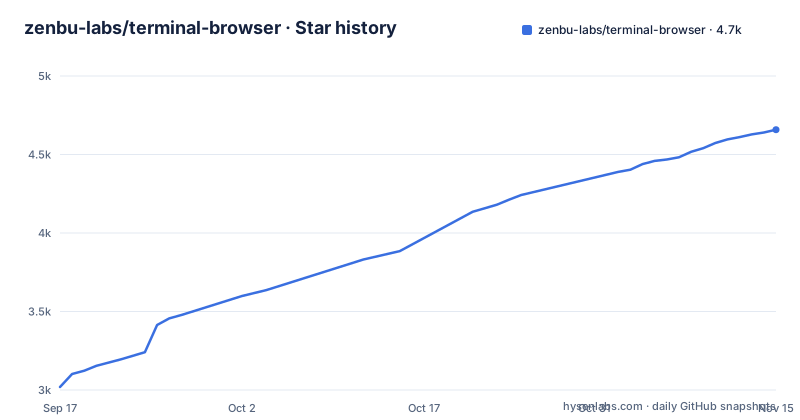
Star history
- zenbu-labs/terminal-browser4,658 ★ · +1,639
| Repository | 2026-09-17 | 2026-11-15 |
|---|---|---|
| zenbu-labs/terminal-browser | 3k | 4.7k |
1,639 Stars in the last 59 days, measured from the daily GitHub snapshot. Compare with other projects
Editorial analysis
Windows means a Linux virtual machine, and one terminal has been tested
The install section has three routes and one of them carries a warning in its first sentence.
For macOS and Linux there is a shell one-liner that pipes a downloaded installer into a shell:
curl -fsSL https://terminal-browser.sh/install | bashand a package manager route for the same two systems. The note next to the shell command is that upgrading is a separate step, which tells you the script installs a specific version rather than tracking the latest one.
Windows is the interesting case. The file says that to install on Windows you must be using WSL, and that terminals with graphics support are very limited there. It then names the terminals it has tested, and the list contains exactly one.
So the honest summary is that this project supports macOS and Linux, and on Windows it supports a narrower version of itself inside a virtual machine on a terminal the author has personally verified. Nothing in the file claims more, and a reader who skips that sentence will discover it at install time.
Chromium's pixels reach the terminal as small patches over three layers
The how-it-works section explains the whole pipeline, and the order matters.
The first layer is the terminal. Terminals that support the kitty graphics protocol let a program display pixels inside the terminal, and the file names several that do, including ghostty, kitty, iTerm2, cmux and vscode.
The second layer is the browser engine. Rather than asking a browser to draw to a window, the project uses Electron's offscreen rendering API to read the pixels generated by Chromium directly from the GPU.
The third layer is the transmission, and this is the part that makes it feel native. Any time the page changes visually, only small patches covering the changed regions are sent to the terminal, rather than a full frame. The file credits that choice with smooth rendering without dropping frames.
That is also why the terminal requirement is not negotiable. Without the graphics protocol there is nothing to send pixels through, and the project says as much by listing which terminals qualify.
The interface is React and TypeScript drawn onto the same canvas as the page
The browser's own chrome is not a terminal UI. That is the second architectural decision worth understanding.
The outer interface is implemented with a graphics engine built on top of Rust. The actual interface is defined inside React using a custom renderer, and it is written in TypeScript. Both the browser's outer interface and the page content are drawn to the same shared canvas inside the Rust engine, which is what allows the interface to be layered on top of the page rather than beside it.
So there are three languages in one application: the page is rendered by Chromium, the interface is React and TypeScript, and the thing that composites both is Rust.
The last sentence of that section is the strategic one. The underlying logic has been abstracted into a JavaScript library you can use to build your own graphical applications in the terminal, and it lives in a directory of its own in the repository. So the terminal rendering engine is not private to the browser; it is meant to be reused, which is also why it carries its own version line.
Input the terminal cannot deliver comes from a background application written in Swift
Once the page is drawing, it has to respond to input, and this is where the project's compromises are most visible.
The first mechanism is the terminal itself. The program listens for mouse clicks, mouse position and keyboard events from the terminal, then sends synthetic events to the engine so the page behaves as if it were focused.
The second mechanism exists because terminals do not deliver everything. For any input events that cannot be retrieved from the terminal, the program reads them directly from the operating system using a background application written in Swift, described as listening non-intrusively.
That second path is what makes two things work: smooth scrolling, and trackpad events. The file says websites with infinite canvases work well inside it, which is a direct consequence of getting scroll deltas rather than discrete clicks.
The cost is that the project ships a native Swift helper in an application whose main interface is a web page. That is a reasonable trade for scroll behaviour.
Two of the same shortcuts do different things on macOS and Linux
The shortcut table has two columns and seventeen rows, and the differences between the columns are where the real information is.
Quitting on macOS is ctrl+q or ctrl+c, while on Linux ctrl+c is copy. So a key that terminates the application on one system copies on the other.
Recording a page is worse. On macOS the record key is ctrl+r, and on Linux ctrl+r is reload while the record key is ctrl+shift+r. So the same unmodified key pair starts a recording on one system and reloads the page on the other, and a user switching machines has to remember which is which.
The command palette is the third divergence: a command key on macOS, two different combinations on Linux. Zoom is the one row where the columns agree, because both say to use whatever the terminal itself provides, which is the correct delegation for a full-screen application.
None of this is documented as a caveat. It is presented as a table, which is the right format, but it means the table itself is the reference you have to learn rather than a set of defaults you can assume.
Over SSH, one mode runs the site locally and the other sends every frame
The remote section is unusually honest about the difference between two ways of doing the same thing, and the recommended one is not the obvious one.
The recommended form takes an ssh flag and its arguments. What it does is run the website on your local device and proxy only the browser's network requests through the remote machine over ssh. The consequence, stated in the file, is that you can load any website listening on the remote machine's loopback address and see it on your own screen.
The alternative is running the program directly on the machine you are connected to. The file says it works, then lists three costs. Every frame the website draws has to be sent over the network. All user input has to be sent over the network before the page can react to it. And it misses optimizations that the graphics protocol offers when the client is local.
Read together, those three lines describe the difference between a remote framebuffer and a remote network, which is the whole design question in one paragraph. It also explains why the recommended mode exists: with only network traffic proxied, the terminal stays local, so the terminal stays fast.
Telemetry is on by default, and the audit trail is a file you can read
The telemetry section is the most carefully written part of the file, and it has one unusual property: it tells you how to check that the promise is being kept.
The project collects what it calls pseudo-anonymous usage events, with the stated purpose of letting its author see how many people are using it. Crash reports are collected too, when the program fails to start or hits an unexpected error.
There are four ways to turn usage telemetry off, listed as two environment variables, a setting in the graphical configuration, and a configuration command that sets usage reporting off. Crash reporting takes the same three plus its own configuration key.
The audit mechanism is the interesting part. Everything that is sent is appended to a log file under the user's local state directory, and the file says that allows you to audit that no sensitive or identifying information is leaving your machine.
Two things to note. The wording of that promise is garbled in the file, so read the log rather than the sentence. And the library that the browser is built on has no telemetry at all, which the file states explicitly, so anything you build on top of it inherits that.
Two version trains in one repository, and a contributing guide that points at an agent
The release history is worth reading because it shows the project is two things at once.
The browser publishes versions in the 0.15 series, with v0.15.2 and v0.15.3 released a day apart. The underlying library publishes its own versions under a differently prefixed tag, and its newest is pixel v0.2.10, which is a separate train with a different numbering scheme. Anyone pinning a dependency has to know which of the two they are pinning.
The root manifest is almost empty: no dependencies, and two development dependencies, one of them a code signing tool for macOS and the other a bundler. Everything else lives in the workspace packages, and the package manager itself is pinned to one exact version. The build and release scripts take their bump level as an argument, and the local distribution build tags itself from the short commit hash rather than a version.
The roadmap has three items, one marked done and two marked in progress. The contributing section is opinionated: pull request descriptions must be written by people and explained well or the pull request will be closed, and the motivation has to be clear.
Editorial conclusion
terminal-browser earns its place when you want a real browser in a terminal session, especially if a coding agent is driving it, because the agent-facing command line and the element-selection shortcut are designed for exactly that loop rather than bolted on. Three things to check first. Your terminal has to support the kitty graphics protocol, and on Windows that means a Linux virtual machine and a terminal the project has only tested one of. Telemetry is on unless you turn it off, though everything it sends lands in a local log you can read, and the underlying library turns it off permanently. And the shortcut table is not portable, since the same key quits on one operating system and copies on the other.
Frequently asked questions
What is terminal-browser?
A browser that runs inside a terminal. It reads frames produced by Chromium straight off the GPU and sends only the changed regions through the kitty graphics protocol, with an interface built in React and TypeScript on a Rust graphics engine.
How do I install terminal-browser on Windows?
Through WSL. The file says terminals with graphics support are very limited on Windows, names the one terminal it has tested inside Windows, and gives the same shell install command used on macOS and Linux.
Does terminal-browser send telemetry?
It collects pseudo-anonymous usage events and crash reports unless disabled. Either of two environment variables turns both off, as does the settings interface or a configuration command, and everything that is sent is appended to a local log file you can read.
Can I use terminal-browser over SSH?
Yes. The recommended form takes an ssh flag and runs the website on your local machine while proxying the browser's network requests through the remote server, so a site listening on the remote loopback address can be viewed locally.
Which terminals can terminal-browser draw in?
Terminals supporting the kitty graphics protocol, with ghostty, kitty, iTerm2, cmux and vscode named as examples. Zoom is left to the terminal's own keybinding, and Windows support requires WSL.
Official sources
Where developers are discussing it
Posts on Hacker News, dev.to and Lobsters that link to this repository, found by our scan of those communities. 1 in the last 30 days; newest first.
- Terminal-browser – Chromium rendered in your terminal via Kitty graphicsHacker News · Oct 26, 2026 · 2 points · 0 comments
- Terminal browser in Claude CodeHacker News · Sep 18, 2026 · 2 points · 0 comments
Add this badge to your README
If you maintain this project, the badge below links readers to this analysis and shows its maintenance status from the daily GitHub snapshot. Paste the markdown into your README; add ?metric=license or ?metric=stars to the image URL for a different field.

[](https://hysenlabs.com/projects/zenbu-labs-terminal-browser)Star history chart for your README
[](https://hysenlabs.com/projects/zenbu-labs-terminal-browser)Was this useful?