Ghostty Config exports only the settings you changed
A beautiful config generator for Ghostty terminal.
At a glance
- What is it?
- Ghostty Config is a Svelte and TypeScript web app that turns Ghostty terminal settings into visual editors, with the export filtered down to whatever differs from Ghostty's own defaults. The interesting engineering sits in the schema that drives those editors, the deployment story that has exactly one automated path, and a roadmap where direct config file integration is still an open item.
- Who is it for?
- Ghostty Config fits someone who knows roughly what they want from their terminal but does not want to learn the config file's syntax to get it, and the per setting indicators remove the main risk of that approach, which is exporting an option your platform or your Ghostty build will not accept. It does not fit someone who wants the tool to manage the config file itself, because the handoff is still a text buffer and direct file integration sits on the long term roadmap.
- Can I use it commercially?
- Yes. Apache-2.0 is a permissive licence: you can use, modify and sell software built on it, as long as you keep its copyright and licence notices.
- Is it still maintained?
- Yes. The repository last received commits 2 days ago.
- What is it written in?
- Mainly TypeScript, according to GitHub's language statistics.
Answers come from the project's GitHub data, last synced on November 23, 2026, and from our analysis. They are not legal advice.
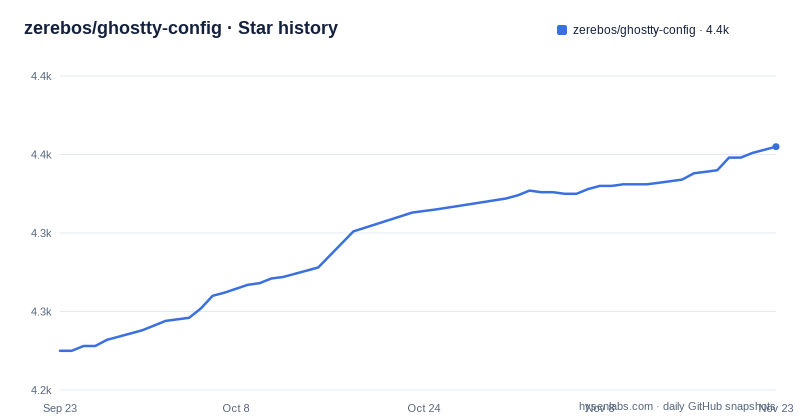
Star history
- zerebos/ghostty-config4,355 ★ · +130
| Repository | 2026-09-23 | 2026-11-23 |
|---|---|---|
| zerebos/ghostty-config | 4.2k | 4.4k |
130 Stars in the last 61 days, measured from the daily GitHub snapshot. Compare with other projects
Editorial analysis
The export is filtered down to what differs from defaults
The design decision that shapes everything else is stated in one sentence: the tool tracks only the values that differ from Ghostty's defaults, so the exported config stays minimal and easy to read.
Everything else is driven by a typed schema derived directly from Ghostty's own config specification. Settings are organized into categories that come from that same config, and each one carries inline documentation, platform restrictions and version metadata sourced from the schema. So the editor is not a hand written form for a terminal: it is a rendering of the terminal's own description of itself, with the documentation and constraints travelling alongside each field.
The consequence for the person using it is that the file you paste into Ghostty is not a snapshot of what you did in the interface. It is the difference between what you chose and what Ghostty would have done anyway, which is the difference between a readable config and a generated one.
Platform and version badges, and four tracked Ghostty releases
Each setting carries indicators: a badge for the platform it requires, naming macOS, Linux and GTK, and another for the minimum Ghostty version that supports it.
That is the feature that makes a generator for someone else's config safe to use, because the failure mode of copying settings between machines is exporting an option the other machine will not honour. Here you find out while editing rather than after a restart.
The version half of that badge has a maintenance cost behind it, visible in the roadmap, which records four separate completed entries for updating the generator: Ghostty 1.1, Ghostty 1.2, Ghostty 1.3 and a 1.4 nightly build. A schema derived from the upstream specification has to be refreshed whenever the specification moves, and the presence of a nightly entry says the refresh is expected rather than exceptional.
The terminal preview is a DOM mock, not a running shell
The interactive preview is described as a DOM based terminal you can type in, which re-themes live as you change settings, and the detail that matters is in the last clause: existing output, including colours, the prompt and the results of a directory listing, updates in place rather than being torn down and redrawn.
What that describes is a rendering of a terminal in the browser, not a shell. Nothing in the feature list says a process is started, and the application's only two runtime dependencies are a variable font package and a markdown renderer, which is what a static site that draws text needs and what an embedded terminal emulator would not.
So the preview is a faithful demonstration of colour, cursor and prompt treatment, and it is not evidence about how a particular program will draw in your real terminal. Separate live previews exist for cursors, text selections, application icons and colour palettes, which is where the tool spends its accuracy budget.
Export is copy and paste, and direct file writing is still on the roadmap
Nothing in the project writes to Ghostty's own configuration file. Import and export work by pasting, uploading, copying or downloading the config as text, and sharing works by producing a URL, falling back to copying to the clipboard when a config is too large for one.
The reason is on the roadmap rather than hidden: a desktop version for direct config file integration is listed as a long term item, still unchecked, alongside component testing. So the boundary between the generator and the terminal is a text buffer that you move by hand.
For most people that is a reasonable trade, since editing a config file is exactly the chore the tool exists to remove, and copy and paste keeps the file under your control. It does mean there is no way to keep the generator as the single source of truth for a machine you also edit by hand.
One automated deployment path, and a manual one for everyone else
Deployment has exactly one automated route. Cloudflare Workers deploys to the hosted address on every push to the main branch, and a configuration file for it sits in the tree alongside a script that builds and then runs the worker locally.
Self hosting is the manual route: build the project and serve the static files that come out under build/. The README is explicit that this is what you do rather than a second deployment target, and the local development path is the four commands the project expects:
git clone https://github.com/zerebos/ghostty-config.git
cd ghostty-config
bun install
bun run dev
After that you open the local development server in a browser. The runtime here is Bun rather than Node, which is worth noting if you are cloning on a machine that has only Node installed.
Two runtime dependencies and eleven package scripts
The package manifest keeps the runtime dependency list short: a variable font package for Inter and a markdown renderer. Everything else, from the Svelte kit and Svelte itself through Vite, Vitest, Wrangler and the linters, is a development dependency, which is what you would expect from an application that ships as static files.
The three eslint configuration packages are all published under the same author scope as the project, so the lint rules come from the author's own published presets.
The scripts block is where the day to day work is written down, and the five the page highlights are only part of it:
bun run build    # production build (output under build/)
bun run preview  # serve the production build locally
bun run check    # Svelte + TypeScript type checking
bun run lint     # ESLint
bun run test     # Vitest unit tests
There is also a watch mode for type checking, a CI lint variant that narrows the scope to the source directory, a format script that runs Prettier and then fixes with eslint, and two Wrangler scripts for running and typing the worker. The test script runs in verbose mode, which is a deliberate choice for a suite the roadmap describes as covering the import and export flows.
Version tags and themes owned upstream
The repository has Git tags including v0.3.0 and v0.4.0. Select a tag or commit when building a reproducible self-hosted version, and inspect the project history for changes.
For a self-hosted deployment, record the tag or commit used for the build and review changes before updating.
The colour themes are owned somewhere else entirely. They are described as hundreds of Ghostty themes kept automatically in sync from an upstream repository of iTerm2 colour schemes, which means a palette can change when the upstream schemes change. The near-term roadmap holds a unified colour scheme across the app and community presets, and the long-term list holds a desktop version and component testing.
Editorial conclusion
Ghostty Config fits someone who knows roughly what they want from their terminal but does not want to learn the config file's syntax to get it, and the per setting indicators remove the main risk of that approach, which is exporting an option your platform or your Ghostty build will not accept. It does not fit someone who wants the tool to manage the config file itself, because the handoff is still a text buffer and direct file integration sits on the long term roadmap. Before relying on it, check four things. Whether your Ghostty version is one the schema has been updated for, since the roadmap tracks 1.1, 1.2, 1.3 and a nightly, and a setting can be gated on version. Whether the settings you want are platform specific, since the badges name macOS, Linux and GTK. Whether the colour themes you rely on arrive from an upstream iTerm2 scheme repository rather than from a commit in this project, so they can change without a release here. And whether you are comfortable with there being no tagged release at all, since the only version number anywhere is 0.3.0 in the package manifest and the repository has no GitHub releases to pin.
Frequently asked questions
What is Ghostty Config?
A web based configuration generator for the Ghostty terminal, built with Svelte and TypeScript through Bun and deployed to Cloudflare Workers. It provides visual editors with live previews for each setting and exports a config file ready to use.
How do I run Ghostty Config locally?
Clone the repository, install dependencies with bun install and run bun run dev, then open http://localhost:5173 in a browser. The project expects Bun as its runtime rather than Node.
Does Ghostty Config write to my Ghostty config file?
No. Import and export work by pasting, uploading, copying or downloading the config as text. A desktop version with direct config file integration is listed as a long term roadmap item, so the handoff is still done by hand.
Which platforms and Ghostty versions does Ghostty Config cover?
Every setting carries an indicator for the platform it requires, naming macOS, Linux and GTK, plus the minimum Ghostty version that supports it. The roadmap records completed updates for Ghostty 1.1, 1.2, 1.3 and a 1.4 nightly build.
Where do the colour themes in Ghostty Config come from?
They are kept in sync automatically from an upstream repository of iTerm2 colour schemes, and the README describes hundreds of Ghostty themes arriving that way. Community presets and a unified colour scheme are still near term roadmap items.
Official sources
Add this badge to your README
If you maintain this project, the badge below links readers to this analysis and shows its maintenance status from the daily GitHub snapshot. Paste the markdown into your README; add ?metric=license or ?metric=stars to the image URL for a different field.

[](https://hysenlabs.com/projects/zerebos-ghostty-config)Star history chart for your README
[](https://hysenlabs.com/projects/zerebos-ghostty-config)Was this useful?