lottie-react-native: shipping After Effects animations in React Native without rebuilding them by hand
Lottie wrapper for React Native.
At a glance
- What is it?
- lottie-react-native wraps the native Lottie players for iOS, Android and Windows behind one React Native component. It is a good fit when a designer owns the animation file; its progress can also be controlled with React Native Animated or Reanimated.
- Who is it for?
- Adopt lottie-react-native if your animations are authored in After Effects, exported as bodymovin JSON, and your app is already on React Native 0.84 with the New Architecture. For older React Native versions, evaluate the documented 7.3.x line.
- Can I use it commercially?
- Yes. Apache-2.0 is a permissive licence: you can use, modify and sell software built on it, as long as you keep its copyright and licence notices.
- Is it still maintained?
- Yes. The repository last received commits 1 day ago.
- What is it written in?
- Mainly TypeScript, according to GitHub's language statistics.
Answers come from the project's GitHub data, last synced on November 14, 2026, and from our analysis. They are not legal advice.
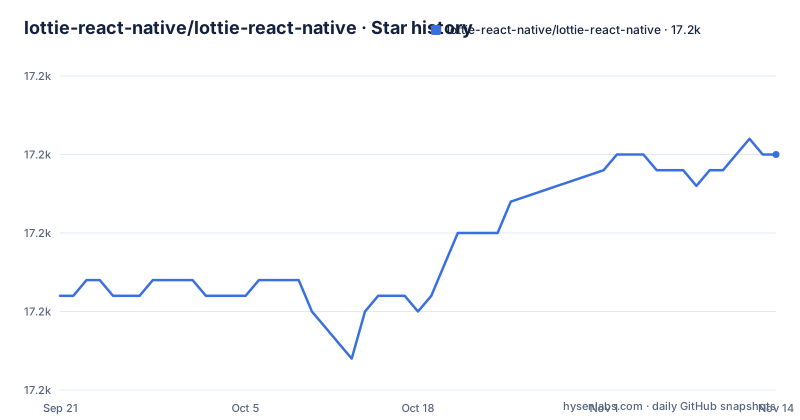
Star history
- lottie-react-native/lottie-react-native17,215 ★ · +9
| Repository | 2026-09-21 | 2026-11-14 |
|---|---|---|
| lottie-react-native/lottie-react-native | 17.2k | 17.2k |
9 Stars in the last 54 days, measured from the daily GitHub snapshot. Compare with other projects
Editorial analysis
The handoff problem lottie-react-native removes
An animation designed in After Effects normally reaches a mobile app in one of two ways. Someone reimplements it with the platform animation APIs, which means the designer's file becomes a specification rather than an artifact, and every revision restarts the work. Or the animation is exported as a video or a GIF, which costs quality and file size and cannot be recoloured or paused at a specific frame.
lottie-react-native takes a third route. The bodymovin exporter turns an After Effects composition into JSON, and the Lottie players for iOS, Android and Windows parse that JSON and draw it with native rendering code. The React Native package is the bridge: one component, LottieView, that talks to whichever native player the platform provides. The audience is mobile teams with a designer who already works in After Effects and wants to ship the file itself. If nobody on the team opens After Effects, the package has little to offer over a hand-written animation.
What actually renders your JSON
The package does not contain an animation engine. It is a wrapper, and the README names the three engines it wraps: airbnb/lottie-ios, airbnb/lottie-android and CommunityToolkit/Lottie-Windows. That distinction explains most of the behaviour people find surprising. Feature support, rendering fidelity and performance come from the platform player, not from the React Native layer, so an animation that looks correct in a browser preview can behave differently on Android.
The data flow is short. A JSON file is bundled or required by the app, passed to LottieView as the source prop, and handed to the native view, which parses and draws it. JavaScript never sees the frame data unless you drive it. Control is exposed two ways. Declarative props such as autoPlay and loop cover the common case. The imperative API exposes methods on a ref, and the README shows ref.current?.play() and ref.current?.play(30, 120) for a start frame and end frame. Progress can also be bound to a React Native Animated value, which the README demonstrates with Animated.createAnimatedComponent(LottieView) and a progress prop driven by Animated.timing with useNativeDriver set to false. That last detail matters: the README's own example disables the native driver for this binding, so do not assume the progress path is free.
Installing lottie-react-native and rendering a first animation
The README states that iOS and Android require React Native 0.84 or newer and the New Architecture, and that older React Native versions should use lottie-react-native 7.3.x. Check that before anything else, because it decides which major line you install.
Add the package with yarn, then install the CocoaPods dependencies from the ios directory so the native iOS player is linked:
yarn add lottie-react-native
cd ios && pod install
For web, the README gives a second dependency alongside the package, the dotlottie React player:
yarn add lottie-react-native
yarn add @lottiefiles/dotlottie-react
The smallest working component requires a JSON file and a sized container. The README's declarative example looks like this:
import React from "react";
import LottieView from "lottie-react-native";

export default function Animation() {
  return (
    <LottieView
      source={require("../path/to/animation.json")}
      style={{width: "100%", height: "100%"}}
      autoPlay
      loop
    />
  );
}
Run the app and the animation should start on mount and repeat. If nothing appears, the usual cause is a container with no resolved height, since the view draws into the box it is given. When you need to start at a specific point rather than on mount, the README's imperative example holds a ref and calls play with a frame range inside a useEffect:
const animationRef = useRef<LottieView>(null);
useEffect(() => {
  animationRef.current?.play(30, 120);
}, []);
One more prop worth knowing early is colorFilters, which the README shows as an array of objects with a keypath and a color, letting you recolour a named layer from code instead of exporting a second file.
Windows is a different install with a narrower feature set
The Windows path does not resemble the iOS and Android one. It requires adding an MSBuild property group and import group to the project file, adding LottieReactNative.vcxproj to the Visual Studio solution, and installing NuGet packages. C# apps need LottieGen.MsBuild, Microsoft.UI.Xaml, Win2D.uwp and Microsoft.Toolkit.Uwp.UI.Lottie, with the last one only necessary if you load JSON dynamically; setting EnableLottieDynamicSource to false lets you omit it when codegen animations are enough. C++ apps need LottieGen.MsBuild and Microsoft.UI.Xaml. WinUI 2.6 is required by default and overriding it means creating a Directory.Build.props file with a WinUIVersion property.
The constraint to plan around is stated plainly in the README: codegen animations work in both C# and C++ applications, but dynamic loading of JSON strings at runtime is currently supported only in C#. A C++ Windows app therefore has to compile its animations into the binary through LottieAnimation items and reference them by name, as in source={"MyAnimation"}, rather than fetching or constructing JSON at runtime. If your Windows build is C++ and your animation set changes per user or per release without a rebuild, this package does not give you that.
Where lottie-react-native is the wrong choice
The binding to React Native 0.84 and the New Architecture is the sharpest limitation, because it is not a preference you can configure away. A team maintaining an app on an older React Native release has two options: stay on lottie-react-native 7.3.x, or upgrade React Native first. Neither is a drop-in. The README also points to a migration guide for the v6 breaking changes and the repository carries MIGRATION-5-TO-6.md and MIGRATION-7-TO-8.md, which tells you major upgrades have historically required code changes rather than a version bump.
A second boundary is interactivity. Lottie playback is a timeline. The README's Animated example binds a single progress value to a timing animation, which is fine for scrubbing a fixed sequence, but it is not a physics or gesture system. The progress value can be driven by Animated or Reanimated, including in interactive designs; test performance and behavior for the gestures and platforms you need.
Third, the wrapper is only as capable as the platform player. Anything the underlying lottie-ios or lottie-android implementation does not support is not something the React Native layer can add. Test on each target rather than trusting a preview.
Alternatives and the difference in approach
The most direct alternative is the native Lottie library for each platform, lottie-ios and lottie-android, used directly from Swift, Kotlin or Java. The difference is where the integration lives. lottie-react-native gives you one JavaScript component and one set of props across platforms, which is the point of using it. Going native means writing the view twice and wiring it into the React Native bridge yourself, but it also means you are on the platform library's release cadence and have access to platform-specific APIs the wrapper may not surface. For a single-platform app, the wrapper's main benefit largely disappears.
A different kind of alternative is a runtime animation system that does not start from an After Effects export, such as Rive. The distinction is the authoring source and the runtime model. Lottie's premise, as the README puts it, is that designers export from After Effects with bodymovin and the file renders natively. A tool built around its own editor and its own state machine is aimed at animations that react to input rather than play a timeline. Choosing between them is really choosing what your designer works in, not comparing two renderers.
Maintenance, licensing and upgrade cost
The repository is not archived and the last push was on 2026-10-31, with releases v7.5.0 on 2026-08-22, v7.4.0 on 2026-08-05 and v7.3.8 on 2026-05-14. That is a steady release cadence on the 7.x line. The monorepo layout also shows work beyond the current release: the root package.json defines a second set of scripts under a nitro prefix targeting example-v8 and a lottie-react-native-nitro workspace, alongside the existing example workspace. That is visible in the build scripts, not in the README, so treat it as a sign of where development is heading rather than as a documented feature.
On licensing, the package is Apache-2.0, which permits commercial use and modification and includes a patent grant. It also carries obligations, typically around retaining notices and stating changes, and the licence text is the authority rather than any summary. Worth noting separately: the native players this package wraps are separate projects with their own licences, so if you redistribute or modify them, check each one. Nothing here is legal advice.
Upgrade cost is the real budget item. The v6 changes required a migration guide, and a MIGRATION-7-TO-8.md file exists in the repository root. Plan for reading that document before bumping majors, and for retesting animations on every platform after the upgrade, since the rendering comes from native players that version independently.
Editorial conclusion
Adopt lottie-react-native if your animations are authored in After Effects, exported as bodymovin JSON, and your app is already on React Native 0.84 with the New Architecture. For older React Native versions, evaluate the documented 7.3.x line. For gesture or scroll-driven animation, test progress binding with Animated or Reanimated on each target platform. Before committing, verify three things in your own project: that your React Native version satisfies the 0.84 requirement, that the Windows path you need is the codegen one, since the README states dynamic JSON loading is C#-only, and that your animation files use features supported by the underlying lottie-ios and lottie-android players rather than by the web player you may have previewed them in.
Frequently asked questions
How do I install lottie-react-native on iOS and Android?
The README says to add the package with yarn, then run pod install from your ios folder. It also states that iOS and Android require React Native 0.84 or newer and the New Architecture, and that older React Native versions should use lottie-react-native 7.3.x.
What is lottie-react-native?
It is a React Native component that renders Adobe After Effects animations exported as JSON with bodymovin. The package wraps the native Lottie players for iOS, Android and Windows rather than implementing its own renderer.
What is an alternative to lottie-react-native?
You can use the native Lottie libraries, lottie-ios and lottie-android, directly from Swift, Kotlin or Java, which means writing the view per platform instead of using one JavaScript component. Rive is a different kind of option, since it starts from its own editor and runtime rather than an After Effects export.
Is Lottie free to use?
The lottie-react-native package is licensed under Apache-2.0, which permits commercial use and modification and includes a patent grant, with the usual notice obligations. The native players it wraps are separate projects with their own licences.
Official sources
Add this badge to your README
If you maintain this project, the badge below links readers to this analysis and shows its maintenance status from the daily GitHub snapshot. Paste the markdown into your README; add ?metric=license or ?metric=stars to the image URL for a different field.

[](https://hysenlabs.com/projects/lottie-react-native-lottie-react-native)Star history chart for your README
[](https://hysenlabs.com/projects/lottie-react-native-lottie-react-native)Was this useful?