zeux/volk: dynamic Vulkan loading for C and C++ applications
Meta loader for Vulkan API
At a glance
- What is it?
- volk is a C89 meta-loader for Vulkan that resolves entrypoints dynamically, supports extension loading, and can call device functions through driver pointers or per-device tables. It suits applications that want Vulkan without a direct loader link, provided the build handles Vulkan headers and platform defines carefully.
- Who is it for?
- volk is appropriate for applications that dynamically load Vulkan, need extension entrypoints loaded automatically, or want to avoid loader dispatch for a single device. It is a poor fit for code that requires direct Vulkan linkage, mixed global and table-based device calls without care, or an application that assumes Vulkan is present before initialization.
- Can I use it commercially?
- Yes. MIT is a permissive licence: you can use, modify and sell software built on it, as long as you keep its copyright and licence notices.
- Is it still maintained?
- Yes. The repository received new commits within the last day.
- What is it written in?
- Mainly C, according to GitHub's language statistics.
Answers come from the project's GitHub data, last synced on October 23, 2026, and from our analysis. They are not legal advice.
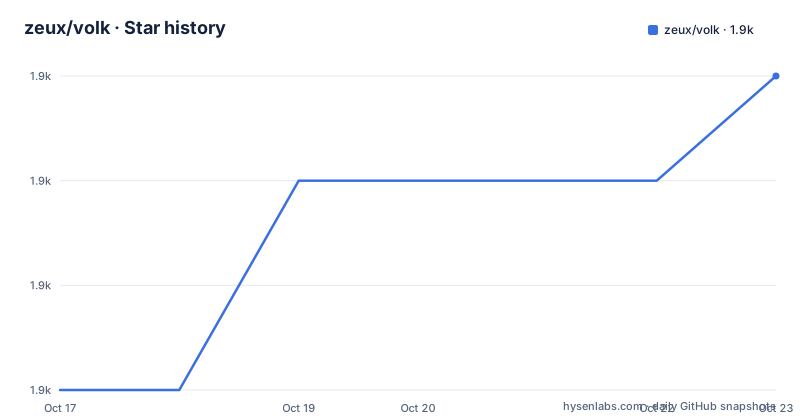
Star history
- zeux/volk1,943 ★ · +3
| Repository | 2026-10-17 | 2026-10-23 |
|---|---|---|
| zeux/volk | 1.9k | 1.9k |
3 Stars in the last 6 days, measured from the daily GitHub snapshot. Compare with other projects
Editorial analysis
Why volk changes Vulkan integration
volk addresses a specific link-time problem in Vulkan applications. Instead of linking an application directly to `vulkan-1.dll` or the Vulkan loader on other systems, it loads the required Vulkan entrypoints at runtime. The README says this allows an application to use Vulkan without statically linking the Vulkan loader. It also automatically loads entrypoints associated with Vulkan extensions, which reduces the amount of manual `vkGetInstanceProcAddr` and `vkGetDeviceProcAddr` handling normally required for a complete Vulkan dispatch setup.
The intended audience is C and C++ developers building Vulkan applications on Windows, Linux, Android, or macOS through MoltenVK. volk is written in C89. Its design is especially relevant to programs that want Vulkan symbols to resolve only after startup checks, or that ship across systems with different Vulkan loader implementations. It does not install a Vulkan runtime, provide a Vulkan driver, or replace the Vulkan API itself. The application still needs a Vulkan implementation available when initialization succeeds.
There is a deliberate trade-off here. Dynamic loading removes one direct link dependency and exposes driver-specific device calls, but it introduces explicit initialization and changes how headers and function pointers are managed. Code that includes `vulkan/vulkan.h` in some translation units while using volk elsewhere can encounter symbol conflicts. The README specifically recommends considering `VK_NO_PROTOTYPES` when compiling code that uses Vulkan in this mixed situation. Direct linkage to `vulkan-1` also remains a conflict in that model.
Initialization and extension dispatch sequence
The documented startup sequence has two explicit phases. An application first calls `volkInitialize()`, then creates a Vulkan instance, then calls `volkLoadInstance(instance)`. `volkInitialize()` attempts to load the system Vulkan loader. The README states that `VK_SUCCESS` permits proceeding to instance creation, while failure means the Vulkan loader is not installed on the system. This is an important boundary: volk is a loader around Vulkan, not a fallback implementation for machines without Vulkan.
After instance creation, `volkLoadInstance()` loads the required Vulkan entrypoints, including all extensions. From that point, the application can use the Vulkan API as usual. This ordering matters because instance-level and device-level functions have different lookup paths. volk resolves the relevant symbols before the application calls them, rather than requiring the application to link every entrypoint it might need.
Device dispatch has two documented modes. `volkLoadDevice(device)` is intended for applications that use one `VkDevice`. It loads device-related entrypoints directly from the driver and overwrites some global function pointers. For applications using multiple `VkDevice` objects, `volkLoadDeviceTable(&table, device)` loads the same category of entrypoints into a `VolkDeviceTable`, with one table required per device. Device entrypoints are loaded using `vkGetDeviceProcAddr`. According to the README, when no layers are present, this commonly points most function pointers directly at driver functions. With layers, the pointers target the first applicable layer, including validation layers.
CMake and header-only installation choices
volk offers three integration paths. A build system can compile `volk.c` directly. Platform-specific Vulkan macros must be supplied to the compiler as needed, including `VK_USE_PLATFORM_WIN32_KHR`, `VK_USE_PLATFORM_XLIB_KHR`, or `VK_USE_PLATFORM_MACOS_MVK`. Alternatively, the repository provides CMake targets. The `volk` target is a static library, and `volk_headers` is an interface target for header-only use. Header-only integration requires `volk.h` wherever Vulkan functions are used and exactly one source file defining `VOLK_IMPLEMENTATION` before its include. In that mode, `volk.c` is not built, but it must remain beside `volk.h`.
For a vendored copy or git submodule, the documented CMake pattern is to add the volk directory and link the selected target. The static target is the default choice when separate compilation is preferred. The headers target is useful when the application wants to control platform defines with preprocessor logic. The README's examples show `VOLK_STATIC_DEFINES` for the static library and a local `VOLK_IMPLEMENTATION` definition for the headers target.
Installation through CMake is disabled by default. Enabling it requires the exact option `-DVOLK_INSTALL=ON`. An installed package can then be found with `find_package(volk CONFIG REQUIRED)`, after which the imported targets are `volk::volk` and `volk::volk_headers`. The repository does not provide a homepage or additional package instructions beyond these CMake files and examples.
Building the first Vulkan application with volk
The README does not present a complete application program, so the shortest confirmed first use is to configure a build target and follow the documented initialization sequence. For a CMake project that vendors volk as a submodule, the target setup is:
add_subdirectory(volk)
target_link_library(my_application PRIVATE volk)
This links the static `volk` target. The compiler must receive any platform defines required by the application. For header-only integration, the CMake target is:
add_subdirectory(volk)
target_link_library(my_application PRIVATE volk_headers)
In one source file, define the implementation macro before including volk. This is the point at which the build supplies the single implementation for the header-only mode:
#define VOLK_IMPLEMENTATION
#include "volk.h"
The application then includes `volk.h` instead of `vulkan/vulkan.h`. Its startup calls should follow this order, with `volkInitialize()` preceding instance creation and `volkLoadInstance(instance)` following it. The first call reports whether the system loader can be loaded. The second fills in the instance and extension entrypoints. Device loading depends on whether the application uses one device or several, so that decision should be made before adding device dispatch calls.
Direct device calls versus per-device tables
The direct-call mode is concise but has a clear ownership boundary. `volkLoadDevice(device)` is appropriate when the application uses just one `VkDevice`. The README says this mode avoids going through Vulkan loader dispatch for device calls and can reduce overhead. It does this by replacing some global function pointers with device-specific versions. That convenience is also its risk: one global pointer set cannot safely represent several unrelated devices, because loading another device can overwrite the pointers associated with the previous one.
The table mode makes the ownership explicit. `volkLoadDeviceTable(struct VolkDeviceTable* table, VkDevice device)` stores device entrypoints in a caller-provided table. Application code must retain one table per `VkDevice` and invoke functions through that table. This is more code to manage, but it is the documented choice for multiple devices and prevents accidental reliance on one shared global dispatch state.
A related configuration can expose mistakes at compile time. Defining `VOLK_NO_DEVICE_PROTOTYPES` hides device-level prototypes. The README notes that device-level functions are never loaded when using `volkLoadInstanceOnly()` and `volkLoadDeviceTable`, so incorrect use would otherwise fail at runtime. Hiding the prototypes lets the compiler reject some such mistakes. `volkLoadInstanceOnly()` can also avoid overwriting device-related pointers when the application intentionally uses tables.
Constraints, alternatives, and maintenance signals
volk is not a replacement for every Vulkan integration strategy. A conventional Vulkan application can include `vulkan/vulkan.h` and link the system loader directly. That approach has a different dependency model: the executable carries a link-time loader dependency rather than resolving the loader through volk. The trade-off is that direct linking is simpler for some build systems, while volk offers runtime loading, automatic extension resolution, and optional direct device dispatch. A project that already uses direct Vulkan symbols throughout its libraries may find volk inconvenient because mixed usage can cause conflicts.
Another limitation is platform scope. The README lists Windows, Linux, Android, and macOS through MoltenVK. It does not document every loader path or error recovery strategy. `volkInitialize()` reports failure when the Vulkan loader is unavailable, but the documented flow does not offer a software Vulkan fallback. Applications that must run on systems without a Vulkan loader need a separate compatibility plan.
The repository is MIT licensed, so the source is available under the MIT License. The license permits use, modification, distribution, and sublicensing subject to its terms, but this review does not provide legal interpretation. The last push was on 2026-10-02. Releases listed for the project include `1.4.350` on 2026-05-04, `1.4.304` on 2025-01-06, and `1.3.295` on 2024-09-06. The version scheme is tied to Vulkan header or API versions, so upgrades may bring new Vulkan declarations. The README does not describe a compatibility policy between older application code and newer volk versions, nor does it document a rollback procedure.
Editorial conclusion
volk is appropriate for applications that dynamically load Vulkan, need extension entrypoints loaded automatically, or want to avoid loader dispatch for a single device. It is a poor fit for code that requires direct Vulkan linkage, mixed global and table-based device calls without care, or an application that assumes Vulkan is present before initialization. Verify first that the required platform defines are passed to the compiler, that Vulkan headers are included through `volk.h`, and that the selected `volkLoadDevice` or `volkLoadDeviceTable` model matches the application's device ownership model.
Frequently asked questions
How do I install zeux/volk in a CMake project?
Add the volk directory with `add_subdirectory(volk)` and link either the `volk` static target or the `volk_headers` interface target. For an installed package, configure with `-DVOLK_INSTALL=ON`, then use `find_package(volk CONFIG REQUIRED)` and the imported `volk::volk` or `volk::volk_headers` target.
How do I initialize zeux/volk and load Vulkan extensions?
Call `volkInitialize()` before creating a Vulkan instance. After instance creation, call `volkLoadInstance(instance)`, which loads the required entrypoints, including extension entrypoints. The README states that initialization returns `VK_SUCCESS` when the system loader can be loaded.
When should I use VolkDeviceTable instead of volkLoadDevice?
Use `volkLoadDevice(device)` when the application uses one `VkDevice`. Use `volkLoadDeviceTable()` when the application uses multiple devices, store one `VolkDeviceTable` per device, and call functions through the appropriate table.
Official sources
Add this badge to your README
If you maintain this project, the badge below links readers to this analysis and shows its maintenance status from the daily GitHub snapshot. Paste the markdown into your README; add ?metric=license or ?metric=stars to the image URL for a different field.

[](https://hysenlabs.com/projects/zeux-volk)Star history chart for your README
[](https://hysenlabs.com/projects/zeux-volk)Was this useful?