hassio-zigbee2mqtt: the wrapper, the onboarding, and two disagreeing paths
Official Zigbee2MQTT Home Assistant add-on
At a glance
- What is it?
- hassio-zigbee2mqtt is the Supervisor add-on repository for Zigbee2MQTT, aimed at Home Assistant OS installs that already run a broker. Its value is packaging that onboarding writes for you; its edges are a config layout that splits across two paths during a restore, and an Edge channel with no version to track.
- Who is it for?
- Adopt the add-on when you run Home Assistant OS and want Zigbee2MQTT installed from the app store, and skip it when you are on a Container or Core install, when you already run Zigbee2MQTT outside Supervisor, or when a Raspberry Pi 3 is the only hardware available.
- Can I use it commercially?
- Yes. Apache-2.0 is a permissive licence: you can use, modify and sell software built on it, as long as you keep its copyright and licence notices.
- Is it still maintained?
- Yes. The repository last received commits 15 days ago.
- What is it written in?
- Mainly Shell, according to GitHub's language statistics.
Answers come from the project's GitHub data, last synced on October 23, 2026, and from our analysis. They are not legal advice.
Star history
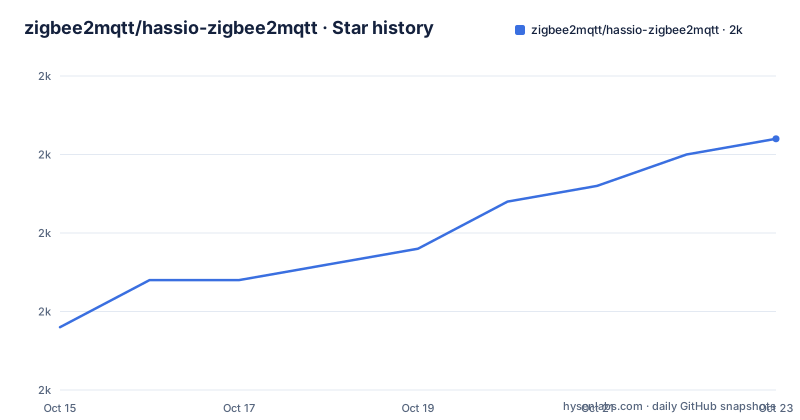
- zigbee2mqtt/hassio-zigbee2mqtt2,006 ★ · +12
| Repository | 2026-10-15 | 2026-10-23 |
|---|---|---|
| zigbee2mqtt/hassio-zigbee2mqtt | 2k | 2k |
12 Stars in the last 8 days, measured from the daily GitHub snapshot. Compare with other projects
Editorial analysis
A Supervisor repository that carries no Zigbee2MQTT code
Nothing in this repository implements a bridge protocol. Its primary language is Shell, and the top level is a set of Supervisor app directories, `zigbee2mqtt/`, `zigbee2mqtt-edge/` and `zigbee2mqtt-proxy/`, sitting alongside `common/` and `repository.json`. That last file is what lets Home Assistant treat the whole tree as an add-on repository rather than a single app. What a user installs is therefore packaging: the upstream Node project is pulled in and run inside a container the Supervisor owns, and persistence, start, stop and the log stream come with it. The default branch is `master`, and the homepage points at the upstream documentation site, `https://www.zigbee2mqtt.io`. Every interesting decision in this tree is about paths, ports and file layout, which is exactly where the sharp edges sit.
Two documented apps against three directories in the tree
Step three of the installation walkthrough says the repository includes two apps. One is `Zigbee2MQTT`, the stable build that follows upstream released versions, which the walkthrough marks as the option for most users. The other is `Zigbee2MQTT Edge`, which follows the upstream dev branch so that fixes which have not shipped can be installed first. The top-level listing disagrees with that sentence by exactly one entry. Next to `zigbee2mqtt/` and `zigbee2mqtt-edge/` there sits `zigbee2mqtt-proxy/`, and no step of the walkthrough names it. A reader counting apps from the instructions gets two, while a reader opening the tree gets three, and nothing in the notes says whether that proxy directory is experimental, unfinished or simply unused. Treat the two documented apps as the supported surface and read that directory yourself before enabling anything in it.
Onboarding writes two nested config groups for you
Starting the app and pressing `OPEN WEB UI` lands on the onboarding page, and this is where the wrapper does most of its work for you. Choosing your radio under `Found Devices` fills two nested groups at once, `Coordinator/Adapter Port/Path` and `Coordinator/Adapter Type/Stack/Driver`, so you do not hand-write a serial path or guess a stack driver. The channel selector is labelled `Closests WiFi Channel`, which is the exact string to search for when you are matching a screenshot or an old support thread. Pressing `Submit` starts Zigbee2MQTT and the frontend appears after a refresh a few seconds later. Two failure states are named outright. A `502: Bad Gateway` on that first refresh is expected while the container is still coming up. If nothing has appeared after two minutes or more, the instruction is to open the Log tab and read the failure rather than to keep refreshing.
The adapter fallback skips the indent the upstream page shows
When onboarding cannot see the dongle, the app stops with `USB adapter discovery error (No valid USB adapter found). Specify valid 'adapter' and 'port' in your configuration.` The documented recovery is to fill in the serial section, with one detail that matters if you copy from upstream: skip the initial `serial:` indent, so both keys sit one level higher than the shape of the page it points at.
adapter: zstack
port: /dev/serial/by-id/usb-Texas_Instruments_TI_CC2531_USB_CDC___0X00124B0018ED3DDF-if00
Those two lines are the whole fix for the discovery error. If you do not know the port and exactly one USB device is attached, try `/dev/ttyACM0`, `/dev/ttyUSB0` or `/dev/ttyAMA0`. Otherwise ask the machine directly:
ha hardware infoThe value of that command here is the serial device list, which is the exact piece the onboarding form was missing when discovery came back empty.
Restoring a standalone data folder crosses two directories
Migration from a standalone install is the most fragile procedure in the tree, and it walks two paths that are never reconciled with each other. Both environments have to run the same version first, and you must be able to reach the Home Assistant OS over SSH, explicitly not the SSH app. The standalone `data` folder is backed up, and `logs/` can be left out of that copy. The app is then started with a tty device that does not exist, a deliberate misconfiguration whose only purpose is to make the Supervisor create the target folder before you write into it. Contents go in like this:
scp -O -P 22222 -i PATHTOUSEDSSHKEY ./data/* root@hass:/mnt/data/supervisor/homeassistant/zigbee2mqtt/The destination is `/mnt/data/supervisor/homeassistant/zigbee2mqtt`, while the next step tells you to edit `/usr/share/hassio/homeassistant/zigbee2mqtt/configuration.yaml`, a different path in the same procedure, and to make its serial port match what the add-on configuration UI is holding. The notes do not explain how those two locations relate, so verify both on the machine before you assume a restore landed. Prune what your setup does not need there: the `mqtt` section when your broker is elsewhere, plus `advanced/log_syslog` and `frontend`.
The trailing counter separates packaging from upstream code
Version numbers here encode two things at once. The base follows the upstream `X.Y.Z` scheme, and the wrapper appends a trailing counter when a change needed no new Zigbee2MQTT build, so the suffix tells you whether the underlying project moved or only the packaging did. The three most recent published versions are `v2.14.2-1` on 2026-10-01, `v2.14.1-1` on 2026-09-03 and `v2.14.0-1` on 2026-09-01, and all three pair a different base version with an app revision of 1. Read closely, that says something the digits hide: the counter only climbs above 1 when a wrapper-only change lands on top of the same Zigbee2MQTT version, so a bare 1 tells you nothing about how much of the add-on itself changed. The Edge channel is the exception that makes the scheme worth learning, since it tracks the upstream dev branch, carries no version number at all and keeps no change history, leaving an Edge install with nothing to compare against when upstream moves. The repository is not archived, and its last push was on 2026-10-02.
Where the add-on is the wrong tool
The wrapper is the wrong choice in several concrete situations. Hardware comes first: a caution states that a Raspberry Pi 4 is the floor and that a Raspberry Pi 3 can be unstable because of its limited resources, so on a Pi 3 the app adds a failure mode a desktop install would never have. It also expects a broker to exist, since the walkthrough makes you install the `Mosquitto broker` app and start it before anything else, and on a Core or Container install where you would rather point at a broker you already run, that dependency direction is backwards. The container is not the place to chase device bugs either: failures tied to a specific device, and anything that appears once Zigbee2MQTT has started, are directed to `Koenkk/zigbee2mqtt` instead. For local work on a pull request, root access to the installation is needed and the app's `Watchdog` must be off, otherwise the Supervisor restarts the container the moment you stop it from the command line. Licensing is short: `Apache-2.0` covers the packaging code, so anyone republishing these app directories carries that notice and its conditions along.
Compared with running Zigbee2MQTT on your own host
The real alternative is not another add-on but the standalone route, where you run upstream Zigbee2MQTT yourself, keep its `data` folder wherever you like, connect it to whatever broker you already operate and map the serial device on your own terms. The difference in approach is ownership. Standalone, you own the process, the file layout, restarts and backups, and the only question left is whether your Node runtime and your dongle cooperate. Inside the add-on, the Supervisor owns the container, writes a `configuration.yaml` at a path you must then edit by hand during a restore, and routes your access through the app store. What that ownership costs you shows up in the two problems above, a config layout that appears in two trees and a bug report that has to go to whichever repository currently owns the failure. For an install already running Home Assistant OS with a broker in place, the add-on removes more work than it adds.
Editorial conclusion
Adopt the add-on when you run Home Assistant OS and want Zigbee2MQTT installed from the app store, and skip it when you are on a Container or Core install, when you already run Zigbee2MQTT outside Supervisor, or when a Raspberry Pi 3 is the only hardware available. Before trusting a fresh install, confirm your coordinator is listed under `Found Devices` during onboarding, and check that `configuration.yaml` keeps `adapter` and `port` at the top level instead of nested under `serial:`. Nothing here makes the Edge channel safe to run unattended, since it carries no version of its own to roll back to.
Frequently asked questions
Does hassio-zigbee2mqtt work on a Raspberry Pi 3?
A caution in the installation notes says to have at least a Raspberry Pi 4 and warns that a Raspberry Pi 3 can be unstable because of its limited resources. The limit is the hardware, not anything about the container itself.
How do I fix 'USB adapter discovery error (No valid USB adapter found)' in hassio-zigbee2mqtt?
Fill in the serial section with `adapter` and `port`, skipping the initial `serial:` indent so that both keys sit at the top level of `configuration.yaml`. If the port is unknown and only one USB device is attached, try `/dev/ttyACM0`, `/dev/ttyUSB0` or `/dev/ttyAMA0`, or run `ha hardware info` to list what the machine sees.
Where does the hassio-zigbee2mqtt app keep its data when restoring a standalone install?
The restore step copies files into `/mnt/data/supervisor/homeassistant/zigbee2mqtt` and then asks you to edit `/usr/share/hassio/homeassistant/zigbee2mqtt/configuration.yaml`. The notes do not explain how those two paths relate to each other, so check both after a migration.
How is the Zigbee2MQTT Edge app versioned?
It tracks the upstream dev branch, carries no version number and keeps no change history. Only the stable app follows the `X.Y.Z-A` scheme, where the trailing counter marks a packaging-only change.
Which issue tracker should a hassio-zigbee2mqtt problem go to?
Problems with the add-on packaging belong in the `hassio-zigbee2mqtt` issue tracker. Anything tied to a specific device, or that shows up after Zigbee2MQTT has started, belongs in `Koenkk/zigbee2mqtt` instead.
Does hassio-zigbee2mqtt install an MQTT broker for me?
No. The walkthrough begins by installing the `Mosquitto broker` app from the Home Assistant app store and starting it, so a running broker is a precondition rather than part of the install.
Official sources
Add this badge to your README
If you maintain this project, the badge below links readers to this analysis and shows its maintenance status from the daily GitHub snapshot. Paste the markdown into your README; add ?metric=license or ?metric=stars to the image URL for a different field.

[](https://hysenlabs.com/projects/zigbee2mqtt-hassio-zigbee2mqtt)Star history chart for your README
[](https://hysenlabs.com/projects/zigbee2mqtt-hassio-zigbee2mqtt)Was this useful?