Knowhere: the vector search core built inside Milvus
Vector search engine inside Milvus, integrating FAISS, HNSW, DiskANN.
At a glance
- What is it?
- Knowhere is the C++ library that provides Milvus's vector search, integrating several index families, and the documentation is mostly a build manual: a Conan-based make interface where flags such as a GPU release select a different index rather than different hardware, and where the interesting engineering is in keeping those flags out of third-party package builds.
- Who is it for?
- Knowhere suits someone working on Milvus internals or needing the index layer directly, since it exposes several index families behind one interface and ships a Python wheel for callers outside the C++ tree.
- Can I use it commercially?
- Yes. Apache-2.0 is a permissive licence: you can use, modify and sell software built on it, as long as you keep its copyright and licence notices.
- Is it still maintained?
- Yes. The repository received new commits within the last day.
- What is it written in?
- Mainly C++, according to GitHub's language statistics.
Answers come from the project's GitHub data, last synced on November 14, 2026, and from our analysis. They are not legal advice.
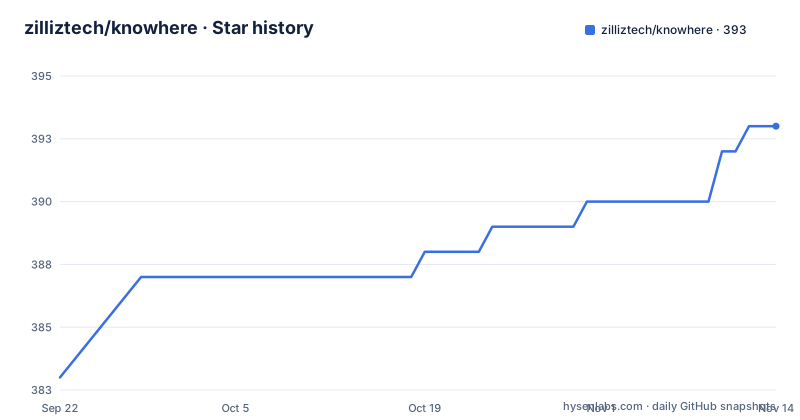
Star history
- zilliztech/knowhere393 ★ · +10
| Repository | 2026-09-22 | 2026-11-14 |
|---|---|---|
| zilliztech/knowhere | 383 | 393 |
10 Stars in the last 53 days, measured from the daily GitHub snapshot. Compare with other projects
Editorial analysis
The first instruction is to go build Milvus instead
The most useful thing in the documentation is a routing decision, and it appears before anything else. If you want to use this library inside Milvus without changing any of its source, the recommendation is to move to the Milvus project and build that directly, because Knowhere is compiled implicitly as part of the Milvus build. That single sentence saves an entire setup, and it clarifies the relationship: this is an internal core of a larger system, described as an independent project that acts as that system's core. The dependency direction is what makes the guidance correct. Standing up the vector library alone means resolving its own third-party build, while going through the parent project means that resolution is already solved for you. So treat this repository as the place to work only when you intend to change it.
A GPU build selects a different index, not just hardware
One detail in the build flags is easy to read past and changes what a GPU build means. The flag that enables GPU support is documented as producing a GPU release built against a GPU-accelerated index, named in the comment alongside the flag. That is a different thing from compiling the same code path with device support. Since the project integrates several index families, including a disk-based one and a general-purpose approximate nearest neighbour library alongside a graph index, the accelerated build is selecting among those implementations rather than accelerating whichever one a CPU build would have picked. Practical consequence: a GPU build is a decision about which algorithm runs, not a drop-in speedup, and results or tuning characteristics can differ. The build flags are composed rather than exclusive, so a GPU build with unit tests enabled is a documented combination rather than an unsupported one.
Flags are opt-in variables defaulting to empty
The build interface is a top-level makefile with a help target listing every target and flag, and the flags themselves are ordinary variables defaulting to empty. The documented combinations are shown directly rather than described:
# CPU release (default)
$ make

# GPU release (cuVS)
$ make WITH_GPU=True

# CPU with unit tests
$ make WITH_UT=True

# CPU UT + AddressSanitizer
$ make WITH_UT=True WITH_ASAN=True

# GPU with unit tests
$ make WITH_GPU=True WITH_UT=True

# Debug build
$ make WITH_DEBUG=True

# Custom compiler via Conan profile (e.g. clang, gcc-15)
$ make CONAN_PROFILE=clang14
Beyond those, the build file declares variables for benchmarks, a vector scalar index, a cardinality index with a version override, and debug builds, all defaulted the same way. Two of the documented flags have ordering requirements that are easy to get wrong. Unit tests cannot be run unless the project was already configured to build them. And the static analysis target needs a prior build to analyse, which is why it appears in the contributing section rather than the build section. Everything routes through a Conan profile, so the compiler choice is data rather than a hard-coded toolchain assumption.
One unexport line stops a sanitizer from breaking the build
The most instructive thing in the build file is a comment explaining why a block of variables is explicitly unexported. The mechanism it describes is a genuine footgun. Make treats command-line variables as exported to the environment of every child process by default. The dependency install and the CMake step are both child processes. So a flag passed on the command line to turn on the address sanitizer would also appear in the environment seen by the recipe that builds a third-party library, which then compiled that library with sanitizer instrumentation of its own. On one compiler that broke the build outright. The fix is to stop exporting the flag set, so the value reaches the project's own compilation but not the vendored packages. It is a small line of configuration, and without it a perfectly reasonable flag combination produces a confusing failure far from its cause.
CMake 4 compatibility is pushed down into vendored packages
The second line of real interest is a policy minimum that gets exported rather than set locally. Newer CMake releases removed compatibility with the older way of declaring a minimum version, so a project declaring a very old minimum fails to configure under the newer tool. The build file exports a policy minimum value for exactly this reason, and the comment explains the subtlety: it has to be exported rather than passed as an argument, because the third-party packages are built by Conan in separate processes, and without the export they would each hit the same failure independently. So a single exported environment variable is what keeps a dozen vendored dependencies building. It is a good illustration of the general shape of this build system. The project's own configuration is straightforward, and the real work is in the interaction between the project's flags, the package manager's subprocesses, and the toolchain versions underneath both.
Two verified Linux releases, one already past end of life
The supported-platforms section is honest in a way most are not. It states that any Linux distribution is available for development, while noting that most contributors work on two particular families and a smaller number work on macOS in both processor architectures, and inviting issues for anything else. Then it gives the actual verified list, which is narrower than the opening claim. Two current Ubuntu releases on both x86_64 and Aarch64, plus macOS on both architectures. The interesting entry is the older Ubuntu release, which is annotated as having reached end of life by April 2025 and being retained for legacy reasons, with a pointer to the dependency install script for the details. That combination is a reasonable engineering stance. The compatibility claim is broad, the tested surface is narrow and explicit, and the one discrepancy between them is documented rather than glossed over.
A Python wheel is a second, separate build path
There is a packaging path for callers who are not writing C++, and it has its own prerequisites rather than being a flag on the main build. Building the wheel requires the SWIG interface generator and Python development headers, both of which the dependency script installs automatically. The wheel target is only valid once the library has been configured as a release build, and the output is a portable manylinux wheel installed with a normal package install command. A separate script exposes further options for a clean build, verbose output, and choosing a specific interpreter, which is the escape hatch for anyone whose system interpreter is not the one you want. Alongside this sits the contributing workflow, which installs pre-commit hooks for both commit and push stages and then runs them through make targets, with formatting and static analysis available individually. On macOS, getting the two clang tools even requires symlinking them from a version-manager install into a standard location, which tells you how much of the contributor experience assumes a Linux workstation.
Editorial conclusion
Knowhere suits someone working on Milvus internals or needing the index layer directly, since it exposes several index families behind one interface and ships a Python wheel for callers outside the C++ tree. It is a poor fit if you just want vector search inside Milvus, because the documentation sends you to build Milvus instead, and a poor fit if you need a reproducible dependency set, since the install script is a single script you are invited to edit for your own dependency choices. Before building, pick your flags deliberately rather than stacking them, confirm your operating system is on the verified list or file an issue if not, and remember that the sanitizer build depends on the unit test build being configured first.
Frequently asked questions
What is Knowhere?
A C++ library that acts as Milvus's internal core for vector search, integrating several index families including a general-purpose approximate nearest neighbour library, a graph index, and a disk-based index. It is built as part of the Milvus build.
How do I build Knowhere with GPU support?
Pass the GPU flag to make, which selects a GPU release built against a GPU index rather than the default CPU one. Combining it with the unit test flag produces a GPU release with tests enabled, which is a documented combination.
What does the sanitizer build flag require in Knowhere?
It builds with the address sanitizer and requires the unit test flag to be configured as well. It also required the build system to stop exporting build flags into the environment of vendored package builds, which had caused a third-party library to be compiled with sanitizer instrumentation.
Can I use Knowhere from Python?
Yes, by building a portable manylinux wheel, which needs the SWIG interface generator and Python development headers. The wheel target is only valid after a release build, and a separate script offers clean, verbose, and custom interpreter options.
Official sources
Add this badge to your README
If you maintain this project, the badge below links readers to this analysis and shows its maintenance status from the daily GitHub snapshot. Paste the markdown into your README; add ?metric=license or ?metric=stars to the image URL for a different field.

[](https://hysenlabs.com/projects/zilliztech-knowhere)Star history chart for your README
[](https://hysenlabs.com/projects/zilliztech-knowhere)Was this useful?