ExcaliDash's compose file lets the backend invent your JWT and CSRF secrets
A self-hosted dashboard and organizer for Excalidraw with multi-user collaboration and scoped sharing.
At a glance
- What is it?
- ExcaliDash is a self-hosted Excalidraw workspace server with collections, real-time collaboration, history, backups, and local or OpenID Connect login, started with three shell commands. Its README is 48 words long, so the real configuration surface is the compose file, and two variables in that file decide whether an install is portable or not.
- Who is it for?
- ExcaliDash is a reasonable choice if you want a shared Excalidraw workspace with history and backups on infrastructure you control, and the compose file is unusually honest about its own defaults, which makes the setup easy to reason about. Two things decide whether a deployment survives contact with reality.
- Can I use it commercially?
- Yes, with conditions. LGPL-3.0 is a weak copyleft licence: you can use it inside commercial and closed-source software, but if you distribute changes to its own files, you must publish those changes under the same licence.
- Is it still maintained?
- Yes. The repository last received commits 2 days ago.
- What is it written in?
- Mainly TypeScript, according to GitHub's language statistics.
Answers come from the project's GitHub data, last synced on November 13, 2026, and from our analysis. They are not legal advice.
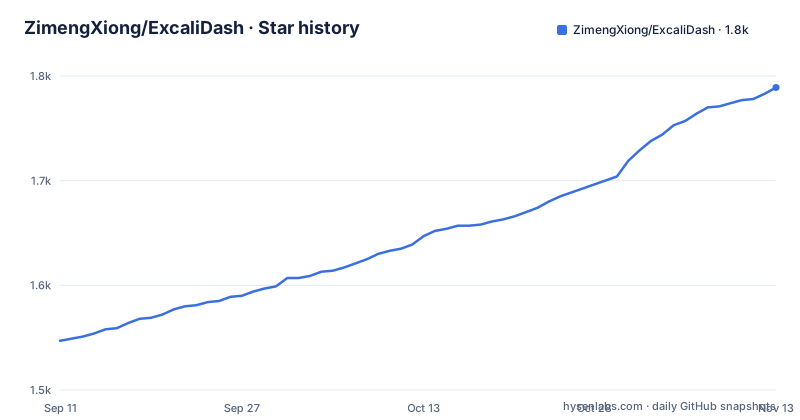
Star history
- ZimengXiong/ExcaliDash1,789 ★ · +242
| Repository | 2026-09-11 | 2026-11-13 |
|---|---|---|
| ZimengXiong/ExcaliDash | 1.5k | 1.8k |
242 Stars in the last 63 days, measured from the daily GitHub snapshot. Compare with other projects
Editorial analysis
The README is 48 words and sends every other question to a docs site
The whole quick start is three shell commands:
git clone https://github.com/ZimengXiong/ExcaliDash.git
cd ExcaliDash
docker compose -f docker-compose.prod.yml up -d
Then two sentences: open `http://localhost:6767`, and configuration and deployment guidance live in the documentation at excalidash.xyz. One more sentence states the license, GNU Lesser General Public License v3.0. Everything else is delegated. The feature set is a single line of adjectives and nouns, collections, real-time collaboration, sharing, history, backups, and local or OpenID Connect authentication, with no explanation of what any of them mean or how they are configured. So the repository ships a starting command and an external manual, and the two are the only places a new operator can learn anything. That split is a deliberate choice, and it works if you are online when you set the thing up. It does not mean the information is in the repository, and it means the compose file is the first place the real decisions actually appear. The documentation is itself a build product rather than a folder of loose text. Four scripts handle it: three run VitePress against the `docs/` directory for dev, build, and preview, and a fourth, `marketing:docs`, runs `scripts/marketing-docs-images.mjs`. So the manual that receives every question the README declines is versioned, built, and previewed in the same repository, on a cycle of its own.
The quick start starts the prod file, and the default file names its database dev.db
There are five compose files at the top level: `docker-compose.yml`, `docker-compose.prod.yml`, `docker-compose.lab.yml`, `docker-compose.oidc.yml`, and `docker-compose.pg-test.yml`. The unsuffixed one is not the one the quick start uses, which means the file a reader is most likely to open first is not the file that defines their first run. That plain `docker-compose.yml` sets `NODE_ENV=production` while pointing `DATABASE_URL` at `file:/app/prisma/dev.db`, with `DATABASE_PROVIDER=sqlite` and the volume `backend-data` mounted at `/app/prisma`. A production node with a database file called dev.db is a naming slip rather than a behaviour change, but it is the kind of detail that makes a reader check the rest of the file. Two other choices in it are deliberate and explained. The service sets `init: true`, with a comment saying the init process runs as PID 1 to reap zombies and forward SIGTERM and SIGINT to node so a graceful shutdown, named as `io.close` and `prisma.$disconnect`, actually runs. The healthcheck begins with a comment reading `Use IPv4 loopback explicitly to`, and that comment is where the visible text of the file ends. The port is worth noting too: the process is given `PORT=8000` while the quick start tells you to browse to 6767. The database is chosen by a variable as well, `DATABASE_PROVIDER`, set to `sqlite` in that same file, and the presence of `docker-compose.pg-test.yml` says a second provider is expected to work too. Nothing in the visible text names it, or says what changes when you switch.
JWT_SECRET and CSRF_SECRET have no default value at all
Most variables in the compose file carry a fallback in the `${VAR:-value}` form. These two do not, and the file explains what happens instead:
      # Optional for single-instance deployments:
      # if unset, backend auto-generates and persists one in the volume.
      # Recommended to set explicitly for portability and multi-instance setups.
      - JWT_SECRET=${JWT_SECRET}
      - CSRF_SECRET=${CSRF_SECRET}
The behaviour is sensible for the first run on one machine, since there is nothing to configure and the backend persists what it invented into the same volume that holds the SQLite file. The cost shows up in three situations. Restoring that volume somewhere else carries the generated secret with it, which is fine once and wrong if you ever expected to rotate. Running a second instance against the same volume, which the comment names, gives you two backends holding different keys, so tokens issued by one are not accepted by the other. And reading the configuration back later, there is no file in the repository that records which secret is in use. The comment recommends setting both explicitly for portability, and doing that before the first run costs one pair of values in a `.env` file.
TRUST_PROXY ships disabled and the comment says what turning it on requires
One setting in the compose file is off by default with the reason written next to it:
      # Keep disabled by default; only enable when a trusted proxy sanitizes forwarded headers.
      - TRUST_PROXY=false
The condition in that comment is the whole design. With the flag off, a forwarded header that a client forges cannot change what the backend believes about the connection. With it on, the backend starts honouring those headers, and a client can supply them directly unless something in front has already stripped the ones it should not set. So the setting is not about performance or about being behind a load balancer, it is about whether there is a component whose only job is to sanitise headers before the application sees them. The compose file does not say which header the application trusts, nor whether it trusts all of them once the flag is on, and the visible text ends inside the healthcheck block, so the health probe itself is not on display either. Treat the flag as a question about your network topology rather than a checkbox, and only enable it once you can name the thing doing the sanitising. The sanitiser is also the component that decides which forwarded headers survive, and nothing else in the visible configuration takes that role.
One Keycloak realm, two issuer URLs, and a dev client secret written into a comment
The OpenID Connect settings sit in the compose file entirely commented out, which is the correct place for them in a file that defaults to local auth, since `AUTH_MODE` falls back to `local`. Reading them explains the mechanism that trips most self-hosted setups up:
      # - OIDC_ISSUER_URL=http://localhost:8080/realms/excalidash/
      # - OIDC_DISCOVERY_URL=http://keycloak:8080/realms/excalidash/
Two URLs, same realm, same path. The first is labelled browser-facing, the second backend-only discovery on the shared container network. The difference is name resolution: your browser resolves `localhost` to your own machine, while the backend container resolves the service name `keycloak` on the Docker network. An identity provider publishes the realm list under whatever host the client used to reach it, so a mismatch between those two values produces a discovery document that lists an issuer the backend cannot reach. The commented block also sets `OIDC_CLIENT_SECRET=excalidash-dev-secret`, labelled a local test secret to be aligned with `oidc/keycloak/realm-excalidash.json`, and the tree holds an `oidc/` directory where that realm definition lives. A real deployment should take its secret from `docker-compose.oidc.yml` and its own provider rather than from a comment.
npm run check verifies four things, and none of them is a test
The root package defines one aggregate command:
"check": "npm run format:check && npm run lint && npm run check:version && npm run check:env"Four gates run in order. `format:check` is Prettier in check mode over the whole tree. `lint` is ESLint. `check:version` runs `scripts/check-version.cjs`, and `check:env` runs `scripts/check-env-boundary.cjs`, whose name says it enforces some rule about where environment variables may be read from. Nothing here runs a test. The three test scripts are separate: `test:integration` delegates to the backend, `test:e2e` to the `e2e` directory, and `test:e2e:auth` to an auth script inside it, with `test` chaining all three. So the gate you would run before every commit and the gate you would run before every release are not the same gate, and the version check is the one thing in the aggregate that is specific to this project. A release pipeline wired to `check` alone would ship without having executed a test, which is the kind of gap the script list makes visible but the naming does not.
Three npm roots install, two of them build, and the root lint skips two directories
The project is three separate npm packages sharing one root manifest. Installing all of them runs `npm ci` three times, once per prefix:
"install:all": "npm --prefix backend ci && npm --prefix frontend ci && npm --prefix e2e ci",
"build": "npm --prefix backend run build && npm --prefix frontend run build",
The test root is installed but has no build step, which is consistent with it holding test code. Using `ci` rather than `install` means every prefix needs its own lockfile, and the top level carries a `package-lock.json` of its own for the tooling. The root manifest is `private`, declares `type: module`, requires Node `>=20`, and pins `packageManager` to `[email protected]`, with a `.nvmrc` at the top level as the second place a Node version is declared. Linting is where the split shows. The root command is:
eslint backend/src backend/scripts e2e scripts --max-warnings 0 && npm --prefix frontend run lintSo the root pass covers `backend/src`, `backend/scripts`, `e2e`, and `scripts`, with warnings promoted to failures, while the frontend is linted by its own script. Two top level directories, `local/` and `oidc/`, appear in neither list. The extensions say something about the module setup too. The root manifest declares `type: module`, yet two of the three root scripts end in `.cjs` and one ends in `.mjs`, which is the deliberate way to pin a CommonJS file inside a package otherwise read as ES modules. Formatting runs `prettier --write .` across the whole tree, so documentation sources are formatted by the same pass as the application, and linting is configured through `eslint.config.js`, the flat config file that matches the ESLint 9 range in the manifest.
Dev prerelease tags carry the commit hash that produced them
The three most recent releases show two naming schemes. The stable one is `v0.6.3`, titled Excalidash 0.6.3, dated 2026-10-03. The two before it are `v0.6.3-dev.faa093a` and `v0.6.3-dev.f739eb6`, dated 2026-10-02, with the same version number as the release that followed them and a seven character commit hash appended. That is the useful part of the scheme: a dev build states which commit it came from in its own version string, so a bug report can name a build and the reader can find the tree behind it without asking. The cost is that the repository's version numbers are no longer a single sequence. The `VERSION` file at the top level and `scripts/check-version.cjs`, wired into the aggregate check, are what keep the shipped number honest, and the last commit recorded for the repository is 2026-10-02, one day before the stable tag. Two dev builds and one stable build inside twenty four hours is a fast cadence for a project whose user-facing documentation is 48 words, and the gap between what gets tagged and what gets written down is where the confusion lives. The root manifest carries no version field at all, which is permitted because the package is private, so the `VERSION` file is the only place in the repository that states a version number. `scripts/check-version.cjs` exists to hold that file to what the release tags claim, and it runs inside `npm run check` rather than only at release time.
Editorial conclusion
ExcaliDash is a reasonable choice if you want a shared Excalidraw workspace with history and backups on infrastructure you control, and the compose file is unusually honest about its own defaults, which makes the setup easy to reason about. Two things decide whether a deployment survives contact with reality. First, set JWT_SECRET and CSRF_SECRET yourself before the first run, because the generated fallback is bound to one volume and one instance. Second, decide deliberately whether to leave TRUST_PROXY off, since enabling it without a sanitizing proxy in front hands the client a header your backend will believe. Read the variant compose file you actually intend to run rather than the plain one, since the quick start starts a different file than the name suggests. Verify the port you browse against and the port the process is given are the same thing before you point a domain at it.
Frequently asked questions
How do I start ExcaliDash?
Clone the repository, change into the directory, and run `docker compose -f docker-compose.prod.yml up -d`. Then open `http://localhost:6767`. Configuration and deployment guidance is kept in the documentation at excalidash.xyz rather than in the README.
What happens if I leave JWT_SECRET and CSRF_SECRET unset in ExcaliDash?
Neither variable has a default in the compose file. The comment next to them says that if unset the backend auto-generates one and persists it in the volume, which is fine for a single instance, and it recommends setting both explicitly for portability and multi-instance setups.
Does ExcaliDash require an identity provider to log in?
No. `AUTH_MODE` falls back to `local`, and the OpenID Connect settings in the compose file are all commented out. A separate `docker-compose.oidc.yml` exists for that path, and the commented development settings point at a Keycloak realm named excalidash.
What does npm run check verify in the ExcaliDash project?
It runs Prettier in check mode, ESLint, a version check through `scripts/check-version.cjs`, and an env boundary check through `scripts/check-env-boundary.cjs`, in that order. The three test scripts, covering backend integration and two e2e passes, are separate commands and are not part of this aggregate.
Which license is ExcaliDash released under?
The GNU Lesser General Public License v3.0. The README states it in one sentence and a LICENSE file sits at the top level of the repository, alongside a `VERSION` file and the compose variants.
Official sources
Add this badge to your README
If you maintain this project, the badge below links readers to this analysis and shows its maintenance status from the daily GitHub snapshot. Paste the markdown into your README; add ?metric=license or ?metric=stars to the image URL for a different field.

[](https://hysenlabs.com/projects/zimengxiong-excalidash)Star history chart for your README
[](https://hysenlabs.com/projects/zimengxiong-excalidash)Was this useful?