xuefeng-agent: a local Gaokao advisor that claims zero error and disclaims everything
An AI advisor for China's college entrance exam (Gaokao) major/university choices -- asks follow-up questions, analyzes options, and tells you the truth.
At a glance
- What is it?
- xuefeng-agent is a Chinese-language local tool for the national college entrance exam, shipping a 420,000-row admissions database across 24 provinces as a gzipped SQLite file that expands to 143 MB on first run. Its licence metadata reads NOASSERTION while its README insists on AGPL v3, and it claims zero data error in one paragraph and no guarantee in another.
- Who is it for?
- This tool suits a candidate who wants to see where a score rank actually lands, on their own machine, with every row labelled as coming from the local database or from a web search. It does not suit anyone who needs the answer to be authoritative, since the document claiming zero data error is the same document telling you the data changes annually and to defer to the provincial examination authorities.
- Can I use it commercially?
- Check first. The repository uses a licence we do not classify automatically, so read its LICENSE file before any commercial use.
- Is it still maintained?
- Yes. The repository last received commits 151 days ago.
- What is it written in?
- Mainly Python, according to GitHub's language statistics.
Answers come from the project's GitHub data, last synced on November 25, 2026, and from our analysis. They are not legal advice.
Star history
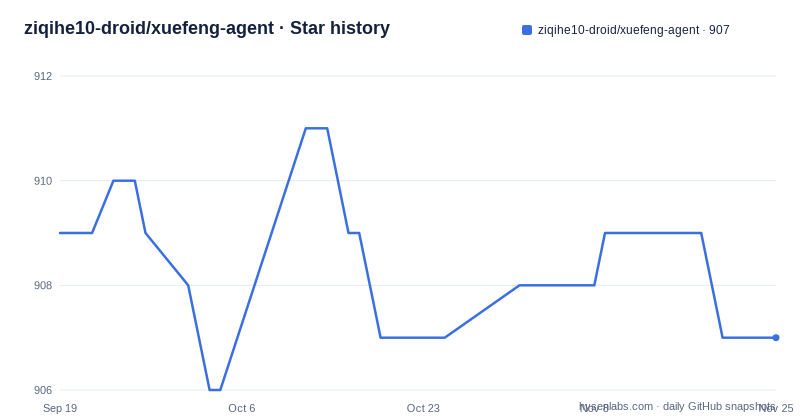
- ziqihe10-droid/xuefeng-agent907 ★ · -2
| Repository | 2026-09-19 | 2026-11-25 |
|---|---|---|
| ziqihe10-droid/xuefeng-agent | 909 | 907 |
-2 Stars in the last 67 days, measured from the daily GitHub snapshot. Compare with other projects
Editorial analysis
Zero error in one paragraph, no guarantee in the next
The database coverage section says the data comes from the official admission cut-off lines of each provincial education examination authority, that it was cross-verified over several rounds online, and that the score error is zero. The disclaimer, five numbered paragraphs later, says the admission data changes every year and that the final word belongs to the provincial authorities' own sites and the universities' admissions pages. Both statements are in the same file. The absolute claim is not accompanied by a method, a date range for the cross-checking, or a sample size, and the example output in the document illustrates rows tagged with a local database marker rather than rows demonstrating the verification. The self-limiting claim that no school is invented where no data exists is the one a reader can actually check.
Filling the shipped spreadsheet switches the database off
The version three feature list contains an inversion worth reading carefully. A spreadsheet named for custom data ships with the project, and the instruction is to fill in a school's two years of scores and ranks. Once it is filled, the tool analyses only that data and does not query the system database at all. The document is explicit that with no spreadsheet it behaves exactly as before and uses the database. So the headline capability, 24 provinces and 420,000 rows, is the fallback path, and a first-time user who follows the new feature instructions will never touch it. The spreadsheet is at the root of the repository and is not mentioned in the documented project structure, which is why the switch is easy to miss.
A 27.6 MB blob that becomes 143 MB on the desktop
The admissions data is committed to the repository as a single compressed file, admission_clean.db.gz, and the project structure describes it as the admissions database, automatically decompressed on first run. The coverage section gives both sizes: 27.6 MB compressed, 143 MB once expanded, which is a little over five times. The Windows walkthrough tells the user to download a ZIP and unpack it to the desktop, so the 143 MB lands wherever the desktop is. The update procedure is to download the ZIP again and overwrite the folder, which means a stale decompressed database from a previous version can survive an overwrite, since nothing in the documented procedure removes it first.
The licence field, the README and the repository files do not agree
Three artefacts describe the terms and none of them can be taken at face value on its own. The repository's licence metadata reads NOASSERTION, which is the absence of a recognised identifier rather than a choice. The README states twice that the project uses AGPL v3 and calls it a strongly copyleft licence, links the GNU page, and carries a use-case table saying personal study is free, modification for private use is allowed, forking requires keeping the author's name and repository address and publishing every change, offering it as a network service requires publishing all source including changes, and commercial or closed-source use is prohibited. A LICENSE file and a separate copyright statement document sit at the root. What the file contents say is not something this text settles, so treat the three as needing a look.
The documented structure omits the file the newest feature needs
The README includes a project structure block, and it is worth setting beside the actual root listing:
├── server.py              # Web 服务器 + 完整 HTML 页面(主程序)
├── admission_clean.db.gz  # 录取数据库(首次运行自动解压)
├── 启动.bat               # Windows 一键启动
├── 打开我.html             # 浏览器入口(自动检测服务器状态)
├── rebuild_db.py          # 数据库重建脚本(从原始考试院 Excel 构建)
├── clean_data.py          # 数据库清洗脚本
The block lists the server as the main program, the compressed database, the Windows launcher, the browser entry point that detects server status, the two database scripts, and three Chinese-language documents. The repository root holds twenty-one entries, and the differences are not all additions. The custom data spreadsheet that the version three feature depends on is absent from the block, as is the copyright statement document that the licence section leans on. There is also a macOS launcher beside the Windows one, a second HTML entry point next to the documented one, a recording script, an examples directory and three image files. So the map is incomplete in both directions, and a reader following it will miss the file they need.
No command line needed, except on Mac
The opening line says this is not a wrapper, and the documentation says it opens in a browser with no command line required. The Windows path delivers that: install Python from python.org with the add-to-PATH box ticked, download the ZIP, double-click the batch launcher, and the browser opens by itself. The Mac path does not. It says to open a terminal, change into the folder and run python3 server.py, then double-click the HTML file. So the no-terminal promise holds for one of the two platforms the project supports, and the FAQ confirms the supported platforms are Windows and Mac desktops with no mobile support. The server is a Python program either way, and the batch file is what hides that on Windows.
Three Python files and no dependency file at all
The root listing contains no requirements file, no project metadata, no lock file and no virtual environment definition. The Python in the project is three scripts: the server, the database rebuild script that builds from the original examination authority spreadsheets, and the cleaning script. The rebuild script matters as much as its absence of a manifest, because it means the 420,000 rows are reproducible from published source files rather than being a blob of unknown provenance, and the cleaning script is the place where the province names and rank normalisation are defined. What a new user cannot tell from the root is what those three files import. The answer determines whether the walkthrough works on a clean Python install, and the repository does not say.
The key stays in the browser while the prompts go to a provider
The capability table claims privacy on three grounds: the data stays local, the key is stored in the browser, and nothing is uploaded to any server. The architecture supports the first and the second. There is no hosted backend, because the server is a Python process the user starts on their own machine, and the API settings screen remembers the key locally so it does not have to be re-entered. The third claim needs reading narrowly. The key is pointed at an OpenAI-compatible endpoint, with DeepSeek recommended first, then Qwen, then Zhipu, with GPT-4o listed as expensive and network-dependent. Prompts therefore leave the machine to whichever provider is configured, carrying the extracted province, rank and major preferences, plus the database rows the tool decided to include.
Editorial conclusion
This tool suits a candidate who wants to see where a score rank actually lands, on their own machine, with every row labelled as coming from the local database or from a web search. It does not suit anyone who needs the answer to be authoritative, since the document claiming zero data error is the same document telling you the data changes annually and to defer to the provincial examination authorities. Check three things first. Read the disclaimer, because it is five numbered paragraphs and it is the honest part. Check the licence, because the repository metadata, the README text and the files in the root do not all say the same thing. And check whether you have filled the spreadsheet, because that single step decides whether the 420,000-row database is used at all.
Frequently asked questions
How accurate is the xuefeng-agent admissions database?
The README says it holds 420,000 official cut-off rows for 24 provinces across 2024 and 2025, cross-verified online over several rounds with zero score error. The same document's disclaimer says the data changes every year and that the provincial examination authorities and university admissions pages are authoritative.
What licence does xuefeng-agent use?
The README states AGPL v3 twice and calls it strongly copyleft, and a LICENSE file and a copyright statement document sit at the root. The repository's own licence metadata reads NOASSERTION, so the three do not agree on the surface.
Does xuefeng-agent work on Windows and Mac?
Both desktops, according to the FAQ, with no mobile support. Windows users double-click the batch launcher after installing Python with add-to-PATH; Mac users are told to run python3 server.py from a terminal.
Which AI providers does xuefeng-agent support?
Any OpenAI-compatible API, by changing the base URL and model in the settings screen. DeepSeek is listed as the first choice, Qwen and Zhipu GLM as recommended, and GPT-4o as optional and expensive.
How is xuefeng-agent updated?
By downloading the ZIP again and overwriting the folder. The compressed database is decompressed on first run, from 27.6 MB to 143 MB, and nothing in that procedure describes removing a previously expanded copy.
Official sources
Add this badge to your README
If you maintain this project, the badge below links readers to this analysis and shows its maintenance status from the daily GitHub snapshot. Paste the markdown into your README; add ?metric=license or ?metric=stars to the image URL for a different field.

[](https://hysenlabs.com/projects/ziqihe10-droid-xuefeng-agent)Star history chart for your README
[](https://hysenlabs.com/projects/ziqihe10-droid-xuefeng-agent)Was this useful?