SpeechRecognition: one pip install, then a separate extra per engine
Speech recognition module for Python, supporting several engines and APIs, online and offline.
At a glance
- What is it?
- SpeechRecognition wraps CMU Sphinx, Whisper, Vosk, and a row of hosted APIs behind one Python interface. The packaging tells the real story: the library installs alone, and nearly every recognizer you actually want needs its own dependency, licence, or binary on the side.
- Who is it for?
- SpeechRecognition earns its place when you need to move between engines without rewriting your loop, especially when a local fallback has to coexist with a hosted API. It does not remove the operational weight of speech recognition: PyAudio for microphones, a compiled PocketSphinx or a model download for offline use, a FLAC binary on anything outside x86 Windows, Linux, and OS X, and credentials for every cloud method you keep.
- Can I use it commercially?
- Yes. BSD-3-Clause is a permissive licence: you can use, modify and sell software built on it, as long as you keep its copyright and licence notices.
- Is it still maintained?
- Yes. The repository last received commits 73 days ago.
- What is it written in?
- Mainly Python, according to GitHub's language statistics.
Answers come from the project's GitHub data, last synced on November 14, 2026, and from our analysis. They are not legal advice.
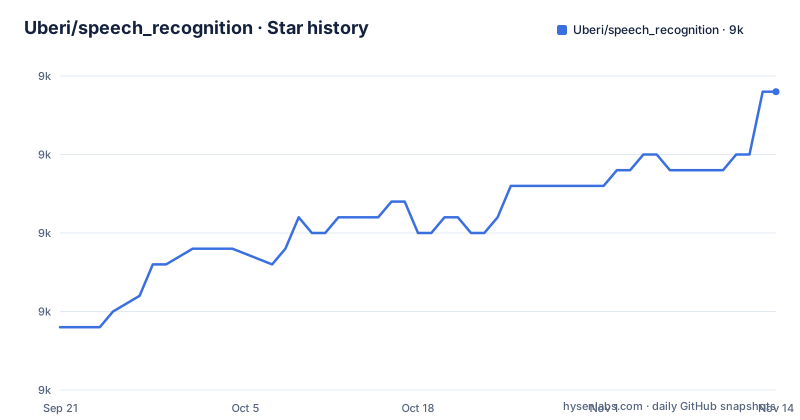
Star history
- Uberi/speech_recognition9,004 ★ · +15
| Repository | 2026-09-21 | 2026-11-14 |
|---|---|---|
| Uberi/speech_recognition | 9k | 9k |
15 Stars in the last 54 days, measured from the daily GitHub snapshot. Compare with other projects
Editorial analysis
pip install SpeechRecognition installs the module and none of the engines
The quickstart is one command, followed by a one-liner to try it out:
pip install SpeechRecognition
python -m speech_recognition
The alternative route is a source distribution from PyPI, extracted and installed with python -m pip install ., and pyproject.toml also registers a console script named sprc that runs speech_recognition.cli:main.
What that install does not include is the interesting half. PyAudio 0.2.11+ is required only for microphone input through Microphone. PocketSphinx is required only for recognizer_instance.recognize_sphinx. The Google API Client Library for Python is required only for recognizer_instance.recognize_google_cloud. Vosk, Whisper, Faster Whisper, and openai are each tied to their own method in the same way. The pattern is deliberate and worth internalising: an ImportError from this library usually means the engine you selected needs a package you did not install, not that the library is broken.
requires-python says 3.10+, while the classifiers stop at 3.13
The packaging metadata and the classifier list disagree by one version. requires-python is >=3.10, and the development status classifier reads Production/Stable, but the supported Python classifiers stop at 3.13. The 3.14 line sits in the file as a comment with the reason attached: openai-whisper does not support Python 3.14 yet. That single comment is the most useful line in pyproject.toml for anyone planning an upgrade, because it names the upstream dependency that gates the newest interpreter.
Two dependencies are also conditional on the interpreter version. typing-extensions is unconditional, while standard-aifc and audioop-lts are pulled in only when python_version >= '3.13'. The effect is that an install on 3.12 or older gets one dependency and an install on 3.13 or newer gets three. If you build a locked dependency set offline, those two wheels have to appear in it before you move to 3.13.
The FLAC encoder is required everywhere except x86 Windows, Linux, and OS X
One requirement is phrased as an exclusion rather than an inclusion: a FLAC encoder, required only if the system is not x86-based Windows, Linux, or OS X. It is easy to misread as an optional extra.
The packaging agrees that FLAC is part of the distribution rather than something you fetch yourself. license-files lists LICENSE.txt and LICENSE-FLAC.txt, so the encoder code ships under its own terms and the project's BSD-3-Clause grant does not automatically extend to it. There is also a third-party/ directory in the repository root next to speech_recognition/, tests/, and reference/, which is where vendored code lives.
For a reader on any platform outside that list, the README requires a FLAC encoder to be installed.
examples/ carries audio fixtures, so most of it can run without a microphone
The example directory ships data alongside code: english.wav, french.aiff, chinese.flac, and counting.gram, the last being the grammar file that PocketSphinx style recognition expects. That is what makes the examples usable in automation, and it also explains why the microphone example is the odd one out.
The scripts cover the recognizer surface from several angles: audio_transcribe.py for a file, microphone_recognition.py for live input, write_audio.py for saving captured audio, extended_results.py for the richer result objects, background_listening.py for a microphone in the background, special_recognizer_features.py as a grab bag, and threaded_workers.py for concurrency. calibrate_energy_threshold.py has its own note in the README pointing at recognizer_instance.energy_threshold, which is the setting you touch first when a noisy room produces garbage transcripts. tensorflow_commands.py is there for the Tensorflow engine.
The gap: the examples that listen to a microphone, such as microphone_recognition.py and background_listening.py, need hardware. Plan for that path to be tested by hand.
PocketSphinx is the only offline engine with a build guide in the repo
Two documents sit under reference/ and are worth knowing by name. library-reference.rst is described as documenting every publicly accessible object in the library, so it is the API surface in full rather than a getting started page. pocketsphinx.rst is narrower and longer in practice: it covers installing languages, compiling PocketSphinx, and building language packs from online resources.
Offline recognition is not just a pip package here, it is a compilation step and a language pack, and the repository documents exactly those steps.
The engine list mixes wire protocols, vendors, and self-hosted endpoints
Fourteen entries are listed under support, and they do not all sit at the same level. CMU Sphinx, Snowboy, Vosk, OpenAI whisper, and Tensorflow are local recognizers, with the first, second, fourth and third marked as working offline. Google Speech Recognition, Google Cloud Speech API, Wit.ai, Microsoft Azure Speech, Houndify, IBM Speech to Text, and OpenAI Transcription API are hosted endpoints you call over the network.
The OpenAI Transcription API entry carries a sub-bullet that changes the shape of the list: OpenAI compatible self-hosted endpoints, with vLLM and Ollama given as examples. That means the same method can reach a vendor or a machine you run, which is the shortest path to keeping audio local without dropping the library. The Groq Whisper API and Cohere Transcribe API entries are separate rows rather than options of that one.
Each hosted row also means its own credential and its own failure mode, and none of them share an authentication path described in the README.
The README opens with a sponsored section before any documentation
The first block of content under the title is a sponsorship link to a meeting transcription API, marked with utm parameters, followed by a paragraph about Zoom, Google Meet, and Microsoft Teams and about diarization that pulls speaker data and separate audio streams from those platforms. It ends with the sponsor's own accuracy claim.
It is worth naming as structure rather than content: the reader meets an advertisement before meeting the library, and the diarization claim belongs to the sponsor.
The rest of the README is unusually consistent about where things live, which makes the opening easier to skip. Install, Requirements, Library Reference, Examples, and the per-engine requirement list each point at a file that exists, and the project links section names the PyPI page, the source repository, and the issue tracker.
Publishing runs through twine under a token, and typecheck covers two directories
The maintenance plumbing is in a Makefile at the repository root, and it shows what the project considers its own quality gate:
pipx run flake8 --ignore=E501,E701,W503 --extend-exclude .venv,venv,build --doctests .
mypy --ignore-missing-imports speech_recognition/recognizers tests
pipx run twine check dist/*
The lint run ignores E501, E701, and W503 and excludes the virtualenv and build directories, and the type check covers speech_recognition/recognizers and tests with missing imports ignored, which is what makes the many optional engine dependencies tolerable to mypy. An rstcheck target validates README.rst and CONTRIBUTING.rst, and a separate pass checks the reference files with the Sphinx directives disabled because PyPI does not render them. The publish target refuses to run without PYPI_API_TOKEN set, and make-release.sh sits beside the Makefile.
The version itself is dynamic in pyproject.toml rather than hardcoded, and setup.py is a bare setup() call. Releases went out as 3.17.0 on 2026-06-17, 3.16.1 on 2026-04-24, and 3.16.0 on 2026-04-05, and master took a push on 2026-09-02, so the branch moves after each tag lands.
Editorial conclusion
SpeechRecognition earns its place when you need to move between engines without rewriting your loop, especially when a local fallback has to coexist with a hosted API. It does not remove the operational weight of speech recognition: PyAudio for microphones, a compiled PocketSphinx or a model download for offline use, a FLAC binary on anything outside x86 Windows, Linux, and OS X, and credentials for every cloud method you keep. Before you adopt it, install the extra for the one engine you will actually call, then decide whether the rest of the list is something you need or something you read.
Frequently asked questions
How do I install speech recognition in Python?
Run pip install SpeechRecognition, or download the source distribution from PyPI, extract it, and run python -m pip install . in that folder. Python 3.10 or newer is required, and the console script sprc is registered by the package.
How do I use SpeechRecognition in Python?
After installing, run python -m speech_recognition to try it out, then read the examples directory for file transcription, microphone input, background listening, extended results, and energy threshold calibration. Every engine beyond the library itself needs its own extra, such as PyAudio for microphone input or PocketSphinx for recognize_sphinx.
How do I use the SpeechRecognition module in Python?
The module is published as SpeechRecognition on PyPI under a BSD-3-Clause licence, with reference/library-reference.rst documenting every publicly accessible object and reference/pocketsphinx.rst covering installing languages, compiling PocketSphinx, and building language packs for the offline engine.
Can I use SpeechRecognition inside VS Code?
The README describes pip install SpeechRecognition, python -m speech_recognition for a quick try, and a console script named sprc that runs speech_recognition.cli:main, none of which depends on a particular editor.
Official sources
Add this badge to your README
If you maintain this project, the badge below links readers to this analysis and shows its maintenance status from the daily GitHub snapshot. Paste the markdown into your README; add ?metric=license or ?metric=stars to the image URL for a different field.

[](https://hysenlabs.com/projects/uberi-speech-recognition)Star history chart for your README
[](https://hysenlabs.com/projects/uberi-speech-recognition)Was this useful?