HugAgentOS: a generated Community mirror, an admin/admin first account, and a Redis container configured to evict anything
HugAgentOS: The Self-Evolving AgentOS for Ontology-Grounded Trustworthy Reasoning
At a glance
- What is it?
- HugAgentOS is a self hosted agent platform with a chat surface, private knowledge base retrieval, sub agents, MCP tools, skills, long term memory and a data canvas, offered as a Community Edition and an Enterprise Edition behind one repository. The Community repository is itself generated from an upstream, the first account is a shared password that has to be changed, and the local profile runs the agent's sandbox as a subprocess on the host rather than a container.
- Who is it for?
- HugAgentOS is built for an operator who intends to run it on their own infrastructure, and the documentation is unusually candid about the parts that are staged rather than finished. Before anything else, decide which profile you are running.
- Can I use it commercially?
- Check first. The repository uses a licence we do not classify automatically, so read its LICENSE file before any commercial use.
- Is it still maintained?
- Yes. The repository received new commits within the last day.
- What is it written in?
- Mainly Python, according to GitHub's language statistics.
Answers come from the project's GitHub data, last synced on November 23, 2026, and from our analysis. They are not legal advice.
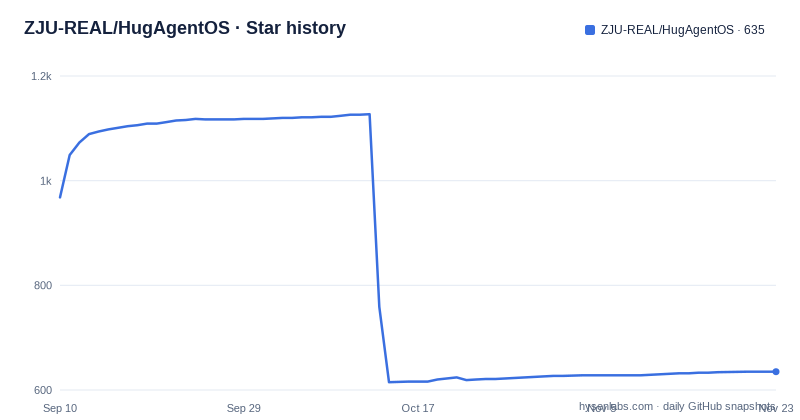
Star history
- ZJU-REAL/HugAgentOS635 ★ · -333
| Repository | 2026-09-10 | 2026-11-23 |
|---|---|---|
| ZJU-REAL/HugAgentOS | 968 | 635 |
-333 Stars in the last 74 days, measured from the daily GitHub snapshot. Compare with other projects
Editorial analysis
This repository is a generated mirror and its release tags cover the desktop app
The first thing the file tells you is that the code in front of you is not the place changes are made. A note near the top states that the Community repository is generated from the upstream main repository for each release and is marked as generated, that changes under the source directory are to be reported through an issue or a discussion, and that pull requests are welcome for documentation and examples. A marker file carrying the edition name sits in the top level listing next to the build files, which is consistent with that. The consequence for anyone who found a bug and came here to fix it is concrete: a patch to the application code is not the accepted route. Versioning is split the same way. The three most recent releases are all tagged for the desktop application, at 1.0.2, 1.0.1 and 0.2.14, while the Python package in the same tree declares its own version as 0.1.0 under the name hugagent. Two numbering schemes, two artifacts, and no tag in the list that names the backend or web release you install.
The first account is admin with the password admin, and there is no registration
Both installation paths share one warning block and it is the most security relevant text in the file. The initial account and password are both admin, and both must be changed at first sign in, and the Community Edition has no self-registration at all, so the first person to reach an instance owns it. The install is also scoped to the loopback interface by default, and the file says so explicitly, adding that remote access means running the serve command with an explicit host and port and no browser, and that a strong password, a firewall and HTTPS must be set first, with the instruction not to expose it on an untrusted network:
hugagent serve --host 0.0.0.0 --port 3001 --no-browserThe local environment configuration agrees, defaulting the authentication mode to session and the sign in mode to local, with a comment noting the first start creates the admin account and forces a password change. Nothing in the file describes a rate limiter, a lockout or a second factor, so a deployment that does change the password is relying on that alone.
Compose publishes the database and cache to the host and gives Redis a cache policy
The Compose file is where the deployment defaults are visible, and three of them deserve a look before the first start. The database service takes its password from an environment variable with a fallback value, so a deployment that forgets to set it runs with the default in the file:
POSTGRES_PASSWORD: ${DB_PASSWORD:-hugagent_dev_password}The same service publishes its port to the host on 5432 by default, so PostgreSQL is reachable from outside the container network unless that mapping is removed. The cache publishes on 6380 and is started with a specific memory policy:
command: redis-server --appendonly yes --maxmemory 256mb --maxmemory-policy allkeys-lruThat last line is the interesting one. An eviction policy of all keys least recently used lets Redis discard any key in the database when it reaches its 256 MB ceiling, chosen by recency rather than by an explicit expiry. That is a normal choice for a pure cache, and it is a consequential one for a store that also holds session state, queues and in-flight agent runs, since nothing in the file marks particular keys as non evictable. Worth checking what your deployment keeps in Redis before adopting the default.
The two installation paths differ in port, store and process model
The documentation offers two routes and they are not variations of one another. Option one pipes a remote install script into a shell, which fetches the source into a directory under the user's home, builds an isolated Python environment and the web application, walks through first run setup and opens port 3001 on the loopback interface. Option two clones the repository, copies the example environment file, creates a storage directory and brings up Compose, after which the interface is on port 3002. The port difference alone is enough to break a reverse proxy configuration copied from the wrong path, and the port is not something the file explains. Underneath, the two profiles differ in kind: the one command path uses SQLite, in process state and a local subprocess sandbox, and the Compose path uses PostgreSQL, Redis, an isolated sandbox and persistent volumes. A third detail sits in the dependency list, where the no Docker profile substitutes an in memory fake Redis behind a memory scheme, and the comment says plainly that it is single process only.
In the Community Edition the sandbox is a stateless script runner on the host
The word sandbox does the heavy lifting in most agent platforms, so it is worth reading what the Community Edition actually configures. The environment example sets the sandbox provider to script_runner and points it at an internal service address, and describes the provider in a comment as a lightweight stateless script runner:
SANDBOX_PROVIDER=script_runner
SANDBOX_RUNNER_URL=http://script-runner:8900
A stateless runner is not a container per task and carries no filesystem or network namespace of its own. The quick install path says as much in plain terms, describing its execution model as a local subprocess sandbox and recommending it for personal use and development, and the list of reasons to use Compose includes an isolated sandbox as a separate item. One limit is documented numerically, with a maximum single artifact delivered by the artifact retrieval tool set to 104857600 bytes, a hundred mebibytes. For a reader evaluating this for a team, the distinction to hold on to is that the community profile's code execution boundary is the machine it runs on, while the Compose profile adds the isolation the documentation keeps pointing at.
Model endpoints and keys are stored in the database rather than the environment
The example environment file has a section for the language model, and the section is empty. A comment explains that model configuration is kept in the database and does not come from the environment, and that after startup you fill in an OpenAI compatible endpoint, being the base URL, an API key and a model name, in the web interface under settings, system management, model services, or you run the interactive onboarding command. That is a design decision with a security consequence worth naming: the credentials that can spend money on a model provider are rows in the application database rather than process configuration, so database backups, exports and any read access to that store are credential exposure. The same pattern appears one section lower for internet search, where the provider name and its key are commented out and the note says the database takes priority over the environment. Three search providers are offered there, and all three are optional. Storage is local by default, with a host path for the directory that Compose mounts.
The dependency file points at a second requirements file the tree does not contain
The runtime requirements are declared once in a text file and read dynamically by the build backend, so the file and the installed package cannot drift apart, and the no Docker installer installs that file and then installs the project itself without dependencies. Reading it closely, two things stand out. The agent framework is pinned to an exact version rather than a range, and the comment next to it says in Chinese that the project migrated to 2.0, that the Agent, Toolkit, Middleware and MCP surfaces were rewritten, and that the upstream main branch has diverged from the 2.0.0 tag and is incompatible. A second comment explains that three vendor SDKs are installed for channels the framework does not bundle, for Bedrock style providers, for Gemini and for a local Ollama, and that all three are lazily imported so a missing one only disables that channel. The comment then says heavy office and chart dependencies live in a separate MCP requirements file that is only installed inside the dedicated MCP container. That file is not in the top level listing. A sibling file for an optional memory component is.
The ontology control plane is described as a target architecture, not a property
The most ambitious claim in this project is the one it qualifies most carefully. The repository description calls it a self evolving agent operating system for ontology grounded trustworthy reasoning, and the README headline calls it the enterprise agent operating system for the same. Then a note states that the ontology trust control plane is an enterprise target architecture being integrated into the existing harness in stages, that it strengthens structured compliance and evidence based review, and that it does not promise zero hallucination for free text. Read the rest of the file and the staged part is visible everywhere. Gated execution is described as candidate plans passing deterministic rule checks, risk tiered evidence review and a gate, with a violating action returning with the rule, the evidence and a correction rather than being waved through. Self evolution is presented the same way in the demo description, which shows the same task run twice with memory, skills and orchestration each settled and each taking effect only after approval. Proposals are recorded, versioned, approved by a human and reversible. That is a governance design, and the note is telling you how much of it is built.
Editorial conclusion
HugAgentOS is built for an operator who intends to run it on their own infrastructure, and the documentation is unusually candid about the parts that are staged rather than finished. Before anything else, decide which profile you are running. The one command path is loopback only, uses SQLite with in process state and a single process in memory stand in for Redis, and executes agent generated code as a local subprocess. That is a development and personal profile. If you need isolation, a real Redis, PostgreSQL and persistent volumes, take the Compose path and read its defaults, including a fallback database password, two published container ports and a cache eviction policy on the store that likely holds your session state. Then check three claims against the code. That the Community repository accepts code changes, because it is generated and asks for issues instead. That the ontology control plane is available, because the README calls it a target architecture integrated in stages rather than a shipped property. And that your model credentials are where you think they are, because endpoint and key configuration is stored in the application database rather than read from the environment. Treat the desktop release tags as covering a different artifact from the package you install, and pin the version you actually deploy.
Frequently asked questions
What are the default credentials for HugAgentOS?
The initial account and password are both admin, and both must be changed at first sign in. The Community Edition has no self-registration, so whoever reaches the instance first is the only account until an administrator creates more.
Do I need Docker to run HugAgentOS?
No for the one command path, which needs Python 3.11 or newer, Node.js 20, Git and curl, and uses SQLite with in process state. Docker with Compose v2 is for the path that needs PostgreSQL, Redis, an isolated sandbox and persistent volumes, and that one serves the interface on a different port.
Where do I enter my model API key in HugAgentOS?
Model configuration is stored in the database rather than read from the environment. After startup you add an OpenAI compatible base URL, API key and model name under settings, system management, model services, or run the interactive onboarding command.
What sandbox does the HugAgentOS Community Edition use?
A lightweight stateless script runner, configured through the sandbox provider setting and an internal runner address. The one command install path describes its execution model as a local subprocess sandbox and recommends it for personal use, while the isolated sandbox is one of the reasons given for using the Compose deployment.
Can I send a pull request to fix a bug in HugAgentOS?
Not for application code. The Community repository is generated from an upstream repository for each release and is marked as generated, so changes under the source directory are requested through an issue or a discussion, and pull requests are accepted for documentation and examples.
How is Redis configured in the HugAgentOS Compose deployment?
The cache container is started with persistence enabled, a 256 MB memory ceiling and an all keys least recently used eviction policy, and its port is published to the host. The no Docker profile substitutes an in process fake Redis, which the dependency notes describe as single process only.
Official sources
Add this badge to your README
If you maintain this project, the badge below links readers to this analysis and shows its maintenance status from the daily GitHub snapshot. Paste the markdown into your README; add ?metric=license or ?metric=stars to the image URL for a different field.

[](https://hysenlabs.com/projects/zju-real-hugagentos)Star history chart for your README
[](https://hysenlabs.com/projects/zju-real-hugagentos)Was this useful?